
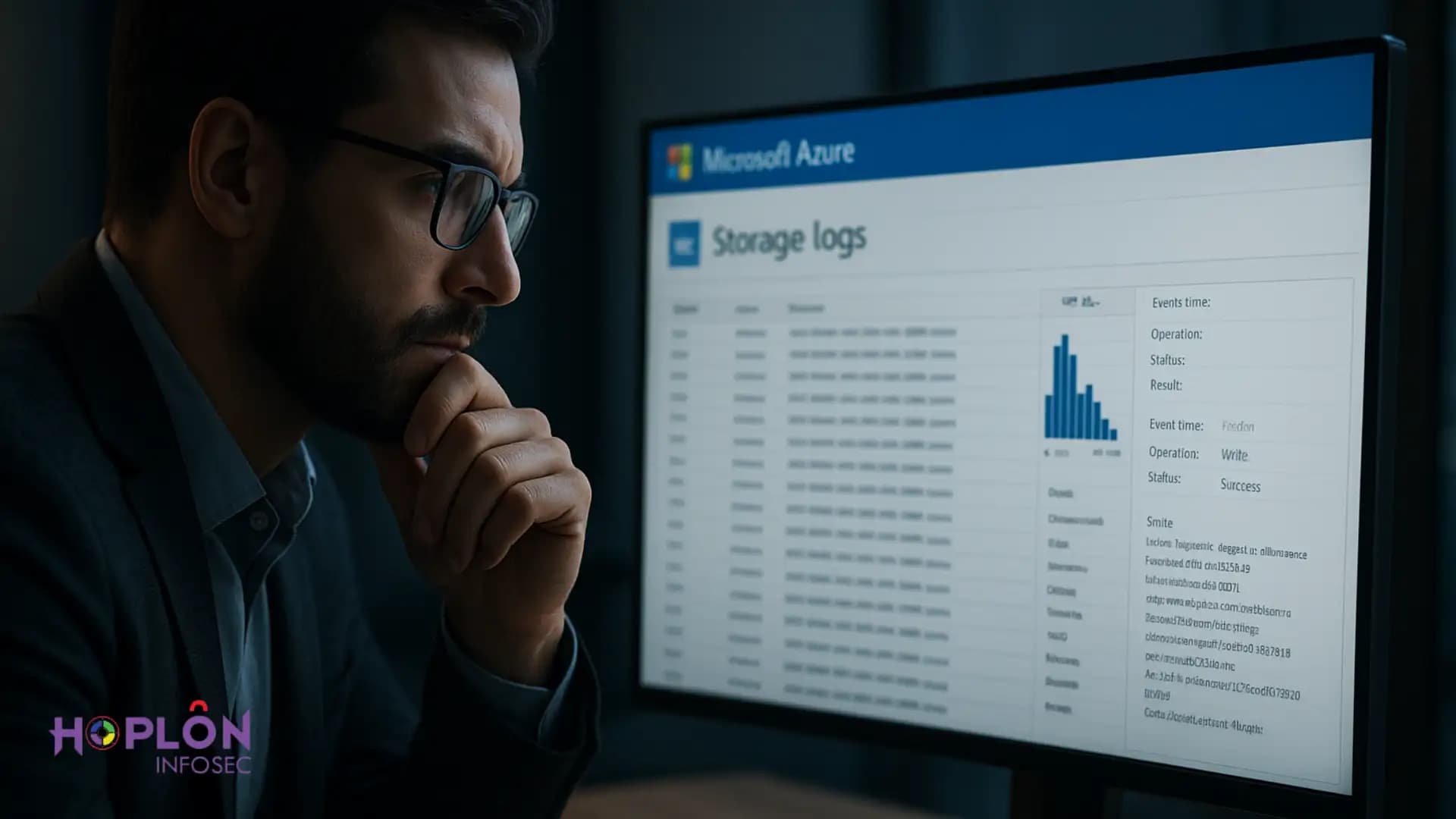
Azure storage logs forensic investigation
When a breach alert hits, teams rush to contain access and understand what actually happened. That first hour is chaotic. This is exactly when storage telemetry earns its keep. Access to files, containers, and snapshots leaves a trail that helps you rebuild the story of who touched what and when. Microsoft has been emphasizing how overlooked storage evidence can change an investigation’s outcome.
In many cases the difference between a hunch and proof is a single line that shows the caller IP, authentication type, and the precise operation on a blob. That small breadcrumb can link a credential theft to actual data movement. This is why [KW1] belongs in every incident response plan, not just in wish lists.
What Azure Storage logs actually capture
Azure Monitor’s storage tables record the nuts and bolts of access. For blobs, the StorageBlobLogs schema includes fields for the account name, caller IP, authentication type, authorization details, operation name, target path, response code, and timing. Each field answers a forensic question, from identity to network to success or failure.
These records differ from performance metrics. Metrics tell you how much activity occurs. Logs tell you which operation, by whom, from where, and with what result. That is the texture an investigator needs to reconstruct a precise timeline.
Where the logs live and how to collect them at scale
Resource logs for Microsoft. Storage can be sent to a Log Analytics workspace, a storage account, or Event Hubs. Most teams centralize into Log Analytics for KQL queries and alerting, then archive long-term to low-cost storage. The supported categories and routing are documented in Azure Monitor references and are updated frequently.
Classic Storage Analytics and classic metrics have been retired or superseded by Azure Monitor. If you still rely on old pipelines, migrate now to avoid gaps when you need data the most.
Turning on the right diagnostic settings without blind spots
Enable storage resource logs for Blob, File, Queue, and Table as needed, stream them to Log Analytics, and verify sample events actually land. Security baselines also recommend central telemetry, least privilege, and monitoring aligned with the Azure Security Benchmark. Be aware that Diagnostic Settings storage-retention features are changing, so plan retention in Log Analytics and archive targets. Keep an eye on deprecations and cutover dates so your evidentiary window stays intact.
Building a clear incident timeline from blob access records
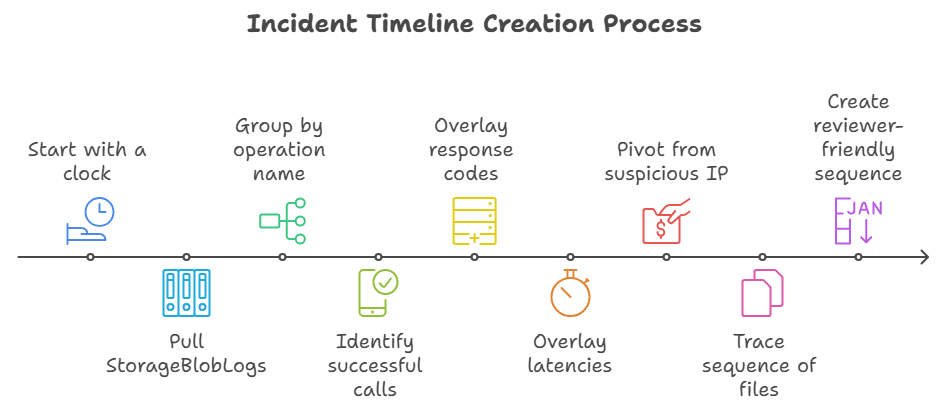
Start with a clock. Pull StorageBlobLogs for the suspected window, then group by operation name. Successful GetBlob, PutBlob, CopyBlob, Delete, and SetBlobTier calls form a trail of what was read, written, copied, or wiped. Overlay response codes and latencies to see automated bursts versus manual probing.
This is where [KW2] shines. You can pivot from a single suspicious IP to all containers it touched, then trace the sequence of files. The net effect is a clean, reviewer-friendly sequence of events that stands up to scrutiny.
Catching SAS token misuse and shared key exposure
Attackers love shortcuts. Two big ones in storage are exposed shared access signature links and compromised account keys. Microsoft has written about incidents where permissive SAS tokens led to unintended exposure. Industry research has shown how easy it is to abuse long-lived or over-scoped tokens. Logs reveal the telltale pattern of access methods and time windows.
To reduce the blast radius, prefer user-delegation SAS tied to Microsoft Entra identities or, better yet, rely on direct Entra authorization and disable Shared Key where possible. Some Microsoft guidance even recommends preventing Shared Key and standard SAS to improve identity attribution. Storage logs then reflect a real user or workload identity, which simplifies [KW3].
Proving or disproving data exfiltration with evidence
Moving from suspicion to proof is all about counts and destinations. Query all successful GetBlob and List operations from external IPs, filter by sensitive containers, and calculate bytes transferred. Use response sizes, content length, and operation counts to estimate what likely left the environment. Official monitoring guidance helps you align these fields with the right tables.
Logs alone do not always prove exfiltration, but they often narrow it down enough to apply containment and notification policies confidently. When the story is incomplete, couple [KW4] with firewall logs, NSG flow logs, and downstream proxy records to close the loop.
Correlating storage logs with activity and Entra ID signals
Management operations live in the Azure Activity Log. It shows who changed access policies, rotated keys, or modified network rules. Those events, tied to the same timeframe as blob reads and writes, can reveal a rushed configuration change that enabled the breach. Investigators often start here to see what a compromised admin did.
Next, bring in Microsoft Entra ID sign-in and audit logs. Correlate client app IDs, conditional access policy results, and unusual geolocation with StorageBlobLogs caller IPs. The triangulation gives [KW5] the identity context that juries and auditors expect.
KQL examples that answer investigator questions fast
You do not need a giant script to start. A few targeted KQL snippets answer high-value questions. Example questions:Which identities accessed container X yesterday, from which IPs, with what auth type? Which blobs were read more than N times within an hour? Which requests used a shared key or an account SAS? All of these map to documented fields.
If logs also land in a storage account for archival, consider pulling them into Azure Data Explorer for historical pivots. That way you can query months of data fast without bogging down your live workspace. It is a practical extension of [KW6] for large environments.
Preserving evidence with immutable storage and legal holds
Once you collect log exports, protect them. Azure offers immutable blob storage with time-based retention and legal holds. That locks evidence into a write-once, read-many state until the hold is cleared. It is built for investigations and regulatory response.
Many teams stage snapshots, exports, and case files in a dedicated SOC storage account with version-level immutability. Microsoft’s reference architecture demonstrates this approach, making preservation a repeatable step instead of a scramble. This habit supports [KW7] from the first hour to the final report.
Chain of custody in the cloud
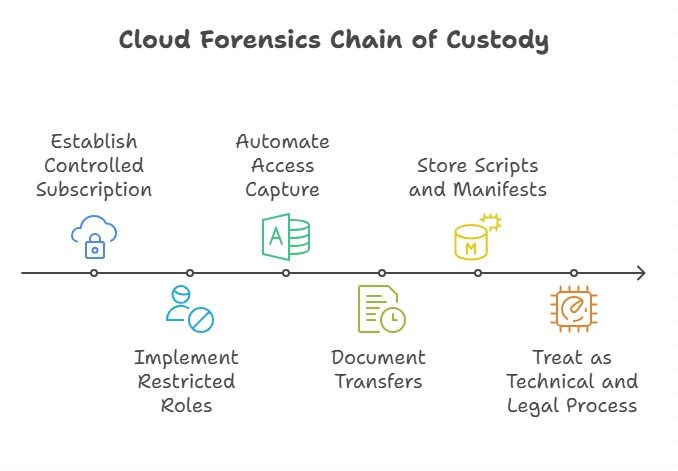
Courts care about who touched the evidence and when. Use a controlled subscription for your forensics vault, restricted roles, and automated capture of who accessed the case container. Microsoft’s cloud forensics scenario outlines how to design custody that withstands legal review.
Document every transfer with timestamps and hashes. Store your collection scripts and hash manifests in the same immutable container. Treat [KW8] as both a technical and a legal process, and future you will thank present you.
Common pitfalls that derail investigations
The first pitfall is assuming logs are enabled everywhere. New storage accounts can slip through change windows. Build a policy that audits diagnostic settings continuously and alerts on drift. Security baselines for Storage and Azure Monitor are good north stars here.
The second pitfall is identity darkness. If most access uses a shared key or broad SAS, attribution gets messy. Prefer Entra-based access and user-delegation SAS so storage logs contain user context. This small design choice makes [KW9] faster and outcomes clearer.
A lean playbook from triage to closure
Triage starts with isolating the account, capturing a log snapshot, and freezing evidence in immutable storage. Then you pivot through four lenses: identity, network, operation, and object. Within each, write down the exact questions your KQL queries should answer, such as who listed sensitive containers or who performed bulk reads after business hours. This discipline accelerates [KW10].
Closure means writing a short, sourced narrative. Attach sample log lines with their timestamps, IPs, and result codes. Map them to actions taken and controls improved. Feed the lessons into baseline policies so the next breach is a little less chaotic.
Cost and retention choices that still meet evidentiary needs
You do not need to keep everything hot forever. Keep 30 to 90 days searchable in Log Analytics for quick pivots, then archive to a storage account with lifecycle policies for longer windows. Be mindful of feature deprecations around diagnostic retention and adjust your plan before deadlines. That prevents holes during [KW11].
For high-volume tenants, consider summarizing common queries into tables and exporting only the fields you need for long-term proof. Evidence does not have to be expensive to be useful.
Readiness checklist for the next incident
First, verify diagnostic settings for every storage account and stream to a central workspace. Second, block shared keys where possible, prefer Entra authorization, and restrict SAS creation to short-lived user delegation. Third, test queries that estimate exfiltration and attribute identity. Fourth, stage an immutable evidence vault and practice using it. These steps turn [KW12] into routine muscle memory.
Finally, run a tabletop that includes storage signals. Walk through a simulated token leak and see if your team can pull the right logs in minutes, not hours. The only bad practice is waiting for a real breach to learn these moves.
Real-world notes and examples
A surprising number of incidents involve public repositories where a long-lived SAS string sneaks into code or documentation. One public post from Microsoft detailed how an overly permissive token ended up in a repo, which prompted hardening and fresh guidance on token hygiene. Storage logs, in that scenario, help validate whether the token was actually abused.
Third-party researchers have echoed the same theme. Over-scoped or long-lived tokens are easy prey. Tight scopes and short expiry help, but visibility is still king. If your logs show repeated reads from an unexpected ASN right after a commit, that is a strong pivot for [KW13].
Takeaway
Treat your storage account like a crime scene that records its own CCTV. Turn on the cameras, point them at the places that matter, and make sure the footage is saved where no one can tamper with it. If you do that, [KW14] becomes a reliable path to truth, not just a line in a checklist.
Hoplon Infosec’s penetration testing services uncover hidden weaknesses in Azure storage and cloud setups, helping you prevent breaches before they happen and strengthening your forensic readiness.
Follow us on X (Twitter) and LinkedIn for more cybersecurity news and updates. Stay connected on YouTube, Facebook, and Instagram as well.





