

In the last few days, headlines and social media posts have spread quickly, saying that Google has released Chrome 114, which fixes 10 security holes in its V8 JavaScript engine. V8 is at the heart of Chrome and runs JavaScript for billions of users around the world, which is why the story has gotten so much attention.
At the same time, both security researchers and regular people have asked an important question. Is the Chrome 144 security update real, mostly true, or too much? This mix-up shows a bigger problem with browser security today. False information spreads almost as quickly as real problems.
This article talks about what is known and what is not known about Chrome 144 security vulnerabilities and the V8 JavaScript engine, and why they are important. It also tells users and businesses how to check Chrome updates, figure out how risky they are, and not fall for fake Chrome security alerts.
Why Chrome Security Updates Always Make You Feel Urgent
You know the pattern if you've worked in IT or even just taken care of your own devices for a long time. There is a new version of Chrome. Blogs about security are buzzing. Social media makes the message stronger. Everyone now feels like they have to update right away.
This sense of urgency is real. One of the most common ways for hackers to get into real-world systems is through security holes in web browsers. A single JavaScript engine exploit can let bad code out of the browser sandbox, steal data, or install malware without anyone knowing.
In the past, Chrome CVE analysis reports have often focused on the V8 JavaScript engine. That history is why any claim about Chrome V8 JavaScript security holes gets a lot of attention. People get scared when they hear "10 vulnerabilities fixed."
However, verification should never be put off because of urgency. In cybersecurity, acting on information that hasn't been checked can be just as dangerous as ignoring a real threat.
-20260114113449.webp&w=1080&q=75)
A Simple Explanation of the V8 JavaScript Engine
It helps to know what V8 does before we go into more detail about the security holes in Chrome 144's V8 JavaScript engine.
Google's V8 is an open-source JavaScript engine. It changes JavaScript code into machine code so that websites load quickly in your browser. It is what makes every interactive site work. That includes email platforms, banking dashboards, admin panels, and business web apps.
V8 is a high-value target because it runs code from the internet that it doesn't trust. A single mistake in how memory is handled or how types are mixed up can make a browser vulnerable on day zero. Attackers are aware of this. That's why security researchers often look at V8 engine exploits.
This background makes it likely that Chrome updates often fix problems with V8. The number of them, how bad they are, and whether the information is true are what matter.
Is Chrome 144 now available to the public? What We Can Check
One of the most common questions that people ask is very simple. Is Chrome 144 out for real?
According to the reports that CyberSecurityNews cites, Chrome 144 is being talked about and reported on in the early stages, but Google has not yet released a full, detailed Chrome security bulletin that confirms all of the fixes that have been claimed. That doesn't mean there aren't any fixes. That means that the public documentation isn't finished or is still being worked on.
Official sources like the Chrome Releases blog posts and CVE listings usually give out news about Google Chrome security patches. When those sources don't keep up with viral headlines, things get more confusing.
Rumors about Chrome vulnerabilities spread in this time between early reports and official confirmation. Fake Chrome security alerts also tend to get a lot of attention here.
What Is Known and What Is Not About the Chrome 144 Security Flaw
Let's split up claims that are certain from those that are not.
In the past, Google has released multiple fixes with Chrome updates, some of which were in the V8 engine. People are always finding security holes in browsers, and Google pays them through its vulnerability reward program.
It is still not clear how many and how serious the vulnerabilities that were supposedly fixed in Chrome 144 are. At the time of writing, there is no universally accepted list of all CVE identifiers. That makes it hard to say for sure that "10 vulnerabilities" have been fixed.
This doesn't mean the update isn't real. Users should be careful with the numbers until official Chrome CVE analysis data is made public.
Why false information about Chrome updates is spreading
Timing is one reason this story went viral. People are already used to getting alerts about Chrome updates every day. People get upset when a headline talks about security risks. Fear of being hacked is strong.
Another thing to think about is how the platform works. Short posts on Twitter and Reddit often make complicated security issues seem too simple. In one retweet, a nuanced claim turns into a clear statement. Then, Discord developer communities spread it even more.
Lastly, how much people trust the Google brand matters. People think that if Chrome is mentioned, the information must be true. People can take advantage of that trust if you don't check for software updates.
How Browser Security Flaws Affect the Real World
To get why the V8 JavaScript engine talks about Chrome's 144 security holes being important, think about a real-life situation.
A group of people who work in finance logs into an online accounting system. V8 processes the JavaScript code that the site loads. If there is a zero-day vulnerability in a browser, a malicious ad or script could take advantage of it without the user having to do anything.
This risk grows quickly in business settings. One weak version of a browser on hundreds of computers can let hackers into internal systems. That's why many businesses make enterprise Chrome patch management a top priority.
Browser exploits can steal your credentials, hijack your session, or install spyware, even on home computers.
Chrome update security risks go beyond the flaw itself.
Unpatched flaws aren't the only security risks. It's also dangerous to respond to fake Chrome update messages.
Attackers often use pop-ups or emails that say there are important updates for Chrome. These fake Chrome security alerts often send malware instead of patches. It's funny that people are more likely to click when they are afraid of news about Chrome vulnerabilities.
That's why false information about Chrome updates isn't just annoying. It is a threat vector that is still active.
How to Safely Check Chrome Security Updates
-20260114114043.webp&w=1080&q=75)
How to check Chrome security updates is one of the most useful questions users ask.
First, always use Chrome's built-in update tool to check for updates. In the address bar, type chrome://settings/help. Chrome will take care of any updates that are available.
Second, use official Google sources. The best way to stay safe is to read Chrome security bulletins and release notes. It's helpful to read articles from other sources, but they should link to the original sources.
Third, don't click on update links from emails, ads, or random websites. That's where fake alerts like to hide. To check for browser vulnerabilities, start with trusted channels.
Businesses that use Chrome Patch Management
The conversation for organizations goes beyond just individual updates. There needs to be structure in Chrome patch management.
A lot of businesses use centralized management tools to keep track of different versions of browsers. This lowers the chance of updates that don't match and makes sure that the rules are followed. Companies often use Chrome browser security audit services to find out if their browsers are patched, set up wrong, or open to attack.
In this case, rumors about Chrome vulnerabilities that haven't been confirmed can cause problems. IT teams might hurry updates or make people worry for no reason. A balanced approach based on facts that have been checked is better.
Technical View: How People Usually Find V8 Vulnerabilities
Knowing how the discovery process works can help explain why details can come out after headlines.
Researchers usually find JavaScript engine exploits by fuzzing, looking over code, or looking at real-world attacks. Google looks into reports and gives CVE numbers to the problems. Some information is kept secret until patches are widely used.
This responsible disclosure process keeps users safe, but it also leaves out some information. During that time, partial reports can spread, which can lead to rumors about Chrome exploit news.
A look at the Chrome Security Update Flow
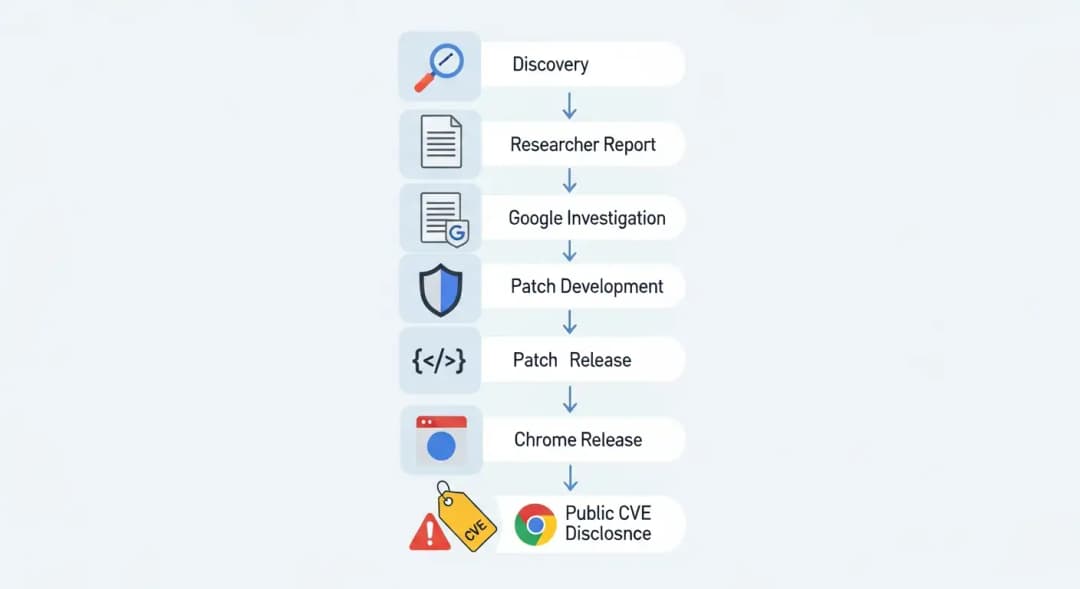
Before the last step, information that isn't complete can leak. That's when false stories often come out.
Looking at Chrome 144 Claims Next to Previous Releases
In the past, Chrome updates have fixed anywhere from a few to dozens of problems. Some releases are mostly about V8, while others are mostly about bugs in the GPU or network stack.
It's not impossible that Chrome 144 fixes 10 security holes. What matters is getting confirmation. Past releases show that numbers alone don't tell you how bad something is. One big problem can be worse than ten small ones.
This context is often not present in the top Google results, which tend to focus on numbers without any analysis.
What Top Google Results Miss and What They Don't
There are a few gaps that stand out after reading the best articles on this subject.
A lot of reports just repeat the headline without explaining what it means. Not many people talk about how false information spreads or how users should check for updates.
Most articles also don't talk about what this means for businesses. People don't talk about Chrome patch management for businesses very often, even though those users are at the most risk.
Lastly, there isn't much help for telling the difference between real updates and fake Chrome security alerts. This article tries to fill in those gaps with useful information and examples.
Does Chrome 144 fix security problems with V8? An Answer That Is Fair
So, does Chrome 144 fix problems with V8 security? Yes, maybe. V8 patches are often included in Chrome updates.
But it's impossible to know for sure what the full scope is without official documentation. It is best to acknowledge possible fixes while stressing the need for verification.
This balanced view respects the truth of cybersecurity news and doesn't make too much of claims that haven't been proven.

Questions and Answers
Is Chrome 144 out now?
There have been reports about Chrome 144's security, but Google hasn't released all the details about the full release yet. Users should use Chrome's built-in update system to confirm.
How many security holes does Chrome usually fix?
It changes a lot. Some updates fix a few problems, while others fix dozens of them. Just looking at numbers doesn't show how risky something is.
What is the engine for JavaScript V8?
V8 is the part of Chrome that runs JavaScript. It is very important for the speed and safety of browsers.
Do fake Chrome updates hurt my computer?
Yes. Fake updates often come with malware. Always use the official settings to update Chrome, not pop-ups or emails.
Important Point
The talk about Chrome 144 security holes in the V8 JavaScript engine brings up a common problem in cybersecurity. There are real threats, but there is also false information. Being smart means staying calm and informed, checking updates with trusted sources, and knowing how browser security really works.





