
Chrome zero day CVE-2025-10585
There are times when a normal click can be dangerous for security. Google put out an urgent update to fix a serious bug, and thousands of security teams went from drinking coffee to doing something in just a few minutes. The Chrome zero-day CVE-2025-10585 is the problem that is causing the rush.
The news is short and to the point. Google said that an exploit exists in the wild for Chrome’s Stable channel, which was updated to fix a type confusion problem in the V8 JavaScript engine. Because of that mix, you are seeing headlines and urgent warnings right now.
A quick summary for people who want to act right away
Make sure Chrome is up to date. For most people, that means opening the browser, going to “About Google Chrome,” letting it check for updates, and then restarting it. For administrators, this means giving priority to machines that deal with customers and public web content.
The patched builds are now being released for desktop platforms. The quickest way to protect yourself is to make sure your version matches the release notes and then restart the browser.
What does CVE-2025-10585 mean in plain language?
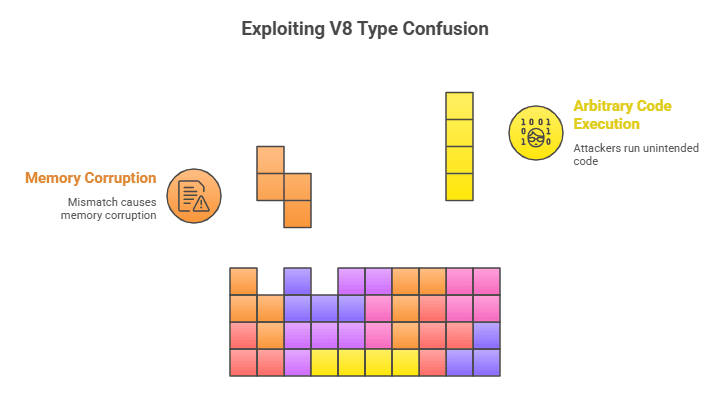
CVE-2025-10585 is a type confusion bug in V8, the engine that runs WebAssembly and JavaScript in Chrome. When code treats a piece of memory as one kind of object when it is really another, this is called type confusion. If an attacker can carefully craft input, that mismatch can cause memory corruption and even allow arbitrary code to run.
Think of it this way: software expects a cup but gets a sieve. The program’s assumptions fall apart, and smart attackers can use that to do things that the original designers never planned. That’s how a visit to a website can lead to a remote compromise.
How the V8 engine works and why problems with it are bad
V8 is not just a pretty piece of Chrome. It is the part that changes web code into instructions for machines, and its performance tricks are hard to understand. If there is a small bug, those tricks give attackers a lot of room to work.
Because V8 is used by many Chromium-based browsers, a single flaw in that engine can have a big impact on a lot of other products that use the same code base.
Who found the bug, and when did it happen?
On September 16, 2025, Google’s Threat Analysis Group reported CVE-2025-10585. The Chrome team quickly released a stable channel update to fix the problem. This kind of coordinated reporting and patching is what makes sure that exposure windows are as small as possible.
Vendors often don’t give out a lot of technical information to the public at first because they don’t want to give opportunists too much information too soon. That’s why the first bulletins are short and tell people what to do.
Proof of active exploitation and why that makes things more urgent
Google made it clear that there is an exploit for this problem in the wild. If a vendor says this, it usually means they have telemetry or reports that show people really trying to take advantage of the bug. That changes this from a theoretical risk to an operational emergency.
Defenders can’t wait for the normal patch cycle when there is active exploitation. It is a call to put updates and controls at the top of the list right now.
Who is most likely to be in danger?
Anyone who uses Chrome on systems that haven’t been patched is at risk, but those who browse external or unvetted web content are at the most risk. Companies that host web services for customers, run kiosks, or use third-party plugins are especially vulnerable.
Attackers like paths that are easy to follow, and social engineering is often one of those paths. Engine-level exploits are often sent through a carefully crafted link in an email or a fake ad on a real website.
The exact versions that are affected and the official patch notes
According to Google’s release notes, the Stable channel moved to 140.0.7339.185 and 140.0.7339.186 on desktop platforms. The new builds will be rolled out over the next few days. The bulletin says that CVE-2025-10585 is a high-severity type confusion problem in V8.
Security teams and national CERTs agreed with the advisory and added the affected versions to regional guidance so that administrators could quickly find endpoints that were at risk.
How to check your Chrome and update it right away
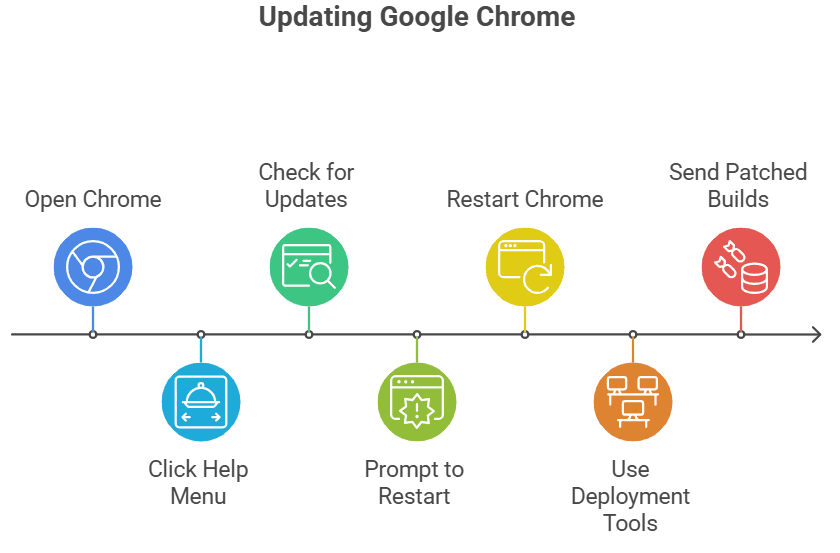
To find out more about Google Chrome, open Chrome and click on the Help menu. If the browser finds a new build, it will check for updates and ask you to restart. That simple series of steps installs the fix for most desktop users.
Use your normal deployment tools if you have to manage a lot of devices. Group Policy, MSI packages, EMM platforms, or endpoint management solutions can send the patched builds to fleets of Windows, macOS, and Linux computers.
What to do in an emergency when you can’t patch right away
If you can’t install the patch right away, limit your exposure. Don’t visit untrusted pages, don’t click on links that could be dangerous, and think about turning off JavaScript on those pages. At the network layer, use web filtering and block domains that are known to be harmful.
For high-value targets, use disposable virtual machines to separate browsing sessions or dedicated hardened kiosks that don’t run general-purpose browsing workloads.
Detection tips and signs of compromise
Zero-days for browsers are hard to find. After a browser session, look for strange browser crashes, strange child processes that the browser creates, or outbound connections to hosts that you don’t know. Telemetry from endpoints and crash reports are very important for finding behavior after an attack.
If you think something has been compromised, gather forensic evidence like memory images, browser crash dumps, and network logs. Those things help responders figure out how an exploit chain works and find signs that you can block somewhere else.
Why it’s important to have other Chromium-based browsers here
V8 is what makes more than just Chrome work. When Google fixes the engine, other companies have to either combine or change the fix. That’s why security teams should keep an eye on vendor advisories from Edge, Brave, Opera, and Vivaldi and install updates as soon as they are available.
The ecosystem is strong because the code is shared and vendors act quickly. If one vendor is late, it also means shared risk.
What we learned from past Chrome zero-days
This event fits a pattern we’ve seen before this year: attackers keep going after engine code that has memory safety problems. Every time something like this happens, it makes it even more clear that updating your browser is a critical security task, not just something you do to keep it running.
It helps to be fast and clear. Clear communication from vendors, short patch notes, and easy-to-follow update steps make things go more smoothly and get more people to use patches.
Things that security teams and IT managers can do to stay safe
Make a list of all your endpoints, find out what versions they are, and put the most important patches at the top of the list for systems that are connected to the internet. Check to see if automatic updates are working. If they aren’t, send the patched builds through your deployment pipeline.
Check the rules for detection, add crash signatures that are relevant, and test the containment playbooks. If you use a managed service to patch your devices, make sure you know when the updates will be rolled out and how to check that they have been installed.
What is Chrome zero day CVE-2025-10585?
It is a high-severity type confusion vulnerability in Chrome’s V8 JavaScript engine. Attackers can exploit it to execute malicious code, and Google has confirmed that it is already being abused in the wild.
How do I know if my Chrome is patched against CVE-2025-10585?
Open Chrome, go to Help > About Google Chrome, and check the version. If it shows 140.0.7339.185 or later, you have the patch installed.
Are other browsers affected by this zero day?
Yes, because many browsers like Microsoft Edge, Brave, and Opera also use the Chromium engine. Their vendors usually release updates shortly after Google, so it’s important to apply those patches too.
Final thought and a checklist
This episode shows how a single memory bug in a shared engine can make things very urgent. For most readers, the best and easiest thing to do is to update Chrome and then restart it. That action shuts down the window that attackers are using right now.
The chrome zero day CVE-2025-10585 shows how fast attackers move. Hoplon Infosec’s Endpoint Security service helps organizations stay protected with proactive monitoring, rapid patch management, and real-time threat detection to keep your systems safe.
Follow us on X (Twitter) and LinkedIn for more cybersecurity news and updates. Stay connected on YouTube, Facebook, and Instagram as well. At Hoplon Infosec, we’re committed to securing your digital world.





