

Did attackers really “hijack” the official repo to push a fake installer, and could regular users be tricked into installing malware while searching for GitHub Desktop?
Multiple security teams reported a malvertising-driven campaign that steered users toward a malicious download flow that looked official, often using paid search ads and GitHub-hosted credibility to lower suspicion. What’s clear is the redirect-and-installer trick and the targeting of IT workers. What’s less clear is the headline wording. Several write-ups describe abuse of GitHub features and link patterns, not a confirmed admin takeover of the official project itself.
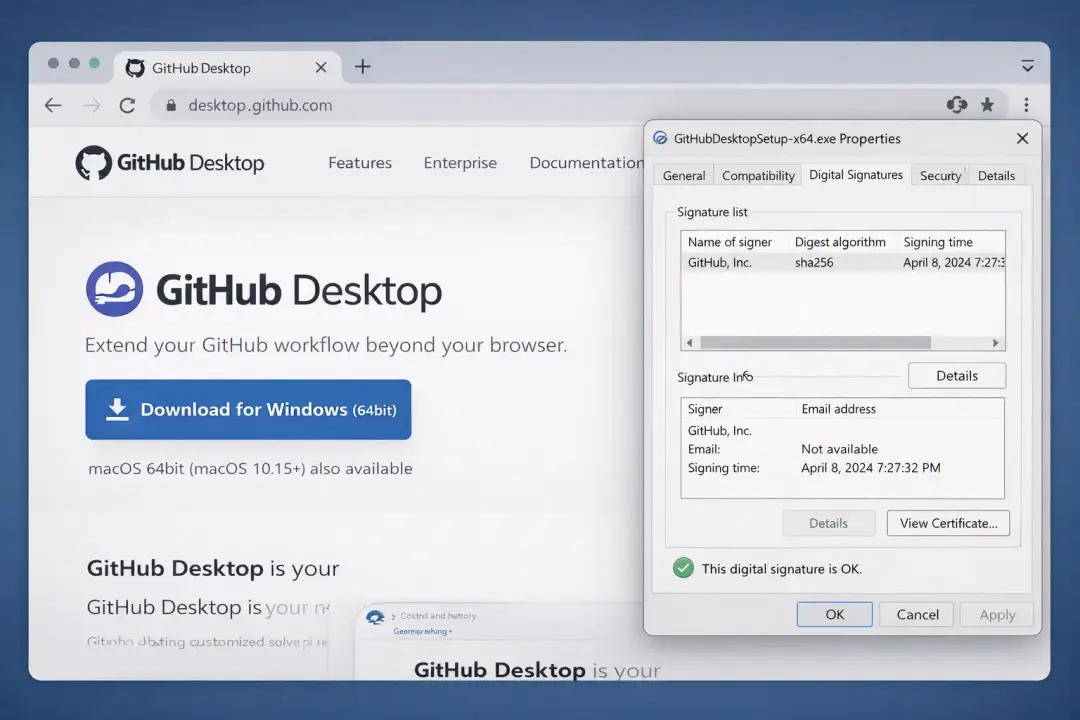
Users are advised to download GitHub Desktop only from the official website and verify the installer’s digital signature before installation.
What happened
If you’ve ever Googled a dev tool in a rush, you know how this goes. It’s early, you’re behind, and the first result looks “official enough.” That’s exactly the moment attackers try to capture.
Researchers described a campaign where victims were led through paid ads and redirect chains toward a fake installer experience. In the reporting, the targets were often IT workers, which tracks with how modern attackers think: compromise the people with higher access first, then pivot.
One of the more detailed public write-ups came from Arctic Wolf, which described an “initial access” style campaign and a hardware-aware twist they named GPUGate. The idea was simple and kind of sneaky: keep the payload encrypted unless the system had a GPU, which could help the malware avoid being fully unpacked in some analysis environments.
A separate thread in public reporting highlighted “dangling commits” as the lure. In plain terms, attackers can abuse how Git objects, forks, and links are surfaced so a page can look like a trustworthy GitHub destination, even when it’s part of a trap.
The headline confusion: Was the official repository actually hijacked?
This is where readers get whiplash, because “hijacked” can mean ten different things depending on who’s writing.
Some coverage frames it as “attackers hijacked the official repository.” Others describe abuse of GitHub’s structure and link pathways, often in connection with malvertising, disposable accounts, and dangling objects rather than a confirmed maintainer takeover.
Here’s the careful, people-first way to say it:
There is credible reporting that attackers used GitHub-related trust signals and workflows to make the malicious download path feel legitimate.
The strongest public descriptions emphasize deception and feature abuse, and do not read like a confirmed, proven full admin compromise of GitHub’s official Desktop project itself.
If you see posts claiming “GitHub officially confirmed the repo was hijacked,” check for a primary statement. If there isn’t one:
“This appears to be unverified or misleading information, and no official sources confirm its authenticity.”
That line protects readers. It also keeps your article honest.
Why this worked: it wasn’t magic, it was timing and trust
I’ve watched very smart people click the wrong download link simply because the page “felt right.” Not because they’re careless. Because they’re human.
This campaign leaned on three habits most of us share:
1. We trust known brands.
2. We trust GitHub links, because GitHub is where real code lives.
3. We skim when we’re busy.
That’s the core of a GitHub supply chain attack: you don’t always need to break the vendor. You break the path between the vendor and the user.
This is also why terms like software supply chain security, open source repository compromise, and developer workstation security keep showing up in security meetings. When developers and IT staff download tools, that’s not “personal computing.” That’s part of production.
-20260128052020.webp&w=1080&q=75)
Where the trap shows up: ads, lookalike pages, and borrowed credibility
The campaign described in public reporting is closely tied to malvertising: attackers use paid placements to catch people at the exact moment they’re searching for a legitimate tool.
In Arctic Wolf’s view, the goal looked like the kind of “get a foothold first” play that can lead to credential theft, infostealing, and ransomware follow-on actions.
This matters because it lines up with the broader pattern Microsoft has documented: malvertising can lead to malware hosted on GitHub infrastructure, followed by multi-stage delivery and persistence.
And yes, this is where GitHub Pages and GitHub hosting can get pulled into the story. GitHub-hosted content can look legitimate, and attackers know that trust transfers fast. Another campaign wave reported by TechRadar noted attackers abusing GitHub Pages as part of SEO poisoning for fake download sites.
Fast safety checklist
This section is intentionally practical.
1) Start at the official download page
If your goal is GitHub Desktop download, start here and treat it as the one “known good” entry point.
For people searching for the GitHub Desktop download for Windows 11, the same official page is still the right start. The platform question matters, but the source matters more.
2) Verify the publisher signature on Windows
Before running an MSI or EXE, right-click → Properties → Digital Signatures. If the signature is missing or the publisher looks wrong, stop.
There’s a real-world example of users raising alarms about detections on a GitHub Desktop installer and discussing hashes and verification. It’s a good reminder: treat alerts seriously, then verify.
That’s the real-world purpose of code signing security.
3) Don’t trust a repo page just because it “looks official”.
GitHub’s own guidance on repo-jacking explains why names and appearances can mislead, and why verifying identity and provenance matters.
This is the mindset behind GitHub trust verification.
What the malware reportedly did
Arctic Wolf’s GPUGate write-up is one of the clearest public descriptions: it discusses a delivery chain that uses Google Ads and a GPU-gated decryption routine as an evasion tactic.
Other reporting and threat notes focus more on the lure mechanics, such as dangling commits and ad-driven traffic.
A key clarity point for readers: there is no widely cited CVE for “the repo hijack” itself in this story, because the main issue is not a single vulnerability in GitHub Desktop. It’s a distribution and trust problem. If someone insists there’s a CVE that proves the official repo takeover, ask them to show a primary source.
How a developer ends up infected
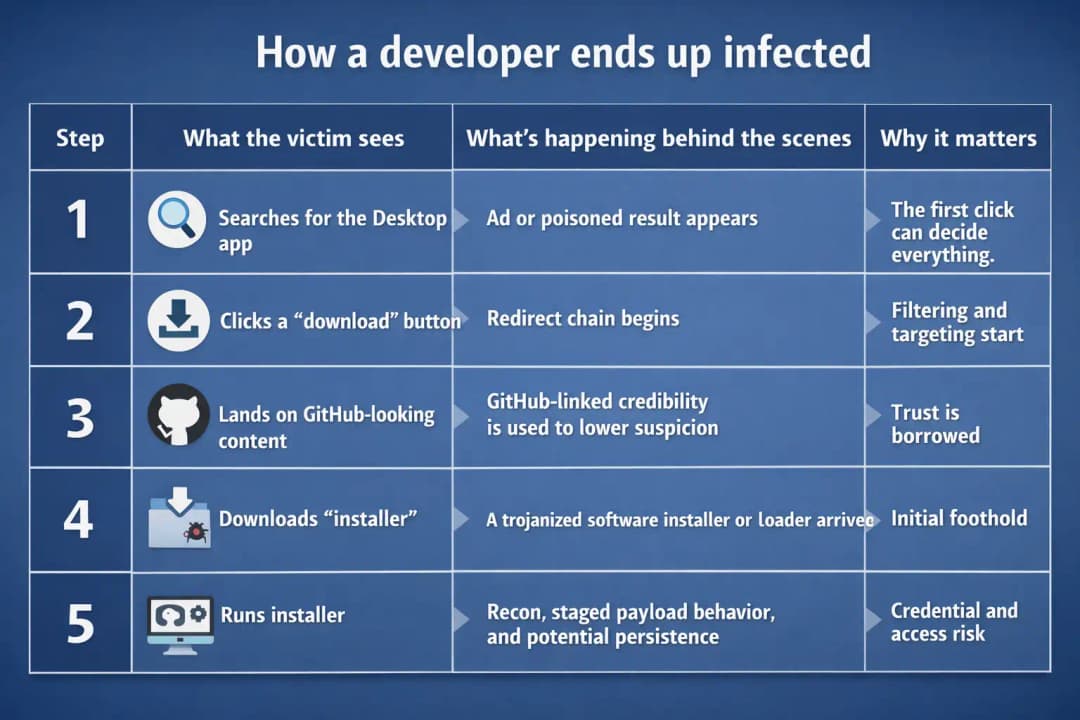
This table is generalized on purpose. Different reports stress different details, but the flow is consistent.
How to check if you already installed the wrong thing
Start with the boring questions first.
· Did you download from the official page for GitHub Desktop page?
· Did Windows show a publisher warning that you ignored?
· Did Defender or your EDR flag it?
There are public discussions where an installer was flagged, and users compared SHA-256 details and detections. That doesn’t automatically prove guilt or innocence, but it does prove you should verify and not shrug it off.
Then look for post-install weirdness:
· Browser sessions logging out unexpectedly
· New scheduled tasks you did not create
· Unknown processes that come back after reboot
· Outbound connections right after install to domains you don’t recognize
If this is a work device, don’t do “solo cleanup.” Escalate.
Verifying authenticity without becoming a forensics person
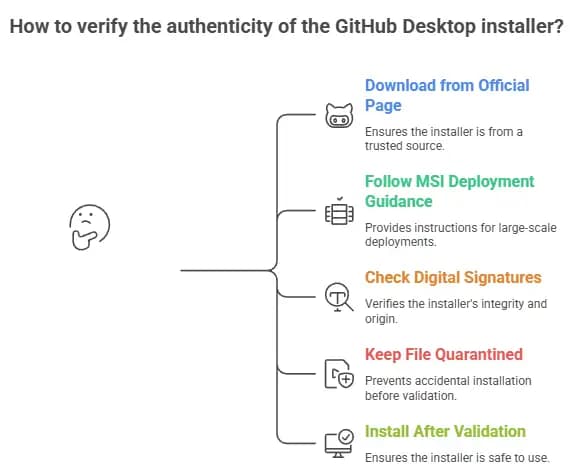
Here’s a routine that normal people can actually follow:
1. Download from the official page for GitHub Desktop page.
2. If you deploy at scale, follow GitHub’s official guidance for MSI deployment.
3. Check Digital Signatures on the installer.
4. Keep the file quarantined until checks are complete.
5. Install only after validation.
This is also the simplest answer to how to verify github desktop installer.
Why one bad download becomes a real incident
Security teams don’t panic over one installer. They panic over what comes next.
Arctic Wolf’s reporting explicitly frames this as an initial access style campaign that could enable credential theft, infostealing, and ransomware deployment.
In real life, one compromised workstation can lead to:
· token theft
· code theft
· CI/CD tampering
· cloud credential reuse
That’s why you see searches like enterprise GitHub security audit, GitHub security audit services, and GitHub repository security assessment after incidents.
This is also where “commercial keyword + problem + education” fits naturally: the problem is real, and the educational part is teaching teams what “safe downloads” means in a repeatable way.
Authentication safety: don’t let a fake installer steal the keys to your house
If you’re setting up a GitHub account, treat it like access to a workbench that also contains your keys.
GitHub’s docs explain how authentication flows work in Desktop, including 2FA prompts and returning to the app after authenticating.
Users often ask about GitHub login and GitHub login with Google. Convenience is fine. Just pair it with strong 2FA, hardware keys if possible, and a quick habit of checking the URL before entering anything.
What to do next, based on who you are
If you’re a solo developer
· Re-download from the official source.
· Verify signatures.
· Rotate tokens if anything feels off.
· Review authorized apps and active sessions.
If you manage a team
· Tell staff not to click ads for installers.
· Publish an “approved download sources” note.
· Watch for unexpected installs on endpoints that don’t normally run dev tools.
If you run security
Treat it as a GitHub repository hijacking attack scenario, even if it “started as an installer.”
Build a playbook for incident response forGitHubb compromise (isolate host, collect logs, rotate credentials, block known bad infrastructure).
Consider allowlisting and policy-based installation for the developer.





