
What is going on with the LinkedIn RAT malware attack? Who is affected, and what does it mean for your business?
In early 2026, cybersecurity researchers saw something that made a lot of security teams very worried. Attackers are no longer just using email to try to get people to click on links that will install phishing and Remote Access Trojan software. They are now using professional networking sites like LinkedIn to spread harmful malware. The key element in this emerging threat is what researchers are calling a LinkedIn RAT malware attack, where hackers use malicious LinkedIn messages to deliver malware that ultimately gives them unauthorized access to systems.
This article goes over what is known, goes into the technical details, talks about the risks for businesses, and gives clear advice on how people and businesses can protect themselves.
The attackers send a message that looks like a real LinkedIn message. It looks like a recruiter or a contact, and it has a file attached, so it seems safe. When the person who gets the file downloads it and runs it, a complicated series of events happens. The file sideloads a hidden virus that installs a Remote Access Trojan, which lets the attacker take over the system. This isn't a made-up story. Security analysts gave The Hacker News the details in a documented threat intelligence report.
This attack makes businesses and professionals think about a lot of important things. Can hackers send malware through messages on LinkedIn? Are there other ways that LinkedIn is used for malware attacks? Why would attackers choose this over email? In the next sections, we'll talk about how this LinkedIn RAT malware attack works, why it's dangerous, how defenders can find and stop it, and what businesses should do right now to protect themselves.
How the LinkedIn RAT malware attack works
When the first reports of this new threat came out, many analysts were shocked. For a long time, phishing and malware delivery efforts were mostly done through email. Now, attackers are using a different method: they are sending harmful files through social engineering malware that uses private messages on LinkedIn to gain trust and trick people into opening dangerous attachments.
At first glance, the attack's setup seems easy. An attacker makes a message and sends it through LinkedIn. This message often seems completely normal, like it could be from a coworker, a business partner, or a recruiter. People trust messages and attachments on LinkedIn more than they would in an unsolicited email because LinkedIn is made for professional networking.
Once the victim downloads the attachment, the DLL sideloading malware attack begins. The archive they run has a lot of different parts. One is a real PDF reader that is open source. Another is a Dynamic Link Library (DLL) file that is bad. The PDF reader is a real program, but it is tricked into loading the bad DLL when it runs. That DLL then starts more bad things to happen.
Sideloading is a way for malware to get onto a computer by tricking a legitimate program into loading a harmful DLL that it shouldn't trust but does anyway. Because the application is real, endpoint defense systems don't always flag the activity. Once the bad code is loaded, it can run in the background without anyone knowing. This is known as a DLL sideloading malware attack.
Cybersecurity researchers noticed that this campaign does more than just drop the bad DLL. It also comes with a portable Python interpreter and shellcode that runs straight in memory. The attackers do this to make sure that regular file scanning tools don't easily find the threat. The end goal is to set up a Remote Access Trojan link back to the attacker's server. This Remote Access Trojan infection gives someone else control over the infected system without permission.
This method works because most endpoint detection systems don't pay much attention to DLL sideloading events, especially when the tool being used is a widely trusted open-source tool. Combining social engineering malware attacks with this technical execution method makes it doubly effective. Attackers are relying on both trust and technical stealth to get past defenses.
What DLL Sideloading Really Means
It helps to think about how normal programs work on Windows systems to get a better idea of the technical heart of this attack. When a program runs, it usually gets code libraries from places that it trusts. One of these is a Dynamic Link Library (DLL). These libraries are necessary for real programs to work correctly.
DLL sideloading is when a bad file is put in the same folder as a program that the operating system trusts. When that program runs, it accidentally loads the attacker's bad code instead of the real thing. In this case, the PDF reader loads a DLL with hidden code that starts the RAT malware.
Traditional defenses often don't see anything wrong because the process being abused is a well-known and trusted tool. In cybersecurity circles, this technique is sometimes described as DLL hijacking or DLL sideloading. A hacked system might keep working normally while quietly sending data to an attacker's server.
This ability to stay hidden is one of the reasons why Remote Access Trojan infections are so dangerous. RATs let people access your computer without you knowing, unlike simple ransomware that shows a ransom note. Attackers can gain more power, add more tools, and move around a network.
In this LinkedIn RAT malware attack, once the bad code has settled in, it makes registry entries to make sure that the Python interpreter and other parts run every time the system starts. This gives the malware a place to hide that is hard to get rid of without careful detection and response.
Why LinkedIn Messages Work Well for Sending Malware
Most corporate security stacks are set up to look for malware and phishing in email traffic. Email gateways often check the reputation of the sender, attachments, and links. They use advanced threat intelligence to stop known bad URLs and files that look suspicious from ever getting to a user's inbox.
But these corporate systems are less likely to look at social media sites like LinkedIn. A lot of the time, companies only use email security tools on Outlook or Gmail and not on LinkedIn InMail or private LinkedIn messages. That means that attackers can use these less secure channels to send bad content.
Cybersecurity researchers said that private social media messages don't have the same level of visibility and security controls as email does in most business defenses. LinkedIn messages are not part of the normal security perimeter. Hackers use that blind spot to spread their bad code.
This also has to do with how people think. People think that LinkedIn messages should be safe and professional. It seems normal and not dangerous to get a message asking you to look over a document about a job opening or a business proposal. That trust that isn't spoken out loud is exactly what social engineers depend on. This is why we use the term RAT malware via social engineering to describe such attacks.
The Human Element: Social Engineering at Its Heart
Even if you have the best firewalls and endpoint defenses in the world, the security chain is only as strong as its weakest link, which is often a person. Social engineers use psychological tricks to write messages that get people to do things they wouldn't normally do.
In these LinkedIn phishing malware campaigns, attackers spend time getting to know their victims or using language that makes them trust them more. They may act like recruiters or people who work in the field. Sometimes the message could be written as a business proposal or an important report for the industry. These tricks are meant to make people less suspicious and more likely to download the bad file.
Many people don't question the messages because they come from what seems to be a real account. People still think LinkedIn has a moderate verification process, even if the account has a generic profile picture and only a few connections. The platform's trust becomes a target for attacks.
The attack chain starts when the user downloads and opens the bad file. The first step in social engineering is just as important as the technical sideloading itself. The DLL sideloading malware can't run unless the user is convinced to open the file.
This mix of psychology and technical exploitation is why businesses need to use both technical and people-focused strategies to keep their data safe.
Failures in detection and evasion at the endpoint
One reason this LinkedIn RAT malware attack is so scary is that it can hide from detection. Most of the time, traditional antivirus and endpoint detection systems look for patterns or signatures of threats that are already known. They look at network traffic to see if there are any strange connections. But these defenses can be easily broken when bad code is run through a real program.
For example, the harmful DLL that is sideloaded into a PDF reader looks like it is part of a trusted process to the system. Standard endpoint detection tools might not see this as a threat because they see the real PDF reader running normal code. The malware is running in memory, though, without leaving a clear trace on disk.
This is a classic case of endpoint detection failure. The bad action is happening while things are going on as usual. Tools that scan disk files don't often find hidden code because it might not be written to disk permanently. For this reason, modern attackers often prefer fileless or in-memory execution methods.
Businesses that don't keep a close eye on how their processes work and how memory is used are especially at risk. This kind of technique is a classic example of endpoint detection failure.
Business Effects and
Risks for the Company
A successful LinkedIn cyber threats fcampaign or companies can have devastating consequences. If an attacker gets a Remote Access Trojan infection on one workstation, they can use it to steal passwords, keep an eye on network traffic, and even move laterally through a company's network.
Attackers like RATs because they let them get into systems without being seen. The attacker could steal sensitive documents, watch what users do, and give themselves more power from a compromised workstation. This can eventually lead to a full network breach without alerting defenders.
For businesses, this could mean a data breach, fines from regulators, losing customers' trust, and high costs to fix the problem. After a malware attack, the cost of incident response services can be hundreds of thousands of dollars or more. In many cases, companies also have to deal with downtime and lost productivity while they fix bugs and rebuild systems.
Enterprise malware delivery methods that use social media platforms add a new type of risk. Just protecting email is not enough anymore. Companies need to expand their defenses to include social media as well.
This also has different effects on different industries. Because the data and systems at risk are so valuable, highly regulated fields like finance, healthcare, and critical infrastructure are especially vulnerable.
How to Find and Protect Yourself from This Threat
Understanding how attackers launch a LinkedIn phishing attacks businesses campaign is only the first step. The next step is to build defenses that can find and stop threats like this in the future.
First, it's important to train users to be aware. People need to know that not all LinkedIn messages are safe, especially if they have attachments that weren't expected or ask them to download files. Training should include real-world examples of how malicious LinkedIn messages operate so users can recognize warning signs.
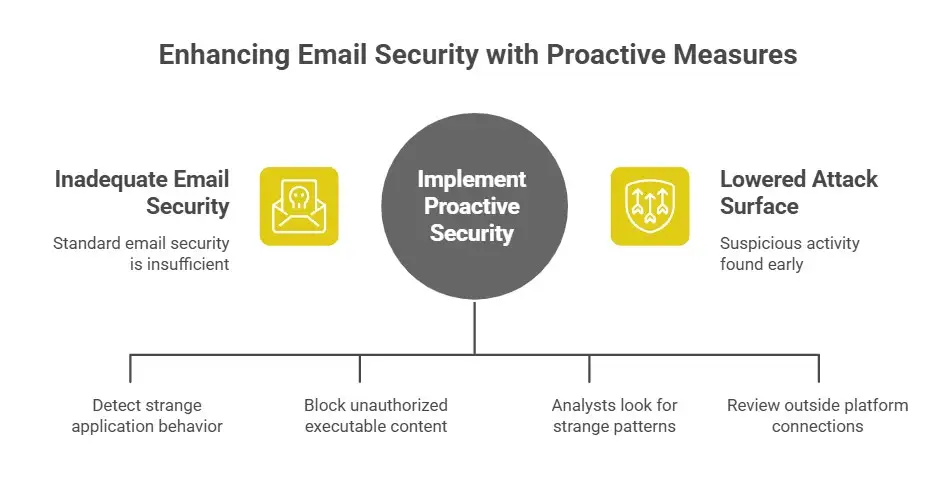
Technical controls also need to change. Standard email security can't be the
only line of defense. Companies should buy security tools that can:
• Keeping an eye on strange application behavior, like loading DLLs without permission
• Finding suspicious execution in memory
• Connecting activity across endpoints and network traffic
Tools that offer DLL sideloading detection capabilities can give defenders a critical edge. Some modern endpoint detection and response platforms look for processes that load code from places or libraries that aren't normal.
Policies for controlling applications can stop unauthorized executable content from running in the first place. By allowing only known good apps and blocking others, you can make it harder for attackers to use sideloading malware to their advantage.
Threat hunting and SOC monitoring services are also useful. Trained analysts can look for strange patterns that automated tools might not pick up on.
Also, companies should review and limit which outside platforms can connect to their systems, especially when those platforms are used for business communication, like LinkedIn.
Education, monitoring, and proactive security measures all work together to lower the attack surface and make it more likely that suspicious activity is found before it turns into a breach.
What to Do Now
Here are some useful things you can do if you are in charge of security at a business:
1. Teach employees to be just as careful with LinkedIn messages as they are with emails.
2. Use security tools that can find memory-based attacks and patterns of sideloading.
3. Set up endpoint protections that keep an eye on processes that act in unexpected ways.
4. Allow logging and monitoring of employees' social media interactions.
5. Look over your incident response plans to make sure they include social media.
In short, you need to think outside the box when it comes to threats and get used to a world where hackers use trusted platforms for business communication. Attackers are taking advantage of the fact that the line between personal and business digital life is getting less clear.
Hoplon Insight Box
Advice from Hoplon Infosec Experts
• Be careful with LinkedIn messages, especially attachments from people you don't know.
• Use advanced endpoint monitoring that can find suspicious module loads and code execution in memory.
• Do phishing tests regularly that include situations that happen on social media.
• Make sure that your incident response plan has steps for looking into and stopping lateral movement after a RAT malware infection.
Talk to trusted professionals about tailored malware incident response services, managed detection and response, and threat hunting services that find hidden threats before they get worse.
Questions that are often asked
Can hackers use LinkedIn messages to send malware?
Yes, documented campaigns show that attackers can use harmful LinkedIn messages to spread malware, such as Remote Access Trojan infection attempts through DLL sideloading.
What does it mean for malware to use DLL sideloading?
This is a method that puts a harmful DLL in a place where a trusted application loads it, which loads malicious code into a legitimate process.
How bad is RAT malware?
Remote Access Trojans are dangerous because they let attackers get into a system without being noticed. Attackers can steal information, keep an eye on activity, and move deeper into a network.
How do businesses find DLL sideloading?
Organizations can find it by using endpoint tools that look for unauthorized module loads, unexpected application behavior, and code execution in memory.



-20260925120840.webp&w=3840&q=75)

-20260918120903.webp&w=3840&q=75)