
-20260202022007.webp&w=3840&q=75)
Are bad Chrome extensions right now stealing access to ChatGPT, and should regular people be worried?
The short answer is yes, and that's why this story is important right now.
In January 2026, security researchers revealed that several Chrome browser extensions were quietly abusing affiliate links to siphon ChatGPT access tokens without users realizing it. This problem affects everyday people, remote workers, marketers, developers, and businesses that need browser extensions to get things done. It's unsettling that these extensions looked so normal on the outside and that trust was so easily abused.
This article explains what happened, why it matters, and how it works; gives real-world examples; talks about the bigger picture; and looks ahead to the future.
Where details are not fully verified, that uncertainty is clearly stated. The goal is clarity, not alarm.
What happened with malicious Chrome extensions stealing ChatGPT access?
The story began quietly, as many security incidents do. Researchers analyzing suspicious browser behavior noticed something odd. Certain Chrome extensions were modifying affiliate links behind the scenes while also collecting session data linked to AI tools. Further analysis showed that some of these extensions were extracting ChatGPT session tokens, which are essentially digital keys that keep users logged in.
This behavior fits squarely into the growing category of malicious Chrome extensions stealing ChatGPT access, a problem that does not rely on breaking into accounts directly. Instead, it abuses browser permissions that users often approve without a second thought.
The extensions were not obviously malware. Many were marketed as productivity helpers, coupon tools, or AI assistants. They lived inside the Chrome Web Store, which gave users a false sense of safety. According to publicly available reporting, not every extension has been independently verified by multiple vendors, and some details are still being investigated. That uncertainty itself is part of the risk.
-20260202022007.webp&w=1080&q=75)
Why this issue matters more than previous extension scandals
At first glance, affiliate abuse sounds like a marketing problem. Someone loses a commission; someone else gains it. But when affiliate hijacking is combined with AI session access, the stakes change completely.
ChatGPT sessions can contain private prompts, business ideas, code snippets, internal workflows, and sensitive conversations. If an extension can perform session token exfiltration, it can potentially replay that session elsewhere. That raises serious concerns about privacy, intellectual property, and account misuse.
This also exposes deeper Chrome Web Store security risks. Users assume that extensions hosted on a major platform have been thoroughly vetted. In reality, review processes focus on surface-level behavior, not long-term silent abuse.
The question many people are now asking is simple and uncomfortable: are Chrome extensions safe to install at all anymore?
How Chrome extensions steal ChatGPT tokens and data
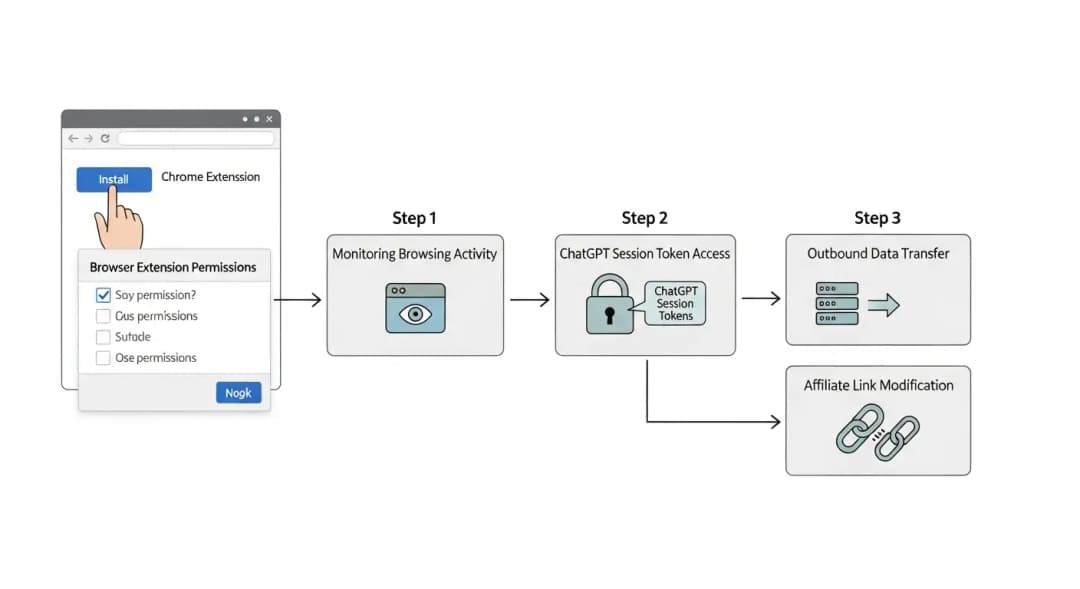
Understanding how Chrome extensions steal ChatGPT tokens does not require a computer science degree. It starts with permissions. Many extensions ask for access to “read and change data on all websites you visit.” That single checkbox opens the door to almost everything.
Once installed, a malicious extension can monitor network requests, observe cookies, or intercept session storage. ChatGPT sessions rely on tokens stored locally in the browser. If an extension is designed to watch for those tokens, it can quietly copy them and send them to a remote server.
This behavior overlaps with what security teams classify as browser extension spyware. It does not break systems. It observes them.
Affiliate abuse works similarly. The extension watches for outbound links and swaps legitimate tracking IDs with its own. These are classic affiliate link hijackers, now combined with AI access theft. This blend is what makes this wave different.
Signs users often miss when an extension turns malicious
Most users do not notice anything wrong. That is the point. Still, there are subtle signs of malicious browser extension behavior that experienced users sometimes catch.
Pages may load slightly slower. Affiliate links may redirect unexpectedly. Logged-in sessions may expire strangely. In rare cases, users report seeing ChatGPT sessions appear active on unfamiliar devices.
These clues are easy to ignore, especially when work needs to get done. That is why many people only realize something is wrong after reading a report and asking themselves, “How to tell if a Chrome extension is stealing my data?”
-20260202022007.webp&w=1080&q=75)
Real-world example from enterprise environments
In one anonymized enterprise case discussed by security analysts, a mid-size company noticed abnormal outbound traffic from employee browsers. The extensions involved were common tools used by marketing teams. Further review revealed background calls to unknown domains and token reuse patterns.
This is where enterprise browser threat protection becomes more than a buzzword. Large organizations increasingly deploy monitoring tools that flag suspicious extension behavior, not just traditional malware.
The lesson was uncomfortable but clear. Trusting extensions by brand name or install count is no longer enough.
The role of affiliate hijacking extensions in this campaign
To understand what affiliate hijacking extensions are, think of them as silent middlemen. They insert themselves between a user and the website, rewriting links for profit. On their own, this is unethical but often overlooked.
When paired with AI session monitoring, the same mechanisms can be reused for data collection. That crossover is what researchers flagged as especially concerning in this case.
Not every affiliate-modifying extension is malicious in the same way. Some operate in legal gray areas. Others cross clear ethical and technical lines. Differentiating between them is difficult for users without expert help.
Effect on users, businesses, and trust in browser ecosystems
The first thing that happens is that privacy is lost. The second effect is that trust is lost. People start to doubt the tools they use every day.
Businesses can face leaked plans, broken AI workflows, and exposure to regulations as a result. For people, it could mean that their personal information ends up where they never meant it to.
This has made the need for a service that can remove malicious Chrome extensions greater, especially for businesses that can't afford to clean up by trial and error.
Educational guides help, but professional remediation is often faster and safer.
What should users do next to protect themselves?
The first step is awareness. Review installed extensions and remove anything unnecessary. Fewer extensions mean fewer risks.
The second step is understanding browser extension security solutions that focus specifically on monitoring extension behavior rather than just blocking known malware.
For users already concerned about AI account exposure, a ChatGPT token theft protection service can help detect abnormal session reuse patterns, though availability varies by region and provider.
When extensions are suspected, a proper Chrome extension malware cleanup process involves more than uninstalling. Sessions should be invalidated, passwords rotated, and browser data reviewed.
Are security services the answer or just another layer?
This is where nuance matters. A security service for Chrome extension threats does not replace good habits. It complements them.
Commercial tools should educate users first, explain the problem clearly, and then offer monitoring or remediation. Overpromising full safety is a red flag.
The same applies to vendors advertising enterprise browser threat protection. Transparency about limitations builds trust far better than fear-based marketing.
The future of browser extension security
Browser vendors are under pressure. More granular permissions, time-limited access, and behavioral audits are being discussed publicly. Whether these changes arrive fast enough is still uncertain.
What is clear is that malicious Chrome extensions stealing ChatGPT access will not be the last evolution of this threat. Attackers follow value, and AI tools are valuable.
Long-term safety will depend on shared responsibility between platforms, researchers, enterprises, and users.
Frequently Asked Questions
What is a malicious Chrome extension?
A malicious Chrome extensionperformss actions beyond its stated purpose, such as spying on activity, modifying data, or sending information to external servers without informed consent.
How do Chrome add-ons take your information?
They abuse permissions to watch what you do online, read stored session tokens, and send that information over the internet, often without showing any signs.
Can Chrome extensions get to ChatGPT tokens?
Yes, extensions could read session data linked to ChatGPT and use those tokens in other places if they had enough access.
How to remove unwanted browser extensions?
Take off the extension, clear your browser's history, log out of any services that were affected, change your passwords, and check your account activity for anything unusual.
Hoplon Insight Box
Key recommendations:
Limit extensions. Review permissions carefully. Be just as wary of productivity tools as you are of software you don't know. If you use AI tools a lot at work, you might want to think about doing regular security checks that look at browser activity as well as endpoints.
Final takeaway
This incident is not about panic. It is about paying attention. Browsers have become operating systems in their own right, and extensions are powerful software, not harmless add-ons. The story of malicious Chrome extensions stealing ChatGPT access is a reminder that convenience always comes with tradeoffs. Knowing where those tradeoffs lie is now part of being a responsible internet user.





