
Malicious npm package nodejs-smtp
You open a terminal, run a quick install to see if an email helper works, and then you go on. In some cases, that one harmless-looking command was the point at which something quietly changed on a developer’s machine. What seemed like a normal helper library turned out to be the source of stolen money and hours of cleanup.
That pattern is all too familiar. A rush, a ticket to close, a search result that looks right, and an install that has effects you didn’t expect. There is a thin line between convenience and risk in open-source ecosystems, and attackers use that line.
The timeline and the discovery
In late August, security researchers and incident responders noticed the behavior and reported it to the public within a few days. Researchers found that unexpected wallet transfers were linked to machines that had the lookalike mailer installed, so the package was pulled.
Early reports from the public made it clear what happened: a short-lived publisher identity, a few downloads, and a quick removal once the activity was looked at. That short window made the blast radius smaller, but it also showed how quickly such code can do damage when it runs on the wrong computer.
Why it was important to copy Nodemailer
Many Node projects use Nodemailer, which is a well-known library. If a package has a name that sounds like a well-known one, it makes it easier for an attacker because developers quickly judge packages by name and a quick read of the README. A lookalike loves to live in places where there are mistakes in paperwork and quick installs.
Many developers don’t look into a package more closely if it promises the same API and ease of use. That trust isn’t bad; it’s how things get done quickly. Attackers use that trust to get the payload into machines where it can find a target and do something.
How it got into environments where developers work
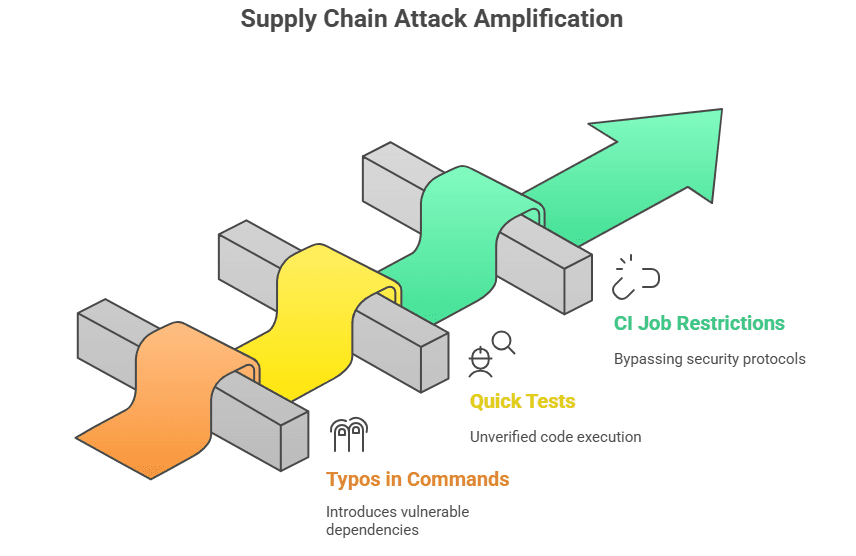
This campaign didn’t depend on a major vendor’s supply chain being broken in a complicated way. Instead, the rogue module was uploaded and sat long enough for curious developers to find it or for small projects to use it as a quick test dependency. In short, simple human workflows made the problem worse.
Some common causes are a typo in an install command, a quick test in a folder that you don’t care about, or a CI job that ran on a runner with fewer restrictions.
Any of those can give a small, harmful program the chance it needs to get to wallets and other sensitive files on a computer.
The clipper method is explained.
A clipper technique is at the center of this attack. Instead of stealing keys directly, the bad code changes or intercepts destination addresses and replaces them with addresses controlled by the attacker. The app signs and sends the changed address when users paste or type in a recipient address. The wallet user thinks the transaction is normal, but the money goes to someone else.
This method is very simple and works well. It doesn’t break cryptographic protections; it happens where the user expects a transfer to be made, and it uses small changes that are easy to hide in moved or changed application resources.
Why Electron apps are easy to hack
JavaScript files and resources are stored in an archive called an Electron package. Usually, those archives are unpacked to known places on the disk, and you only need basic scripting skills to unpack, change, and repack them. That makes wallets that use Electron a good target for someone who can run code on a local system.
Electron apps don’t separate their JavaScript the same way that native code does, so making small changes to one file can change how the app works the next time it runs. Attackers use that predictability to add hooks that run in the normal flow of the app.
Atomic and Exodus are in the crosshairs.
People who looked at the modified logic found clear signs that it was looking for common desktop wallets like Atomic and Exodus. Those wallets are popular, easy to set up on Windows development rigs, and often used by hobbyists and testers who might keep small amounts of money in them.That makes them very valuable to attackers who are looking for a chance.
The campaign’s main goal was to move transfers between different blockchains. It picked currencies that move quickly on exchanges and can be cashed out with little trouble. That choice shows that the person wants to quickly turn stolen money into cash after a successful clip.
Windows details and why they were important
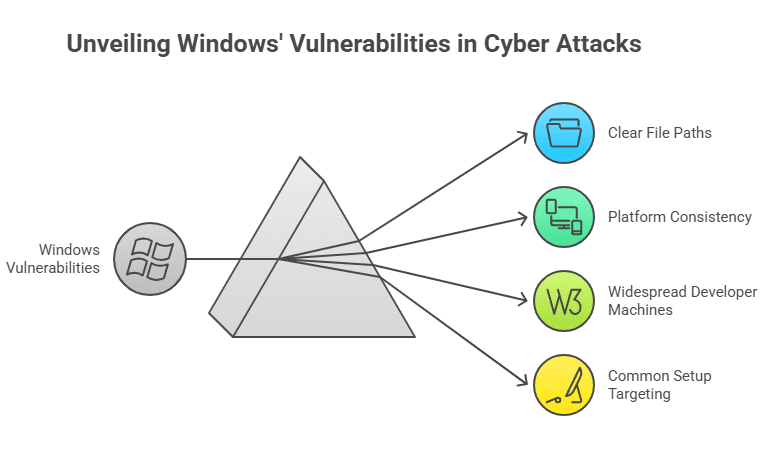
Most of the cases that were reported had Windows hosts. Electron apps on Windows have clear file paths, and it’s easy to find the app bundles. This makes it easier for a script that wants to make a small change to a transaction-building routine. The platform’s consistency makes it easier for attackers to write and run automated tools.
Windows also has a lot of developer and test machines around the world, which made it more likely that the bad package would find a wallet to change. Attackers make their jobs easier by going after the most common setups.
What the package does to app.asar files
The attacker unpacks the app.asar archive, finds a module that builds transactions or reads clipboard data, adds a short function to switch addresses, and then packs the archive back up. The change is small, but it happens in a trusted process every time a user makes a transfer. That makes it hard to find by just looking around.
It’s easier to find these kinds of changes if you know what to look for, like changed timestamps on archives, files that are bigger than expected, or new files that have been added to the app bundle. A baseline and a quick diff can show you things that a simple review might miss.
Signs that every developer should look out for early on
Look out for packages that have new publisher accounts, a short history of maintenance, or readmes that copy language from a well-known project instead of linking to an official repository. If you see unexpected post-install scripts, code that is hard to read, or any package that writes to local application directories, you should be very careful.
There are also network indicators. If a package reaches out to strange domains during or after installation, or if it uses temporary email providers in its metadata, you should stop. Automated scanners that flag network egress during installation help find these problems early.
Who could be behind this, and what does the code show?
Attribution is not always clear. The code in this campaign reused parts from earlier drainer kits, which suggests that there are small groups of sellers or shared toolkits in underground markets. Short-lived publisher identities and throwaway emails are more likely to be used for quick cash grabs than for long-term spying.
That means the attacker probably set up a process that they could use over and over: upload a convincing package, wait for installs, and then use those computers to patch wallets and collect transfers. The evidence points to a focused, practical operator instead of a wide-ranging campaign by a nation-state.
The attack is part of a bigger trend in the npm supply chain.
This incident is part of a pattern of bad packages, typosquat uploads, and post-install surprises in many registries. Open-source registries are very useful, but their openness also makes it easy to abuse them. Patterns are the same in different languages and ecosystems.
Security teams and registries are getting better at quickly flagging these packages, but because development moves so quickly, some attacks get past the first line of defense. Every event is a reminder that going fast without safety measures raises the risk.
What happens to CI, build agents, and teams?
Build agents and CI runners are very valuable targets because they have access to secret credentials and may be linked to deployment pipelines. If a temporary test dependency gets into a runner, the attacker might be able to get to staging wallets and service keys. Lock down CI like it is production.
Limit the tools that can access a wide file system or network, change the credentials if you find a suspicious package, and think about using temporary runners that don’t keep state between jobs. You can greatly lower your risk by making small changes to how you run builds.
Steps for finding and getting rid of practical things
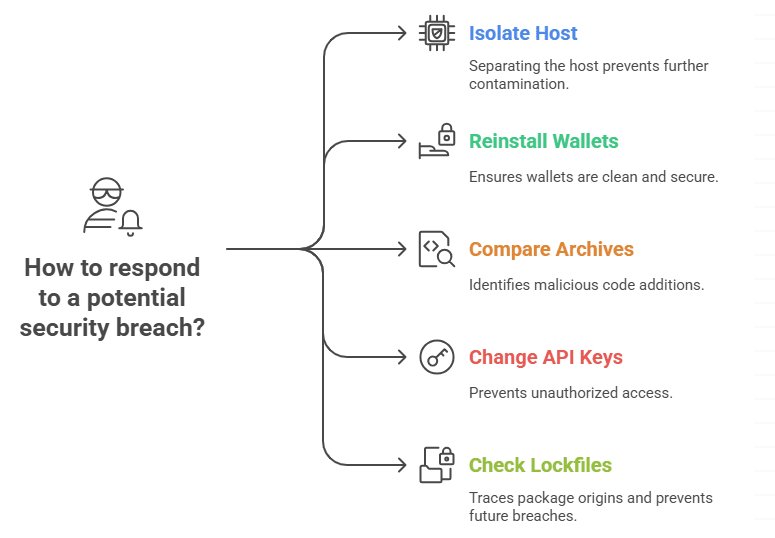
If you think something is wrong, separate the host and keep the artifacts. Reinstall wallets from official vendor sources on a clean machine and use new seed phrases to move money. Look for modified archives and compare them to known good versions to find code that has been added.
Change the API keys and reset any credentials that were made public. For teams, check your lockfiles and package histories to see where the package entered the dependency tree. Then, make a rule to stop packages that look like this one from getting in again.
Lessons that will last a long time and safer ways to depend on others
A combination of education and automation is the best long-term defense. Teach teams to look into packages they don’t know about, pin dependencies, and use registries and scanners that look at behavior, not just metadata. Make a short list of trusted libraries for common tasks and set up automatic checks for post-install scripts and unexpected file writes.
Open source is still a great resource. The goal here is not to slow down development to a crawl, but to make malicious attempts loud and costly. A few extra seconds of checking before you do a quick install can save you a lot of time later.
What is the bad npm package nodejs-smtp, and how does it act like Nodemailer?
The nodejs-smtp package is a fake npm library that looks like the well-known Nodemailer tool for sending emails. Hackers use it to trick developers into downloading it, and then it can steal private keys from crypto wallets like Atomic and Exodus.
How does the nodejs-smtp malware attack people who use the Atomic and Exodus wallets?
After it is installed, the bad package looks for files and private keys related to wallets on the system. It looks at folders that are connected to Atomic Wallet and Exodus Wallet and sends this information to servers that the attacker controls.
How can developers and users keep themselves safe from bad npm packages like nodejs-smtp?
Before installing npm packages, developers should check the number of downloads, the author’s credibility, and the GitHub links. Atomic and Exodus wallet users should regularly update their software, turn on multi-factor authentication, and keep their recovery phrases safe offline to lower their risk.
Hoplon Infosec’s Endpoint Security products keep developer computers safe from threats like the malicious npm package nodejs-smtp. Their tools for monitoring and detecting help keep endpoints and operations safe by stopping malware from getting into wallets or sensitive data.





