
What Is Actually Happening
At its core, this malware attack via Windows Screensaver is not about breaking Windows security. It is about using Windows exactly as it was designed.
Screensaver files use the .scr extension. Despite how they look, these files are executable programs. When launched, they run with the same permissions as any other application. That behavior has always been true, but many users and even administrators forget it.
Attackers take advantage of that gap in awareness. They hide harmful code in a screensaver. This way, they can run the software without attracting the same suspicion as a regular executable file. Once launched, the screensaver installs legitimate remote management software, giving the attacker ongoing access to the system.
Nothing crashes. Nothing breaks. From the outside, the system looks fine.
Why This Approach Works So Well
There is a reason this malware attack via Windows screensaver stands out. It does not depend on speed or chaos. It depends on patience.
Screensavers are trusted by default. They are often shared internally, customized for branding, or downloaded for visual appeal. In many environments, they are not treated as high-risk files.
Remote monitoring and management tools add another layer of cover. These tools are widely used by IT teams for support, patching, and system administration. When attackers install them quietly, their activity blends into legitimate administrative behavior.
Security tools are often designed to look for anomalies. This attack avoids anomalies by mimicking normal operations.
How the Malware Attack via Windows Screensaver Works
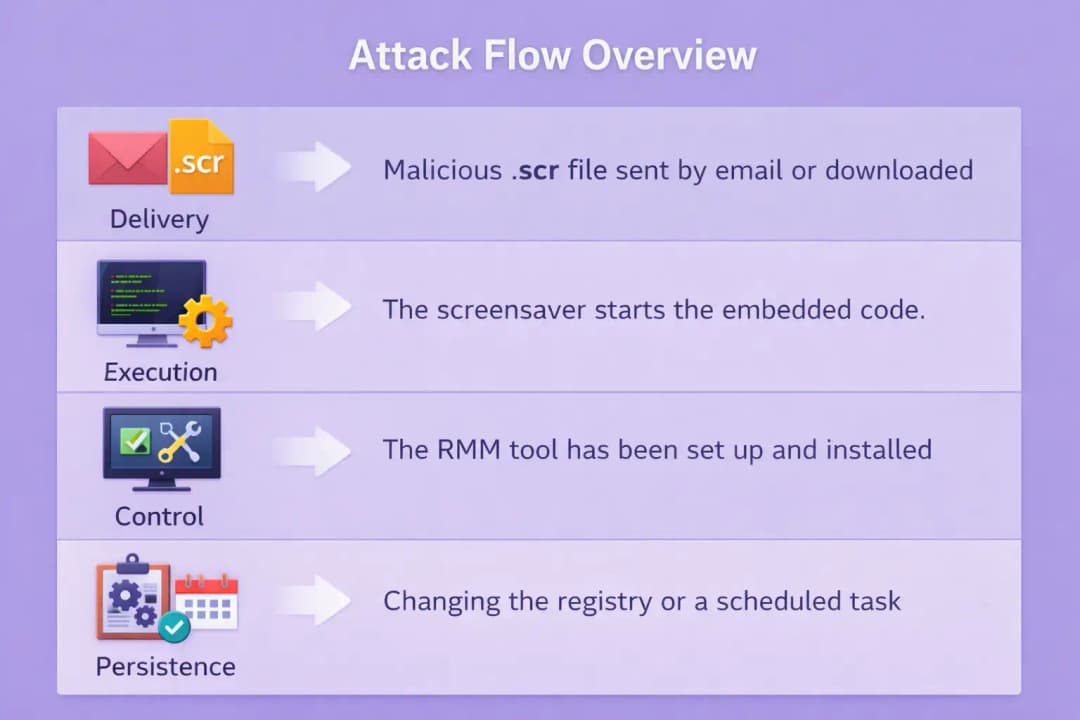
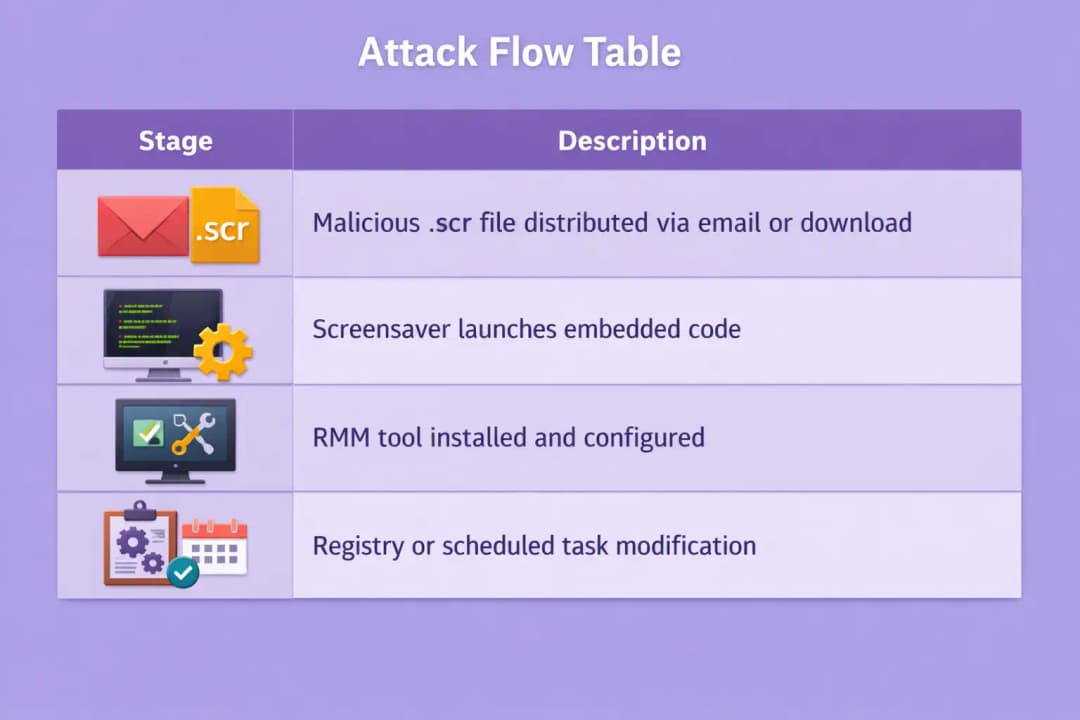
The attack typically unfolds in stages that feel unremarkable on their own.
Delivery
The malicious screensaver is delivered through email attachments, shared folders, or bundled downloads. File names are usually plain and uninteresting. Sometimes they reference themes, utilities, or internal projects.
There is no exploit involved at this stage. The attacker simply needs the file to be opened.
Execution
When the screensaver runs, embedded code executes in the background. The user may not notice anything beyond a brief visual change, if that.
The screensaver connects to infrastructure controlled by the attacker and gets more parts behind the scenes.
Manage
The attacker doesn't use custom malware; instead, they install a real RMM tool. This choice lowers the risk of being found and makes it easier to control things after a breach.
After the attacker installs the software, they can access the system from anywhere, run commands, move files, and watch what people are doing.
Staying Power
Registry changes or scheduled tasks are two common ways to make something persistent. It's easy to miss these changes because they happen all the time in managed Windows environments.
At this point, the attacker can get in and stay there for a long time.
Why RMM Tools Are Central to This Attack
Remote monitoring and management software is not malicious by nature. In fact, it is essential for many organizations. The problem arises when these tools are installed without authorization.
In a malware attack via Windows Screensaver, RMM tools give attackers everything they need after initial access. There is no need for additional malware or noisy persistence techniques.
Because these tools are legitimate, their network traffic often looks normal. In environments where RMM software is already used, distinguishing between authorized and unauthorized access becomes difficult.
This is part of a larger trend in modern cybercrime. Attackers are using trusted tools more and more instead of custom malware.
A Possible Situation in the Real World
Think about a company that uses branded screensavers for all of its employees. An attacker sends a fake update or breaks into a shared resource where screensavers are kept.
An employee quickly installs the file.
After all, it looks like something the company already uses.
Within minutes, the system is enrolled into an attacker-controlled RMM console. No alerts are triggered. No warnings appear.
Days or weeks later, the attacker begins exploring the environment remotely. From a monitoring perspective, it looks like normal administrative activity.
This is the danger of a malware attack via Windows screensaver. It hides behind routine behavior.
Impact on Organizations
The immediate impact is not system damage. It is exposure.
Once attackers have permanent access, they can take their time and do things carefully. They can gather credentials, map out internal systems, and wait for the right time to move up.
This kind of access often happens before more obvious events, like the spread of ransomware or the theft of data.
From the point of view of incident response, these cases are hard. The entry point may not stand out in logs. The tools involved are legitimate. The timeline can be unclear.
Cleanup requires more than deleting a file. RMM installations, persistence mechanisms, and potential lateral movement must all be addressed.
Detection Challenges and Warning Signs
Detecting a malware attack via Windows Screensaver requires attention to context rather than signatures.
Unexpected screensaver installations should be reviewed carefully, especially if they originate from external sources.
Another important sign is when RMMs are installed without permission. Tools that seem to come out of nowhere without documented approval should make you think.
Connections to management servers that are not familiar and new scheduled tasks that are linked to the execution of a screensaver also need to be looked into.
Practical Mitigation Steps
Preventing this type of attack does not require advanced tools. It takes discipline.
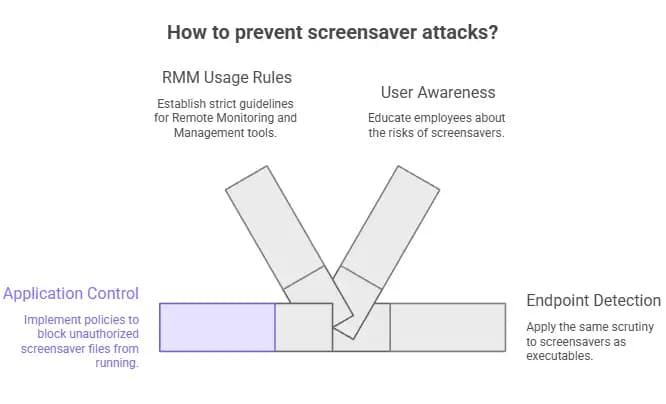
Companies should treat .scr files like executable software and limit their use as such. Application control policies can stop screensaver files that aren't allowed from running at all.
There should be strict rules about how RMM can be used. There should be clear documentation for approved tools, and installations should be watched.
It's also important for users to be aware. Employees need to know that screensavers are programs, not just pictures.
Endpoint detection tools should apply the same scrutiny to screensavers as they do to executables.
Why This Technique Matters Going Forward
This malware attack via Windows screensaver is part of a larger shift in attacker behavior. Instead of breaking systems, attackers are blending into them.
Legacy features, trusted tools, and overlooked workflows are becoming entry points because they attract less attention.
There is no evidence that this technique is limited to a single campaign. Similar abuse patterns are likely to appear elsewhere.
Defenders need to reassess assumptions. Familiar does not mean safe.
Frequently Asked Questions
Are Windows screensavers inherently unsafe?
No. Screensavers are legitimate executable files. Risk arises when they come from untrusted sources.
Is this attack exploiting a Windows vulnerability?
No confirmed vulnerability has been disclosed. This technique abuses intended functionality.
Can antivirus software detect this?
Detection varies. Behavioral monitoring improves visibility, especially for unauthorized RMM installations.
Should organizations disable screensavers entirely?
Not necessarily. Restricting their source and execution behavior is usually sufficient.
Has large-scale exploitation been confirmed?
Public reports haven't shown that abuse is common, but the method is possible and scary.
Suggestions
• Treat screensavers like programs that can be run
• Check RMM installations on a regular basis
• Stop .scr files from running from places you don't trust.
• Keep an eye on the patterns of traffic for remote management
Final Thoughts
A Windows screensaver malware attack isn't very showy. That's why it works. It depends on trust, habit, and assumptions that haven't changed as attackers have. The lesson for defenders is clear. No matter how familiar it seems, anything that can run code should be looked into.





