
The moment that changed everything for Exchange Online users
There were no emergency alerts or dramatic language when Microsoft announced that Exchange Online EWS would be shutting down. It came in a quiet way, like many long-term changes to platforms do. But for businesses that rely on Exchange Web Services, the effect is anything but small.
For more than ten years, EWS has been a part of Microsoft Exchange. It became the foundation for a lot of internal tools, CRM connectors, monitoring systems, and email apps made by other companies. For years, it just worked. It was trusted by developers. Administrators made workflows that used it. A lot of businesses never felt the need to leave.
Now the comfort window has a set end date. Exchange Online will no longer accept EWS connections after April 2027. After that, requests will not work. Apps won't sync anymore. If you don't do something about it before the deadline, automation tasks will quietly fail.
This is why the Microsoft Exchange Online EWS shutdown is important now, not in 2027. You can't plan late.
What is Exchange Web Services, exactly?
EWS, or Exchange Web Services, is an API that lets apps talk to Exchange mailboxes. It lets you programmatically read emails, add events to your calendar, manage your contacts, and search your mailbox.
For a long time, EWS was the only option. It gave you deep access, flexible queries, and dependable performance. A lot of developers learned EWS early on and never forgot it. It was the basis for whole products.
But EWS was made in a time when cloud security was very different. A lot has changed since then about how people can log in, what they can do, and how they can get to information.
For years, Microsoft has been hinting that EWS would be replaced by newer APIs.
The end of Microsoft Exchange Online EWS is the last step in that long change.
Why Microsoft is shutting down EWS now
Microsoft's choice isn't sudden or random. Several things made this move happen.
First, people's expectations about security have changed. EWS uses a lot of older authentication flows that are harder to secure when there are a lot of users. Microsoft Graph and other modern APIs allow for more fine-grained permissions, better logging, and stronger identity controls. Microsoft thinks that keeping EWS up and running increases long-term risk.
Second, it's important that the platform stays the same. Microsoft Graph is now the single API for all of Microsoft 365's services. Keeping two systems running at the same time makes things harder for developers and slows down new ideas. When Microsoft stops using EWS, it can put all of its engineering resources in one place.
Third, usage patterns show that a lot of businesses have already moved or are in the process of moving. Microsoft has noticed that newer deployments are using EWS less and less, even though older ones are still using it a lot.
These things all add up to show why the Microsoft Exchange Online EWS is shutting down now, even though the last date is still a few years away.
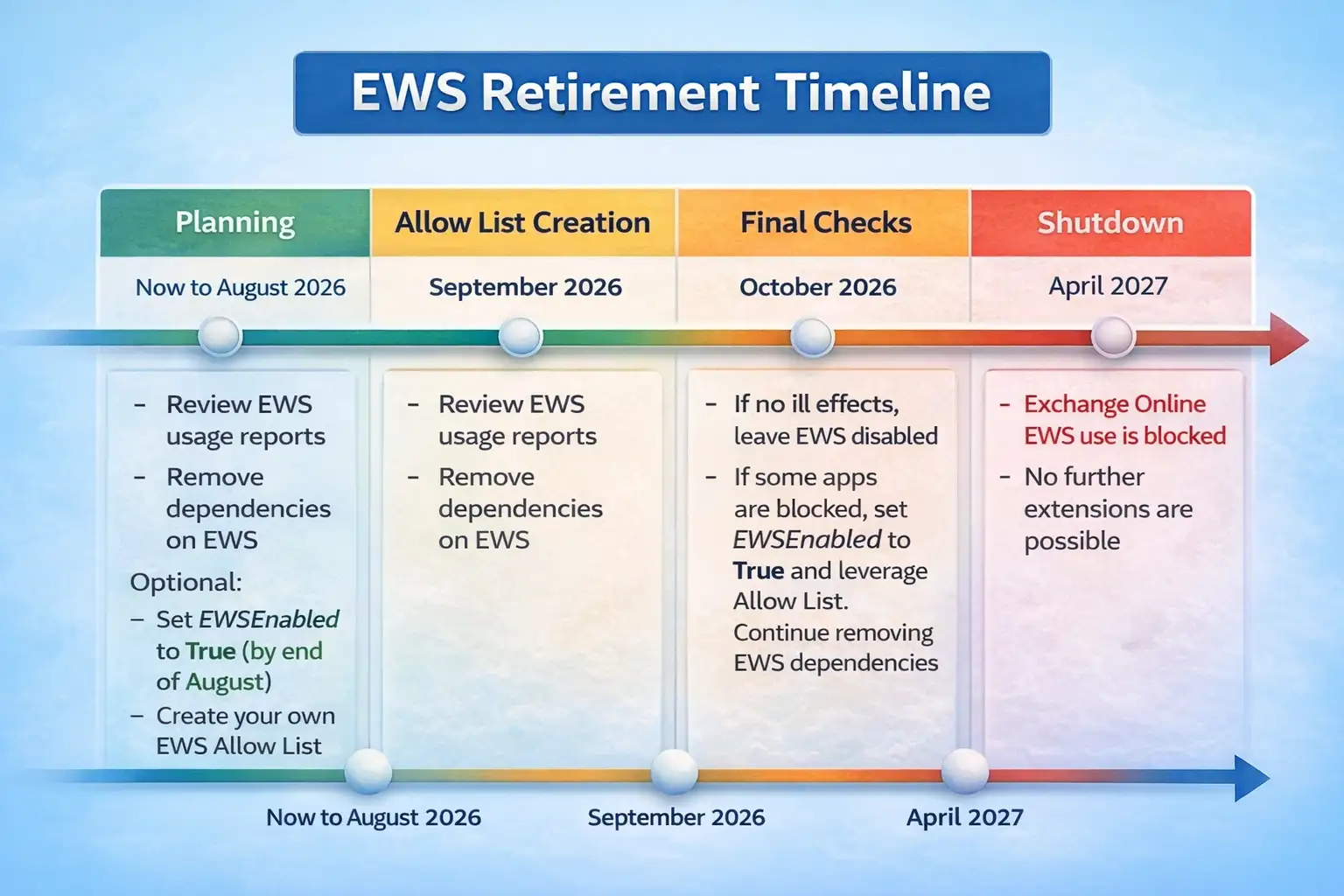
What will no longer work after April 2027?
Exchange Online will stop accepting EWS requests once the shutdown date comes. So far, there have been no announcements about extensions to the grace period. If an application only uses EWS, it will lose access right away.
This includes internal tools that get mailbox data, scheduling systems that use EWS to set up meetings, and third-party apps that never added support for Microsoft Graph. In a lot of cases, failures might not be clear right away. Scheduled jobs might fail without anyone knowing. Sync delays might get worse without anyone noticing.
This shutdown doesn't include on-premises Exchange. The Microsoft Exchange Online EWS shutdown only affects Exchange Online that is hosted in the cloud. That difference is important, but it doesn't solve the problem for hybrid environments.
The real danger is when dependencies are forgotten. Many businesses use EWS in old scripts, vendor software, or integrations that aren't well maintained.
How Microsoft Graph takes the place of EWS
Microsoft Graph is meant to replace EWS in the long run. It lets you access email, calendars, contacts, files, and a lot more through one API endpoint.
Graph uses modern authentication standards, such as OAuth 2.0 with scoped permissions, which is different from EWS. This means that apps only ask for the access they need. Administrators can see more clearly what apps can do.
Graph also gets better with more money being put into it. New features, better performance, and security controls come out all the time. In contrast, EWS has stayed mostly the same for years.
Moving from EWS to Graph isn't always easy. Data models are not the same. Some EWS features do not correspond directly. This is when testing early is very important. Microsoft still knows what it wants to do.
Microsoft's path is still clear, though. The goal of shutting down Microsoft Exchange Online EWS is to move the entire ecosystem toward Graph.
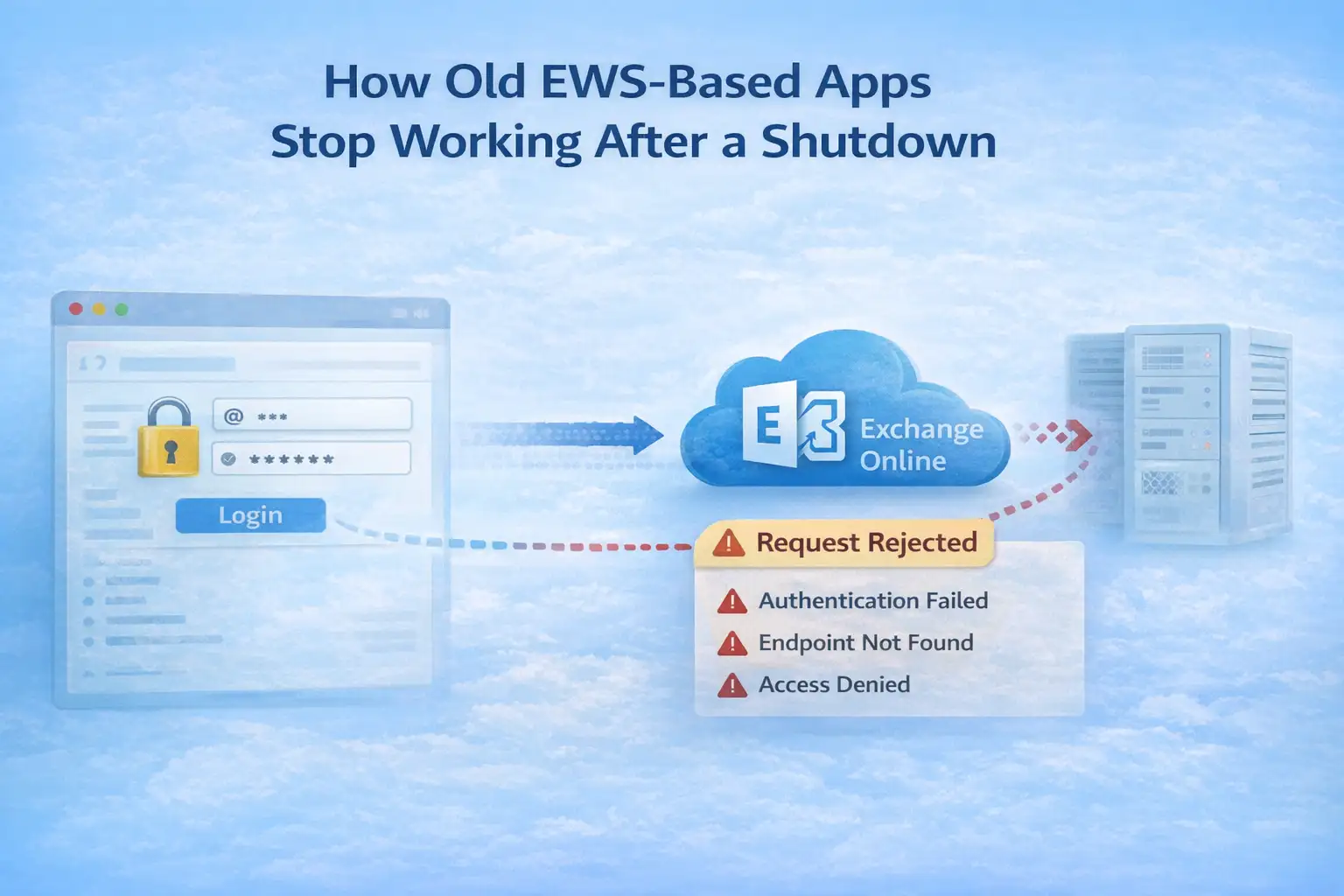
How old EWS-based apps stop working after a shutdown
This isn't an attack scenario, but it's still important to know how things go wrong.
An app tries to log in with EWS credentials. The request to connect gets to Exchange Online. The service doesn't return mailbox data; instead, it denies the request. Authentication or endpoint failures are shown in error logs.
From the app's point of view, nothing has changed except that it no longer gets responses. There is no data corruption. There is no breach. Things just stop.
This is why just keeping an eye on things isn't enough. Business processes may already be messed up by the time mistakes show up. Planning ahead stops that silent failure mode.
The end of Microsoft Exchange Online EWS makes a clear line between what came before and what comes after that developers must follow.
Example from the business world
A mid-sized financial services company made a reporting tool years ago that looked through executive inboxes for compliance keywords. Every night, the tool used EWS to run. It worked perfectly and was hardly ever touched.
When the news about the EWS shutdown came out, the team knew that no one still fully understood the code. The person who made it first had left years before. There wasn't much documentation.
This happens a lot. Success in the past hides risk in the future. The Microsoft Exchange Online EWS shutdown makes those hidden dependencies clear.
In the end, the company rebuilt the tool with Microsoft Graph. It took months, not weeks. It made a difference to start early.
Effect on IT teams, vendors, and developers
Developers have to deal with changes to code and testing cycles. If vendors don't update their products, they could lose customers. IT teams need to check how things are being used, give new permissions, and handle changes.
The load isn't the same for everyone. Companies that already use Graph won't have to make many changes. People who rely heavily on EWS may have a lot of work to do.
There is also a part that involves training. Teams that are already familiar with EWS need to learn new Graph ideas. Don't underestimate how hard this learning curve will be.
But putting it off only makes things riskier. There is enough time to act on the Microsoft Exchange Online EWS shutdown timeline, but not enough time to ignore it.
Things to think about for security and compliance
From a security point of view, it can be good to move away from EWS. Microsoft Graph has better access control, clearer audit logs, and better monitoring.
But if migration is not done carefully, it can be risky for a short time. Permissions must be set up correctly. Graph permissions that are too broad can expose you to new risks.
Compliance teams should be involved from the start. Patterns of how people access data may change. Different logging formats exist. During audits, these details are important.
The end of Microsoft Exchange Online EWS does not lessen compliance requirements. It changes how they are enforced.
What groups should do right now
Begin with discovery. Find all the applications, scripts, and service accounts that use EWS. This often means looking at logs and contacting the vendor.
Next, make a list of what is most important. Not all uses of EWS are equally important. First, look at systems that have to do with revenue, compliance, or running the business.
Then make plans for the move. Some apps might already work with Graph. Some need to be rebuilt. Plan your time and money wisely.
Finally, test a lot and early. There isn't much room for error if you wait until 2026.
This proactive approach changes the Microsoft Exchange Online EWS shutdown from a crisis to a planned change.
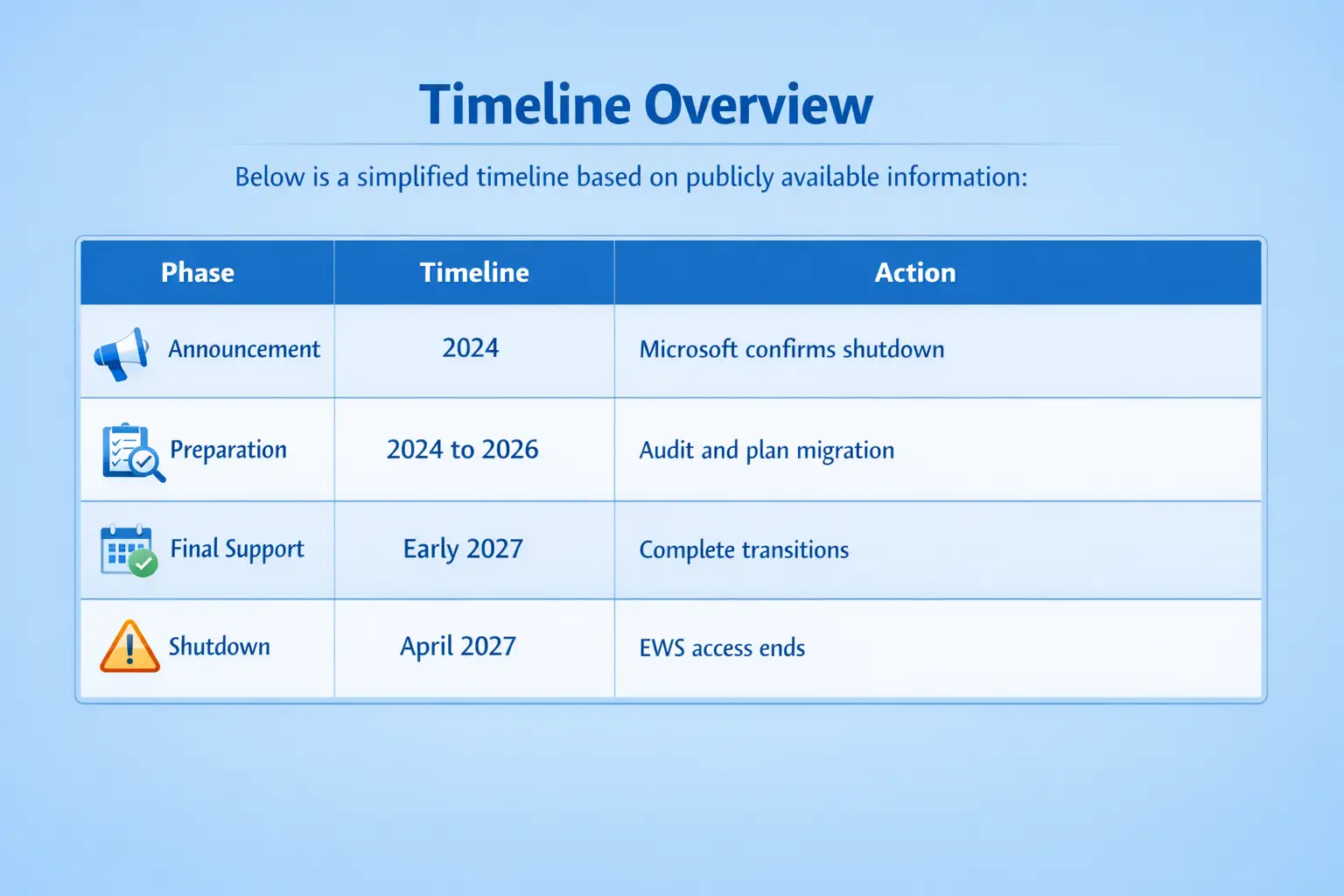
This table shows the most recent disclosures. Organizations should change their plans if Microsoft changes the timeline.
Things people often get wrong
A common mistake is to think that EWS will keep working unofficially after it shuts down. That is not likely. Microsoft has made it clear when the cutoff is.
Another wrong idea is that moving is easy. Graph is very powerful, but it often needs changes to the design.
Lastly, some think that small environments are not affected. In fact, even small tenants often use third-party tools that rely on EWS in the background.
The Microsoft Exchange Online EWS shutdown has a big effect on a lot of people.
What will happen to Exchange Online APIs in the future?
Microsoft Graph will keep growing after 2027. Expect better performance, tighter security controls, and more integration with AI-driven features.
Microsoft has not yet said what will happen to Graph. Graph itself changes over time. This means that things will be more stable in the long run once migration is done.
The end of EWS also shows that Microsoft is willing to push for modernization, even when old software is still widely used.
The end of the Microsoft Exchange Online EWS service for many people marks the end of an era and the start of a more unified cloud API strategy.
Questions that come up a lot
When will Microsoft stop supporting Exchange Online EWS?
Microsoft plans to stop supporting Exchange Online EWS in April 2027. Microsoft has publicly confirmed this date, but it could change if they release updates.
Does this have an effect on Exchange servers that are on-site?
No. The shutdown only affects Microsoft 365's Exchange Online. Exchange on-premises is not included.
What should I move to instead of EWS?
Microsoft says that Microsoft Graph is the best API to use instead of the old one for accessing email, calendars, and contacts.
Will Microsoft give us tools to help us move?
Microsoft gives instructions and documentation, but it's up to the companies to keep their applications up to date.
Is this connected to a security breach?
No. There is no proof that this choice led to a breach or active exploitation.
Companies should see the Microsoft Exchange Online EWS shutdown as a long-term modernization project instead of a quick fix, according to Box of Hoplon Insight. Get security and compliance teams involved early, start discovery right away, and test Microsoft Graph integrations well before 2027.
Today, the risk level is medium, but it will be high if you don't pay attention.
Chance: Better security and long-term stability of the API.
Last thought
The Microsoft Exchange Online EWS shutdown isn't just a technical detail. This is a clear sign that cloud integrations that are already in place will stop working at some point. Companies that act quickly will have an easy time moving. People who wait might have to deal with broken processes and fixes that aren't done right away.
April 2027 seems like a long time away, but not in the world of business IT.




-20260925120840.webp&w=3840&q=75)
