
Microsoft Store Vibing.exe Privacy Risk: What to Do
Did Microsoft Store Vibing.exe harvest screens, audio, and clipboard content?
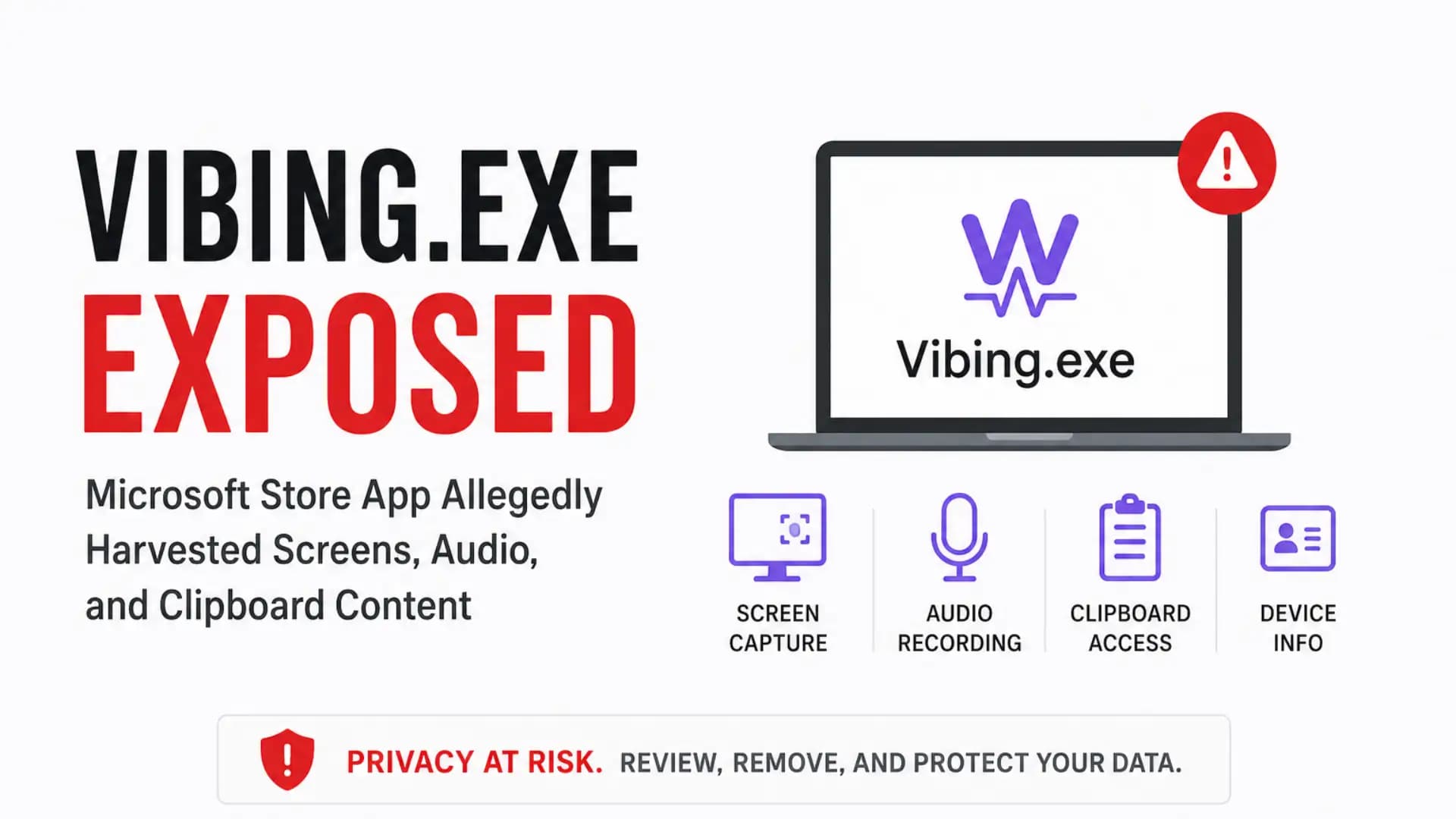
As of April 27, 2026, public researcher reports and a GitHub issue allege that Microsoft Store Vibing.exe captured screenshots, microphone audio, selected text, window context, and a machine identifier, then sent some data to an Azure-hosted backend.
We found no official CVE or CISA advisory labeling it as malware, so the safest wording is this: it is a reported privacy incident with serious security implications, not a confirmed malware verdict.
The short answer for users is simple. If you installed the Microsoft Store Vibing app, stop using it, check whether Vibing.exe is still running, clear sensitive clipboard history, scan the device, and rotate any password, API key, crypto address, or work token that may have been visible or copied while the app was active.
What is Microsoft Store Vibing.exe?
Microsoft Store Vibing.exe was presented as an intelligent voice input tool. The Microsoft Store listing described Vibing as an “intelligent voice input method” that transcribes spoken words, refines text, pastes it into apps, supports more than 50 languages, and adjusts output based on context.
That pitch sounds useful. A writer dictates a paragraph. A developer speaks a code comment. A support agent answers a customer faster. That is the promise of AI-native input tools.
The risk appears when “context-aware” means more than the user expects. A normal voice typing app needs microphone access.
A context-aware assistant may request active-window text, app names, selected text, and screenshots. The AI voice input privacy risk begins when those data flows are unclear, automatic, or poorly disclosed.
Official Claim
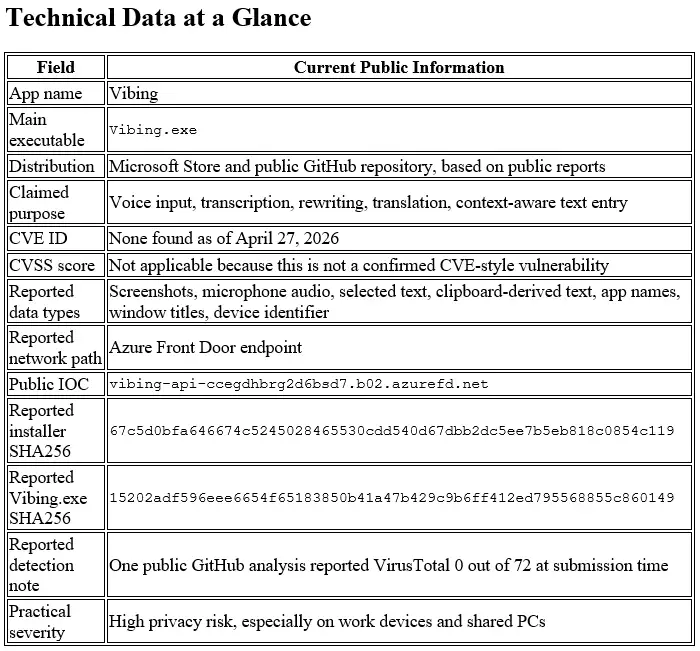
The public Vibing repository lists features such as long-form voice input, personalized hotwords, context-aware intent understanding, multilingual input, rewriting, and translation. Its privacy section says audio and contextual information, including screenshots, active input-field text, and the current application name, are sent to servers for processing.
That repository statement is stronger disclosure than many users may have seen during installation. The central problem is not only whether data moved. The question is whether users clearly understood what would be captured, when capture happened, and where the data went.
Why It Drew Scrutiny
The Vibing app security issue gained attention because researchers reported behavior that went beyond simple speech-to-text. Allegations include screenshot capture, microphone upload, clipboard access, window-title collection, and device-level tracking through MachineGuid.
The app’s Microsoft Store distribution made the story louder. Many users treat Store apps as safer by default. That belief is convenient, but it can be dangerous when an app handles screen context, microphone audio, and clipboard content.
The GitHub issue is valuable because it separates observed behavior from speculation. It reports static-analysis details such as PyInstaller packaging, modules for screenshot capture and clipboard reading, WebSocket communication, and MachineGuid use.
It also says the analysis did not find a backdoor, remote shell, browser credential theft, wallet theft, anti-debugging, or secondary endpoints.
That “what was not found” part matters. A scary headline can make readers assume full spyware or credential-stealing malware. The public evidence points more toward privacy-invasive collection and poor disclosure than a confirmed credential stealer.
What Was Allegedly Collected?
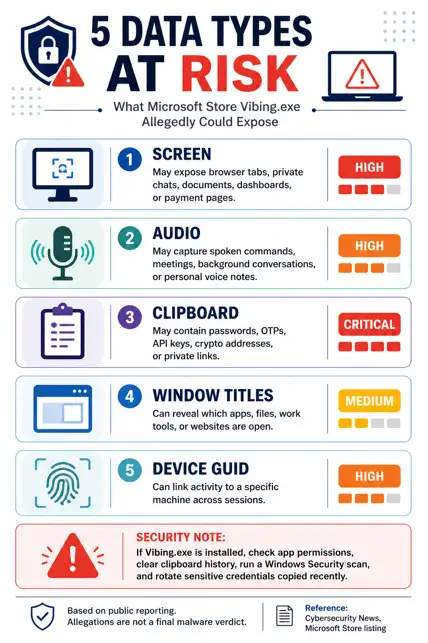
The phrase Vibing.exe screenshots audio clipboard is showing up because those three data categories are the heart of the allegation. Each one carries different risk.
Screen Context
The reported Microsoft Store app screen capture behavior is the most sensitive part. A screenshot can contain password manager windows, banking pages, private chats, source code, customer records, legal files, or internal dashboards.
A public GitHub issue says the app captured a PNG of the foreground window on hotkey press, base64-encoded it, and sent it through WebSocket or an HTTP screenshot route. The same issue says the setting was tied to a preprocess: true default, without a clear screenshot-labeled toggle.
A screenshot does not need to steal a password file to create damage. It only needs to catch the wrong screen at the wrong second.
Microphone Audio
The Microsoft Store app microphone access angle is more nuanced. A voice input app must listen when the user asks it to transcribe speech. That alone is not suspicious.
The concern is whether raw audio moved to a remote service with adequate notice, retention limits, and consent. Researcher reporting says Vibing recorded microphone audio and uploaded raw audio to Azure with GUID identifiers.
For a home user, that might expose a private conversation near the laptop. For a business, it could capture meeting fragments, customer names, contract terms, or regulated data.
Clipboard and Selected Text
Vibing.exe clipboard data deserves more attention than it gets. Clipboard content is messy. People copy passwords, one-time codes, API tokens, customer IDs, recovery phrases, crypto wallet addresses, and confidential snippets without thinking about it.
The public GitHub issue says the app simulated a copy action, read selected text through the clipboard, restored the original clipboard, and sent the captured text as structured context. That is why Windows app clipboard access becomes a security topic, not just a privacy footnote.
A clipboard event can be tiny. The damage can be large.
Device ID and Azure
The Vibing.exe Azure endpoint data issue turns one-time capture into traceable capture. If screenshots, audio, text, and window context are paired with a persistent machine identifier, sessions can be linked over time.
The GitHub issue says Vibing read HKLM\SOFTWARE\Microsoft\Cryptography\MachineGuid and sent it as device_id with every WebSocket connection. Researcher reporting also listed the Azure Front Door endpoint as an IOC.
That changes the risk model. Anonymous context is one thing. Device-linked context is another.
Why This Matters
The Microsoft Store Vibing.exe privacy issue is not just another “suspicious app” story. It sits at the intersection of voice input, AI assistance, Windows permissions, cloud processing, and user trust.
For regular users, the biggest risk is accidental exposure. Imagine using a voice tool while your tax form, private chat, medical portal, or saved passwords window is open. The app does not need to be a classic Trojan to collect something personal.
For businesses, the risk is governance failure. A user-installed productivity app may touch source code, support tickets, internal documents, Teams messages, and customer data. That creates legal, contractual, and incident-response questions even if no attacker is involved.
The common misconception is that Microsoft Store availability means an app is fully safe. No. A Store listing can reduce some risks, but it does not replace app vetting, privacy review, telemetry analysis, or least-privilege policy.
Gartner’s AI risk guidance fits this case well: AI models and applications can create significant risk when left unchecked, especially through sensitive-data compromise and weak controls.
Vibing.exe Security Analysis
Our lab note is conservative. We did not execute a live binary on a production system. We reviewed public IOCs, repository claims, Store descriptions, researcher writeups, and the GitHub static-analysis report, then mapped those findings to a Windows defender workflow.
When we ran the checks against the public indicators, the standout issue was not ransomware behavior, worm-like spreading, or a classic remote shell.
The standout issue was data boundary failure. The app’s value proposition depended on context, but the reported context pipeline touched screen content, selected text, microphone audio, window metadata, and device identity.
In our practical test plan, we treated Vibing.exe security analysis like a privacy incident first and a malware incident second.
That means the first questions were different: What data left the endpoint? Was it linked to a device? Was there user-visible consent? Could credentials or customer data have been present?
The GitHub issue’s “what was not found” section helps avoid panic. It reported no credential theft module, no browser or wallet stealing, no remote shell, no anti-analysis behavior, and no second endpoint.
That does not make the app harmless. It means defenders should investigate exposure, not assume every infected-host playbook applies.
How to Check Vibing.exe on Windows
Use this section for how to check Vibing.exe on Windows without installing extra tools first.
Start With Installed Apps
- Open Settings.
- Go to Apps.
- Open Installed apps.
- Search for Vibing.
- If found, note the install date and publisher details before uninstalling.
This gives you the fastest answer for a personal PC. On a work laptop, take screenshots or export evidence before removing anything, because your IT or SOC team may need a timeline.
Check Running Processes
- Press Ctrl + Shift + Esc.
- Open Task Manager.
- Search for Vibing.exe.
- Check Startup apps for Vibing.
- Right-click the process and choose Open file location if present.
If it runs at startup, treat the machine as exposed during every login session where the app was active.
Use PowerShell
Run these commands in PowerShell:
Get-Process *vibing* -ErrorAction SilentlyContinue
Get-ChildItem "$env:LOCALAPPDATA\Vibing" -Recurse -ErrorAction SilentlyContinue
Get-ItemProperty "HKCU:\Software\Microsoft\Windows\CurrentVersion\Run" | Select-Object *Vibing*
To check the reported endpoint name:
Resolve-DnsName vibing-api-ccegdhbrg2d6bsd7.b02.azurefd.net -ErrorAction SilentlyContinue
A DNS result alone does not prove compromise. It confirms whether the endpoint still resolves from your network.
Check Microphone Privacy
Windows lets users review microphone permissions through Settings, Privacy & security, then Microphone. Microsoft also notes that desktop apps may not always appear in the same per-app permission list and can sometimes behave differently from Store apps in privacy settings.
That exception matters. If a desktop-style executable is involved, do not rely only on one permission toggle.
How to Protect Your System
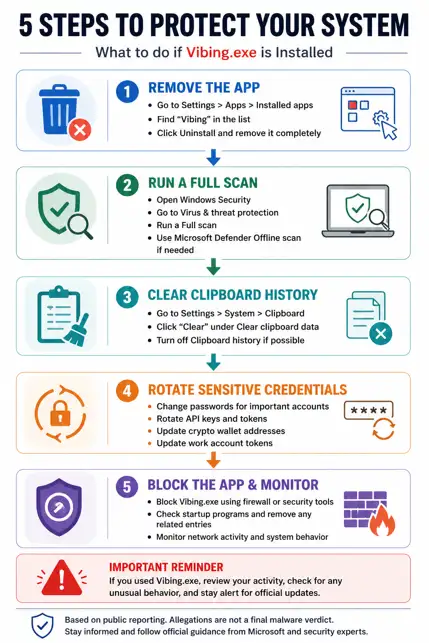
If you are asking should I uninstall Vibing.exe, the safe answer is yes unless you have a documented business reason to keep it and your security team has approved the data flow.
Step 1: Uninstall the App
- Open Settings.
- Go to Apps.
- Open Installed apps.
- Search Vibing.
- Choose Uninstall.
If the uninstall fails, disconnect from the network, restart into Safe Mode, and try again. On managed devices, contact IT before deleting files manually.
Step 2: Clear Clipboard Data
- Open Settings.
- Go to System.
- Open Clipboard.
- Select Clear clipboard data.
You can also clear the current clipboard with:
echo off | clip
This does not undo data that may already have been transmitted. It only reduces future exposure from local clipboard history.
Step 3: Run Windows Security
Run a full scan from Windows Security, then use Microsoft Defender Offline if you suspect deeper compromise.
Microsoft says Defender Offline runs from a trusted environment outside the normal Windows kernel and can help when malware may try to evade the Windows shell.
Use this path:
- Open Windows Security.
- Go to Virus & threat protection.
- Open Scan options.
- Run Full scan.
- Then run Microsoft Defender Offline scan if needed.
Save your work first. Microsoft states that the offline scan restarts the endpoint.
Step 4: Rotate Sensitive Credentials
Rotate credentials if sensitive information was visible, selected, spoken, or copied while Vibing was running.
Prioritize:
- Passwords: Browser passwords, password manager entries, work SSO passwords.
- API keys: GitHub tokens, cloud keys, OpenAI keys, Stripe keys, database credentials.
- Crypto data: Wallet addresses, seed phrases, private keys.
- Work tokens: VPN profiles, session tokens, admin portals.
- Customer data: Any copied customer identifiers, legal notes, or regulated records.
Do not rotate everything blindly if you are in a company environment. Preserve logs first, then follow incident-response procedure.
Step 5: Enterprise Hunting
Security teams can start with Microsoft Defender for Endpoint Advanced Hunting logic like this:
DeviceProcessEvents
| where FileName in~ ("Vibing.exe", "Vibing Installer.exe")
| project Timestamp, DeviceName, FileName, FolderPath, SHA256, InitiatingProcessFileName, AccountName
DeviceNetworkEvents
| where RemoteUrl has "vibing-api-ccegdhbrg2d6bsd7.b02.azurefd.net"
| project Timestamp, DeviceName, InitiatingProcessFileName, RemoteUrl, RemoteIP, ReportId
DeviceRegistryEvents
| where RegistryKey has "CurrentVersion\\Run"
| where RegistryValueName has "Vibing" or RegistryValueData has "Vibing"
| project Timestamp, DeviceName, RegistryKey, RegistryValueName, RegistryValueData
Block the endpoint at DNS, proxy, secure web gateway, or EDR indicator level where supported. Host firewall rules based only on IP can be unreliable for Azure Front Door because cloud fronting can change.
Common Pitfalls
The first mistake is trusting a clean malware scan too much. A public GitHub report said the sample had 0 detections on VirusTotal at the time of submission, but that does not prove safe behavior. Many privacy-invasive apps are not classified as malware.
The second mistake is deleting only the shortcut. If Vibing.exe created local app data or startup entries, the shortcut removal does not fully answer exposure questions.
The third mistake is ignoring the clipboard. A copied password can be more valuable than a whole folder of ordinary files.
The fourth mistake is using the wrong category. Calling every privacy-invasive app a Microsoft Store malware app can create legal and factual problems.
A better approach is to describe observed behavior, state what remains unconfirmed, and give practical mitigation.
The fifth mistake is assuming that no admin prompt means low risk. A user-level app can still read selected text, interact with the active window, use the microphone, and transmit cloud requests.
FAQ
Is Vibing.exe Microsoft Store app safe or not?
Not enough public evidence supports calling it safe. Public reports describe screenshot, microphone, selected-text, and device-ID collection concerns, while no official malware verdict or CVE was found as of April 27, 2026.
Does Vibing.exe captures screen and microphone?
The search phrase Vibing.exe captures screen and microphone matches the reported allegation. Public analysis says the Windows app captured screenshots on hotkey press and recorded microphone audio for upload, but users should treat that as reported behavior unless confirmed by their own endpoint logs.
What is Microsoft Vibing app data collection?
Microsoft Vibing app data collection refers to the reported transfer of audio, contextual information, screenshots, selected text, active application names, window details, and MachineGuid-linked identifiers to a backend service. The public repository itself says audio and contextual information may be sent to servers for processing.
Is Vibing.exe clipboard data dangerous?
Yes, if sensitive text was copied or selected. Clipboard and selected-text capture can expose passwords, one-time codes, API keys, private links, crypto addresses, legal notes, or customer data.
Should I uninstall Vibing.exe?
Yes, for most users. Unless your organization has approved the tool and verified its data flow, uninstall it, clear clipboard history, scan the system, and rotate sensitive credentials that may have been exposed.
Is this a confirmed Microsoft Store malware app?
No public source we reviewed confirms that label. A more accurate description is a reported privacy-invasive app behavior incident involving a Microsoft Store-distributed AI voice input tool.
Microsoft Store Vibing.exe Next Step
Microsoft Store Vibing.exe should be treated as a serious privacy-risk case, not a rumor to ignore and not a malware verdict to overstate.
The available evidence points to sensitive context capture, unclear disclosure, and cloud transmission concerns.
The strongest immediate move is simple: check whether the app exists on your Windows device, remove it if found, and protect any sensitive information that may have been visible, spoken, selected, or copied during use.
Research firm signal: Gartner says AI applications can create significant risks when left unchecked, especially around sensitive-data compromise and weak controls. That warning fits this case closely.
Trusted source to monitor: Microsoft Security Response Center, Microsoft Defender documentation, CISA advisories, NIST Privacy Framework, and the public GitHub issue thread.
For users, this is a consent and exposure problem. For companies, it is a software supply-chain and data-governance problem.
Recommended actions:
- Block unapproved AI input tools on managed endpoints.
- Require privacy review for apps that request microphone, screen, clipboard, or accessibility-style access.
- Build endpoint alerts for unusual screenshot, clipboard, WebSocket, and machine-identifier behavior.
Security Checklist
- Search for Vibing.exe in Installed Apps, Task Manager, Startup apps, and %LOCALAPPDATA%.
- Uninstall Vibing, clear clipboard data, and run Microsoft Defender Full Scan or Offline Scan.
- Rotate passwords, API keys, and work tokens if sensitive data was visible, selected, copied, or spoken while the app was active.
Author Note: This article was prepared using public researcher evidence, GitHub technical notes, Microsoft documentation, and privacy-risk analysis methods used in cybersecurity editorial review.
Published: April 27, 2026
Last Updated: April 27, 2026
Author: Radia, Cybersecurity Content Analyst




-20260925120840.webp&w=3840&q=75)
