

A practical guide for builders and leaders on how to manage the security of mobile apps
You sent out a great app and then realized that the hard work was just starting. Attackers don't wait. Every new feature changes the way you can be attacked. Managing the security of mobile apps is not a simple task. Every day, you do this to protect your product, users, and reputation.
Why it's important to manage mobile app security now
Mobile apps are the first line of defense between threats and user data. Recent research in the industry shows that many development teams are sure of themselves but still have security breaches that can cost them money and trust. Adding security to the life cycle lowers the need for emergency patches and damage to your reputation.
Both startups and big teams need processes that can be used over and over again. If you add security at the end, you might be surprised by hidden risks, weak authentication, exposed APIs, or insecure storage. A planned program for managing the security of mobile apps changes your approach from reactive to proactive.
The main parts of a good program
A good security program is built on a few tried-and-true pillars: secure design, automated testing, runtime protections, and being ready for incidents. Each pillar has specific strategies you can start using right away.
Threat modeling and clear security requirements are the first steps in design. Draw a map of how data moves, figure out where trust ends, and describe what "compromise" means for your app. Threat modeling gives the team a way to talk about how to fix things in order of importance. Industry manuals like OWASP MASTG are very important for getting tools and help.

Testing is the process of using static analysis, dynamic testing, and manual review all at once. Automated scans catch common errors early on. Tools miss logic errors and complicated API problems that manual review and penetration tests find. Testing should be a part of every build.
Obfuscation, integrity checks, and runtime application self-protection are all examples of runtime protections. These controls make it harder to reverse engineer and change things. A lot of teams don't use advanced runtime defenses enough, and attackers often take advantage of that gap.
Finally, playbooks and monitoring are important for being ready for an incident. Think about how breaches can happen and have clear steps in place to limit damage, let users know, and quickly update the app.
A useful list you can use today
These are things that most teams can do. Each item is short and useful and can be added to sprints.
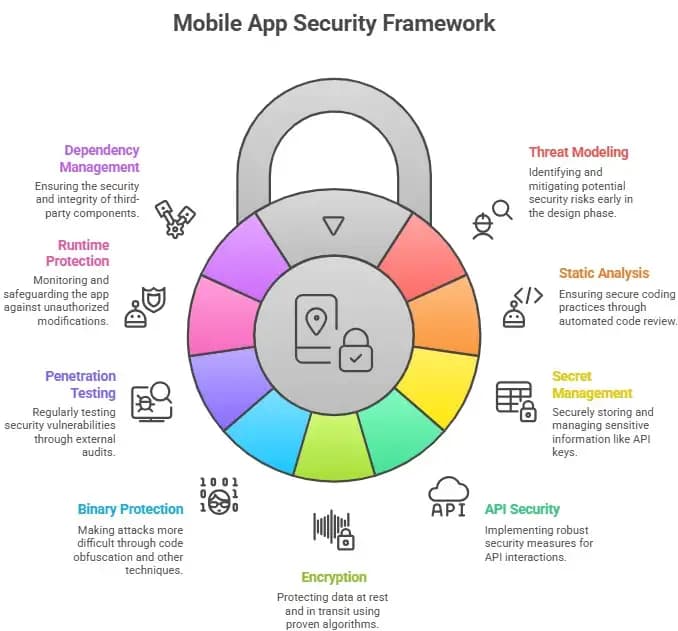
1. Include threat modeling at the start of the design phase. Draw out data flows and make a list of your most valuable assets.
2. Use static analysis to make sure that CI follows secure coding rules. Stop merges for serious failures.
3. Keep secrets safe. Don't put API keys in builds. Use secure vaults and token exchange while the program is running.
4. Make APIs stronger. When you can, use least privilege, rate limits, and mutual TLS.
5. Use proven algorithms to encrypt sensitive data when it is at rest and when it is in transit. Stay away from old hashes.
6. Use binary protections and code obfuscation to make attacks more expensive.
7. Set up yearly external pentests and run dynamic scans regularly.
8. Keep an eye on how the app works and protect it from being changed or repackaged.
9. Keep your dependencies clean and look for problems in the supply chain. Supply chain risks are now one of the most important issues for mobile users.
These steps are the most important parts of any good mobile app security management program.
A payments startup I worked with learned this the hard way. They hurried a feature to refresh tokens and forgot to check a redirect endpoint. Attackers took advantage of that hole to change the payment destinations in a sandboxed flow.
After that happened, the team added threat modeling to each sprint, made automated API checks a requirement in CI, and made a one-hour outage playbook. The fixes took a week of focused work, but they stopped bigger problems from happening later.
This is why security is more than just keeping your code clean. It controls the risk for the whole product.
Standards and tools that everyone should know
Don't try to make something new; use standards and community guides. The OWASP Mobile Top 10 is a great resource for setting priorities because it lists common risk areas. The OWASP Mobile Application Security Testing Guide has testing recipes for a lot of threats that only affect mobile devices. For safe SDLC practices, use lightweight secure gates in CI so that builds fail quickly when big problems come up.
You should also keep an eye on threat reports and app store trends. There have been more and more large-scale malicious app campaigns lately, so make sure to keep app vetting and monitoring in your program.
How to tell if you're successful
A few simple metrics that are in line with business goals are used by good security programs. Keep track of how long it takes to fix critical vulnerabilities, how many incidents happen each quarter, and what percentage of builds pass security gates. Most importantly, find out how long it takes to get back to normal after a big problem. These numbers help leaders see security as a way to lower risk, not a cost.
How to make security bigger on a tight budget
With discipline, small teams can get a lot done. Put the most important things first: protect authentication flows, secure the most sensitive data stores, and lock down APIs. Use open-source scanning tools to find obvious flaws. Outsource certain tasks, like a yearly external pentest, and focus your internal work on stopping problems before they happen and fixing them quickly.
Think about managed runtime protection or mobile application management if you need to control a lot of devices from one place. These services take care of some of the work so that your engineering team can focus on making sure the features are safe.

Questions and Answers
Q: What's the first thing I should do to keep my mobile app safe?
A: Start by modeling threats during the design phase and making sure that basic CI checks are in place for secrets and common vulnerabilities. That lowers the risk right away.
Q: How often should I check for security issues?
A: Every build should run automated tests. Depending on the level of risk, manual pen tests or code reviews are useful once a year or with major releases.
Q: Can you trust app stores?
A: App stores do some checking, but they aren't perfect. Keep an eye on people's behavior after they get the game, and be ready to act quickly if you hear about something strange.
Q: Which standards should I read first?
A: The OWASP Mobile Top 10 and the MASTG are good places to start. They are practical, have been reviewed by the community, and are directly linked to what developers do.
Takeaway
Mobile app security management is not a one-time job. It is a way of life and a set of things you can do again and again. To keep users safe, you need to include security in the design, test it early and often, use runtime defenses, and be ready for problems.
Model threats, enforce CI gates, and always keep an eye on your app's dependencies and APIs. That method changes security from a problem into a feature that makes customers trust your product.
Explore our main services:
· Deep and Dark Web Monitoring





