

What Happened
It starts with a weird complaint that sounds like a browser problem. Someone says, “Your site is sending me to a gambling page,” or “I clicked Support and ended up somewhere sketchy.” You test it. Everything looks fine. Ten minutes later, someone else reports the same thing, but only on certain pages.
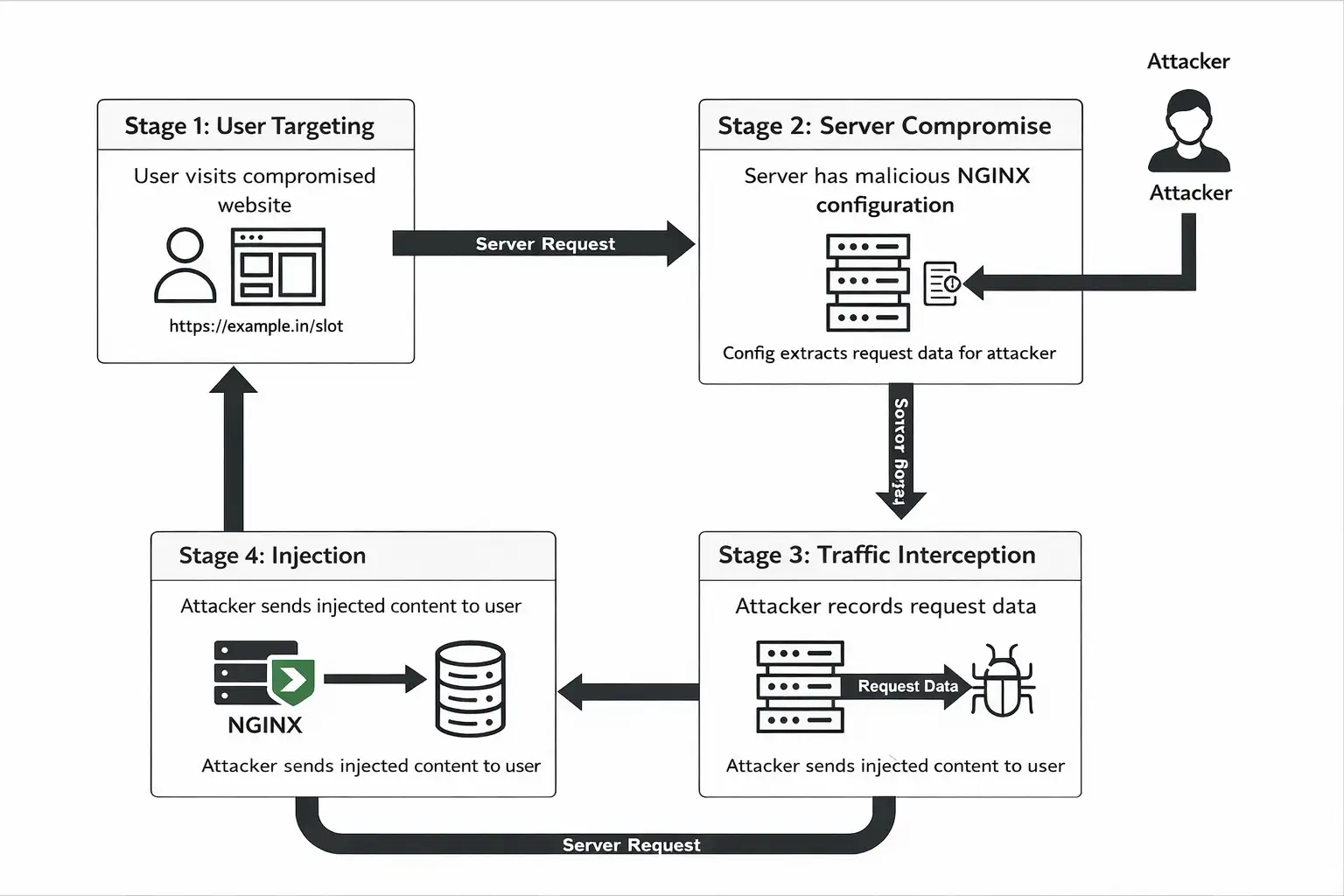
That pattern matches what researchers are describing in this new wave of web traffic hijacking. Instead of defacing the whole site or dropping a loud piece of malware, attackers go after the traffic control layer. They change NGINX rules so specific URL paths act like a hidden detour. Visitors believe they are loading your page. However, they are quickly sent through a backend controlled by an attacker. This backend decides what the visitor will see. Datadog clearly states that the campaign uses harmful NGINX settings. These settings intercept regular traffic and send it through the attacker's system.
And yes, this is part of why "NGINX Servers Targeted by Hackers" is such an uncomfortable headline. NGINX sits in front of everything. If it’s compromised, the attacker does not need to touch your application code to cause damage.
Why This Matters Right Now
A lot of security guidance still treats web server configuration like plumbing. Important, but not the “real” app. In modern setups, that is backwards. NGINX often is the gatekeeper: reverse proxy, load balancer, cache, SSL termination, routing logic, and header rewriting. Which means a small config tweak can have an outsized impact.
Security Labs at Datadog describes this as a campaign that hijacks web traffic. It targets NGINX installations and management panels like Baota, often called BT. That matters for two reasons:
First, if a panel is exposed or poorly secured, it can become the shortcut into your server. Once an attacker has access, changing config files is quick and “normal-looking.” No flashy malware needed.
Second, the behavior can be selective. The attacker can choose paths like /news/, /help/, /blog/, or region-based traffic, so the compromise hides in plain sight. Your monitoring might not catch it until customers complain.
When people ask why hackers go after NGINX servers, I have a simple answer.
First, NGINX is quiet.
Second, it scales well.
Finally, it can turn trusted sites into delivery channels.
Malicious Configuration Patterns Observed in the Attack
Investigations show that attackers use automated shell scripts to inject hidden NGINX configuration rules instead of making manual changes. These scripts add routing logic that appears normal but quietly alters how traffic flows.
The injected rule usually makes a custom path. This path captures the full request URL. It then sends this URL to a backend controlled by an attacker before the request gets to the real application. To stay unnoticed, common headers like IP address and user agent are passed along, making the traffic look legitimate.
The path and destination server change for each compromised domain. This lets the same script be used for many targets. The rule uses standard NGINX commands. This allows it to stay active for a long time without being noticed. It effectively turns the server into a quiet traffic relay.
How the Attack Works
Here’s the main idea: NGINX uses configuration "blocks" such as server and location. These blocks help decide what happens when a visitor requests a URL. Within those blocks, directives like proxy_pass, rewrite, and proxy_set_header can route traffic to backend servers. That’s normal. That’s how reverse proxies work.
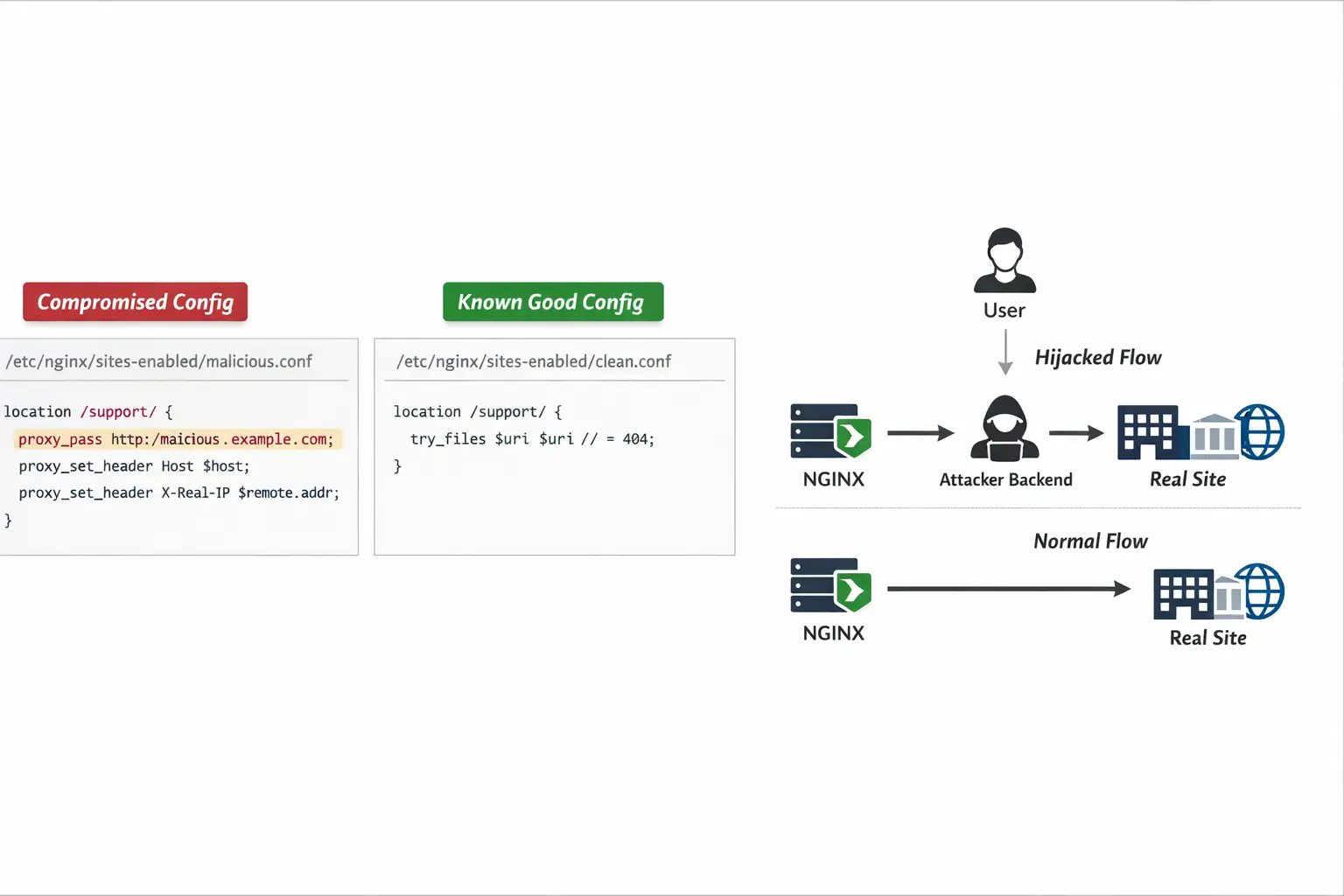
In this campaign, attackers add a harmful location block. This makes requests to certain paths go to an attacker’s domain using proxy_pass. Datadog has a clear structure. It captures the full URL and rewrites it into a request that the attacker’s backend understands. It also forwards headers to make the request appear legitimate.
Think of it like someone swapping the road signs right before an exit ramp. The highway still works. Most exits still work. But the one ramp you take to reach “Support” now routes you through a side road the attacker controls.
Datadog describes a multi-stage toolkit that uses shell scripts. These scripts automate discovery and injection. They target Baota-managed NGINX configurations. They also focus on common Linux NGINX directories, such as /etc/nginx/sites-enabled and similar paths.
That is why NGINX servers targeted by hackers are not just “a redirect bug.” It’s infrastructure-level traffic manipulation.
A Realistic Example: The “Only Some Pages” Redirect Mystery
A company runs a small marketing site plus a help center. NGINX fronts both. Nobody touches the config because “it’s been stable for months.” One day, support tickets spike: “Your help page is sending me to a casino site.” The homepage is fine. The pricing page is fine. Only /help/ and /support/ are weird.
Why? Because an attacker does not need to redirect everything. Redirecting a few paths is safer. It reduces detection and makes the incident feel like a browser extension problem, a DNS glitch, or “some random ad thing.”
Datadog's research shows that attackers can pick specific path patterns and templates. This matches their selective behavior.
If you run NGINX servers that hackers might attack, here’s an important lesson. Odd behavior is often more suspicious than a total failure.
Impact: What Can Go Wrong When Traffic Gets Hijacked
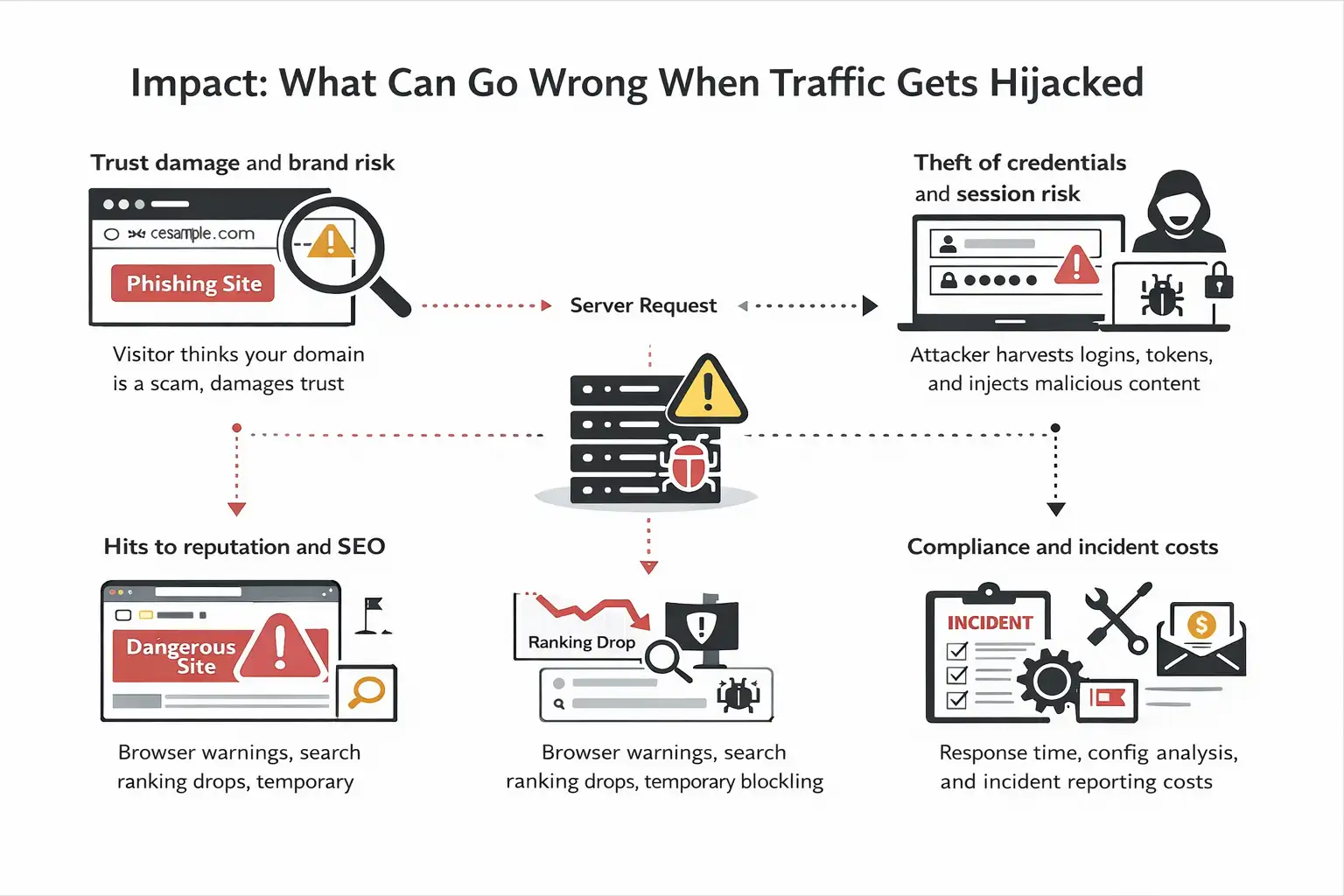
Even if the attacker is “just” redirecting people to spam, the fallout is rarely just spam.
Trust damage and brand risk
A visitor does not analyze HTTP headers. They blame you. If a customer visits a scam page after clicking your domain, you lose trust quickly. Trust is harder to rebuild than fixing a server.
Theft of credentials and the risk of a session
Routing traffic through a backend controlled by an attacker increases the chances of them getting credentials. It can also reveal session tokens or add harmful content. The attacker can change the answers or show a page that looks like the real thing.
Hits to reputation and SEO
Search engines and security tools mark domains that do bad redirects.
That can lead to warnings in browsers, drops in ranking, or temporary blocking.
Compliance and incident costs
Even if you prevent data loss, you still face the incident response costs. This includes log reviews, config changes, server rebuilds, and customer updates.
This is why NGINX servers should be taken seriously when hackers target them. It is not just a nuisance redirect.
Detection: How to Tell If Your NGINX Was Turned Into a Detour
If you suspect NGINX servers targeted by hackers, do not start by reinstalling everything in a panic. Start by proving or disproving config tampering.
1) Check for unexpected proxy_pass in public-facing paths
Search your NGINX configs for proxy_pass values that point to domains or IPs you do not recognize. Pay attention to location blocks that look out of place or are oddly specific.
Datadog highlights this exact technique and shows how attackers use proxy_pass as the routing mechanism.
2) Diff against a known-good config
If you keep the config in Git (please do), compare the current live config to the last approved commit. If you do not, compare file timestamps and contents to your last backup.
Look for:
new location blocks
unfamiliar rewrites
added proxy_set_header lines that preserve “legit” headers in strange contexts
3) Look for suspicious NGINX reload patterns.
An attacker who modifies config usually reloads NGINX to apply changes. Datadog notes script behavior that attempts reloads after injection to minimize disruption.
So review:
shell history if available
process execution logs (auditd, EDR, or similar)
system logs around nginx -s reload, systemctl reload nginx, or service restarts
4) Review access logs for path-based anomalies.
If only certain paths are hijacked, focus on those endpoints. Look for:
spikes in requests to weird paths that match the injected rule
unusual upstream response sizes or timing
sudden changes in referrers or user agents tied to redirection complaints
5) Watch for known IOCs, but treat them as leads.
Datadog shared key signs in their report. These include suspicious domains and an IP linked to data theft in their toolkit.
Use IOCs as “clues,” not as the only test. Attackers rotate infrastructure. The bigger signal is unauthorized config logic.
Mitigation: What to Do Next
If you confirm or strongly suspect compromise, do these in order.
Step 1: Stop the bleeding safely.
Remove or comment out the suspicious blocks.
Test config with nginx -t.
Reload NGINX, not restart, if you can preserve stability.
Datadog’s observed scripts can even check the config (nginx -t) in some cases. This shows that attackers try to avoid breaking your service.
Step 2: Lock down management panels and access paths
If you use Baota or any server management panel, treat it as a high-value entry point. The campaign explicitly targets environments like Baota (BT).
Minimum moves:
restrict panel access by IP allowlisting
Enforce strong authentication and MFA if supported
Remove public exposure if not needed.
patch and update the panel and server OS
Step 3: Add file integrity monitoring for NGINX configs.
If your NGINX config files are “quietly writable,” you are giving attackers an easy persistence mechanism.
Datadog even shows an example detection approach focusing on write activity to common NGINX config paths.
Step 4: Reduce blast radius with least privilege
Make sure only the right accounts can write NGINX config files. Avoid shared credentials. Avoid the “everyone has sudo” culture. It always comes due.
Step 5: Rotate credentials and review keys
If an attacker accessed the box, assume exposed secrets: SSH keys, panel passwords, and API tokens. Rotate what matters.
Step 6: Consider rebuilding if you cannot establish trust.
If you cannot explain how access happened, the cleanest recovery is often
rebuild server from known-good image
restore config from version control
redeploy app
Add monitoring before returning to normal.
Yes, it’s work. It’s also peace of mind.
Attack Flow (Normal flow+Hijacked flow)
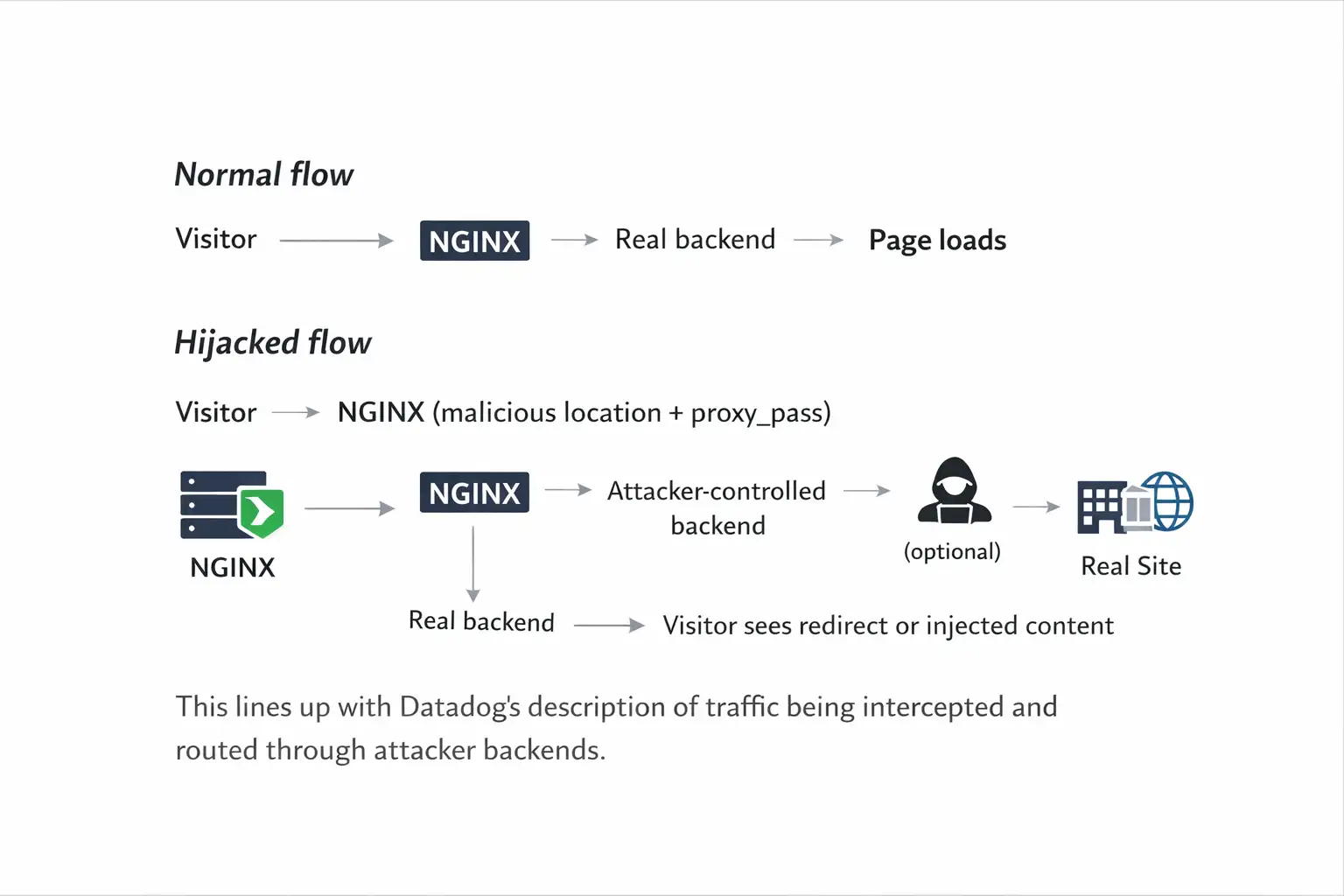
This lines up with Datadog’s description of traffic being intercepted and routed through attacker backends.
Future Outlook
I expect this pattern to spread for one boring reason: it works.
Attackers have learned that identity controls are improving, and endpoint defenses are noisier. So they aim for places where trust is implicit and changes look legitimate. Reverse proxies and edge configs are perfect for that.
CSO describes these NGINX redirection attacks as a “return to old-school hacking.” This happens as attackers adjust to stronger identity controls.
So, as NGINX servers targeted by hackers continues to be a theme, the best defense is not one magic rule. It is basic discipline at the edge: locked-down access, config change control, monitoring, and fast response.
Hoplon Insight Box:
If you run NGINX in production, do these three things this week:
Put NGINX config under version control and treat it like application code. If it cannot be diffed, it cannot be trusted.
Add alerts for config writes and reloads. Any write to /etc/nginx/ plus a reload event should raise an eyebrow.
Shrink your exposure surface. If a management panel is public, make it private. If SSH is open to the world, restrict it. If multiple people can edit configs directly on the server, tighten it up.
FAQ
How do hackers redirect traffic from a legitimate website?
Often by changing server-side rules, not by changing the site itself. In this campaign, researchers describe attackers modifying NGINX configuration so requests are forwarded using proxy_pass to attacker-controlled infrastructure.
How can I check if my NGINX config was modified?
Begin by comparing with known good configurations. Then, look for unfamiliar location blocks, proxy_pass targets, and unusual rewrites. Also check system logs for unexpected reloads after config edits.
What is the biggest sign of NGINX traffic hijacking?
The most common early sign is selective misbehavior: only some URLs redirect, or only some visitors see it. That is consistent with a path-based injection approach described by researchers.
Do I need to rebuild the server if this happens?
If you can remove the malicious rules and prove the entry point is closed, you might recover without rebuilding. If you cannot establish trust in the system, a rebuild is often the safer path.
Closing Takeaway
If you remember one thing, make it this: NGINX Servers Targeted by hackers is not just a headline; it’s a reminder that “config” is production security. The attacker does not need to smash your app if they can quietly steer your traffic.
Treat your NGINX rules like you treat your source code. Track changes, limit who can edit them, and alert on anything that touches them. It’s not glamorous, but neither is explaining to customers why your trusted domain sent them somewhere dangerous.
When NGINX servers are targeted by hackers, penetration testing is the most effective way to uncover silent configuration abuse and traffic redirection risks before real damage happens.




-20260925120840.webp&w=3840&q=75)
