
As of January 2026, security researchers have made public a TP-Link authentication bypass vulnerability that takes advantage of flaws in the router's password recovery feature. The problem affects a number of TP-Link router models and lets people get in without the right login information. This is important right now because millions of home and small office routers use these devices as their first and sometimes only line of defense against network threats.
The technical flaw itself isn't the only thing that makes this issue scary; it's also how easily it can be used. No alerts that flash. There are no clear signs of a break-in. Just quiet access through a feature that most users don't think about after they set it up.
Why This TP-Link Security Hole Is Getting So Much Attention
There have always been problems with routers. But this case seems different. It touches something crucial to me. How to get your password back. That safety net that people think will keep them safe if they forget their login information.
The TP-Link authentication bypass vulnerability that was made public shows how attackers can change that recovery logic to get administrative access. Once inside, an attacker can control traffic, watch what connected devices are doing, or send users to bad sites. For someone at home, that could mean stolen login information. It could mean that client data gets out for a small business.
The most important thing to notice is how easy it is for the attack to happen. No advanced malware. No emails that try to trick you into giving them money. Just taking advantage of a flaw in router authentication that should never have been there in the first place.
A Closer Look at the Security Hole in TP-Link Password Recovery
The main problem is a TP-Link password recovery flaw that has to do with how some versions of router firmware handle authentication tokens. Researchers found that password reset endpoints did not properly check requests.
To put it simply, the router sometimes trusts requests it shouldn't. If an attacker knows how to take advantage of the password recovery process, they could send fake requests that reset or completely skip authentication checks.
This is not an attack that uses brute force. It's not trying to guess passwords. It doesn't make sense. A flaw in the firmware security design makes a useful feature an open door.
How can people use TP-Link Password Recovery in real life
Think about this situation. For remote management, a small office router is connected to the internet. The owner thinks that a strong password for the admin is enough. Sadly, the password recovery feature is always listening in the background.
A hacker scans the network, finds a TP-Link model that is weak, and then starts the recovery process without checking it first. They get around network access in a matter of seconds.
After that, the damage depends on what you want to do. Some attackers may change DNS settings to add ads. Some people might keep an eye on the traffic or go deeper into the internal network. This is why the TP-Link authentication bypass is real and not just a theory. It works.
-20260120184104.webp)
Which TP-Link routers are affected?
Multiple SOHO router models are affected, according to news reports. At the time of writing, TP-Link has not yet released a full list of all the models that have been confirmed. This lack of certainty is a problem in and of itself.
Many people who use their computers at home don't check the firmware versions. Some small businesses set up routers and then forget about them for years. That makes it easy for a TP-Link router security flaw to stay active long after it has been made public.
If you have a TP-Link router and have never updated its firmware, you should assume that it is vulnerable until you can prove otherwise.
Why Weaknesses in Router Authentication Are So Dangerous
Everything revolves around routers. Smart TVs, laptops, phones, and security cameras. All traffic goes through them. It's like giving someone the keys to your house and your mailbox at the same time if your router is weak.
Router compromises are harder to find than endpoint attacks. Routers are not watched by antivirus software. People don't often log in to check their settings. Attackers are especially interested in flaws in network device authentication.
This is why cases of router password recovery exploits tend to last a long time in the wild.
Are TP-Link Routers Hackable from Afar?
People ask this question a lot. The honest answer is yes, but only in some situations.
If remote management is turned on or if the router can be accessed through open services, the TP-Link authentication bypass vulnerability could be used from a distance. That said, not all routers are equally open to attack.
It is also possible for attacks to happen on local networks. In a shared Wi-Fi setting, a bad person could use the TP-Link password recovery exploit without ever having to touch the interface that connects to the internet.
How it affects home users and small businesses
For people who use their computers at home, the risk often doesn't seem real until something goes wrong. Websites suddenly change direction. The internet is slow. Things don't work right. All of these could be signs that your router is broken.
Small businesses have to deal with bigger problems. Exposing client data. Violations of compliance. Not trusting anymore. A single flaw in a router's security can affect the whole operation.
This is why more and more professionals are suggesting that even small offices do a TP-Link router security audit every so often.
Why This Security Hole Went Unnoticed for So Long
Password recovery features don't get checked very often. Developers spend a lot of time on login screens, encryption, and firewalls. People don't pay as much attention to recovery paths.
This flaw in the firmware security design probably went unnoticed because it didn't cause any obvious problems. For real users, everything worked as it should. That makes it risky.
Security experts often say that attackers don't break down doors. They see that the window is open. This flaw is a great example.
TP-Link's answer and updates to the firmware
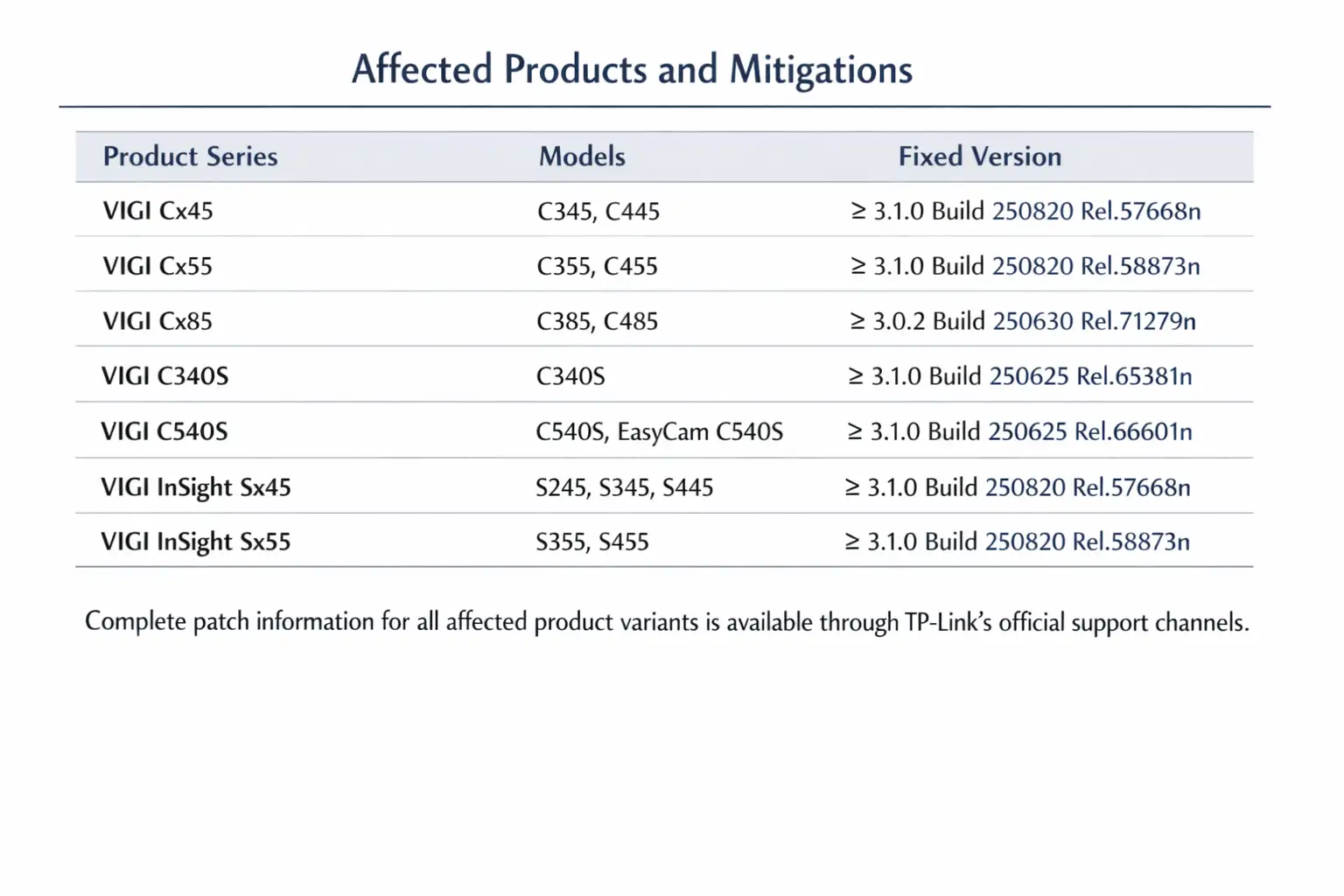
TP-Link has confirmed the report and is either releasing or getting ready to release firmware updates for the affected models. But updates don't install themselves.
Users have to check the firmware versions and apply patches by hand. Many attacks are stopped by this step alone, but people often forget to do it.
If you're wondering if you should update the TP-Link firmware now, the answer is yes. Delaying makes things more dangerous.
How do I lock down my TP-Link router right now?
Begin with the basics. Turn off remote management unless you really need it. Even if you think the default credentials aren't being used, change them. Look for changes in DNS settings.
Install the most recent firmware updates that TP-Link has made available. If your model is no longer supported, you might want to buy a new one.
If you own a business, you might want to look into a router vulnerability assessment service. It gives most internal teams a view they don't have.
Step-by-Step Guide to Securing TP-Link Routers
First, log in to the router's dashboard on your own. Don't use public networks while you do this.
Second, check the settings for password recovery if you can. Some models let you limit access or turn off recovery endpoints.
Third, keep an eye on logs for strange access attempts. Logs can still show patterns, even if they are limited.
Finally, write down the changes you've made. When configuration is done on purpose instead of by accident, security gets better.
Why routers for network penetration testing are no longer optional
In the past, penetration testing only looked at servers and endpoints. It was assumed that routers were safe by default. That idea is no longer true.
Infrastructure devices are becoming more and more common targets for modern attacks. A professional network penetration testing router engagement often finds weaknesses like this before hackers do.
This is especially important for small businesses and managed service providers.
Is the TP-Link router vulnerability real or exaggerated?
This question comes up a lot in search results. The weakness is real. But how it affects things depends on how it's set up, how often it's used, and how people use it.
Some TP-Link routers are still safe. Not all places are equally at risk. What matters is how quickly you notice and respond.
Don't panic when it comes to safety. It is about getting ready.
-20260120183846.webp)
Questions People Also Ask
Is there really a problem with TP-Link routers?
Yes, the problem that was reported is based on real research. Even though the details may change, the risk is real.
Can someone hack TP-Link routers from a distance?
Yes, especially if remote management is turned on or the device is set up incorrectly.
How can I make my TP-Link router safe?
Update the firmware, turn off services you don't need, and check the settings often.
Yes, you should update the firmware on your TP-Link right now. Firmware updates fix known security holes like this one.
Why This Is Important for More Than TP-Link
This isn't just a story about TP-Link. It shows that SOHO routers have a bigger problem with security holes. A lot of vendors use the same firmware logic in different models.
When one flaw shows up, more often than not, others do too. People should remember that routers are important pieces of infrastructure, not just appliances, because of this event.
A senior analyst at a global cybersecurity research firm said in January 2026 that router authentication failures are still one of the most common but least watched ways that hackers get into home and small business networks.
That observation is very similar to what happened here.
Hoplon Insight Box: Useful Tips
What you should do next
• Check all network devices, not just endpoints.
• Install firmware updates right away
• Turn off password recovery features if you can
• Set up regular checks of router security holes.
For businesses:
• Think about managed security monitoring
• Include routers in the scope of penetration testing
Last Thoughts
It's not about fear when it comes to the TP-Link authentication bypass vulnerability. It's all about being seen. When infrastructure devices fail without making a sound, attackers win without making a sound.
The lesson is the same for everyone, whether you work from home or run a business. Routers need to be looked at. It's important to get updates. And you should never trust features that are meant to make things easier.




-20260925120840.webp&w=3840&q=75)
