
Why it's important to protect mobile banking
On Monday morning, Lisa was late for work. She accessed her banking app to send money to a friend while holding her phone in one hand and a half-empty cup of coffee in the other. She finished the work in a few seconds and ran out the door. Lisa had no idea that a small piece of spyware was watching everything she did in the background. In that split second, her ease of use almost became a drawback.
This is how mobile banking really works. On the other hand, it's the kind of convenience that makes life easier. If it's not locked, though, cybercriminals can get in through that door. That's why everybody who cares about their money needs to use mobile banking security.
Knowing the Risks That Aren't Obvious
Your phone is like a little digital bank. You aren't just pushing numbers about on a screen when you use it; you're also sending sensitive information over networks, which aren't always safe. Hackers know this. They use phishing tactics, spyware, and even fake apps that appear like your real banking software to steal your information.
Check out Kevin's story. He got an email that looked like it came from his bank and requested him to verify his account. The link seemed safe. But when he clicked, the hacker got into his account. There are stories like this every day, and no one wants to be Kevin. It highlights how crucial it is to take steps to protect your mobile banking before something bad happens.
Using public Wi-Fi in a café could put you at risk. Hackers can listen in on your connection, much like someone listening in on your discussions. All of a sudden, your passwords and account information are out in the open. Knowing the risks is the first step to keeping yourself safe.
Multi-Factor Authentication: Your Digital Bodyguard
Imagine yourself walking into your office building. You need more than just a key; you also need a passcode, a badge, and sometimes a guard. That's what Multi-Factor Authentication (MFA) does for your banking app.
Sophie discovered this the hard way. She had an easy password for her bank account, and one day a hacker was able to guess it. But the intruder hit a hurdle because they required her phone to receive a code to prove who they were. That extra step helped her save money. MFA is like hiring a bodyguard for your money. Putting mobile banking into action is one of the finest ways to make it safer.
Passwords That Protect You
Like toothbrushes, passwords function best when they are strong, unique, and not shared with anybody. Think about how hard it would be to keep a treasure box safe if the lock was weak. That's what occurs when people use the same password over and over again or pick one that's easy to figure out.
Thinking with phrases instead of words is one technique to grow better. "SunnyDay!42Horse" is a far safer password than "password123." This protects your account from most attacks when you utilize MFA with it. Strong passwords are the first line of defense in a layered approach to mobile banking security.
When you lock your smartphone, don't forget the gatekeeper.
If someone hacks your device, no app, no matter how safe it is, can protect you. Marcus left his phone in a cab once. The burglar could access all of Marcus's banking apps because he didn't have a lock screen or remote wipe set up. He now makes sure that each device has biometrics, a passcode, and the ability to be wiped from a distance.
Getting information on a regular basis is also very significant. Developers are always fixing security weaknesses, so not updating is like leaving the doors of your vault open. Don't root or jailbreak your phone. It would feel good to do, but it has a lot of security flaws. The first step to safe mobile banking is to have a secure device.
Phishing: The Wolf in Sheep's Clothing
Phishing attacks are dishonest and deceitful. Think of a wolf in sheep's attire trying to trick the shepherd. Hackers act like your bank or a reputable business in order to get you to give them your login information.
A text message alerted Emma that her bank account was "temporarily suspended." She almost opened the link, but a quick call to her bank showed that it was a hoax. Always read messages carefully, don't click on links that look strange, and remember that banks don't normally ask for important information over insecure channels. Being mindful of your surroundings keeps your accounts safe and makes mobile banking safer.
Public Wi-Fi: The Price of Convenience
Free Wi-Fi is hard to say no to. Just like you wouldn't leave your wallet on a table in a café, you shouldn't leave your private information out in the open. Hackers can simply get into traffic that isn't encrypted and steal your passwords and data.
A VPN makes your connection private by encrypting it. This makes it like a safe tunnel that keeps people who wish to see your data out. Use mobile data instead if you're not sure. These easy actions can make mobile banking a lot safer overall.
Watching Your Accounts
You should still be careful, even if you have the strongest defenses. Set up alerts for unusual behavior and check your account periodically. If you think something is incorrect, let someone know straight away.
It's like looking at the cameras in your home. You don't expect difficulties to happen every day, but if you pay attention, you'll see them early. The key to keeping mobile banking safe is to find problems early.
Learn on your own and with others.
Staying up to date is just as crucial as using the correct tools. Cyber dangers are always changing, so what worked last year might not work this year. The digital world is safer when you tell your friends and family what you know.
Like a neighborhood watch, it keeps an eye on your money. The fewer attacks will work if more people know about the hazards. Education alters mobile banking security from something you do on your own to something you do with a group.
In the end, make security a part of your everyday existence.
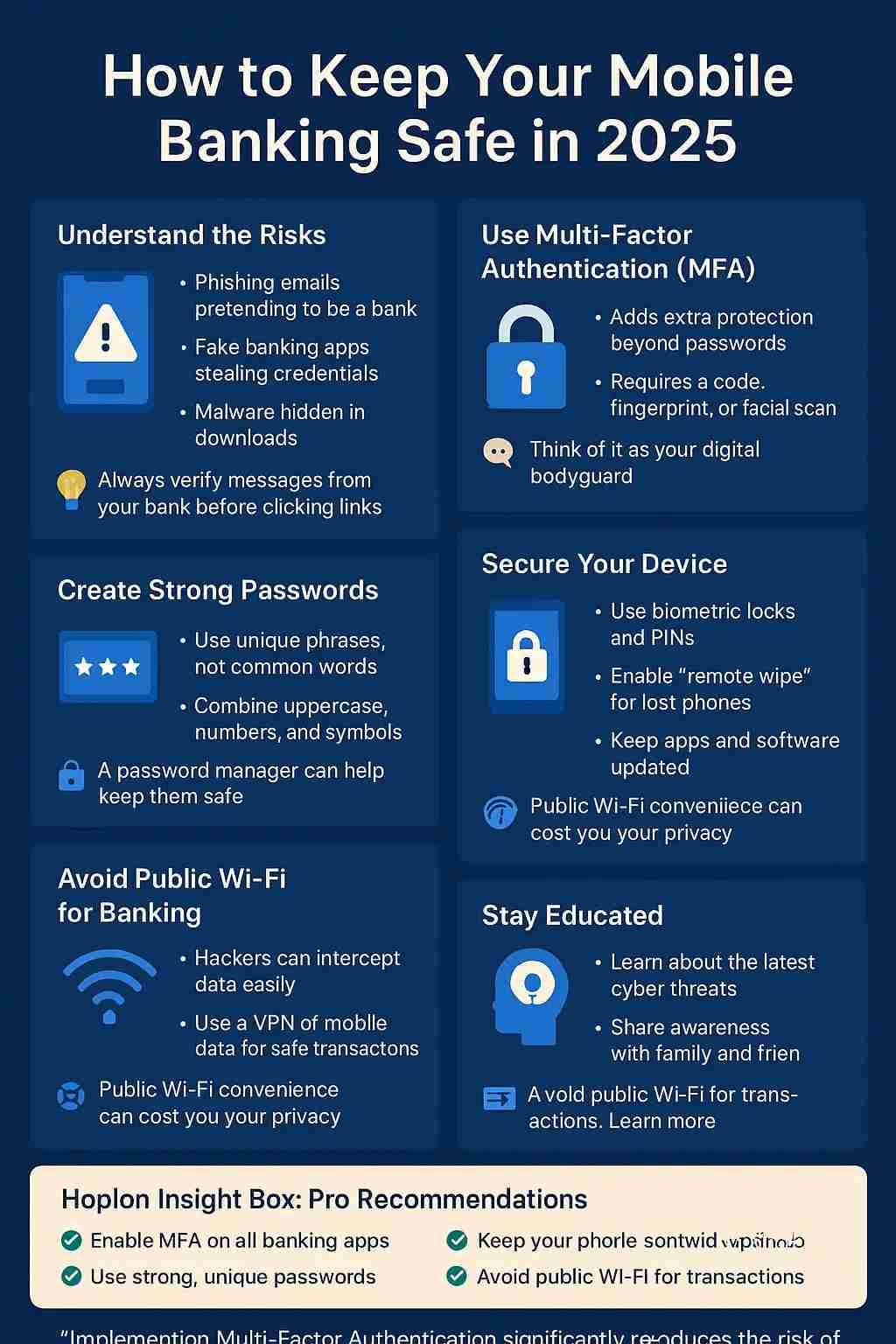
Mobile banking is strong, fast, and easy, but you need to use it wisely. To protect your money, you should use strong passwords, two-factor authentication, and secure devices; be wary with Wi-Fi; stay aware; and keep learning.
Taking care of your teeth is like making sure your mobile banking is protected. You might not see the benefits right now, but they will help you avoid huge difficulties in the future. You won't have to worry about dangers all the time when you utilize digital banking if you make these routines second nature.
Explore our main services:
ISO Certification and AI Management System
Web Application Security Testing
For more services, go to our homepage.
Follow us on X (Twitter) and LinkedIn for more cybersecurity news and updates. Stay connected on YouTube, Facebook, and Instagram as well. At Hoplon Infosec, we’re committed to securing your digital world.





