

Not too long ago, a project manager at a medium-sized consulting firm expressed frustration. The company's official file-sharing system was slow, clunky, and always had problems. They quietly switched to a free cloud storage app they found online.
It worked better, was faster, and helped them meet their deadlines. Everyone was happy until a private document from a client was leaked through the cloud storage service. The team that thought they were being smart was now in the news for all the wrong reasons.
That story shows what happens when technology goes off the radar. People often call this phenomenon "Shadow IT." It has become one of the biggest hidden forces that shape today's businesses. It isn't always bad, but it always has an effect.
What Shadow IT really is
Shadow IT is any software, tool, service, or device that an organization uses without the IT department's permission or oversight. It is the technology that runs in the background but is often not seen by those in charge of security and compliance.
This scenario can mean using software that wasn't approved by IT, personal devices connecting to company networks, or whole workflows that were built on tools that IT didn't approve.
The recurring theme is the lack of visibility into what's happening. If the people in charge of keeping data safe don't even know about the tool, they can't protect it.
The many sides of Shadow IT
The phrase may sound dark and mysterious, but it really comes in many different forms. Employees sign up for free SaaS platforms, managers make reports in online dashboards, and teams use personal messaging apps to keep in touch. Developers set up test servers or APIs without officially logging them. Remote workers connect their devices to cloud systems.
New versions are coming out all the time. There is Shadow AI, which lets workers play around with AI models on their own. Someone connects a smart device to the office network without telling IT about it. This technique is called Shadow IoT. With each new wave of technology, a new kind of hidden adoption comes along.
Why workers use hidden tools
Rebellion is not usually the cause. People use shadow IT because they want to finish their work. Many people can see that the choice is clear if it takes weeks to request a new tool through the official process but only minutes to obtain a free service.
Convenience is another reason. Today's workforce has become accustomed to swift consumer apps that outperform traditional business systems. When the company's tools seem old, employees will naturally seek employment elsewhere.
Employees also look for hidden solutions when there are gaps in functionality. When official tools can't meet a specific need, workers do it themselves.
It's clear that the human aspect is important. Individuals prioritize speed, often resorting to shortcuts when tasks appear cumbersome.
The good and the bad
Not every result is undesirable. Shadow IT can sometimes lead to new ideas. A marketing team might try out a new analytics tool that later becomes the official platform. A developer might use a harmful API that gives them an idea for a new product. Hidden adoption can show where the organization's official systems aren't working as well as they should.
But the risks are big. Unchecked apps may store private information in unsafe locations. More than one department might pay for the same tool without knowing it. Support teams can't resolve problems with tools they don't know about. Security teams can only fix security holes in software they can see.
In short, shadow IT can be both good and bad at the same time. On one side, it's flexible; on the other, it's risky.
How often does it actually happen
You might think this is a minor issue, but polls indicate that it's not. A recent study found that 41% of workers say they use technology that IT hasn't approved. According to other reports, unofficial channels conceal between 30 and 40 percent of business IT spending.
Some research found that companies thought they were using about 100 cloud services, but they were actually using almost 1,000. This illustrates the significant extent of the problem that remains unknown to people. And the rise of AI has worsened it. Many workers now admit that they use AI tools at work without telling their bosses.
Security issues that are easy to see but difficult to find
Data security is the biggest problem. Shadow IT tools often don't encrypt data or store it on servers that are difficult to find. IT may not be able to monitor personal accounts where sensitive files are stored. The less visible the tool is, the more likely it is to leak.
Apps that you didn't ask for can also let in malware. If the vendor doesn't fix security holes quickly, attackers can use them. Hidden APIs could accidentally show company login information. Using the same password on both official and unofficial systems can let criminals move from one breach to another.
Compliance adds another level. Rules like GDPR and HIPAA require strict controls on personal data. The organization could be fined and have to go to court if a hidden service collects that data without protections.
The costs in terms of money and time are significant
IT can't replace a hidden tool if something goes wrong with it. That leaves teams stuck, slows down projects, and makes things unclear. Duplicate tools also cost money. Different departments might pay for the same subscriptions, but no one keeps track of them. This secret spending hurts budgets and makes it harder to buy things.
One data breach can also cost millions. There are also legal fees, fines, and damage to your reputation. The breach itself may not be as bad as the hidden costs, like lost time, shaken customer trust, and damaged employee morale. Shadow IT can end up costing a lot of money.
The human aspect
People are at the heart of shadow IT. Employees don't try to make security weaker on purpose. They want to do well, reach their goals, and not get frustrated. When the official systems appear to be impeding their progress, they adapt accordingly.
A lot depends on culture. Staff will hide their choices if they think IT is a problem. Employees are more likely to share their ideas if IT is friendly and helpful. Shadow IT grows when people are scared. It can be changed in a trusting environment.
Working from home makes it bigger
The move to remote and hybrid work has made things worse. Employees are not on the controlled office network when they are at home or in a coworking space. They rely more on cloud services, personal devices, and apps that aren't theirs. Its visibility gets smaller.
A lot of workers would rather download a quick messaging app than wait for approval. When time is short, convenience wins. The farther away employees are from the office, the more likely they are to use unofficial tools.
AI, IoT, and APIs are new frontiers
The most recent wave of shadow IT includes AI. Without supervision, workers try out chatbots, image generators, or code helpers. The situation makes people worried that private information will be shared with platforms they don't know about.
At the same time, connected devices like smart speakers or personal gadgets make secret entry points. Developers often make quick integrations with APIs that don't go through official reviews. Every new layer of technology adds more shadows to deal with.
Bringing the hidden to light
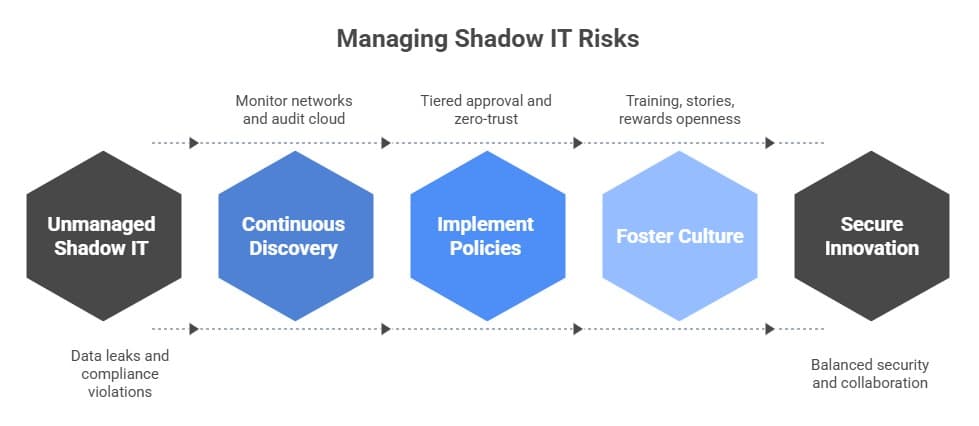
If organizations can't see shadow IT, they can't deal with it. The first step is to find it. Network monitoring can show you traffic that isn't normal. Security tools for cloud access can find services that aren't allowed. Regular audits and surveys of employees can show hidden use.
Even simple things like looking at expense reports for software subscriptions can show you things you didn't expect. Discovery needs to constantly happen. Without it, the hidden landscape grows darker and darker.
Better governance, not just punishment
The response matters once it is found. A harsh crackdown often backfires and makes tools harder to locate. Smart governance strikes a balance. Make it easy for employees to ask for new tools by making clear approval paths.
Offer a tiered model where tools that aren't very risky get lighter checks and apps that are more sensitive get stricter reviews.
Models that don't trust anyone also help. Even if a hidden app shows up, it shouldn't be able to get to core systems very much. Access reviews and quick revocations lower long-term exposure. The goal is not to get rid of shadow IT completely but to handle it smartly.
The importance of culture and training
Policies are important, but culture is what makes them work. Training should use language that people can understand to explain risks, not just legalese. Real-life stories often have more of an impact than long documents. Employees need to know why the rules are there, not just that they are.
Provide rewards for being open. If a team says they tried a tool, thank them for being honest. Give people a safe way to suggest new ideas. People will work together more if they trust it than if they hide. Culture connects security and new ideas.
Bringing what is hidden out in the open
When you find a shadow tool, start by talking. Find out why the team chose it. The answer sometimes shows holes in the official systems. If the tool is useful and safe, put it under the official umbrella. If it is too dangerous, purchase something safe to replace it.
A structured onboarding program is beneficial. Ask teams to send in the apps they use that aren't public. Look over them, approve the ones that work, and get rid of the rest. As time goes on, the shadows get smaller and the light gets brighter.
The path of a business
A marketing agency faced this challenge firsthand. IT found more than 150 hidden apps that people use every day. Instead of shutting down, the management organized a week-long tool showcase. Every department talked about what they were using and why.
The result was unexpected. Some tools were officially adopted, some were replaced with better ones, and many were retired. In six months, the company cut down on wasted subscriptions by almost a third, improved security, and built stronger trust between IT and employees. The problem that started out as a mess turned into a chance to change the culture.
Thinking about the future
Shadow IT will never go away. Tools will always come out faster than rules. As AI and connected devices become more common, the shadows will get darker. But groups can change. We can manage the risks by improving discovery, expediting the approval process, and fostering a culture of trust.
The truth is that shadow IT shows how creative people are. People come up with solutions when systems don't work. Leaders need to discover a way to safely direct that creativity instead of stifling it.
Sources you can trust
According to JumpCloud, 85% of businesses had cyber incidents in the past two years, and 11% of those were linked to shadow IT (source).
Gartner says that by 2027, 75% of workers will use technology that IT can't control (source).
"Employees find ways to use tools faster than IT can approve them." Not strict bans, but smarter governance is the real answer.
Suggestions
Use discovery tools to keep track of hidden apps all the time.
Establish efficient approval pipelines to ensure that employees feel acknowledged.
Sort tools by risk. Not everything needs the same level of control.
Don't just train with policy papers; use stories too.
Be open. Provide staff rewards for sharing secret tools.
Examine your expenses and logs often for software that hasn't been approved.
Encourage a culture of working together between IT and business units.





