

Tableau Server Vulnerability: CVE-2025-26496 Patch and Security Guide
Last Updated: September 2026
If your company relies on Tableau Server for dashboards, reporting, or embedded analytics, CVE-2025-26496 deserves attention. The issue sits in Tableau's file-upload functionality, and Salesforce classifies it as a type-confusion vulnerability that can allow Local Code Inclusion on affected Windows and Linux systems.
Salesforce discovered the issue during a proactive security assessment and addressed it as part of a broader group of Tableau vulnerabilities in 2025. That group also included dangerous file-upload and path-traversal problems, which makes this more than a routine "install one patch and move on" situation.
For most security teams, the practical response is simple: find every Tableau instance, check exactly what version it runs, move vulnerable systems onto a current supported maintenance release, review upload permissions, and make sure Tableau service accounts cannot reach more systems or data than they actually need.
The Short Version
CVE-2025-26496 affects Tableau Server and Tableau Desktop on Windows and Linux through file-upload modules. Salesforce says exploitation of the flaw can lead to Local Code Inclusion.
There is one detail administrators should not overlook. Salesforce's advisory contains different version boundaries in different parts of the same page. Its broader summary says affected Tableau Server versions are before 2025.1.3, 2024.2.12, and 2023.3.19, while the CVE-2025-26496-specific entry says before 2025.1.4, 2024.2.13, and 2023.3.20.
Rather than trying to stop at the oldest build that might contain the fix, the safer approach is the one Salesforce itself recommends: upgrade to the latest supported maintenance release for your branch.
You can verify the original security details through the official Salesforce Tableau security advisory.
Tableau's release page should always be checked before making an upgrade decision because release numbers continue to change over time. See the official Tableau Server release page.
That is why an old article telling you to upgrade only to 2025.1.4 or 2025.1.5 should no longer be treated as current patch guidance.
What is CVE-2025-26496?
CVE-2025-26496 is a type-confusion vulnerability in the file-upload modules used by Salesforce Tableau Server and Tableau Desktop.
Type confusion happens when software handles a resource as a type that is different from the one it was supposed to be. In the wrong place, that mistake can affect how files or other resources are processed.
Salesforce says this particular issue can allow Local Code Inclusion. The affected platforms include Windows and Linux.
The terminology sounds technical, but from an administrator's point of view, the bigger question is much easier to understand:
If someone reaches a vulnerable Tableau file-processing path, what could the Tableau environment give them access to next?
That is where real business risk starts.
A Tableau server may connect to sensitive databases, internal applications, data warehouses, identity systems, or reporting environments used by senior management. A vulnerability in the analytics platform therefore should not be treated like an isolated software bug.
This is exactly why a risk-based vulnerability management program should look at exposure, business value, privileges, and attacker opportunity together instead of relying only on a severity score.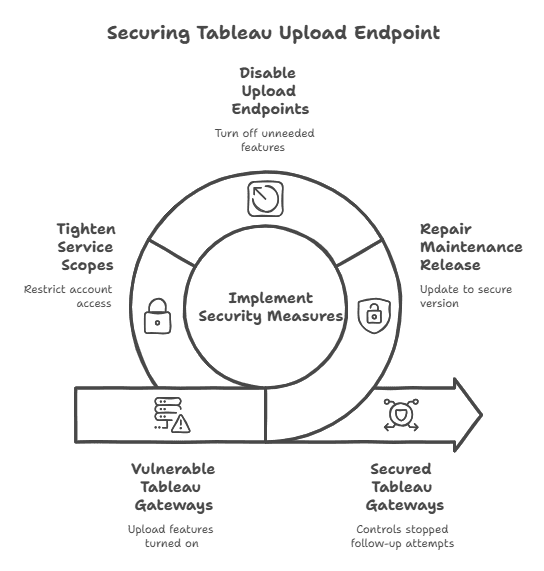
Affected Versions Are More Complicated Than They First Appear
The version guidance around CVE-2025-26496 needs a little care.
Salesforce's advisory first states that the Tableau Server issues affect versions before:
| Branch | General Advisory Boundary |
|---|---|
| 2025.1 | 2025.1.3 |
| 2024.2 | 2024.2.12 |
| 2023.3 | 2023.3.19 |
However, farther down the same Salesforce advisory, the CVE-2025-26496 entry provides different CVE-specific version boundaries.
Because those historical boundaries differ within the vendor material, the safest practical approach is not to deliberately install the oldest possible fixed build.
Do not deliberately upgrade to an old minimum fixed release in 2026.
Move to the latest supported maintenance release that fits your Tableau branch and environment.
You can check current builds directly through the Tableau Server releases page.
Why This Vulnerability Matters More Than a Normal Application Bug
Tableau often sits close to important data.
Depending on the deployment, it may connect to customer records, finance systems, operational databases, employee information, cloud warehouses, or internal reporting applications.
That creates a simple risk chain:
Tableau exposure → application access → service identity → connected systems → sensitive data
The vulnerability does not guarantee that every stage of that chain will happen. Strong permissions, segmentation, monitoring, and identity controls can break the path.
But if Tableau runs with an overly powerful account or has broad access to internal resources, a weakness in the server can become more damaging than it first appears.
If you are not sure how much trust your Tableau environment currently has inside the network, a broader cyber security assessment can help map those relationships before an incident forces you to investigate them under pressure.
File Uploads Are a Security Boundary
File uploads are normal business functionality. They are also one of the places where untrusted input enters a trusted application.
That makes them worth treating carefully.
Checking only the filename is not enough. A file ending in .pdf, .csv, or another expected extension is not automatically safe simply because the name looks right.
Good upload controls should consider:
- actual file type
- file content
- MIME information
- storage location
- permissions
- approved formats
- user authorization
- whether uploaded content can reach executable locations
Attackers can manipulate filenames, file extensions, headers, MIME declarations, archive contents, and file structure.
That is why server-side validation matters.
The wider Salesforce advisory also points to related Tableau security problems involving file uploads, path handling, and input validation.
For applications or customer portals that interact with Tableau, web application security testing can help review access control, application logic, trust boundaries, and the way separate weaknesses may interact.
What Could an Attack Path Look Like?
Think about the environment from an attacker's point of view.
A user or integration reaches a Tableau-facing upload function. The server processes that input. The Tableau service itself runs under an operating-system identity. That identity may then communicate with databases, file shares, APIs, or other internal services.
So the defensive model looks something like this:
User or Integration → Upload/API Surface → Tableau Server → Service Account → Internal Resources
Every arrow is an opportunity to limit damage.
Authentication can limit who reaches the upload function.
Input validation can reject unsafe content.
Network controls can restrict which systems Tableau can talk to.
Least privilege can stop a Tableau service identity from having administrator-level access.
Monitoring can reveal behavior that does not fit normal Tableau activity.
This is why infrastructure security testing matters after patching. An authorized infrastructure penetration test can help show whether one compromised application could realistically provide a path deeper into the environment.
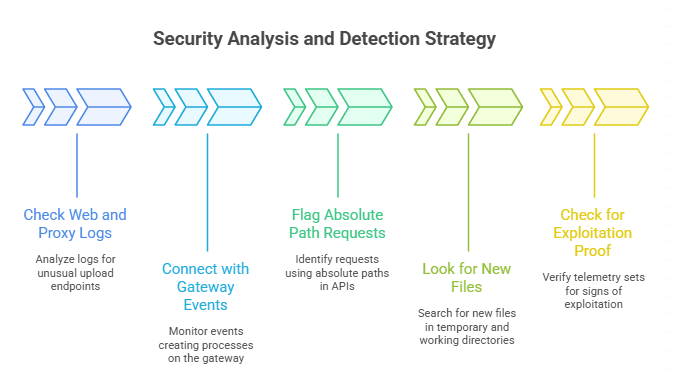
What Should You Look for in Logs?
Patching should be the priority, but administrators should also look backward.
If an affected Tableau build was exposed for months, you want to know whether anything unusual happened before the fix was installed.
Start with activity around file-upload and document-processing functions.
Useful signals can include:
- unusual spikes in POST requests
- unexpected upload attempts
- uncommon file types
- double extensions
- suspicious filename patterns
- unexpected temporary files
- unexplained service restarts
- abnormal service-account activity
Then move beyond the application logs.
Look at what the Tableau service account did around the same time.
Did it access a database it had never used before?
Did a new child process appear on the host?
Did the server make an unusual outbound connection?
Were credentials or tokens used from an unexpected location?
None of those signs proves exploitation by itself. What matters is the combination of events.
This is where cyber threat intelligence can add useful context by helping security teams connect internal observations with vulnerabilities, attacker behavior, and current threat activity.
Start With a Complete Tableau Inventory
Before discussing advanced detection, make sure you know what you actually own.
That sounds basic, but older analytics environments are easy to forget.
A company may have the obvious production Tableau cluster and still have an old development server, a disaster-recovery node, a test environment, or an embedded analytics instance running somewhere else.
Inventory:
- production servers
- development environments
- test environments
- disaster-recovery nodes
- internet-facing gateways
- embedded analytics deployments
- relevant Tableau Desktop installations
For each deployment, record:
- exact version
- operating system
- business owner
- network exposure
- connected data sources
- service identity
- authentication method
Once the inventory exists, patching becomes much less chaotic.
Upgrade to a Current Supported Maintenance Release
Do not treat an old security article as your release-management source of truth.
The official Tableau Server release page should be checked when planning the production upgrade because supported releases and maintenance versions continue to change.
That does not mean every organization should immediately jump branches without testing.
Tableau upgrades may affect:
- connectors
- authentication
- embedded dashboards
- extensions
- custom integrations
- operational processes
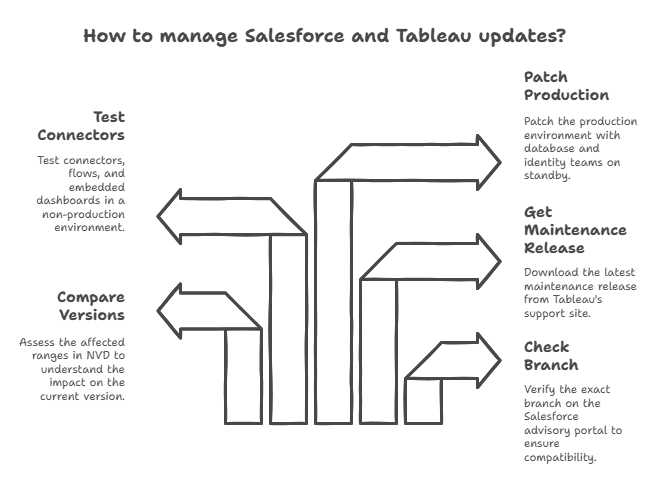
A sensible upgrade path is to:
- back up the environment;
- identify dependencies;
- test the release outside production;
- validate authentication;
- test connectors;
- check important dashboards;
- verify embedded applications;
- schedule the production change.
The important part is that "patched" should mean a supported and verified current build, not simply "we reached the minimum version mentioned in an old advisory."
A mature vulnerability management strategy should also verify the running version after deployment instead of closing the issue based only on a change ticket.
Reduce Upload Exposure While You Patch
If your environment cannot be upgraded immediately, reduce the places where vulnerable functionality can be reached.
Review which users and integrations really need upload capabilities.
Remove old integrations.
Restrict upload access to trusted networks or authenticated workflows where practical.
Avoid exposing unnecessary administration functions or Tableau services directly to the public internet.
Tableau also provides an official Server Security Hardening Checklist, which should be reviewed alongside the specific vulnerability advisory.
Temporary controls do not replace the patch, but they can reduce exposure while an upgrade is being prepared.
Tighten the Tableau Service Account
The service identity behind Tableau deserves almost as much attention as the patch.
Ask what that identity can actually do.
Can it read sensitive file shares?
Does it have broad database permissions?
Can it authenticate to systems unrelated to Tableau?
Does it have local or domain privileges it no longer needs?
Least privilege will not remove CVE-2025-26496, but it can reduce what an attacker could reach after an application compromise.
Review:
- database privileges
- filesystem permissions
- administrative rights
- API tokens
- service credentials
- cloud permissions
- old integrations
A strong application boundary matters much less if the application service account already has excessive access.
Do Not Ignore Embedded Analytics
Embedded Tableau deployments deserve extra attention because they often introduce more moving parts.
A customer portal might authenticate the user, call an internal application, interact with Tableau, and connect to one or more data sources behind the scenes.
The more systems involved, the easier it becomes for trust boundaries to blur.
Review:
- which users can upload
- tenant isolation
- API authorization
- gateway restrictions
- authentication boundaries
- application-to-Tableau trust
- service credentials
Also check whether your reverse proxy or gateway is doing meaningful access control rather than simply forwarding every request.
If you already run vulnerability scans and are wondering whether that is enough, Hoplon Infosec's guide to penetration testing vs vulnerability assessment explains why automated scanning and hands-on attack-path validation answer different security questions.
Harden Tableau Beyond This One CVE
Once the immediate patch is installed, use the issue as a reason to review the rest of the platform.
Tableau's official security hardening guidance covers broader security controls that should be considered alongside routine maintenance releases.
Administrators should review:
- TLS configuration
- administrator access
- operating-system permissions
- authentication
- network segmentation
- unused services
- firewall rules
- logging
- backup protection
- service accounts
- database permissions
Security works best when patch management and platform hardening are treated as separate but connected activities.
What If You Find Signs of Compromise?
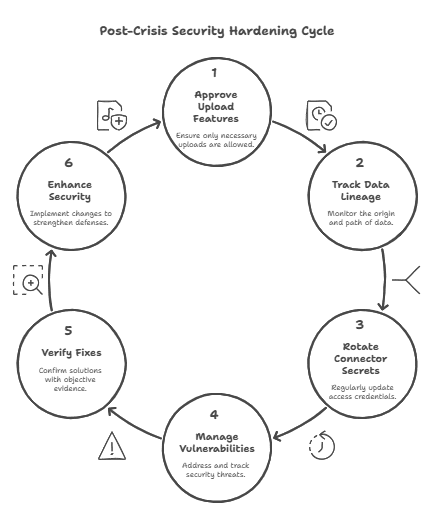
If your investigation finds suspicious processes, unexpected files, unfamiliar service-account activity, or evidence that a Tableau host accessed systems it normally does not touch, the problem is no longer just vulnerability management.
Treat it as a potential security incident.
Preserve relevant logs.
Avoid destroying evidence unnecessarily.
Work out which Tableau nodes were affected and what those nodes could reach.
Check connected data sources.
Review authentication and service-account activity.
Evaluate whether credentials, secrets, or tokens need to be rotated.
Patch and harden affected systems, but do not assume that installing the update removes anything an attacker may already have placed in the environment.
Having documented incident response and recovery procedures makes this process easier because the team already knows who investigates, who isolates systems, who communicates, and how recovery is validated.
Has CVE-2025-26496 Been Exploited in the Wild?
Based on the authoritative information reviewed for this article, public confirmation of widespread active exploitation could not be established.
That should not be interpreted as proof that exploitation has never happened.
Public visibility into exploitation is incomplete.
More importantly, Salesforce has already published remediation guidance.
Waiting for a public attack campaign before patching adds unnecessary risk.
Does Tableau Desktop Need to Be Updated Too?
Yes.
Salesforce identifies Tableau Desktop alongside Tableau Server in relation to CVE-2025-26496.
That means your inventory should not stop with central server deployments.
Large organizations should also identify outdated Desktop installations where relevant and make sure endpoint software management includes Tableau.
Which Version Should You Upgrade To?
There is no permanent version number that will remain correct forever.
The safest general recommendation is to use the latest supported maintenance release appropriate for your deployment after compatibility testing.
Always verify the latest build through the official Tableau Server release page before making a production decision.
What Security Teams Should Do This Week
If you have not reviewed this vulnerability yet, start with the basics.
Identify your Tableau installations and compare them with the Salesforce advisory.
Confirm which systems process uploads or sit behind customer-facing applications.
Check Tableau service accounts and connected databases.
Upgrade vulnerable environments onto a current supported maintenance release.
Review logs from the period when vulnerable builds were running.
After patching, verify the running version rather than assuming the deployment succeeded.
Then ask one broader question:
If Tableau were compromised tomorrow through a different vulnerability, how far could an attacker move?
That question is more useful than simply closing CVE-2025-26496.
The Tableau Server vulnerability matters, but the lesson goes beyond one CVE.
CVE-2025-26496 sits inside a broader set of Tableau security issues involving file processing and input handling. Salesforce has already provided remediation guidance, and Tableau continues to publish maintenance releases containing security fixes.
The strongest response is straightforward:
- keep Tableau on a supported maintenance release;
- limit unnecessary upload paths;
- avoid excessive service-account privileges;
- keep the server behind appropriate network controls;
- monitor the host as well as the application;
- verify remediation after deployment.
That approach helps with this vulnerability and makes the environment more resilient when the next Tableau security issue appears.
Questions and Answer
No, this isn’t just about one CVE. There were a number of problems in the disclosure window, but CVE-2025-26496 is the worst and has to do with the upload modules. Related upload vulnerabilities and path traversal problems make the risk picture bigger.
Do we have proof that people are being exploited in the wild?
There is no public proof of exploitation or public proof of concept as of the end of August 2025. That could change, so keep an eye on threat feeds.
Feedly
Which version should we choose?
Advisories list the versions that will be affected before 2025. 1.3, 2024.2.12, and 2023.3.19. A number of sources say 2025. 1.4 or later. 2025 is the current date on the product page. 1.5. The newest maintenance release for your branch is the safest option.
Does Tableau Desktop need to be fixed too?
Yes. The important problem with type confusion impacts both the server and the desktop. Update both when necessary.
In the End
The latest Tableau Server vulnerability reveals that even trusted business tools may become valuable targets if file upload features aren’t examined. This is not just a job for security leaders to fix; it should also remind them to make validation stronger, privileges tighter, and detection faster. The message is clear: don’t wait for something bad to happen to show the risk. Now is the time to act, evaluate your policies, and make sure your analytics platform is strong.
Hoplon Infosec is ready to help you with patching, monitoring, and long-term defense so that your team can stay one step ahead of hackers.
If you're not sure whether your Tableau environment is fully patched, properly segmented, or giving service accounts more access than they need, Hoplon Infosec can help you review the exposure and identify which security improvements should come first. The goal is to give your team a clearer picture of the risk and a practical path forward.
Follow us on X (Twitter) and LinkedIn for more cybersecurity news and updates. Stay connected on YouTube, Facebook, and Instagram as well. At Hoplon Infosec, we’re committed to securing your digital world.





