
What’s going on with Weaponized Voicemail? Attacks
Weaponized Voicemail Attacks are a modern twist on an old trick: attackers borrow a familiar, routine message and use it as a delivery vehicle for something harmful. A “You missed a call” notification feels normal. People are used to it at work, especially in offices that run on VoIP systems and unified communications.
The danger is not the word “voicemail.” The danger is what comes next. Many campaigns use the voicemail theme to push you toward a link, a fake login page, or an attachment that looks harmless. In one documented example, a voicemail-like email arrived with a WAV audio file attached, designed to pull the recipient into trusting the message.
Here’s the key reality check. The internet sometimes claims that simply receiving or listening to a voicemail automatically gives an attacker remote access. That claim, in general, is not supported by the public reports most people cite. What is supported is that voicemail-themed lures can lead to credential theft or malware installation, and that is how remote access can happen.
Why Weaponized Voicemail Attacks Work So Well
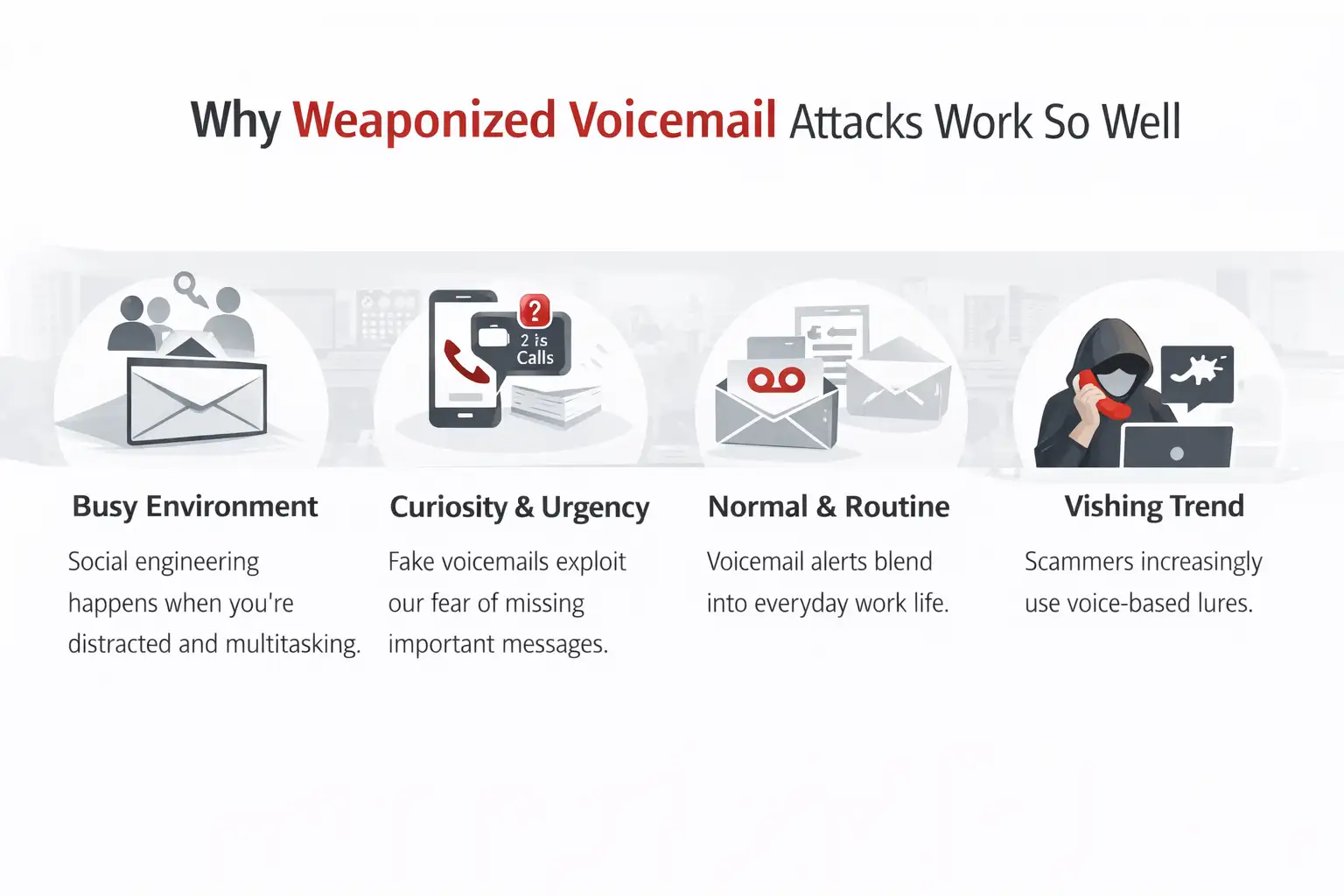
Weaponized Voicemail Attacks work because they hit you when your guard is down. A password reset email screams “security.” A voicemail alert screams “busy day.” It blends in with normal life. You do not feel like you are walking into danger. You feel like you are catching up.
They also play on curiosity and mild urgency. People do not want to miss a client call, a job interview message, or a note from a coworker. Attackers do not need you to be careless. They need you to be human for about eight seconds.
There’s another subtle advantage: voicemail-themed lures can bypass the mental filters people have built for obvious phishing subjects like invoices or package deliveries. Some analysts note scammers pivot to voicemail notifications because users are tired of the usual tricks.
Finally, voice-related scams sit inside a bigger trend. Voice phishing, often called vishing, has been rising and evolving. IBM notes a sharp increase in phishing activity reported in 2024, tying it to broader criminal adoption of voice-based social engineering.
How Weaponized Voicemail Attacks usually happen
Most weaponized voicemail attacks fall into a few predictable patterns. The theme changes, the accents change, and the logos change, but the core playbook stays annoyingly consistent.
The most common pattern: voicemail-themed email phishing
You receive an email claiming you have a new voicemail. It includes a “Listen” button or a “View Voicemail” link. When clicked, it takes you to a fake sign-in page that looks like Microsoft 365 or Google Workspace. The goal is credential harvesting, plain and simple.
Once attackers have your credentials, they may log in, set forwarding rules, steal sensitive mail, or use your account to target coworkers. That is often the real “remote access” in practice: remote access to your email environment and everything that email can unlock.
The attachment pattern: audio files used as bait
A more unusual variation uses an audio attachment, like a WAV file, alongside a voicemail notification. SANS documented a case where a voicemail-style email included a WAV attachment and a persuasive script that tried to build legitimacy. The “weaponized” part here is not that WAV audio is magically evil. It is that the attacker is weaponizing familiarity and the workflow around voicemail.
The older cousin: voicemail system hacking
There’s also classic voicemail hacking, where attackers break into voicemail systems, often by exploiting weak or default passwords or abusing call forwarding features. The FCC has warned about this for years, particularly around default PINs and voicemail system misuse.
This is a different category from the voicemail-themed email lure, but it often gets mixed into the same conversation online.
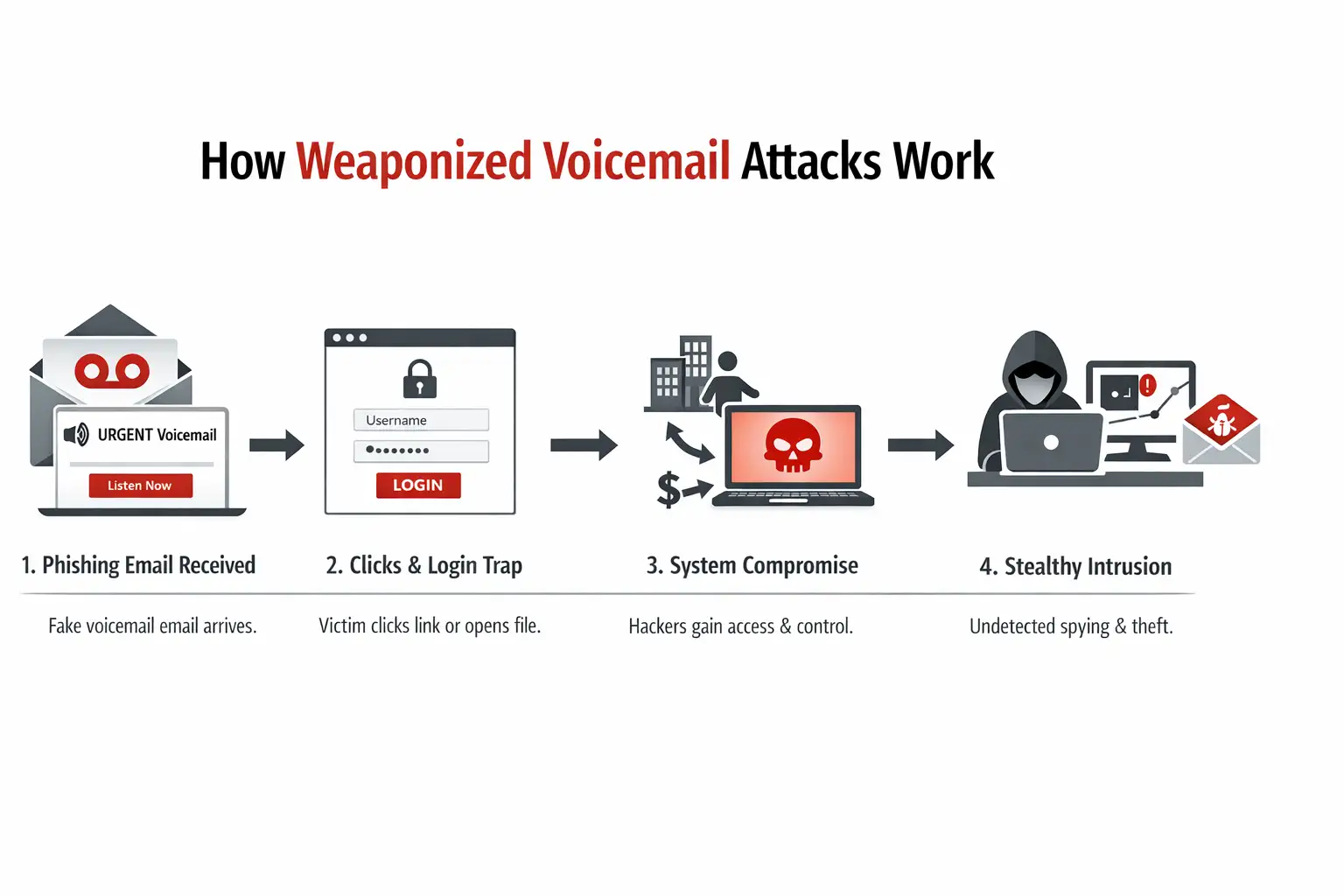
How the Attack Works
Below is a plain-English walk-through of how a typical weaponized voicemail Attack chain plays out in the real world. Think of it like a domino line. Each piece is small. That’s the point.
Step 1: The lure lands in your inbox
The email looks like a standard voicemail notification generated by a VoIP system. It may include a timestamp, a phone number, and a button that says “Listen.” Sometimes it includes an attachment like “Voicemail.wav.”
A careful reader might notice something off: a weird sender domain, mismatched branding, or unusual wording. But on a busy morning, lots of people do not read carefully. They skim.
Step 2: You click or open something
If it’s a link-based lure, the button opens a sign-in page designed to steal credentials. If it’s an attachment-based lure, the attacker hopes you’ll open the file and then follow the next prompt, which could involve enabling macros, downloading a “player,” or visiting a link included in the message. Different campaigns use different tricks.
Step 3: The attacker gets what they want
· If you typed credentials into a fake page, they can attempt to log in right away.
· If malware runs, it may provide persistence and remote access features.
· If they accessed your mailbox, they can pivot to finance, HR, vendors, and clients.
This is the moment where “remote access” becomes real. Not because voicemail is magic, but because one click can open a door.
Step 4: The quiet aftermath
Many victims don’t realize anything happened until later. A coworker reports strange emails. A finance payment gets redirected. Or MFA prompts start popping up at odd hours.
This quiet phase is why weaponized voicemail attacks are so frustrating. They can be slow-burn incidents, not loud explosions.
A real-world example you can picture
You’re at work. It’s 9:12 AM. You’re behind on email. A message comes in with the subject line “New Voice Message.” There’s a button: “Play Voicemail.” You think, “Probably a client,” and click without thinking too hard.
If it’s a credential-harvesting page, it asks you to sign in to listen. You type your password. It spins for a second and then errors out. You shrug and move on, slightly annoyed.
That’s the moment the attacker celebrates quietly.
This style of voicemail-themed credential phishing has been documented in multiple write-ups over the past few years, including research on voicemail-themed phishing targeting Microsoft 365 credentials.
If the campaign uses an audio attachment instead, the emotional hook is different. It feels even more “real.” Audio feels personal. That’s why researchers keep calling out how effective voicemail-themed lures can be, especially when they mimic enterprise tooling.
Impact: what you could actually lose
Weaponized Voicemail Attacks can create damage in layers. Some of it is obvious. Some of it is sneaky.
Personal impact
For individuals, the first hit is often account compromise. If your email is taken over, the attacker can reset passwords on other services. They can impersonate you. They can dig through old messages to find security questions, invoices, or personal details.
Even if you catch it fast, the cleanup is annoying. New passwords everywhere, MFA resets, and that lingering feeling of “What did they read?”
Business impact
In organizations, voicemail-themed phishing can be a gateway to business email compromise. Attackers love email because it’s the key that opens other keys.
They might set mailbox rules so you never see certain security alerts. They might watch conversations, then jump in at the perfect time to redirect a payment. Even a small compromise can turn into a big money problem if the attacker times it right.
What you should do next if you receive one
Here’s the calm, realistic checklist I give friends and coworkers. It’s not fancy, but it works.
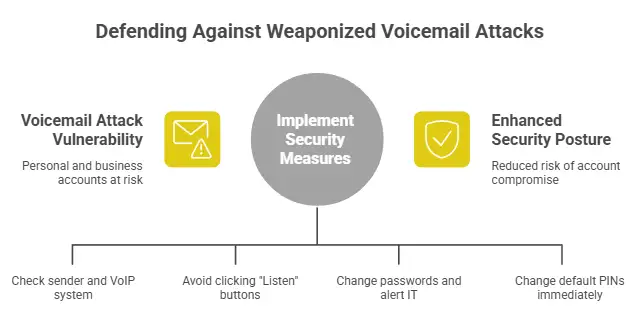
1) Slow down and verify the source
If it claims to be from your VoIP system, ask yourself: do we even use that system? Does the sender match the vendor domain? Does the email feel oddly generic?
If you want to check a voicemail, don’t use the email button. Go directly to the official app or the known voicemail portal by typing it yourself.
2) Treat “Listen” buttons as suspicious by default
This is blunt advice, but it’s saved people. Voicemail-themed phishing often relies on a single click to pull you into a fake sign-in flow.
3) If you clicked, act quickly, not quietly
If you entered credentials into a page, change your password immediately and review account sessions. If your organization uses Microsoft 365, alert IT so they can check sign-in logs and mailbox rules. Voicemail-themed credential theft has been a repeated target for cloud accounts.
4) Strengthen voicemail and VoIP basics
For voicemail systems themselves, the FCC has long warned about default or weak passwords and voicemail system abuse. If your voicemail still uses a default PIN, change it today.
Where Weaponized Voicemail Attacks Are Heading
Weaponized voicemail attacks are not going away. If anything, the “voice” angle is getting more flexible.
One reason is that voice scams can move across channels. It’s not just phone calls. It can be voicemail notification emails, audio clips dropped into collaboration tools, or even AI-generated voice messages that sound convincing. Google’s threat intelligence coverage and other industry discussions show how voice-based social engineering is evolving beyond the classic robocall stereotype.
Another reason is simple economics. Attackers keep using what works. And voicemail themes work because they feel routine and personal. It’s a quiet corner of the inbox where people are less defensive.
The practical defense trend will likely be a mix of better filtering, stronger identity security, and more human-focused training. Some security teams now run vishing simulations the same way they run phishing simulations, because voice-based lures are increasingly part of the threat landscape.
Smart, realistic recommendations
If you remember only five things, remember these:
1. Assume voicemail notifications can be faked. Verify in the official app or portal, not through the email button.
2. Lock down your email identity. Strong MFA, no reused passwords, and quick reporting when something feels off.
3. Watch for mailbox rules. Attackers love auto-forwarding and hidden rule tricks after credential theft.
4. Train for the moment, not the theory. Short, frequent reminders beat long annual training.
5. Harden voicemail basics. Change default voicemail PINs and review call-forwarding settings.
rather than destiny, but the direction of travel is clear: voice-based scams are rising.
FAQs
What is a voicemail phishing scam?
It’s a scam that pretends you have a new voicemail to get you to click a link, open an attachment, or enter your login details. The most common goal is credential theft through a fake sign-in page.
Why am I suddenly getting so many voicemail notification emails?
Attackers rotate themes. When people get better at spotting one type of phishing, scammers switch to a new “normal-looking” message, like voicemail alerts, to catch people off guard.
Is a voicemail email with a “Listen” button ever safe?
Sometimes legitimate systems do send voicemail notifications, but the safe habit is to avoid clicking the button and instead check voicemail through the official portal or app you already trust.
What should I do if I clicked a voicemail scam link?
If you entered a password, change it immediately, enable or tighten MFA, and tell your IT or email provider. Then check account sessions and mailbox rules. If you downloaded anything, run a trusted security scan and consider professional help if it’s a work device.
Closing thought
Weaponized voicemail attacks succeed because they don’t look like an attack at first glance. They look like the boring stuff we all ignore until we can’t. That’s why a small habit change, like checking voicemail only inside the real app, pays off so much.
If you’re writing this for a general audience, keep the message simple: voicemail itself is not a cursed file. The risk shows up when the voicemail theme is used to steer you into a fake login or a risky download. And once credentials or malware enter the picture, remote access becomes a very real possibility.
Endpoint Security is the best way to fix this issue.
Most of the time, weaponized voicemail attacks only work if the user clicks on a bad link or opens an attachment that has a virus in it. Strong endpoint security can find and block files that look suspicious, stop harmful processes, and stop remote access tools from running on laptops and desktops before they can do any real harm. This adds a safety net that works even when people mess up.





-20260925120840.webp&w=3840&q=75)