
Imagine discovering one morning that your banking app is empty, your phone has been compromised, or your private images have been taken. Isn’t it frightening? Our smartphones now hold more personal data than our wallets ever did in the digital age. They are therefore a popular target for cybercriminals. Regular security updates are the one feature that really guarantees your phone won’t be attacked, even though many other features, like lock screens, passwords, and encryption, help secure devices.
Why Lock Screens Are Insufficient on Their Own?
When it comes to mobile safety, lock screens are crucial. They prevent unauthorized individuals from accessing your data and opening your phone. This feature is an excellent first barrier, regardless of whether you use a PIN, fingerprint, or face recognition. A lock screen, however, is powerless to stop malicious apps, phishing, or hidden malware once the device has been unlocked. Though incomplete, it is useful.
The Function of Encryption
Another effective tool is encryption. It jumbles your personal information, making it difficult for someone to read your files, messages, or pictures in the event that your phone is stolen. This guarantees that only you can access the content and safeguards private data. However, encryption does not prevent hackers from taking advantage of flaws in your phone’s software; it only safeguards data that has been stored.
Tracking Features: Limited but Beneficial
Additionally, modern phones come with location tracking features that help you locate your device in the event that it is stolen or lost. Although this feature aids in phone recovery, cyberattacks are still possible. Even after apprehending a thief, malware may continue to operate in the background. Location services are not preventive; they are supportive.
The True Game-changer in Mobile Security is Security Updates.
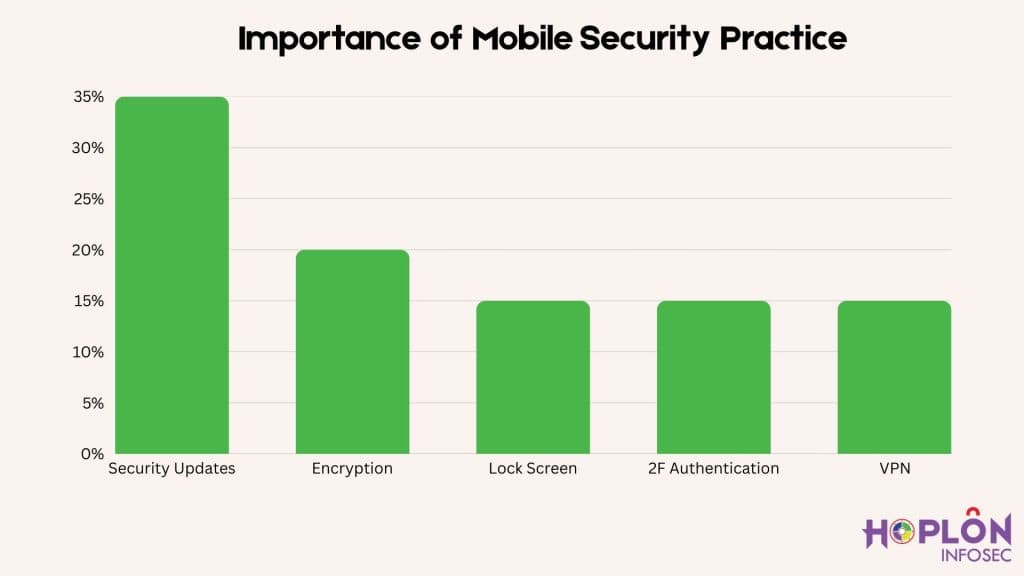
The security update significantly transforms mobile security. Updates actively address vulnerabilities in the operating system and apps, rather than lock screens, encryption, or tracking. Every update is made to fix vulnerabilities before criminals can take advantage of them because hackers are always coming up with new ways to attack. If you don’t update your phone, hackers can still exploit it, even with all other features enabled.
The Practical Operation of Updates
Your phone is frequently fixing a recently found bug when it alerts you to an update. For instance, a hacker may have developed malware that targets a system flaw. Your phone remains vulnerable if you neglect that update. Installing updates immediately eliminates these vulnerabilities. Updates are therefore the most dependable security feature available.
The Best Ways to Remain Safe
Enabling automatic updates for your operating system and apps is the best way to keep your phone safe. You avoid missing important patches in this manner. Additionally, you should refrain from putting off updates when your phone alerts you to them. A robust, multi-layered defense for your online life can be achieved by combining updates with other security features like encryption, lock screens, two-factor authentication, and a reliable VPN.
Conclusion: The Explicit Response
Which mobile security feature ensures your device remains protected from attacks? Security updates are the solution. They are the most crucial tool for protecting mobile devices because they directly fix the vulnerabilities that hackers target. Nothing is more effective than staying up to date, even though features like lock screens and encryption provide additional security. Never disregard that update notification if you want genuine peace of mind; it might be the saving grace for your financial and personal future. Click here If you want to know more about mobile security.





