
-20260126052329.webp&w=3840&q=75)
Microsoft is investigating reports that some PCs running Windows 11 25H2 fail to boot after the January 2026 security update, with affected machines showing the “UNMOUNTABLE_BOOT_VOLUME” stop error. The update most often mentioned in reports is KB5074109, released on January 13, 2026.
Did the January 2026 update break booting on Windows 11 25H2, and should you worry right now?
Microsoft says it has received a limited number of reports of devices failing to boot with the stop code “UNMOUNTABLE_BOOT_VOLUME” after installing the January 13, 2026, security update and later updates, and it is actively investigating. If your PC is already affected, you may need recovery steps to remove the update. If you are not affected yet, pausing updates briefly, backing up, and watching for Microsoft’s next guidance is the safest move.
-20260126052914.webp)
What caused the Windows 11 25H2 boot failure issues?
This month’s Windows Patch Tuesday was supposed to be routine: security fixes, stability improvements, and the usual “install and forget.” Instead, a small but serious set of users reported something far worse: their PC restarted after the update and never made it back into Windows.
In the cases being discussed publicly, affected machines show a black crash screen or a reboot loop and then an error tied to storage access: UNMOUNTABLE_BOOT_VOLUME with stop code 0xED. In normal life, that message can point to disk problems. But what makes this episode different is the timing: people report it happening immediately after the January 2026 cumulative update.
Microsoft has acknowledged the reports and says it is investigating whether a Windows update caused the regression.
Why is this story getting so much attention?
A boot failure is not like a glitchy Start menu or a weird driver hiccup. A boot failure blocks work, school, and everything else. It also raises a quiet fear most people hate admitting: “Did I just lose my files?”
Even when data is safe, the experience feels dramatic. You go from “I’ll restart quickly” to troubleshooting mode fast. If you have BitLocker, you might also worry about recovery keys and whether you’ll be locked out. That panic is understandable.
There’s another reason this is blowing up: January 2026 updates have been linked to multiple headaches beyond booting, including app issues involving cloud-backed storage and remote connection credential prompts, with out-of-band patches released to address some of them.
The core details Microsoft is investigating.
Here’s what’s been consistently reported across credible coverage:
The January 13, 2026, Patch Tuesday cumulative update is identified as KB5074109.
Affected systems include Windows 11 25H2 and Windows 11 24H2 editions.
The symptom is a boot failure tied to “UNMOUNTABLE_BOOT_VOLUME,” sometimes described as a black crash screen during boot.
Microsoft says it has received a limited number of reports and is requesting feedback submissions through the Feedback Hub to help diagnose.
Early reporting notes that physical devices appear affected, while virtual machines have not shown the same pattern so far.
That “physical devices vs virtual machines” clue is interesting. It hints that this might involve storage drivers, firmware interaction, or hardware-specific boot chains that VMs don’t replicate.
A fast timeline of the January 2026 update mess
Sometimes the best way to understand these incidents is to line them up like a crime scene timeline.
January 13, 2026: Microsoft releases the Patch Tuesday update (including KB5074109) for supported Windows 11 versions, including Windows 11 25H2.
January 17, 2026: Microsoft releases an out-of-band update (KB5077744) to address specific remote connection credential prompt issues (Azure Virtual Desktop and Windows 365 problems were called out).
January 24, 2026: Another out-of-band update (KB5078127) is released, described as cumulative and meant to address issues including app unresponsiveness tied to cloud-backed storage scenarios and Outlook Classic/PST problems.
January 25–26, 2026: Multiple outlets report that Microsoft is investigating boot failures with “UNMOUNTABLE_BOOT_VOLUME” after the January updates.
If you’re thinking, “That’s a lot of emergency patching in one month,” you’re not alone. It’s been a loud start to 2026 for Windows Update.
_compressed-20260126052329.webp)
What “UNMOUNTABLE_BOOT_VOLUME” actually means
When Windows boots, it needs to access the drive partition that contains the operating system. If Windows can’t reliably read it, you’ll see the UNMOUNTABLE_BOOT_VOLUME error.
That can happen for classic reasons like corrupted file system structures, disk controller issues, or even sudden power loss during a write. But in this specific January case, the suspicion is that a change in the update or its interaction with storage drivers or boot configuration can trigger a failure on some systems.
Important nuance: the presence of this error does not automatically mean your SSD is dead. It means Windows can’t mount the boot volume in its current state. Recovery steps can often restore access, especially if the trigger is a recent update.
Who is most likely affected?
Based on what Microsoft and reporters have shared so far, here’s a cautious way to think about risk:
You may be at higher risk if:
You installed the January 2026 update (KB5074109) on Windows 11 25H2 and experienced immediate boot problems afterward.
Your device is physical hardware (laptop or desktop), not a VM.
You’re seeing repeated restarts or a boot loop with that specific stop code.
You’re probably not affected if:
You haven’t installed the January 2026 update yet.
You installed it and have rebooted several times with no issues.
You’re running a virtual machine (reports say VMs are not showing the defect so far).
This is not a guarantee. It’s just the pattern that’s been reported.
What to do right now if your PC still boots
If your machine is still booting normally, your goal is simple: reduce risk without turning your life upside down.
1) Pause updates briefly (short-term)
If you rely on your PC for work or school, it’s reasonable to pause updates for a short window while Microsoft investigates, especially if you’re on Windows 11 25H2 and you don’t urgently need the patch immediately.
This is not anti-security advice. It’s the practical balancing act: stability matters too.
2) Make a quick backup.
Do one backup that actually works. If you’ve been meaning to do it “someday,” this is the day.
Copy the most important folders to an external drive or trusted cloud storage.
If you can, create a system restore point.
If you’re comfortable, consider a full system image.
3) Check for out-of-band updates.
Microsoft has already used out-of-band releases this month to address other January issues. The Windows 11 release health notes show KB5078127 as an out-of-band cumulative update addressing specific problems tied to January updates.
Boot failures are a separate thread, but the broader pattern is that Microsoft is actively shipping fixes outside the normal cadence.
-20260126052330.webp)
What to do if you’re stuck in a boot loop on Windows 11 25H2
If you’re already living the nightmare and you can’t boot into Windows, the practical recommendation repeated across reporting is to use the Windows Recovery Environment (WinRE) and remove the latest update.
Step-by-step: Remove the latest update from WinRE.
These are the common steps that generally apply when a bad quality update prevents booting:
Force WinRE to appear
Power on the PC, and as Windows tries to start, force it off.
Repeat a couple of times until Windows shows recovery options.
Go to Troubleshoot
Choose Troubleshoot → Advanced options.
Uninstall Updates
Choose Uninstall Updates.
Pick the latest quality update.
Reboot and test
If it boots, pause updates for a short period and monitor official guidance.
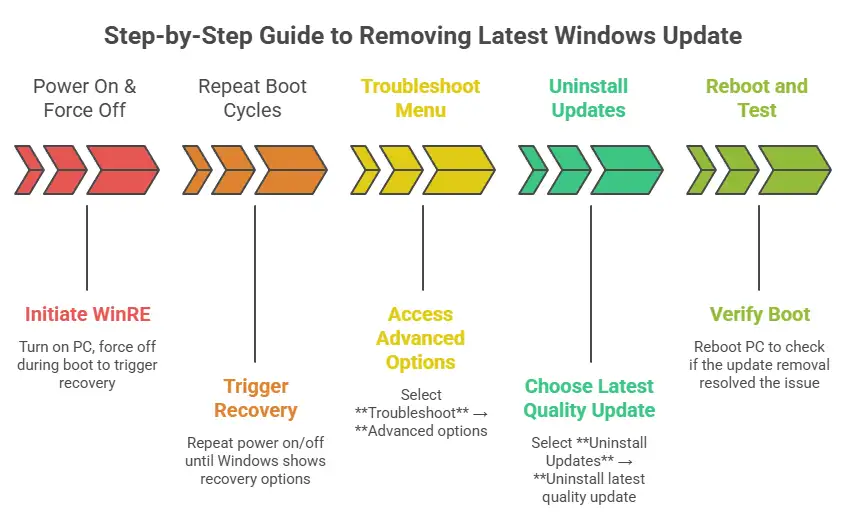
This matches the general mitigation advice described in coverage of this incident.
If uninstalling fails or throws an error
Some users have reported problems uninstalling KB5074109, including failures tied to error codes like 0x800f0905 in community threads. If this happens, you may need alternative recovery routes like System Restore (if enabled) or Windows repair options that keep files.
And yes, it’s annoying: the update can break things, and then the uninstall can fail too.
The bigger impact: home users vs. businesses
Home users
For most home users, the biggest risk is downtime and frustration. You might lose hours doing recovery steps, and if you don’t have backups, you could be forced into more disruptive repair options.
A smaller but real impact is trust. When updates feel risky, people delay them, and delayed updates can lead to security exposure later. That’s the long-term cost of short-term chaos.
Business and IT teams
For IT teams, incidents like this are why “rings” exist.
Microsoft’s own guidance around staged patching and ring-based rollout is built on a simple truth: you need to test updates before they reach every device. Microsoft has published patch testing and staged patching approaches for enterprise environments, including guidance tied to automated patching and testing in dev or pre-production before production rollout.
And research-backed security guidance is blunt about patch management being a core preventive practice. NIST describes enterprise patch management as a process that includes identifying, prioritizing, acquiring, installing, and verifying patches across an organization. In other words, it’s not just “install updates”; it’s “install updates safely and measurably.”




-20260925120840.webp&w=3840&q=75)
