
-20260317210130.webp&w=3840&q=75)
Windows 11 Bluetooth Bug Fixed with Emergency Update
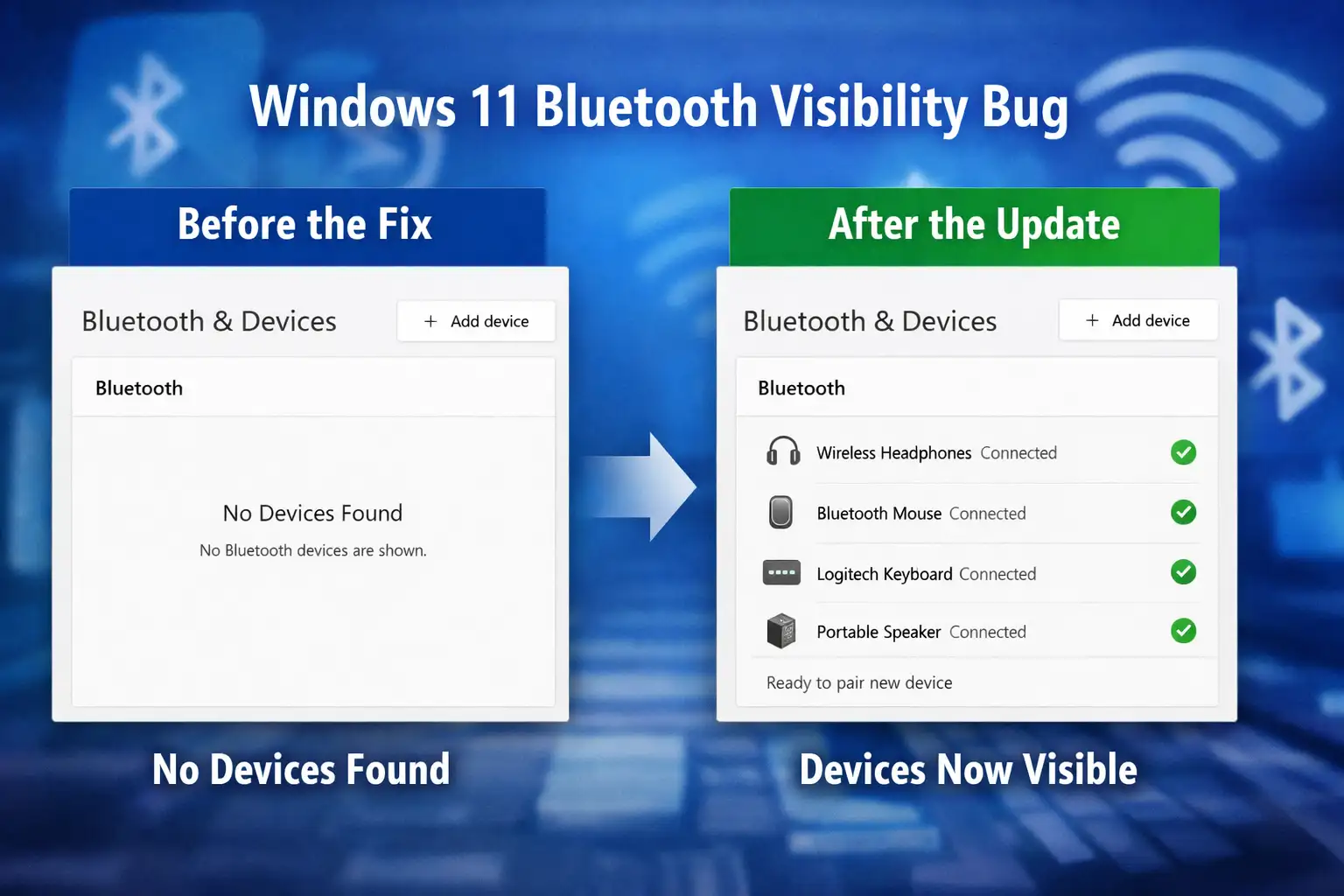
Microsoft released an emergency update in March 2026 to fix a problem in Windows 11 that made Bluetooth devices disappear from settings, even though they were still working. This Bluetooth visibility bug in Windows 11 made it hard for people with newer versions to connect new devices. The fix was quickly sent out through update KB5084897, and most users got it without having to do anything.
Small Bug, Big User Frustration
When I first heard about the Windows 11 Bluetooth visibility bug, it sounded like a small problem with the interface. It doesn't seem like a system-breaking problem when devices don't show up in settings. But when you sit down and try to connect a new keyboard or headset, that missing list becomes a real pain.
A lot of people noticed something odd. Their Bluetooth headphones were still playing music. Their mouse still worked. But when they looked at settings, it seemed like nothing was connected. It seemed like the system was keeping something from me.
This gap between what was real and what was on the screen caused confusion. It made people who use it a lot wonder. Is my Bluetooth not working? Is my driver out of date? Do I need to start over? The Windows 11 Bluetooth visibility bug was worse than it seemed because of that uncertainty.
Causes of Windows 11 Bluetooth Visibility Bug
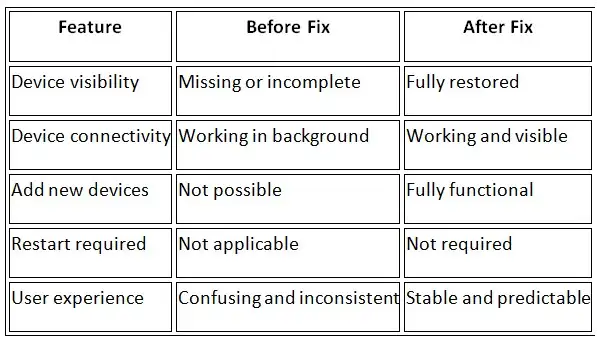
Based on what we know, the problem wasn't with connectivity. There was a problem with the display in the system interface. The devices were connected at the system level, but the user interface didn't show them.
This is how you should think of it. Picture this: your phone is connected to WiFi, but the icon goes away. The connection is still there, but you start to doubt it. That's exactly what happened here.
Microsoft hasn't made public the full technical details of the root cause. We need to be careful because of this. Some online conversations point to problems with UI rendering or system service communication, but these have not been officially confirmed.
So, the best way to put it is simple. The Windows 11 Bluetooth visibility bug was a visual bug that made it hard for the system to show connected devices correctly.
Affected Versions and Users
The problem mostly happened in newer versions of Windows 11, like 24H2 and 25H2. Not everyone had the same experience at the same time because these versions are still being released in stages.
People who use wireless devices a lot felt the effects more. People who work in offices and use Bluetooth keyboards, gamers who use wireless headsets, and even people who just connect speakers all noticed the difference.
It's interesting that not all of the devices acted the same way. Some users said they could only see part of it. Some people didn't see anything at all. This inconsistency made it harder to find the problem.
The Windows 11 Bluetooth visibility bug didn't affect all systems the same way, which made things even more confusing.
Why This Bluetooth Bug Matters
Nothing was broken on a technical level. But on a personal level, everything felt up in the air.
Users lose control when they can't see their devices. They can't easily disconnect, reconnect, or add new hardware. In daily work, this becomes a real problem.
Imagine that you can't find your Bluetooth headphones in settings when you try to join an online meeting. You can tell that they are connected, but you can't control them. That delay can cost time and even chances at times.
This is why the Windows 11 Bluetooth visibility bug was given top priority. It wasn't just a bug. It was a problem with usability.
KB5084897 Update: Quick Fix Explained
Microsoft quickly released an out-of-band update called KB5084897 as an emergency fix. This kind of update doesn't happen every month like the other patches. It is used to fix things quickly.
The update is meant to fix the visibility problem. It brings back the list of Bluetooth devices in both the settings and quick access panels.
One interesting thing is how the update was sent out. It used a technique known as hotpatching. This lets the system make changes without having to restart.
This means less interruption for users. The fix happens in the background without any noise. No waiting, no restarting, and no downtime.
This new way of updating made it easier to fix the Windows 11 Bluetooth visibility bug.
Why No-Restart Updates Matter
It may seem easy to update without restarting, but it's a big change.
Hotpatching may seem like a small change, but it shows a bigger shift in how systems are kept up to date.
In the past, even small.
To learn more, visit our blog page.
For official details, you can check Microsoft update documentation




-20260925120840.webp&w=3840&q=75)
