
Underground forums are actively promoting a new AI-assisted phishing kit that Microsoft environments are facing. The kit makes it easier for cybercriminals to do their jobs by automating the creation of phishing pages, the writing of emails, and the targeting of victims. Its main goal is to steal login information from Microsoft accounts, such as Microsoft 365, Outlook, and Azure AD.
It's not just one zero-day exploit that makes this campaign stand out. Instead, it uses artificial intelligence along with tried-and-true phishing-as-a-service methods. The result is size, speed, and a scary level of believability. People who are aware of security can still be fooled if they are in a hurry or are not paying attention.
This article explains what is known, what is still unclear, how these attacks work, and how people and businesses can realistically protect themselves from them.
Check and Overview of Threats
For years, security teams have been keeping an eye on phishing campaigns that go after Microsoft users. The new thing here is that AI is helping attackers not only write emails but also change phishing pages in real time.
Several researchers have confirmed that there is an AI-assisted phishing kit that is going after Microsoft credentials. The kit is sold as a one-stop shop. It has fake Microsoft login pages, email templates, hosting automation, and analytics dashboards that show when a victim types in their username and password.
So far, there is no proof that the Microsoft infrastructure itself has been hacked. The attacks don't use software flaws; they use social engineering. That difference is important. This means that just patching won't fix the problem.
Some claims going around on social media make the kit sound like it can automatically get around all of Microsoft's security measures. That part is still not verified. Researchers say that even though AI phishing attacks on Microsoft users are more convincing, they still rely on people making mistakes.
How AI Changes the Game of Phishing
Phishing emails that are sent in the usual way often look bad. Bad grammar, generic greetings, and weird formatting used to be signs of an attack. AI takes away a lot of those signs.
With the help of AI, hackers can now make emails that look like real internal Microsoft notifications. The language is smooth. The tone is the same as in official communications. You can even change the time zones and spelling for different areas automatically.
Personalization is another important change. AI can get public information from LinkedIn or company websites and then make phishing messages that are specific to a department or job role. A fake Microsoft 365 billing alert could go to someone who works in finance. A fake Azure AD security warning could show up for an IT admin.
This change is why Microsoft users are seeing more success with AI phishing attacks than with older ones.
In the AI-Assisted Phishing Kit
According to reports from analysts, the AI-assisted phishing kit that Microsoft users are being targeted with usually includes:
• Phishing emails that look like Microsoft branding and are made by AI
• Fake Microsoft login pages hosted on hacked or temporary domains
• Panels that capture credentials in real time
• Automatic forwarding of stolen logins to attackers
• Optional modules for MFA fatigue attacks
A lot of the time, this kit is sold as a subscription. That's classic phishing-as-a-service, which lets criminals who aren't very good at computers run advanced campaigns without having to know a lot about technology.
One scary thing is how quickly phishing pages can be made again. When a domain is blocked, the kit quickly creates a new one. That speed puts a lot of stress on traditional defenses that use blacklists.
Attack Vectors for Microsoft
Fake Login Pages for Microsoft 365
The fake login page is still the most common trick. Victims get an email that says there is strange activity or that someone wants to share a document. When you click the link, a page that looks exactly like a Microsoft 365 sign-in page opens.
The page collects login information and sometimes takes the user to the real Microsoft site after that. A lot of victims think it was just a temporary problem and don't tell anyone.
People are trying to get around Azure AD Phishing Protection.
Attackers also try to get around Azure AD phishing protection by hosting pages on trusted sites or using URL shorteners. This doesn't always work, but it makes it harder to find out about.
Some kits change the content of pages on the fly to avoid being detected by signatures. This is where AI tools for spotting phishing emails have trouble.
Attacks of MFA Fatigue
If attackers get a password but have to go through multi-factor authentication, they might try to log in multiple times. Victims get notifications that push them to approve one out of frustration. There is a lot of evidence that these MFA fatigue attacks work against users who aren't well-trained.
Step by step, how hackers steal Microsoft logins
Defenders can find weak points more easily when they know how the flow works.
1. The attacker sends a phishing email that looks real and urgent but was written by AI.
2. The victim clicks on a link that takes them to a fake Microsoft login page.
3. The attacker gets the credentials right away after they are entered.
4. If MFA is turned on, the attacker tries to log in multiple times.
5. After getting access, you can make inbox rules to hide future alerts.
This process shows why Microsoft account security threats can go unnoticed for days or even weeks.
How Organizations Are Affected in the Real World
There is more damage than just one hacked inbox.
Once hackers get into a Microsoft account, they can:
• Send phishing emails from a trusted address
• Access OneDrive files
• Reset passwords for linked services
• Start business email compromise scams
One stolen Microsoft 365 account can lead to financial fraud for small businesses. The blast radius is much bigger for bigger businesses.
People who respond to incidents say that AI phishing attacks on Microsoft users often lead to other attacks. Sometimes, after getting in, hackers will steal data or hold it for ransom.
Problems with detection and holes in current defenses. A lot of the time, Google results give general advice like "train users" or "enable MFA." They are important, but they miss practical gaps.
One problem is that people rely too much on email filtering. AI-written emails can get past basic filters because they don't have any obvious red flags.
Another problem is that people get tired of alerts. Security teams get so many alerts that they don't pay attention to small signs of phishing.
Some businesses think that Microsoft takes care of everything. That's not right. Microsoft's tools to stop phishing are helpful, but they aren't perfect.
Microsoft's ways to stop phishing and defend against it
Making Microsoft 365's defenses against phishing stronger
Companies should set up Microsoft Defender for Office 365 completely. Safe links, safe attachments, and strong anti-phishing rules are important.
Azure AD's conditional access rules can stop logins from strange places or devices that are known to be dangerous. This makes things less bad, even if credentials are stolen.
Making AI better: Finding Phishing Email.s
It is not safe to rely on just one detection engine. Email security solutions that look at behavior, language patterns, and how users interact with each other are more effective.
Some managed providers offer managed email security for Microsoft 365 environments. These services use Microsoft tools and third-party detection.
Teaching Users How to Handle Real-Life Situations
Training that is too general doesn't work anymore. Users need to see real-life examples of phishing that fit with their daily tasks.
Tell me how fake Microsoft login pages work. Show small differences. Even if you're not sure, report it.
How to Stop Microsoft Phishing Attacks in Real Life
This is a useful checklist based on real-life incident response cases:
• Make sure MFA is enforced with number matching, not just simple approve prompts.
• Turn off old authentication whenever you can.
• Check login logs every day, not every week.
• Set up alerts for when new inbox rules are made.
• Run phishing simulations that look like how hackers are attacking right now.
A clear Microsoft phishing response plan makes people less likely to panic when something happens. Know who to call, what to cut off, and how to quickly reset access.
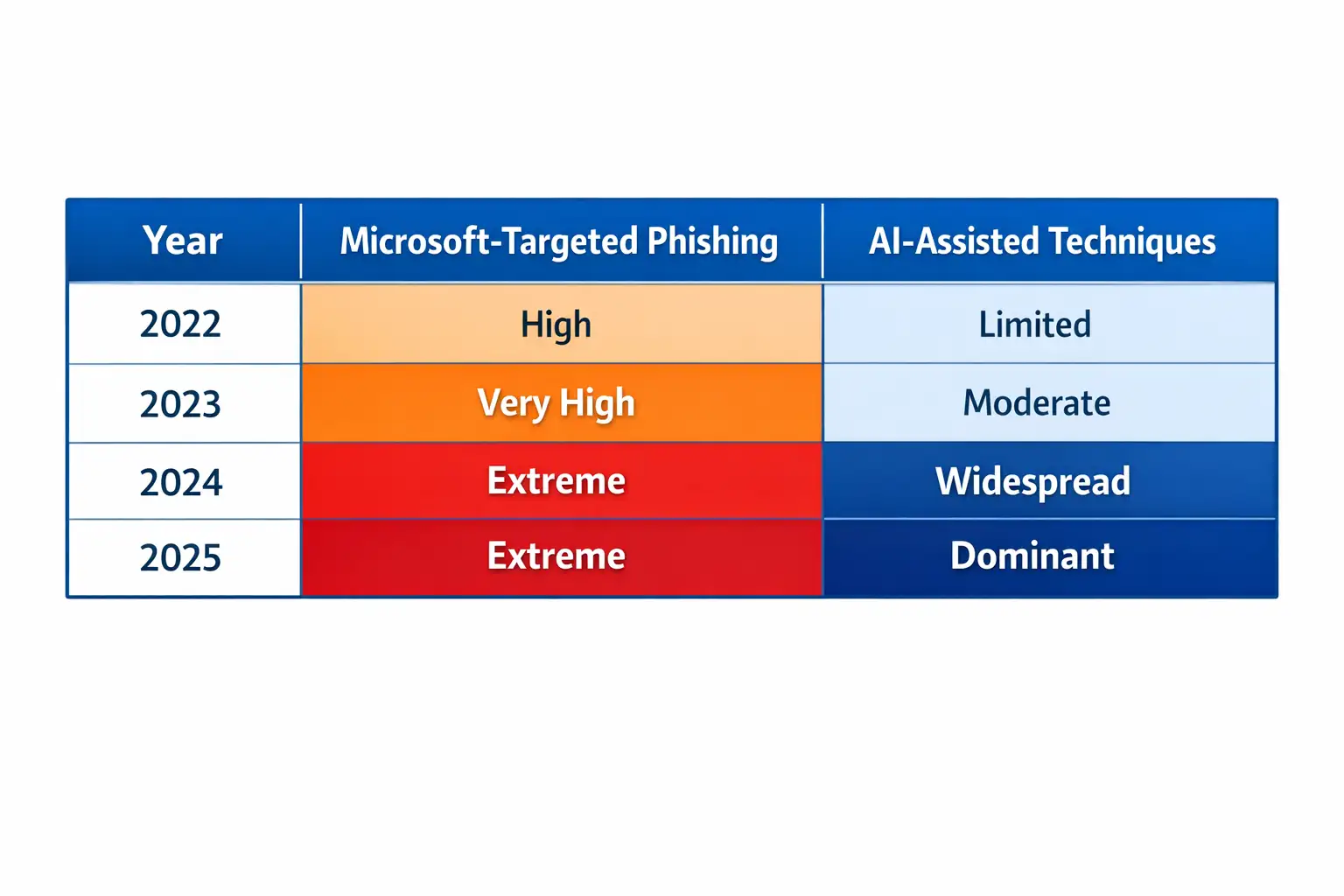
Phishing Trend Comparison Table
Questions that come up often
Can phishing attacks use AI?
Yes. AI is now often used to write convincing phishing emails, make fake login pages, and run campaigns on its own. Several security researchers have confirmed this.
How do hackers get into Microsoft accounts?
Fake Microsoft login pages and social engineering are used in most attacks. In these cases, technical exploits are not common.
Does MFA stop people from phishing?
MFA helps, but doesn't completely stop phishing. MFA fatigue attacks can still work if users click on prompts they didn't expect.
How can you tell if a Microsoft login page is fake?
Be careful with the URL, don't click on links in emails, and use bookmarks to get to Microsoft services. Right away, report pages that look suspicious.
Some posts on the internet say that the new phishing kit can automatically get past all of Microsoft's security measures. This hasn't been officially confirmed yet. Right now, the evidence points to it taking advantage of how people act, not flaws in the system.
Services and Solutions for Dangerous Places
Companies that are often targeted by phishing should think about using Microsoft phishing protection services or having a third party keep an eye on them.
A professional Microsoft service for responding to phishing attacks can cut down on downtime and stop them from happening again.
These services do more than just block emails; they also focus on finding, containing, and recovering from attacks.
Final Thoughts
AI has changed phishing, but it hasn't made it impossible. The biggest threat to Microsoft users from AI phishing attacks is being too sure of themselves. Attackers are getting better at sounding like people and moving faster, but they still rely on trust and urgency.
The most resilient companies see phishing as a constant threat, not just a training problem that happens once. They build layers of protection, keep an eye on behavior, and act quickly when something seems wrong.




-20260925120840.webp&w=3840&q=75)
