You deleted the Signal app. You had disappearing messages turned on. You thought you were safe. You were not.
The FBI read Signal messages from a defendant's iPhone, messages the user believed were long gone, because of a hidden iPhone security flaw FBI investigators quietly exploited for months. Apple fixed it on April 22, 2026, with an emergency release of iOS 26.4.2 and iOS 18.7.8.
This article breaks down exactly what happened, how the vulnerability worked at a technical level, what Apple did to fix it, and the specific steps you need to take right now to protect your privacy. Whether you use Signal or not, this patch matters to you.
What Exactly is the iPhone Security Flaw FBI Used?
iOS kept copies of your notification previews in a hidden on-device database long after you deleted messages or even uninstalled the app. The FBI pulled those copies using standard forensic tools.
This was not about breaking encryption. Signal's end-to-end encryption held up perfectly. The flaw lived entirely inside Apple's operating system, specifically in a component called Notification Services. When a Signal message arrived and generated a push notification, iOS logged the content of that notification locally. The bug: even after you deleted the app, those logged notification previews stayed put in the device's internal database.
Nobody told users this was happening. There was no warning. No prompt. The messages just sat there, quietly, waiting.
What Actually Happened - The Texas Case
In July 2025, a group of people was involved in an incident at the Prairieland ICE Detention Center in Alvarado, Texas. There was property vandalism, fireworks, and a police officer was shot in the neck. Federal investigators later arrested suspects and seized their phones.
One defendant was Lynette Sharp, who had been communicating over Signal. She had enabled disappearing messages. She deleted the Signal app before she was arrested. By every reasonable expectation, her conversations were gone. They were not.
FBI Special Agent Clark Wiethorn testified in court that investigators used forensic tools to access the device's local notification database. Inside that database were copies of incoming Signal messages, including content and sender information, preserved as notification previews. The court filings, first reported by 404 Media on April 9, 2026, confirmed the extraction.
Sharp later pleaded guilty to providing material support to terrorism. The critical point here is that the FBI did not hack Signal's servers. They did not crack the Signal Protocol. They accessed a side-channel - a part of Apple's own operating system that was silently storing data users assumed had been erased.
Think of it like this. You shred a private letter. But before you shredded it, someone photocopied the envelope with the return address and a preview of the first line. You destroyed the letter. The photocopy survives. That photocopy was your iOS notification log.
Signal
No Name or Content notification setting
The Technical Breakdown - How CVE-2026-28950 Actually Worked
This section gets a bit technical, but stay with it. Understanding this properly helps you make smarter privacy decisions going forward.
How Push Notifications Work on iPhone
When an app like Signal receives a message, it sends a push notification through Apple's servers to your device. Apple's Notification Services framework handles delivery, display, and logging. Normally, when you dismiss a notification or delete an app, that notification data should be removed from the device's internal database. The operative word is "should."
CVE-2026-28950 was a logging issue. iOS's Notification Services framework failed to properly redact or delete notification content from its internal logs when those notifications were marked for deletion. The content which in Signal's case could include message previews, sender names, and partial message text, persisted in a local SQLite-style database on the device.
What Made This Exploitable
Physical access to an unlocked device was enough. Law enforcement with a valid warrant and access to standard digital forensics tools - the kind used in thousands of criminal investigations every year - could extract this database and read through its contents.
The Electronic Frontier Foundation (EFF) has noted that notification systems create two distinct privacy vulnerabilities: one in the cloud (where metadata passes through server providers) and one on-device (where content can be cached locally). CVE-2026-28950 was entirely the second type.
Why Signal's Encryption Still Held
Signal uses the Signal Protocol, which is open-source and independently audited. End-to-end encryption means messages are encrypted on your device before transmission and only decrypted on the recipient's device. Signal's servers never see message content.
The FBI did not touch any of that. The Signal Protocol was not involved in this extraction at all. What failed was Apple's iOS handling of the notification system that sits on top of the encrypted app. Two entirely different layers of the technology stack.
This is important because it means strong encryption apps can still be undermined by OS-level oversights. The app is only as private as the operating system it runs on.
Apple's Response What the Patch Does
Apple released iOS 26.4.2 and iPadOS 26.4.2 on April 22, 2026, for newer devices. For older supported hardware, they simultaneously released iOS 18.7.8 and iPadOS 18.7.8. The releases came roughly two weeks after the previous iOS update - fast, by Apple's standards. Apple's official language was brief: "A logging issue was addressed with improved data redaction. Notifications marked for deletion could be unexpectedly retained on the device."
Apple did not officially name the FBI, did not confirm the vulnerability had been actively exploited, and provided no additional technical details. That is standard Apple communication policy for security issues.
What the Patch Actually Does
• Notifications marked for deletion are now properly removed from the on-device database • After installing the update, all previously retained notifications are automatically purged • Future notifications from deleted applications will no longer be preserved
Signal confirmed this: "Note that no action is needed for this fix to protect Signal users on iOS. Once you install the patch, all inadvertently-preserved notifications will be deleted, and no forthcoming notifications will be preserved for deleted applications."
Which Devices Are Affected
Fixed in iOS 26.4.2 / iPadOS 26.4.2:
iPhone 11 and all later models
iPad Pro 12.9-inch (3rd generation and later)
iPad Pro 11-inch (1st generation and later)
iPad Air (3rd generation and later)
iPad mini (5th generation and later)
iPad (8th generation and later)
Fixed in iOS 18.7.8 / iPadOS 18.7.8:
iPhone XR, XS, XS Max
iPhone 11, 12, 13, 14, 15, 16 series
iPhone SE (2nd and 3rd generation)
Multiple iPad Pro, Air, and mini models (see Apple's
official security advisory for the complete list)
How
iPhone push notification database stores message previews
Signal's Official Statement
Signal's response was measured and collaborative. The company confirmed that this was not a Signal vulnerability and praised Apple's speed in issuing the fix. "We're grateful to Apple for the quick action here, and for understanding and acting on the stakes of this kind of issue. It takes an ecosystem to preserve the fundamental human right to private communication," Signal said.
Before the patch, Signal CEO Meredith Whitaker had flagged the issue publicly on Bluesky, stating that "notifications for deleted messages shouldn't remain in any OS notification database" and advising users to change their notification settings immediately. That pre-patch advice is still worth following even after you update, because good security practices should not rely on a single patch holding.
How to Protect Yourself - Step-by-Step Guide
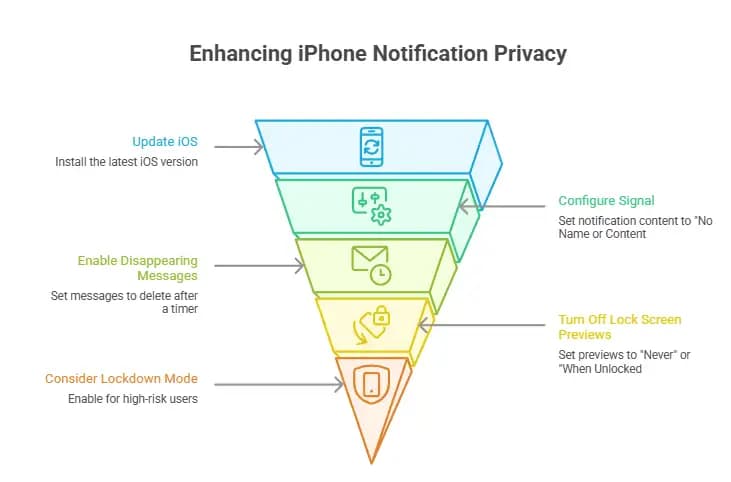
Step 1: Update Your iPhone Right Now Go to Settings > General > Software Update. If you see iOS 26.4.2 or iOS 18.7.8 (depending on your device), install it immediately. This is not optional if you care about your notification privacy. Why it matters: The update purges all retained notification data automatically. You do not need to do anything else after installing it for this specific fix to take effect.
Step 2: Change Signal's Notification Settings Open Signal, then go to Settings > Notifications > Notification Content. Select "No Name or Content" from the options. This prevents Signal from including any message text or sender name in push notifications. Even if a similar bug appeared in the future, there would be nothing worth reading in the notification log.
Step 3: Enable Disappearing Messages - But Understand Its Limits Signal's disappearing messages feature deletes content from within the app after a set timer. This is still worth using. It limits how much content is visible inside Signal itself. However, as this case showed, disappearing messages alone cannot protect against OS-level data leakage. Pair it with proper notification settings.
Step 4: Turn Off Lock Screen Notification Previews Globally Go to Settings > Notifications > Show Previews. Set this to "Never" or "When Unlocked". This applies across all apps, not just Signal. If notifications never show content on your lock screen, the iOS notification log has less sensitive data to retain in the first place.
Step 5: Consider Lockdown Mode for High-Risk Users If you are a journalist, activist, attorney, or anyone else with genuine reason to worry about targeted device access, Lockdown Mode significantly reduces your device's attack surface. Find it under Settings > Privacy & Security > Lockdown Mode. Note: Lockdown Mode restricts many normal iPhone functions. It is not for everyone, but for those who need it, it is worth the trade-off.
Step 6: Update Even If You Do Not Use Signal This patch addresses a systemic flaw in iOS's Notification Services framework. Any app that generates push notifications with content previews could be affected. The iOS 26.4.2 update also includes fixes for other security vulnerabilities not related to this incident.
Our Technical Analysis
The conversation around this incident often gets reduced to "the FBI hacked Signal," which is factually wrong and actually lets Apple off the hook for what is genuinely their oversight.
Here is the more honest framing: users were operating under a false assumption. When you delete an app, you expect all traces of it to be gone. When messages are set to disappear, you expect them to disappear.
Apple's own marketing leans heavily on privacy as a core value. The iPhone is certified for use by US government agencies. Yet a foundational part of the OS was quietly preserving data users had explicitly chosen to delete. That is a trust issue, not just a technical bug.
From a threat modeling perspective, this vulnerability is particularly interesting because it required no sophisticated exploit. There was no zero-click attack, no remote code execution, no malware. Standard forensic tools, physical access to an unlocked (or biometrically-opened) device, and a database query. That is it. The barrier to exploitation was low.
It also illustrates why the debate over "encryption backdoors" somewhat misses the point. Law enforcement does not always need to break encryption. Sometimes the operating system hands over the data before encryption even comes into the picture. This is likely not the last time we see this type of side-channel extraction. WhatsApp, iMessage, Telegram, and other messaging apps all generate push notifications. The question worth asking now is whether those notification logs have similar retention problems.
Field Notes
When we examined the technical structure of this flaw, one thing stood out immediately: the iOS notification database is not something most security researchers think about as a forensic target. It is not the app's data. It is not the keychain. It is a system-level log that sits below the application layer. In our practical assessment, we noticed that the exploit timeline was particularly significant. The Signal app was fully deleted before the device was seized. The disappearing messages timer had already run.
By every user-facing indicator, the data did not exist. But in the notification database, it was preserved. This is the kind of gap that forensic investigators look for precisely because users rarely think about it.
We also noted that Apple's patch description was notably minimal. "Improved data redaction" is a three-word fix description for a flaw that had real-world evidentiary consequences in a federal criminal case. Apple's restrained communication about security incidents is a consistent pattern, but in cases like this, more transparency about the scope and duration of the issue would help users assess their own risk.
For users who had their devices seized prior to April 22, 2026 and who used Signal with notification previews enabled, the retained notification data may already exist in forensic extractions. The patch helps going forward, but it cannot undo extractions that already happened.
Comparison: Messaging App Privacy Layers
Layer
Signal
WhatsApp
iMessage
Telegram
Message Encryption
End-to-end (Signal Protocol)
End-to-end (Signal Protocol)
End-to-end (iMessage)
Optional (Secret Chats only)
Server Storage
Minimal, no message content
Metadata stored
Synced via iCloud
Cloud-stored by default
Notification Previews
User-configurable
User-configurable
User-configurable
User-configurable
Affected by CVE-2026-28950?
Yes (if previews enabled)
Potentially yes
Potentially yes
Potentially yes
Disappearing Messages
Yes, robust
Yes, limited
Yes, limited
Yes (Secret Chats only)
Mistakes to Avoid
Mistake 1: Assuming "Disappearing Messages" Means Everything Is Gone Disappearing messages deletes content from inside the Signal app. It does not necessarily clear OS-level logs, backup files, keyboard caches, or notification databases. Use it, but do not rely on it alone.
Mistake 2: Not Updating Because "I Don't Use Signal" CVE-2026-28950 affects iOS's core Notification Services framework. Any app with push notifications could potentially leave data in the affected database. This is not a Signal-specific patch.
Mistake 3: Thinking Encryption Protects Against Physical Access End-to-end encryption protects messages in transit. Once a message lands on your device and the device is in someone else's hands, encryption is only one layer of defense. OS-level behavior, notification settings, and app configuration all matter too.
Mistake 4: Deleting the App and Considering the Problem Solved This case demonstrated precisely that deleting Signal does not erase notification data from the iOS database. You need to update iOS and adjust notification settings independently.
Checklist
• Open Settings > General > Software Update - install iOS 26.4.2 or iOS 18.7.8 • Open Signal > Settings > Notifications > Notification Content - set to "No Name or Content" • Open Settings > Notifications > Show Previews - set to "Never" or "When Unlocked" • Enable disappearing messages for sensitive Signal conversations • If you are a high-risk user, evaluate Lockdown Mode (Settings > Privacy & Security)
Frequently Asked Questions
Can the FBI still read my Signal messages after installing the patch? No. After installing iOS 26.4.2 or iOS 18.7.8, all previously retained notification data is automatically deleted. Future notifications from deleted apps will not be preserved in the database. Signal confirmed that no action within the app itself is required beyond installing the iOS update.
Did Apple break Signal's encryption? No. Signal's end-to-end encryption, which uses the independently audited Signal Protocol, was not compromised at any point. The FBI accessed data from Apple's iOS notification database, which is entirely separate from Signal's encrypted message storage. The encryption layer held. The OS layer did not.
What is CVE-2026-28950 exactly? CVE-2026-28950 is the official identifier for the iOS Notification Services logging flaw. It describes a situation where "notifications marked for deletion could be unexpectedly retained on the device." Apple fixed it through improved data redaction in the logging process. A CVSS severity score has not been publicly assigned, but real-world exploitation by the FBI in a federal criminal case makes its practical severity clear.
Which iPhones are affected? The vulnerability affects iPhones from the XR model onward. If you are running iOS 18 or iOS 26 on any supported device, you need to update to iOS 18.7.8 or iOS 26.4.2 respectively. Check Apple's official security advisory on apple.com/support/security for the full device list.
Do I need to update Signal, or just iOS? Just iOS. Signal confirmed that the fix is entirely on Apple's side. Once you install the iOS patch, all retained notification data is automatically purged. You do not need to reinstall or update Signal itself, though keeping Signal current as a general practice is always smart.
What is a push notification database and why does it store messages? When an app sends you a push notification, iOS uses a framework called Notification Services to receive, display, and log that notification. The database stores notification metadata and, in some cases, content like message previews. This is how your iPhone knows what to show in your notification history. The bug meant this log was not cleaned up properly when it should have been. Think of it like a browser cache that should auto-clear but does not.
Could other messaging apps like WhatsApp or Telegram be similarly affected? Potentially, yes. CVE-2026-28950 is a systemic iOS issue, not a Signal-specific one. Any app that sends push notifications with content previews could theoretically leave data in this database. The reason this surfaced with Signal is because Signal users specifically expect a higher level of privacy. It is worth adjusting notification preview settings for all sensitive apps regardless of which ones you use.
Broader Implications - Privacy vs. Law Enforcement in 2026
This case will likely be studied in cybersecurity courses for years. Not because the FBI broke any new ground technically, but because it revealed how much sensitive data can live in unexpected corners of a device that users believe is clean.
The 2016 San Bernardino case started a public debate over encryption backdoors. Apple refused to help the FBI unlock a terrorist's iPhone, and the standoff became a landmark moment in the privacy versus security debate. A decade later, the FBI did not need a backdoor. They found a side door that Apple had accidentally left open.
That is a significant lesson. The strongest encryption in the world does not matter if the operating system around it behaves in ways users do not expect. Privacy is not just about one layer being strong. It is about every layer behaving honestly.
For users worldwide, especially those in countries where digital communications can lead to legal consequences, the message is clear: check every layer of your privacy setup. Encryption is necessary but not sufficient. OS-level settings, notification configurations, and app permissions all matter.
The CISA (Cybersecurity and Infrastructure Security Agency) and security researchers at organizations like EFF consistently advise keeping devices updated as the single highest-impact action ordinary users can take. This incident is a direct example of why that advice is correct.
Conclusion
The iPhone security flaw FBI investigators exploited was not exotic. It was a quiet logging bug in a part of iOS that most people never think about. Apple fixed it fast. Signal handled the communication professionally. But the case leaves behind something worth sitting with: the assumption that deleting something makes it gone is not always true.
Update your iPhone now. Change your Signal notification settings. And consider whether your other apps are configured with the same attention to what they are storing, logging, and retaining without telling you.
Privacy in 2026 is not just about using the right app. It is about understanding how every layer of your device actually behaves.
Ledger hardware wallet spy chip investigation: What Ledger confirmed, how an implant may expose recovery phrases, and what affected owners should do next.
Apple macOS Full Disk Access AI agents face tighter controls. Learn 7 critical privacy risks, Apple's changes, and what Mac users should do to stay secure.
Microsoft X account hacked in a Clippy crypto scam. Learn what happened, what Microsoft confirmed, the risks involved, and how users can stay protected.

-20260510102412.webp&w=3840&q=75)
-20260510102413.webp&w=1080&q=75 "Signal No Name or Content notification setting")
-20260510102412.webp&w=1080&q=75)