
-20260410094844.webp&w=3840&q=75)
Chrome Infostealer Protection Targets Stolen Sessions
Dated April 10, 2026: Yes, chrome infostealer protection is now a real and important security step.
Google has rolled out Device Bound Session Credentials, or DBSC, for Chrome on Windows, and the goal is simple: make stolen session cookies far less useful to attackers trying to hijack logged-in accounts.
The rollout is tied to recent Chrome releases on Windows, with Chrome 146 widely cited in current reporting, while Google’s own developer documentation notes DBSC availability on Windows beginning with Chrome 145 and expansion work continuing.
For everyday users, that matters more than it may sound at first. A lot of people still think the biggest risk online is a stolen password. It is not that simple anymore.
In many real attacks, criminals do not even need your password if they can grab the browser session that proves you already logged in. That is why this update deserves attention right now.
Why This Update is Big
For years, infostealer malware has quietly turned browsers into gold mines. The malware sneaks onto a device through fake software, poisoned downloads, malicious attachments, or cracked tools.
Once inside, it looks for saved credentials, tokens, and browser data that can help criminals break into accounts. Cookies are especially attractive because they can keep a session alive without forcing a fresh login.
That is what makes this story bigger than a routine browser patch. Google is not just fixing a small bug. It is strengthening the way Chrome handles trust after a login already happened.
In other words, the browser is getting better at saying, “This session belongs to this device, not just anyone holding copied data.” That is a major shift in how browser security is evolving.
There is also a timing issue here. Attackers have been leaning harder into session-based attacks because multi-factor authentication made password-only attacks less reliable.
If a criminal can steal the active session instead of guessing a password, they may sidestep the extra prompt entirely. That is why session hijacking prevention is becoming a bigger focus for browser makers and enterprise security teams alike.
-20260410094845.webp "Chrome Infostealer Protection")
What is Chrome infostealer protection?
Chrome infostealer protection is Chrome’s effort to reduce the damage caused by stolen session data. The new layer is built around device bound session credentials, a web capability designed to tie a logged-in session to the device that created it.
If the session data is copied somewhere else, it should be much harder for an attacker to reuse it from another machine.
That matters because traditional browser protections are often aimed at protecting stored secrets at rest.
A copied cookie creates a different kind of problem. The attacker is not trying to crack encryption in the browser profile.
They are trying to replay evidence of an already authenticated session. Google’s answer is google chrome cookie theft protection that relies on possession of a device-linked credential, not just a copied cookie value.
This is why people searching what is chrome infostealer protection are really asking a bigger question.
They want to know whether Chrome can still protect them if malware slips past the front door. The answer is encouraging, but not magical. Chrome is raising the cost of abuse. It is not promising perfect immunity against every malware scenario.
Session Cookie Theft Basics
A session cookie is one of those invisible conveniences that makes the web feel smooth. You log in once, maybe approve MFA, and the site remembers you. That is great until the same session token lands in the wrong hands. Then the convenience turns into a shortcut for account abuse.
This is why session cookie theft is such a serious issue. It does not always look dramatic on the user side. You may not notice anything at first.
There may be no password reset email, no obvious brute-force attempt, no loud warning. Yet an attacker with the right cookie can act as if they are already you, at least for that session.
Think of it like someone copying a valid backstage pass instead of forging an entire identity card. They are not proving who they are from scratch.
They are slipping through because the system recognizes the pass. That is why chrome session cookie protection has become such an important security topic in 2026.
How device bound session credentials work
So, how device bound session credentials work is the question at the center of this update. Google’s developer documentation describes DBSC as a way for a website to establish a device-bound credential and later verify possession of that credential during the session lifecycle.
The key point is that the session is linked to cryptographic proof tied to the device, not just the cookie itself.
That changes the replay problem. In older patterns, the attacker steals the cookie and reuses it elsewhere. With device bound session credentials, the site can demand proof that the device holding the session is the one that originally established it.
A copied cookie by itself becomes less useful if it cannot satisfy that proof step. That is the heart of google chrome session hijacking protection.
If you have been looking for dbsc in chrome explained, this is the practical takeaway: DBSC is not just a nicer way to store cookies. It is a way to make session replay harder by tying trust to the originating device.
That does not mean every site instantly gets the benefit in the exact same way, because websites need to support the capability, but the direction is clear and important.
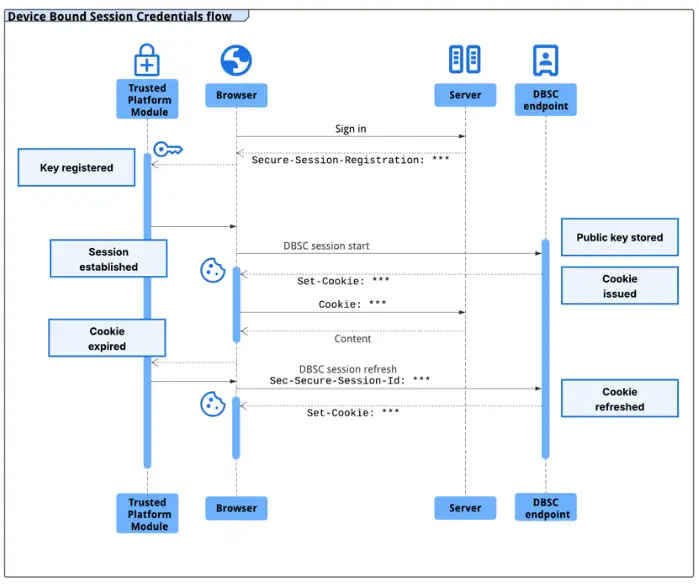
Source: Google
chrome 146 security update and the road here
Current reporting says the feature is rolling out in the chrome 146 security update for Windows users, while Google’s developer blog announced Windows availability for DBSC in Chrome 145 in early March 2026.
The difference likely reflects staged availability, documentation timing, and broader rollout coverage across channels. The core point is consistent across sources: Windows users are getting DBSC support now, and macOS support is expected later.
This update also fits into a larger Chrome security story. Back in Chrome 127, Google introduced App-Bound Encryption on Windows to improve how secrets such as cookies are protected from other apps running as the same logged-in user.
That earlier step was aimed at making it harder for infostealers to extract browser secrets directly. DBSC builds on that momentum from another angle.
Put simply, App-Bound Encryption helps protect secrets stored on the device, while DBSC helps reduce the value of session data if it is stolen and replayed elsewhere.
One protects local access better. The other helps weaken remote reuse. Together, they make chrome protection against stolen cookies a lot stronger than it was even two years ago.
A lot of people still ask, can infosteWhy infostealers love browser sessionsaler malware steal session cookies? Unfortunately, yes. Malware families and stealers have long targeted browsers because that is where users keep the most valuable mix of secrets, from passwords to autofill data to authenticated sessions.
That is why Google has been steadily hardening Chrome’s Windows protections against this class of malware.
The criminals are following the path of least resistance. Why bother fighting through repeated logins, passkeys, recovery prompts, and MFA prompts if a ready-made active session is sitting in the browser?
From an attacker’s point of view, a stolen session can be faster, quieter, and more profitable. That is exactly why infostealer malware protection has become one of the most urgent browser security goals.
And this is where the new chrome security feature for cookie theft really earns its value. It does not assume the attacker will play fair.
It assumes the attacker already has something valuable and asks whether that stolen artifact alone should still be enough to unlock an account. Increasingly, Chrome’s answer is no.
Quick comparison table
|
Security issue |
What attackers steal |
Why it matters |
How Chrome is responding |
|
Password theft |
Username and password |
Can enable account access if no strong protections exist |
Safer storage, phishing defenses, passkey support |
|
Cookie theft |
Session cookies or tokens |
Can reuse active sessions and bypass fresh login prompts |
App-Bound Encryption plus DBSC on supported flows |
|
Session replay |
Copied authenticated session data |
Lets criminals impersonate users without knowing the password |
chrome cookie theft prevention feature built around device-bound proof |
|
Local infostealer abuse |
Browser secrets on infected Windows devices |
Helps malware loot credentials and sessions |
Windows hardening introduced from Chrome 127 onward |
Who is affected most
The obvious answer is Windows users running Chrome, because that is where this rollout is live today. But the practical answer is broader.
Anyone who uses the browser for email, admin consoles, cloud dashboards, finance tools, collaboration suites, or social accounts should care. A stolen session in any of those contexts can become a fast route to damage.
Remote workers are a big part of this picture. So are small businesses that may not have deep endpoint security. In the real world, plenty of account takeovers begin with one careless download or one fake installer.
That is why improvements in google chrome cookie theft protection are not niche details for security teams. They matter to ordinary people who use a browser all day and assume the hard part ended once they logged in.
What users should do next
This is not a moment to panic. It is a moment to update and clean house.
First, make sure Chrome is updated on Windows. DBSC support is now part of the live product path for Windows releases, and keeping Chrome current is the easiest way to benefit from the latest browser hardening.
Second, treat browser hygiene like home hygiene. Old extensions, suspicious downloads, pirated software, and random helper tools are where a lot of real trouble starts.
Browser protections are stronger than before, but they work best when they are not fighting against malware already living on the machine.
Third, if you suspect compromise, sign out of important accounts, review active sessions, rotate passwords where appropriate, scan the device for malware, and remove anything you do not trust.
Chrome is improving session hijacking prevention, but recovery still depends on user action after a compromise.
What to Do Next
1. Update Chrome on all Windows systems this week.
2. Audit extensions and remove anything unneeded or untrusted.
3. Block cracked software and unofficial installers in work environments.
4. Review endpoint security, because browser protections cannot fully rescue an already infected device.
5. Ask SaaS vendors whether they support DBSC or other session-binding controls.
6. Train staff that account theft is no longer only about passwords. It is often about sessions.
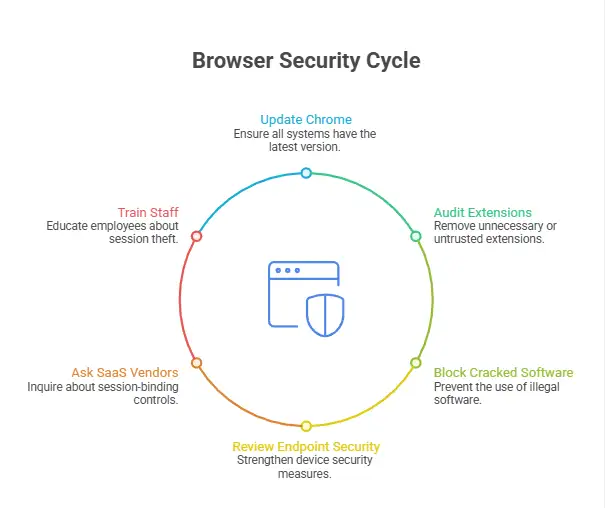
Why This Feature is Important
This update is not just another routine patch. It reflects a deeper shift in how browsers handle security. Here’s why chrome infostealer protection is such a big deal:
- Stolen session cookies are no longer enough
In the past, a simple case of session cookie theft could give attackers instant access. Now, Chrome makes it much harder to reuse stolen sessions across devices. - Accounts stay safer even after malware
exposure
Even if infostealer malware protection is bypassed, attackers may still fail to use stolen data because device bound session credentials tie sessions to the original device. - MFA
bypass attacks become less effective
Attackers often used stolen sessions to skip login verification. With improved google chrome session hijacking protection, this method is becoming less reliable. - A
clear step toward modern browser security
This new chrome cookie theft prevention feature shows that browsers are evolving beyond passwords and focusing on protecting entire user sessions.
Final takeaway
The big story here is not just a browser update. It is the fact that the browser wars are quietly turning into a fight over session trust. That matters because attackers have already adapted. They know stolen sessions can be more useful than stolen passwords.
So yes, chrome infostealer protection is worth paying attention to. It shows Google understands where the threat is going. The smartest move for users is simple: update Chrome, reduce risky downloads, keep endpoints clean, and stop thinking of browser security as a solved problem. The browser is now part of your identity perimeter, whether you notice it or not.
Trusted reference: Current reporting and official Chrome documentation support the rollout details and DBSC design direction. See Google’s Chrome developer materials and current coverage for the most recent Windows rollout status.
Keep Chrome updated and avoid untrusted downloads to prevent session cookie theft.




-20260925120840.webp&w=3840&q=75)
