
What does the most recent Chrome security update do to fix remote code execution, and why should you care right now?
A new Chrome security update for remote code execution fixes eight serious flaws that could let hackers run harmful code on your device. If you don't patch this, a simple browser session could lead to a full system compromise.
From Risk to Protection
From Silent Risk to Active Protection Not too long ago, most people thought a browser was just a tool. Open a page, read it, and then close it. That way of thinking doesn't work anymore. With threats getting more sophisticated, a browser is often the first line of defense. The most recent Chrome security update that fixes remote code execution shows this change.
Old way: Users could browse without worrying about risks from hidden code execution. New way: Security patches stop memory-level attacks from happening. Result: Your device is safe even from complicated attacks. This update is not optional if you use Chrome every day. It is very important.
What Change
What Changed in This Chrome Security Update? The Chrome security update remote code execution patch fixes eight serious security holes in the browser's internal parts. These problems weren't just little bugs. There were serious technical problems with how Chrome handles memory and web content. The new versions have:
• Windows and macOS are getting newer, more stable builds.
• Linux getting a patched version that works with it
The rollout is slow. That means that some users may already have the fix, while others are still waiting. CVE tracking is used to find each vulnerability, which makes sure that security teams around the world can work together and be open about what they are doing.
What is RCE
What is Remote Code Execution, and Why Is It So Dangerous? The term "remote code execution" sounds technical, but the idea is simple. It means that someone can run code on your device without your permission. In this case, the Chrome security update's remote code execution flaws could let attackers:
• Add bad scripts to web pages
• Use flaws in the browser to run those scripts
• Take charge of some parts of your system
Think about going to a website that looks normal. No downloads. Not a single click. Something is still running in the background. That is the risk here.
Vulnerability Breakdown
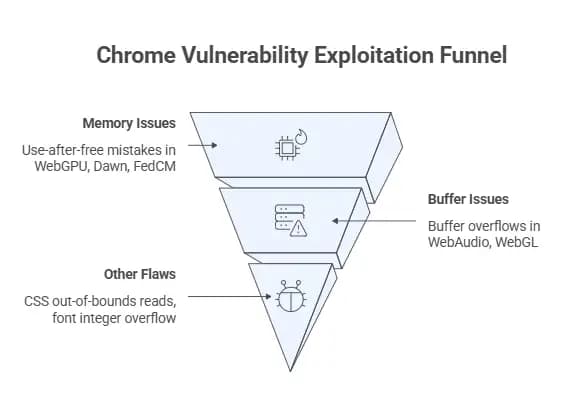
A technical breakdown of the 8 weaknesses This is the part where things get more specific. The update confirmed these technical categories:
Memory Issues
Problems with memory management "Use-after-free" mistakes were linked to a number of security holes. These things happened in parts, like
• WebGPU
• Dawn
• FedCM
In short, Chrome tried to use memory that had already been freed up. This hole lets attackers put in harmful instructions.
Buffer Issues
Issues with Buffer Overflow Two big parts were affected:
• WebAudio
• WebGL
Because of these problems, more data could be written to memory than it could handle. When this happens, attackers can replace safe data with bad code.
Other Flaws
Other Important Problems
• The CSS component had problems reading data that was out of bounds
• There was a bug in the fonts system that caused an integer overflow
Each flaw is dangerous on its own. When used together, they can get around Chrome's sandbox protection.
Why This Update
Why This Update Is Here This fix for remote code execution in the Chrome security update didn't just show up out of the blue. It is part of an ongoing effort to stay one step ahead of attackers. Today's web browsers can do things like
• Making 3D graphics
• Processing sound
• Taking care of secure identity systems
Every feature makes things more complicated. And risk comes with complexity. Advanced tools like these are used by security teams:
• AddressSanitizer
• MemorySanitizer
• libFuzzer
These tools find hidden bugs and edge cases before attackers do.
How Exploits Work
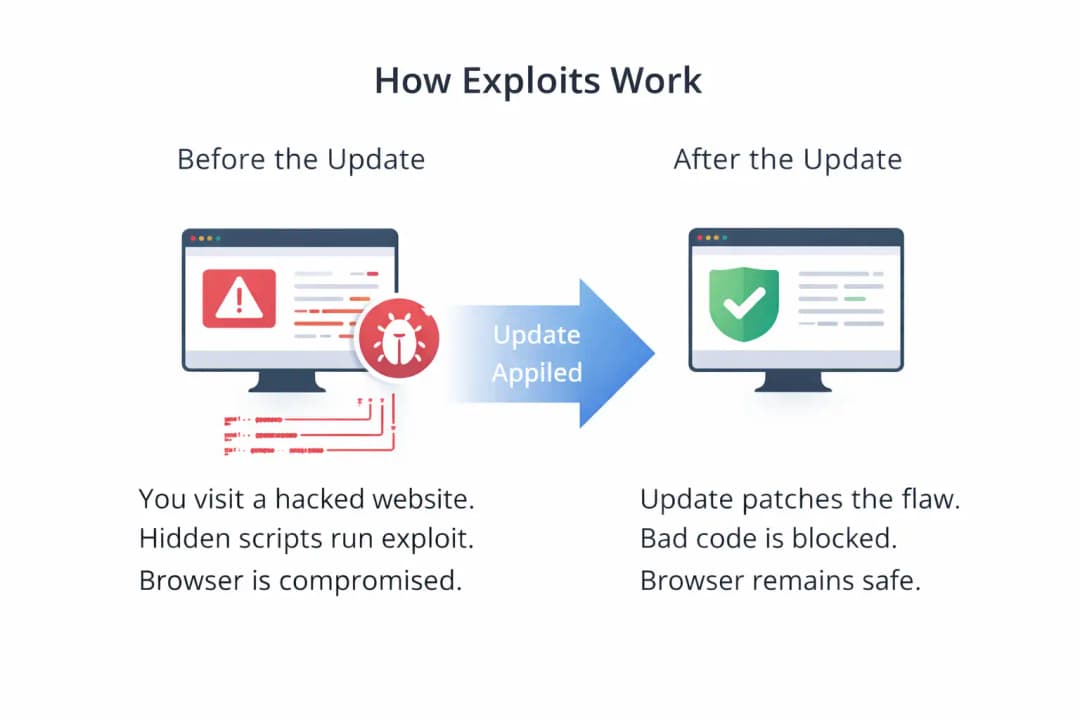
How the Exploits Work in the Real World Let's make this into a simple example.
Before the change: You go to a website that has been hacked. It runs scripts that aren't visible. These scripts take advantage of a flaw in memory. Your browser suddenly becomes a way into your system.
After the update: The same try doesn't work. There is no longer a weakness. The bad code can't run. That is the real difference.
Who is Affected
Who is Affected by This Problem? This Chrome security update has a remote code execution vulnerability that affects a lot of people.
Users
Single Users People who use Chrome on:
• Windows
• macOS
• Linux
They could be at risk even if they just look around.
Businesses
Companies Groups have more at stake:
• Exposure of private information
• Network breach
• Vulnerability at the endpoint
Enterprise administrators must make sure that updates are applied quickly.
Developers
Teams of Developers and IT Developers who use Chrome-based environments need to know how these security holes could affect systems for testing and deployment.
Pros and Limits
Pros and Cons of the Update
Pros
• Fixes eight vulnerabilities that are very dangerous
• Lowers the chance of a system-level breach
• Makes browser sandbox protection stronger
• Makes memory safer overall
Limitations
• Not all users get updates right away
• Some details about the exploit are still secret
• Dependencies on third parties may still be risky
That last point is important. Even if Chrome is safe, systems that are connected to it must also be kept up to date.
Why Details Are Limited
Why Google Doesn't Give Out Too Much Information You may have noticed that not all of the details about exploits are available to the public. This is on purpose.
If attackers get all the technical information too soon, they can figure out how to fix it and go after people who haven't updated yet.
So, the limit is really a way to keep people safe.
A few years ago, a news website used a similar flaw in a browser to install spyware. People who used it did nothing wrong. The attack happened just by reading the page.
That event changed how a lot of security teams think about browsers. This fix for remote code execution in Chrome security updates is meant to stop that from happening.
What To Do Now
What Users Should Do Right Now If you use Chrome, take a second to check what version you have.
What you need to do is:
• Go to Chrome settings
• Click Help
• Click on About Chrome
• Let it look for updates
For businesses:
• Use systems for managing patches in one place
• Send updates to all endpoints
Putting off updates makes you more vulnerable. That's all there is to it.
Common Mistakes
Things that users often do wrong Some people think that automatic updates always happen right away. That isn't always the case.
Some people put off updates because they are still working or have open tabs. Again, it's risky.
A quick restart can stop big problems from happening.
FAQs
Questions that are often asked
What is the remote code execution security update for Chrome?
It refers to a patch that fixes security holes that let attackers run code from the browser.
Is my browser still safe after the update?
The known security holes are fixed in the most recent version.
How often does Chrome get new security updates?
Chrome updates its software on a regular basis, especially when serious security holes are found.
Can this have an effect on people who use mobile devices?
If mobile Chrome uses the same weak parts, it could also be affected.
Should companies act right away?
Yes, businesses should make patch deployment a top priority.
Key Points
Important Points
• Eight high-risk vulnerabilities that had been confirmed were fixed
• The main problem was memory-related bugs
• Exploits could make the whole system vulnerable
• Updates right away lower risk a lot
Industry View
Viewpoint from the industry People who find and report these security holes are given rewards. One of the problems got a confirmed bounty payment all by itself.
This shows how important responsible disclosure is in cybersecurity now.
Conclusion
In short, The Chrome security update patch for remote code execution fixes serious bugs that could let hackers take over systems through the browser. The main benefit is that it can find vulnerabilities before they are exploited by using advanced testing tools.
This method lowers real-world risk a lot more than older reactive methods. Organizations that quickly apply updates get better protection and less exposure across all endpoints.
Final Thought
Last Thought This is the one thing you should remember. A browser is more than just a way to get to the internet. It is a part of your security system. Updating it is not a technical job. It's a normal thing to do. And in situations like this, it makes a big difference.





