
-20260128162648.webp&w=3840&q=75)
The Chrome Security Update fixes a risky Background Fetch API bug. Why should you care right now?
Because this Chrome Security Update (released January 27, 2026) patches a High-severity flaw in the Chrome Background Fetch API that could be abused in certain scenarios, and the fix only protects you after your browser updates and restarts. The official Chrome release notes list CVE-2026-1504 as “Inappropriate implementation in Background Fetch API” and confirm the patched stable versions for desktop.
Quick summary
Chrome Security Update is rolling out for Windows, macOS, and Linux as Chrome 144.0.7559.109/.110, patching a high-severity Background Fetch API issue tracked as CVE-2026-1504. The outlet notes that exploit details are being kept limited until more users are updated, and it highlights that Google awarded a bug bounty for the report.
Chrome Security Update patches the Background Fetch API vulnerability in Chrome 144
In the latest Chrome Security Update, Google rolled out a Google Chrome Security Patch that closes a high-severity bug tied to the Chrome Background Fetch API. If you live in Chrome all day like most of us, this kind of quiet fix matters more than it sounds. Browsers are basically our work desks now: email, banking, documents, admin panels, shopping carts, everything.
Within the first day of the rollout, the official release notes confirmed the stable channel update to 144.0.7559.109/.110 for Windows and Mac and 144.0.7559.109 for Linux. The notes also identify the specific fix: CVE-2026-1504, described as an “inappropriate implementation” in the Background Fetch API, credited to researcher Luan Herrera.
This is a Chrome Vulnerability Update that lands in the “update it as soon as you can” bucket. It also adds to a broader pattern: modern browser features that help sites feel like apps are useful, but they sometimes create weird edge cases that attackers love. That is why Chrome Browser Security updates keep arriving like clockwork.
What happened in plain words: Google shipped a Chrome Latest Update that fixes a Google Chrome security issue in a background download feature. If you do nothing, your device does not magically become safer. You need the update and a restart to fully apply the fix.
-20260128161907.webp&w=1080&q=75)
What Google confirmed in the official release notes
Google’s Chrome Releases blog states that the stable channel was updated on Tuesday, January 27, 2026, to Chrome 144.0.7559.109/.110 for Windows and Mac and 144.0.7559.109 for Linux, rolling out over the coming days and weeks.
Most importantly, Google lists one security fix in that build:
· High CVE-2026-1504: Inappropriate implementation in Background Fetch API (reported on 2026-01-09)
Google also notes a familiar policy: bug details and links can stay restricted until a large portion of users have the fix. That is normal in browser security, and it is meant to reduce copycat exploitation while updates spread.
Chrome security: what was patched
When people hear “high severity,” they often imagine Hollywood hacking scenes. Real life is usually less dramatic and more annoying. A browser flaw can be chained with other tricks, used in targeted campaigns, or used to leak data in ways that are hard to notice until it is too late.
This Chrome security bug sits inside a web capability designed to keep downloads running even if you leave a page. That convenience is great for legitimate uses like downloading a large file from a web app or saving offline content in a progressive web app. But whenever a feature keeps working in the background, the permission and isolation rules have to be rock solid.
Think of it like leaving a delivery at your doorstep. Most days it is fine. But if the “who is allowed to drop packages here” logic is sloppy, you can end up with the wrong thing delivered to the wrong person. That is the kind of logic mistake the phrase “inappropriate implementation” usually hints at.
This is also why a Chrome update that fixes vulnerability headlines is not just noise. Browsers are exposed to untrusted content constantly. One bad page visit can be enough in some attack chains.
Background Fetch API vulnerability
The Chrome Background Fetch API is a web platform feature that lets websites start and manage large downloads that can continue even when you are not actively staring at that tab. Developers often use it for large assets, offline support, or app-like experiences. MDN describes the Background Fetch API as a way to manage longer downloads in the background and flags it as experimental technology.
So, what is the Background Fetch API vulnerability in this story?
· The official description is short: CVE-2026-1504 is a high-severity “inappropriate implementation” in the Background Fetch API.
· Google has not published full technical details publicly as of the release note posting, which is common while patches roll out widely.
If you are seeing social posts claiming “it lets hackers fully take over any PC instantly,” treat that with skepticism. This appears to be unverified or misleading information, and no official sources confirm its authenticity.
The honest takeaway is simpler: a security flaw existed, it was rated high by Google, it is now patched in the latest stable release, and you should update.
-20260128161906.webp&w=1080&q=75)
How dangerous is the Chrome Background Fetch API bug?
A fair question, and also the one people argue about the most online.
Here is what we can say with confidence:
Google rated CVE-2026-1504 as high severity in the stable channel bulletin.
Public exploit details are limited for now, which reduces what outsiders can verify about real-world abuse today.
Here is what we cannot confirm from official sources yet:
Whether this specific issue is being actively exploited in the wild right now.
A public CVSS score from an official vulnerability database for CVE-2026-1504 as of today (some sites may quote a number, but do not rely on it unless you can trace it to an authoritative listing).
So, is it dangerous? High-severity signals meaningful risk, especially if you browse widely, install lots of extensions, or work with sensitive accounts. But there is no need for panic scrolling. Just update, restart, and move on.
Does the Chrome Vulnerability Update affect users?
Yes, in the most practical sense: if you are on an older Chrome 144 build (or older major versions that have not received the patch), your browser may be missing the fix.
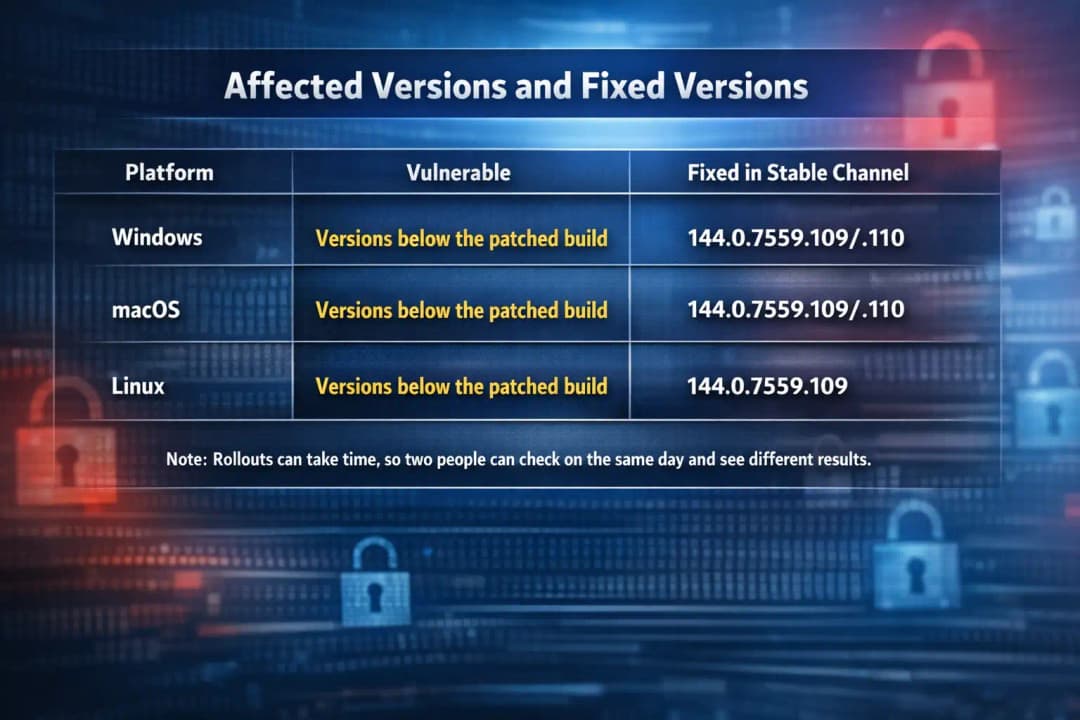
Google’s release notes specify the patched desktop versions:
Windows and Mac: 144.0.7559.109/.110
Linux: 144.0.7559.109
Cybersecurity News also reported the same version numbers for the rollout.
Who should care the most?
People who keep lots of tabs open for days and rarely restart Chrome.
Anyone using Chrome for work logins, admin dashboards, banking, or healthcare portals.
Teams managing fleets of devices, because “rolling out over days/weeks” means not everyone gets it instantly.
Google releases Chrome security update: what changed for Chrome Browser Security in 2026?
If you follow browser security, the bigger trend is that web APIs are expanding. That is not bad; it is progress. But every new capability adds complexity.
Background Fetch is a good example. It touches service workers, permissions, download handling, storage, and sometimes notifications. Even when a vulnerability is “just” an implementation bug, the surrounding surface area is large.
Also, browsers are now patched continuously. A Chrome browser update in 2026 is not a yearly event. It is a steady pipeline. That is why it is smart to treat browser updates like you treat phone updates: routine, not optional.
Technical details we can safely report today
This section stays intentionally grounded in what is publicly documented.
· CVE: CVE-2026-1504
· Component: Background Fetch API
· Severity (per Google): High
· Patched stable versions (desktop): 144.0.7559.109/.110 (Win/Mac) and 144.0.7559.109 (Linux)
· Public exploit details: restricted for now, per Google’s standard disclosure note
If you see a post claiming a full exploit chain, a named threat actor, or a malware campaign tied to this specific bug, verify it. Right now, the official notes do not name an actor or confirm active exploitation.
Is this a Chrome zero-day vulnerability?
Not based on what Google has publicly said in the release note.
A Chrome zero-day vulnerability generally means Google has confirmed active exploitation in the wild or a flaw was being exploited before a patch was available. The January 27, 2026, stable bulletin for CVE-2026-1504 does not include language confirming exploitation.
So here is the careful phrasing:
· This is a serious Google Chrome security issue.
· It is not publicly confirmed as a Chrome zero-day vulnerability at this time.
That distinction matters. It is the difference between “drop everything right this second” and “update today; do not postpone.”
-20260128161906.webp&w=1080&q=75)
Google Chrome bug fix timeline and what users might notice
Most people will not notice anything. That is the best kind of security fix.
Still, two real-world behaviors are worth calling out:
1. Your browser may say “up to date” but still needs a restart.
Chrome often downloads updates in the background, then waits for you to relaunch. That means the Chrome exploit fixed does not fully apply until you close and reopen Chrome.
2. Managed devices may lag.
Enterprises often stage rollouts. If you are on a work laptop, your IT team may control timing. You can still check your version and confirm when you land on the patched build.
How to update the Google Chrome security patch
This is the simple part, and it is the part that actually protects you.
How do I update my Google Chrome security?
1. Open Chrome.
2. Click the three-dot menu (top right).
3. Go to Help, then About Google Chrome.
4. Chrome will automatically check and download the Google Chrome Security Patch if one is available.
5. Click Relaunch when prompted.
Google’s stable channel update posts routinely direct users to update and note that rollouts happen over days and weeks.
How do I know if my Google Chrome needs to be updated?
Go to About Google Chrome and look at the version number.
For this specific Chrome Security Update, patched desktop versions are
Windows and Mac: 144.0.7559.109/.110
Linux: 144.0.7559.109
If you are below those numbers on desktop, you likely do not have the fix yet.
Does Chrome security work automatically?
Usually yes, eventually. Chrome typically updates in the background, then asks you to relaunch to apply it fully. The catch is the “eventually” part: if you keep Chrome open for days, you can delay the protection.
My practical advice: if you see a pending update icon or a “Relaunch” button, treat it like washing your hands. Small effort, big payoff.
Chrome update fixes vulnerability
Even without public exploit details, we can talk about plausible risk in a responsible way.
Example 1: the everyday user
You click a link in a forum or a sketchy download site. If a browser bug exists in background download handling, a malicious page might try to abuse that path. Most users will never know if something odd happened. That is the scary part of browser bugs: they can be silent.
Example 2: the office environment
A company uses internal web apps that download reports, invoices, datasets, or media in the background. Features like Background Fetch can be part of that workflow. If a flaw exists, defenders worry about data exposure or unexpected access paths.
Example 3: shared computers
If multiple people use the same machine, anything involving cached downloads, permissions, or background tasks gets more sensitive. A patch becomes even more important because user boundaries matter more on shared devices.
This is why Chrome Browser Security updates are not “optional improvements.” They are the lock on the front door.
A simple risk “heatmap.”
Likelihood vs. Impact:
· Low likelihood, high impact: targeted attacks against high-value users
· Medium likelihood, medium impact: opportunistic attacks via malicious pages
· High likelihood, low impact: nuisance behavior like forced crashes or prompts
Where does this Background Fetch API vulnerability sit?
Google labeled it high severity, which suggests the impact side is meaningful. The likelihood side is uncertain because public exploitation is not confirmed in the official note.
Affected versions and fixed versions
FAQ
What is the Background Fetch API vulnerability in Chrome?
It refers to CVE-2026-1504, a high-severity issue caused by an inappropriate implementation in Chrome’s Background Fetch API. Google lists it as fixed in the stable desktop releases of Chrome 144.
How dangerous is the Chrome Background Fetch API bug?
Google rated it. High severity, which is your strongest signal that it matters. However, technical details are limited publicly while the update rolls out, and Google has not publicly confirmed active exploitation in the release notes.
Does the Chrome vulnerability affect users?
Yes, if you are running an older version that has not received the patch. The fixed versions are Chrome 144.0.7559.109/.110 (Windows and Mac) and 144.0.7559.109 (Linux).
What version of Chrome has the fix?
For the desktop stable channel, the fix is in 144.0.7559.109/.110 (Windows and Mac) and 144.0.7559.109 (Linux).
Why does Chrome say it updated but still show “Relaunch”?
Because the update is downloaded, but the running browser process needs a restart to apply the security changes. This is common with browser patching.
Do I need to update other Chromium browsers too?
If you use Edge, Brave, Opera, or other Chromium-based browsers, watch for their updates as they incorporate Chromium security fixes on their own schedules. (This is general guidance, not a claim about their patch status for this CVE.)
Hoplon Insight Box
If you do one thing: open About Chrome, update, and then relaunch. Confirm you are on the patched build numbers.
If you manage devices (IT teams):
· Monitor which endpoints have reached Chrome 144.0.7559.109/.110.
· Encourage a relaunch policy. The patch is not fully active until a restart.
· Communicate clearly that “rolling out over days/weeks” means some users may not see it immediately.
If you are a developer using Background Fetch:
· Recheck your permission assumptions.
· Treat experimental APIs with extra caution and keep Chrome updated on dev machines.
Update now, then get back to your day
This Chrome Security Update is not the kind of news that feels exciting, but it is the kind that quietly prevents the worst Monday of your month. Google shipped a Google Chrome Security Patch for CVE-2026-1504 in the Chrome Latest Update for Chrome 144 stable, addressing a high-severity Chrome security flaw in the Chrome Background Fetch API.
If you take away one practical step, install the Chrome Security Update and relaunch Chrome today. That is it. Quick win for Chrome Browser Security, and you move on.
Related Blogs:
Chrome Security
Chrome security update vulnerability patch





