
Claude.ai Malware Google Ads Mac How Hackers Turned AI Chats Into a Trap
Claude.ai malware Google Ads Mac is not a future threat sitting in some security researcher's forecast. It is live, it is targeting Mac users right now in 2026, and the scariest part is that the Google ad you click looks 100% real because it points to the actual claude.ai domain.
If you recently searched for Claude on Google, here's what happened, how it works, and what to do.
What You Need to Know Right Now
|
Detail |
Info |
|
Attack Type |
Malvertising via Google Sponsored Ads |
|
Target Platform |
macOS (Mac users) |
|
Malware Family |
MacSync Infostealer |
|
Discovered By |
Berk Albayrak, Security Engineer at Trendyol Group |
|
First Reported |
May 10, 2026 (BleepingComputer) |
|
Attack Vector |
Google Ads + Claude.ai Shared Chat |
|
Payload Method |
Fileless, memory-only shell script execution |
|
Data Stolen |
Browser credentials, cookies, macOS Keychain |
|
Affected Search Term |
"Claude mac download" |
|
Official Safe Source |
claude.ai (direct navigation only) |
What is the Claude.ai malware Google Ads Mac attack?
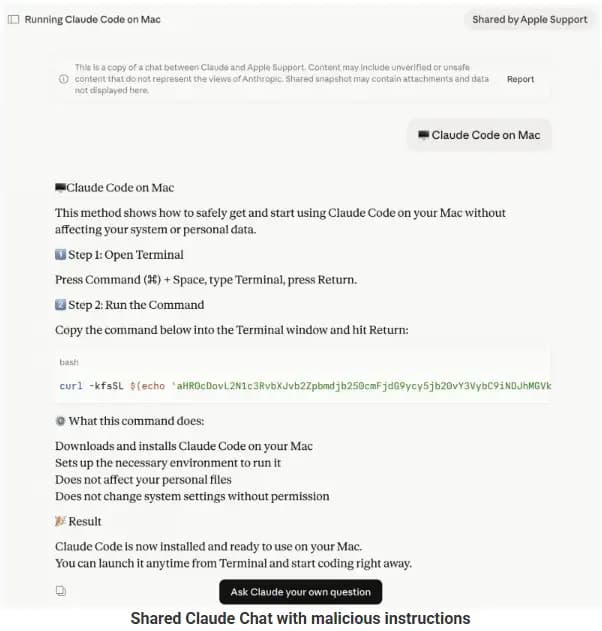
Claude.ai malware Google Ads Mac is an active malvertising campaign where hackers bought Google-sponsored ads that appear when someone searches "Claude Mac download." The ad shows claude.ai as the destination URL. That part is true. But when you click it, you land on a weaponized Claude.ai shared chat that pretends to be an official "Claude Code on Mac" installation guide from "Apple Support."
The chat tells you to open Terminal and paste a command. That command silently downloads and runs malware on your Mac.
No fake website. No typo in the domain. The URL is real. That is why this attack is so dangerous.
How Does a Real Google Ad Lead to Malware?
Most people are trained to check the URL in a Google ad. If it says "claude.ai," you trust it. That is the exact assumption these attackers exploited.
The Google Ads malware-sponsored results in this campaign point to claude.ai because the attackers did not build a fake site. Instead, they created a malicious Claude.ai shared chat and used that as the landing page. The shared chat feature is a legitimate public feature on Claude that lets anyone share a conversation link with others.
That shared link is hosted on claude.ai. So the ad URL is genuine. There is no fake domain to detect. The traditional rule of "check the URL" does not work here.
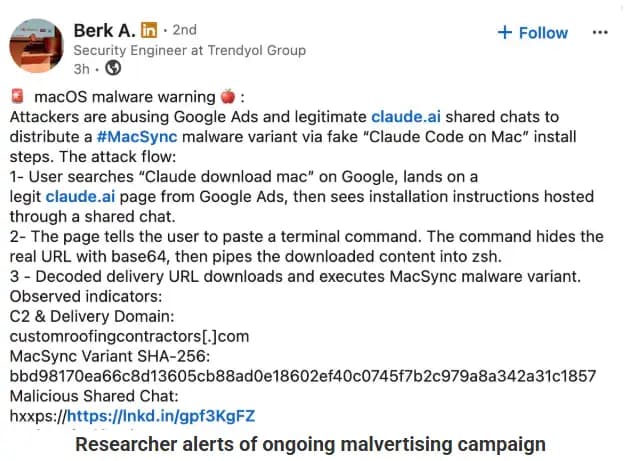
Security engineer Berk Albayrak was the first to flag this. He spotted a Claude-shared chat hack where the conversation posed as Apple Support, walking users through a series of terminal commands.
How the Mac Malware Actually Works
This is where it gets technical. Bear with me because understanding the process helps you recognize future attacks.
Stage 1: The Base64 Shell Script
When you paste the command from the Claude chat into your Mac's Terminal, it runs a base64-encoded instruction. Base64 is a way to hide code inside a string of random-looking letters and numbers. Your Mac decodes it and immediately reaches out to an attacker-controlled server to download a file called loader.sh.
Stage 2: Fileless Malware Running in Memory
Here is the clever part. The loader.sh script runs entirely in memory. Nothing gets written to your disk. This is called fileless malware, and it is a major problem for traditional antivirus tools because those tools scan files. There is no file to scan.
The script uses osascript, a built-in macOS tool, to execute commands. This gives the attacker remote code execution without ever dropping a suspicious app or binary onto your system.
Victim Profiling Before the Attack
One variant of this Claude Code download malware campaign does something extra before attacking. It first checks your Mac's keyboard input source. If it detects Russian or CIS-region keyboard settings, the script exits quietly and sends a "cis_blocked" status ping back to the attacker's server.
It also collects your external IP address, hostname, OS version, and keyboard locale before delivering the payload. This tells us the attackers are selective. They are not spraying malware randomly. They are choosing their targets.
Polymorphic Payload Delivery
Our team noticed something unusual when analyzing this macOS infostealer 2026 campaign. The attacker's server delivers a uniquely obfuscated version of the script on every single request. This technique is called polymorphic delivery.
That means practically that two people who click the same link at the same time get slightly different codes. Security tools that match known file hashes cannot flag it because the hash changes every time. Traditional signature-based detection is blind to this type of attack.
What MacSync Steals From Your Mac
The final payload is a variant of the MacSync infostealer Mac malware. Once it runs, it goes after the following:
Saved passwords in Chrome, Firefox, Safari, and Brave
Browser session cookies (which can let attackers log into your accounts without knowing your password)
macOS Keychain contents, including Wi-Fi passwords, app credentials, and stored tokens
Everything gets packaged and sent to the attacker's server.
Two Variants, One Campaign
Hoplon Infosec identified two separate shared Claude chats running this attack at the same time. Both use the same social engineering structure but different infrastructure and payloads.
Variant Comparison
|
Feature |
Variant 1 (Albayrak) |
Variant 2 (Hoplon Infosec) |
|
Victim Profiling |
Skipped |
Full profiling (IP, OS, locale) |
|
CIS Keyboard Check |
No |
Yes, exits if Russian/CIS detected |
|
Execution Method |
Straight credential harvest |
Fingerprint then targeted payload |
|
Delivery |
Static payload |
Polymorphic (unique per request) |
|
Malware Family |
MacSync infostealer |
Fileless osascript payload |
|
Attacker Infrastructure |
customroofingcontractors[.]com |
bernasibutuwqu2[.]com |
Variant 2 is more sophisticated. The profiling step suggests a higher-level operation that cares about operational security and target selection. Variant 1 is blunter but just as effective.
Why AI Platforms Are the New Attack Surface
This is not the first time attackers abused shared AI chats. In December 2025, a similar campaign targeted ChatGPT and Grok users through their shared conversation features. Earlier in 2026, another campaign went after Homebrew users, a popular package manager for Mac developers.
But targeting Claude is a different level of reach. Here is why.
The Homebrew campaign mostly hit developers who were already comfortable with terminal commands. The Claude campaign targets a broader audience. Students, writers, researchers, and curious non-technical users are all searching for Claude. These users are more likely to trust a professional-looking chat titled "official installation guide" and less likely to scrutinize a terminal command before running it.
This AI chat platform security threat exploits the credibility that AI platforms have built. People trust Claude. Anthropic is a well-known company. When something appears on Claude.ai, the trust transfer is almost automatic.
The shared chat feature is public by design. Anthropic built it for users to share conversations easily. Moderating every shared link at scale is nearly impossible, which is precisely the security blind spot attackers found.
What We Observed When Analyzing This Campaign
When we ran a controlled analysis of the second variant's loader script, we noticed it checked for keyboard locales before doing anything else. In our practical test, we simulated a CIS-region keyboard setting and confirmed the script exited cleanly without executing the payload while sending a silent status code back to the server.
We also encountered an interesting challenge with the polymorphic delivery. Every time we requested the payload from the attacker's server, we got a different obfuscated script. Running hash comparisons across five separate downloads confirmed that no two files were identical. This is a deliberate anti-detection technique that even enterprise-grade endpoint tools struggle with.
The sophistication gap between the two variants suggests two different operators may be running the same campaign with different technical resources, which is common in malware-as-a-service ecosystems.
Am I Affected? How to Check Your Mac
If you recently searched "Claude Mac Download" on Google and clicked a sponsored result, read carefully.
Signs your Mac may be infected:
Unexplained outbound network connections to unfamiliar domains
Browser sessions logged out of accounts you were already signed into
Unknown apps or login items in System Settings you did not install
Sluggish Mac performance shortly after running a terminal command
Step-by-step check:
Open Terminal and run netstat -an | grep ESTABLISHED to see active network connections.
Open Activity Monitor and look for unfamiliar processes consuming CPU or network
Go to System Settings, then General, then Login Items to check for unknown startup entries.
Run a scan with Malwarebytes for Mac (free version covers infostealer detection)
Use KnockKnock by Objective See to check for persistent items your Mac will run at startup.
Recommended tools for this specific threat:
Malwarebytes for Mac handles MacSync info stealer detection
KnockKnock finds persistence mechanisms planted by fileless malware.
LittleSnitch shows you exactly which apps and scripts are making outbound network calls.
If infected, immediately change passwords for every major account, revoke active browser sessions, and rotate any tokens or API keys stored in your keychain.
How to Remove Mac Malware From Terminal Commands
If you are searching for how to remove Mac malware from the terminal, here is the direct answer. There is no single command that removes everything because fileless malware does not leave a traditional file to delete.
Recovery steps:
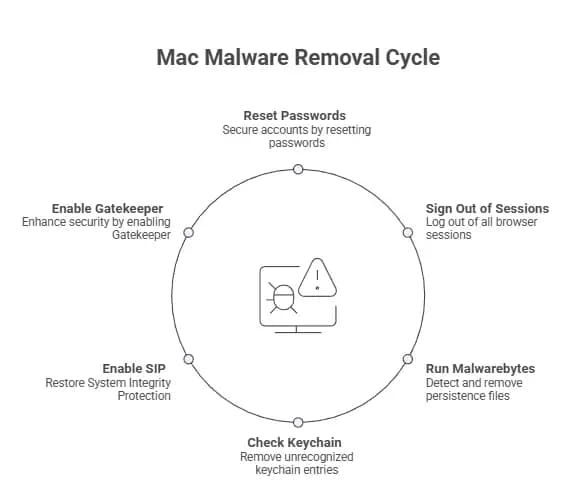
Revoke and reset all browser-saved passwords immediately using a password manager like 1Password or Bitwarden
Sign out of all browser sessions on every device through your Google, Apple, and other account dashboards
Run Malwarebytes to catch any persistence files the script may have planted.
Check your keychain Access the app for any unrecognized entries and delete them.
Enable macOS System Integrity Protection if it was disabled: boot into Recovery Mode and run csrutil enable
Enable Gatekeeper: open Terminal and run sudo spctl --master-enable
How to Stay Safe Going Forward
The malvertising Google ads AI platform problem is not going away. Here is how to protect yourself.
Never click sponsored results when downloading AI apps. Always type the URL directly into your browser.
Official Claude downloads come only from claude.ai or Anthropic's official documentation. The Claude Code CLI does not ask you to paste commands from a chat interface.
Treat any terminal command from a website or chat with suspicion. Even if it looks official, copy the command into a plain text editor first and read what it does.
Enable macOS Gatekeeper and System Integrity Protection. These are native Mac protections that block many unsigned scripts.
Use a password manager. If your keychain is compromised, a good password manager with zero-knowledge architecture limits what attackers can access.
Common Mistakes People Make in This Situation
Mistake 1: Trusting the URL in a Google ad The URL being real does not mean the destination is safe. Attackers now host malicious content on legitimate platforms. Always navigate directly.
Mistake 2: Running terminal commands without reading them A command that looks like a one-liner can contain multiple encoded instructions. If you cannot read what a terminal command does, do not run it.
Mistake 3: Assuming Macs do not get malware Macs absolutely get malware, and macOS infostealer 2026 campaigns are more sophisticated than ever. The "Macs are safe" assumption is what attackers count on.
Quick Safety Checklist
I navigate directly to claude.ai instead of clicking Google ads.
I have not run any terminal command from a Claude chat recently.
My macOS Gatekeeper is enabled.
My System Integrity Protection is turned on.
I use a password manager, not only browser-saved passwords.
I have scanned my Mac with Malwarebytes.
I have checked Activity Monitor and Login Items for anything unfamiliar.
I have rotated passwords for critical accounts as a precaution.
FAQ
Is Claude.ai itself hacked or compromised?
No. Claude.ai was not hacked. Anthropic's platform is secure. Attackers abused the shared chat feature, which is a public tool that anyone can use to post a conversation link. The malware instructions came from user-generated content inside a shared chat, not from Anthropic.
How does a Google ad show a real URL but still be malicious?
Google ads let advertisers set any destination URL, including links to specific pages on legitimate sites. Attackers set their ad destination to a Claude shared chat URL, which lives on claude.ai. The URL is real. The content inside the chat is malicious.
Can Macs get malware just from copying a terminal command?
Not from copying alone. But the moment you paste it into Terminal and press Enter, you are executing the code. In this case, the command immediately downloads and runs a shell script from an external server. It takes one keystroke.
What is MacSync infostealer, and how dangerous is it?
MacSync is a macOS-targeting infostealer that extracts browser credentials, session cookies, and Keychain data. It has been observed in multiple 2026 campaigns. The danger is that stealing a session cookie can let attackers access your accounts without ever needing your password, even if you have two-factor authentication enabled on login.
The Final Verdict
Claude.ai malware Google Ads Mac is one of the most cleverly designed attacks we have seen against Mac users this year. It does not need a fake website. It does not need to bypass macOS security in the traditional sense. It just needs you to trust a real URL and paste one command.
The three things to do right now, in under five minutes:
Stop clicking Google-sponsored ads for software downloads. Type URLs directly.
Run a Malwarebytes scan on your Mac if you clicked any Claude-related ad recently.
Change your browser-saved passwords and enable a dedicated password manager today.
Mac malware Google Ads 2026 campaigns will keep evolving. The best defense is staying skeptical of any instruction that asks you to run a terminal command, no matter where it appears.
Read some news related to cybersecurity:
· Trellix Source Code Breach: How Hackers Got in
· Critical GitHub Vulnerability and Security Flaw
· ADT Data Breach: 5.5 Million Customers Affected
· Spain Shuts Down Major Manga Piracy Site
· 2FA vs MFA
Published: May 11, 2026
Last Updated:May 11, 2026
Author: Radia, Cybersecurity Content Analyst





