

Did Anthropic really make it possible to move your saved AI preferences and context from ChatGPT and other assistants into Claude, and when did that change happen?
Yes. Anthropic’s own Claude Help Center and release notes confirm that Claude now supports importing and exporting memory and that memory is available to free users, with this update listed in Claude’s official release notes dated March 2, 2026.
Old way: you spent weeks teaching one assistant how you write, what you care about, and how you work, then lost that “setup” when you switched tools.
New way: Claude Memory Feature Data Transfer from ChatGPT uses a guided import flow that lets you bring that stored context into Claude in a structured format.
Result: less rework, fewer “let me explain again” conversations, and a cleaner path for teams that want an exit plan from vendor lock-in.
If you run a business, this matters for a simple reason: “memory” is not a novelty anymore. It is becoming part of how people get work done, and switching costs add up fast when staff have to rebuild preferences, prompt libraries, and workflow rules.
What happened and what it is
Anthropic added a built-in process to import and export memory so users can transfer the information an assistant stores about them, such as preferences and instructions, between Claude and other AI providers. This is documented in Claude’s official help article on memory import and export.
Claude’s official release notes also state that memory from chat history is now available for all Claude users, including free users, and they link directly to the memory import and export documentation.
If you are thinking, “So is this just chat export?” Not quite. The focus here is memory, meaning the specific facts and instructions the assistant has saved for future chats, not your entire raw conversation log.
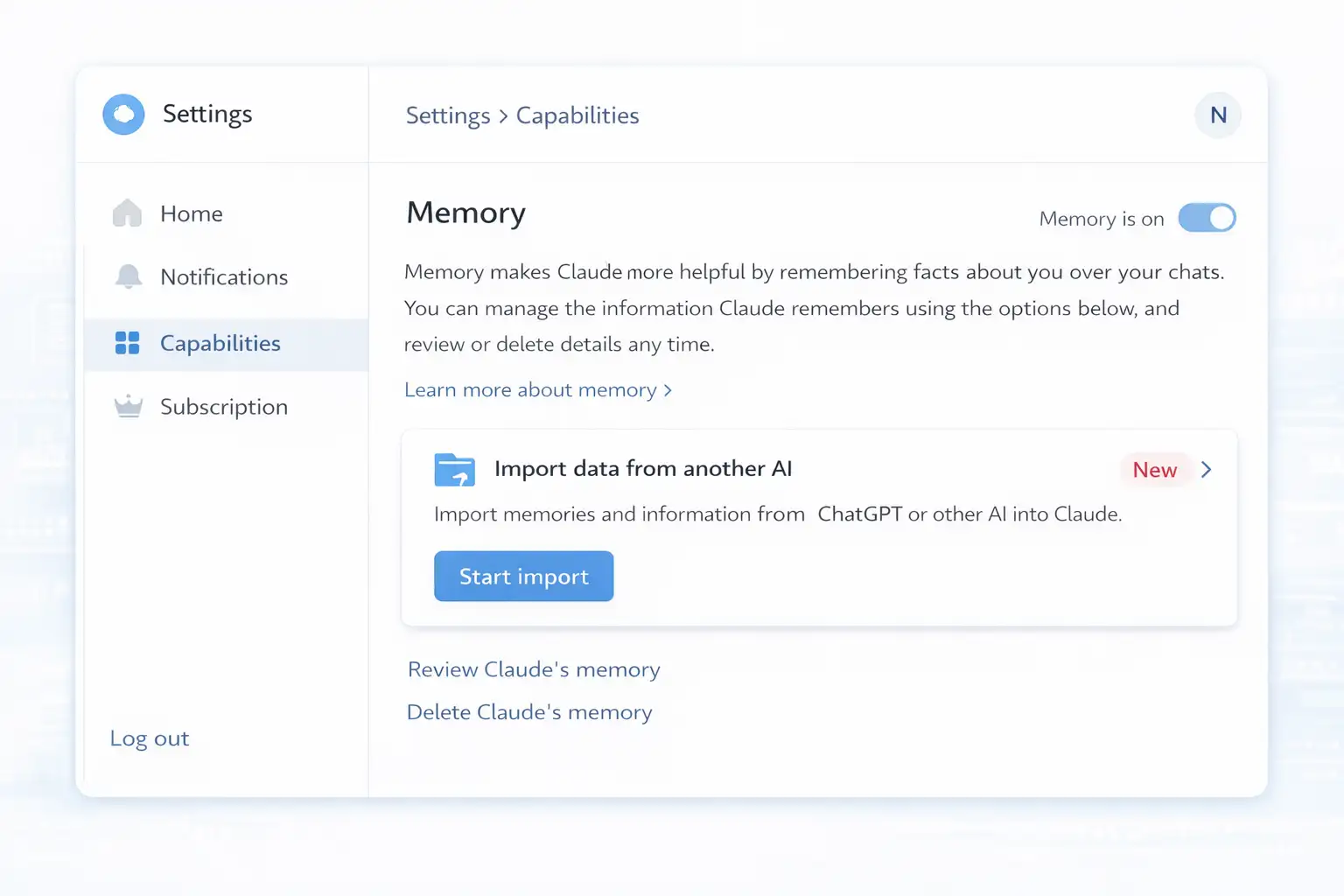
What is the Claude Memory Feature Data Transfer from ChatGPT?
Claude Memory Feature Data Transfer from ChatGPT refers to Claude’s official memory import flow that lets you bring saved preferences, instructions, and other stored context from another AI assistant into Claude. Claude provides a recommended prompt to extract those memories, and then you paste the result into Claude’s import tool.
Now for the practical part. Claude’s documentation is unusually specific here: it gives you the exact extraction prompt format, tells you where the import button lives, and points out you can edit what you share before importing.
That last detail matters more than people admit. In real organizations, “memory” can include sensitive items like internal project names, client context, or personal details staff casually mentioned. Claude’s help article explicitly suggests customizing the export prompt to exclude sensitive information.
Traditional migration vs. the Claude approach
The traditional method for switching AI assistants usually looks like this:
You export a data archive, if the platform offers one.
You try to sift through it.
You manually rebuild instructions and preferences.
You hope your team stays consistent.
Claude’s approach is different in a very specific way: it centers on a single structured prompt designed to pull “memories and context” into one copyable block, then routes that into an import flow inside Claude settings. That reduces the need for custom scripts or API work for most users.
From a decision-maker perspective, the “USP” is not that this is magical. It is that the workflow is simple enough that non-technical teams can actually do it while still keeping the user in control of what gets imported.
Why this exists
Let’s be blunt. Persistent memory creates a kind of lock-in. The more useful the assistant becomes, the harder it feels to switch.
Policy and research bodies have been talking about this dynamic for years in broader “data portability” terms. The OECD, for example, frames data portability as a tool that can empower users and reduce switching costs and lock-in effects across digital services.
Claude’s memory import and export is not a full industry standard. It is a product feature. Still, it fits the same direction of travel: users want control over what a platform knows about them and the ability to move that value elsewhere.
How it works in practice
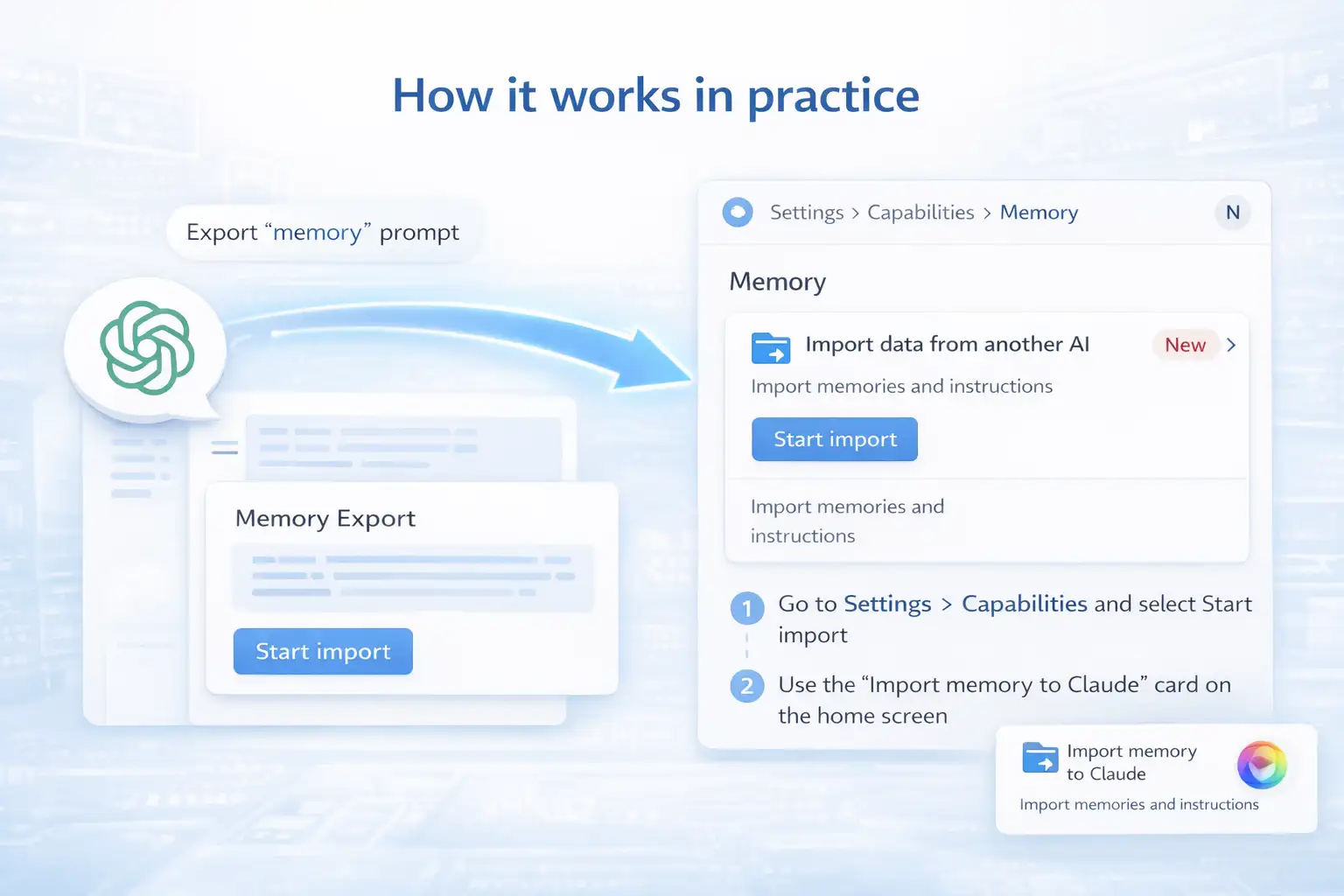
Claude Memory Feature Data Transfer from ChatGPT works by exporting the “memory” content from your current AI assistant using a recommended extraction prompt, then pasting that output into Claude’s built-in import flow. You start the import from Claude settings under Capabilities in the Memory section.
Claude’s help article lays out two ways to start the import:
Go to Settings > Capabilities, find the Memory section, and select Start import.
Use the “Import memory to Claude” card from the home screen, if shown.
And yes, the export side is intentionally lightweight. Claude recommends a prompt that asks your previous assistant to list every saved memory and relevant context, output in a single code block, in a consistent entry format.
Here is the part many teams miss: you can and should treat this like a data handling step. Read what you are about to import. Edit it. Remove anything you do not want carried over. Claude explicitly calls out the option to customize the prompt to exclude sensitive information.
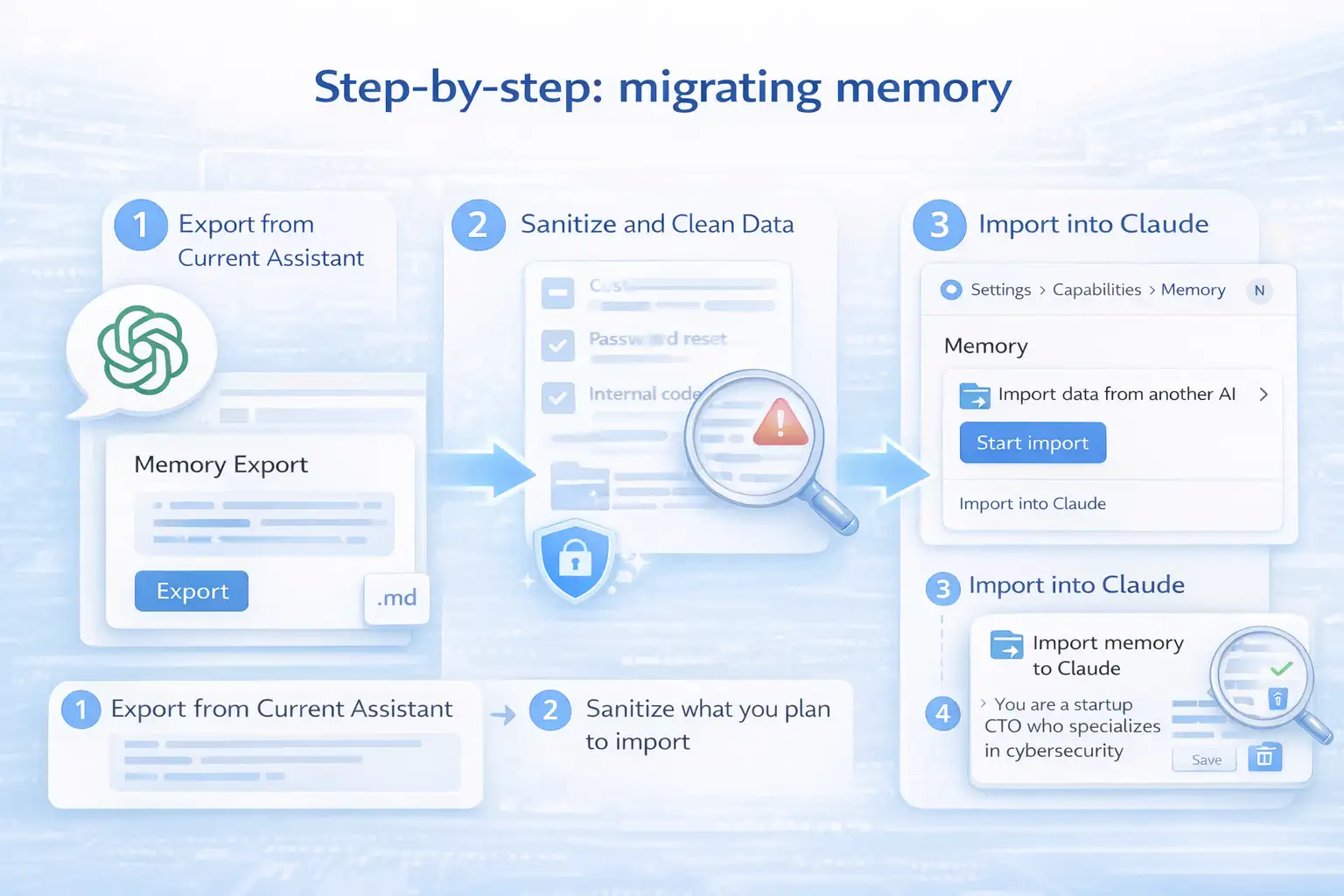
Step-by-step: migrating memory
This section is where most “how-to” articles get sloppy, so let’s keep it tight and realistic.
Step 1: Export the memory from your current assistant.
Use Claude’s recommended extraction prompt to ask your current assistant to list stored memories and learned context in one block. If your current assistant supports files, Claude notes you can request a Markdown file for your records.
A practical tip: do this in a clean workspace. If you are on a corporate device, store the exported block in an approved location, not a random notes app. This is governance, not paranoia.
Step 2: Sanitize what you plan to import.
Claude’s documentation explicitly encourages excluding sensitive information before importing.
In plain English, remove anything like
Customer names that do not need to live in a general assistant memory
Password reset hints, personal phone numbers, personal addresses
Internal-only project codenames if they are not required
If you are thinking, "But memory is the whole point,” you are right. The trick is deciding what belongs in reusable memory versus what should stay in a project system.
Step 3: Import into Claude using the built-in flow.
Open Claude settings, go to Capabilities, find Memory, then start the import and paste the exported content into the text box provided.
Step 4: Verify and trim
After import, check what Claude now “knows.” Claude’s help content emphasizes user control through the memory interface, including review and management through settings.
This is where teams should create a habit: a quick monthly review of memory entries for accuracy. People change roles, priorities shift, and stale memory can become a quiet productivity drag.
Real-world example
Picture a VP of Sales who has been using one assistant for months. The assistant “knows” their tone, preferred slide structure, key accounts, and how they handle objections.
Before, switching assistants meant two frustrating weeks of repeating, “Stop writing like legal counsel." “Use bullet points, not long paragraphs,” and “Here’s our ICP again.” The assistant got there eventually, but the VP lost time and patience.
After: With the Claude Memory Feature Data Transfer from ChatGPT, the VP exports their saved instructions and preferences, removes anything sensitive, imports the block into Claude, and starts with an assistant that already matches their working style. The difference is not theoretical. It is the gap between “usable on day one” and “usable after a month.”
That is the business value. Less ramp time. Less friction. Fewer support tickets from staff who feel like the tool is fighting them.
Who is affected?
Individual users
If you are a heavy AI user, memory portability reduces the cost of experimenting with alternatives. You can keep your core preferences and move on if your needs change.
Claude’s release notes explicitly state memory from chat history is available for all users, including free users. That widens the audience beyond paid plans.
Business teams
Teams are affected in a more structured way:
Onboarding: new hires often inherit templates and workflows. Memory portability can reduce setup time.
Governance: Imported memory becomes a new type of data asset that needs light controls.
Vendor risk: portability improves your negotiating position because “leaving” becomes less painful.
Security and compliance stakeholders
Security teams should care because memory can become a container for sensitive business context. Claude’s own documentation encourages excluding sensitive data before import, which is a subtle but important acknowledgement of the risk.
Benefits and limitations
Benefits
Claude Memory Feature Data Transfer from ChatGPT can reduce switching friction by letting users carry over saved instructions and preferences instead of rebuilding them manually. It may shorten ramp time for individuals and teams, and it supports a more realistic multi-assistant strategy where you choose tools based on tasks rather than history.
One benefit that business leaders often overlook is resilience. If a platform changes pricing or policy, portability gives you options. You are not trapped by your own “training investment.”
There is also a competitive market effect. Research on portability in digital markets often links it to reduced switching costs and less lock-in. The OECD makes this relationship explicit at a policy level.
Limitations
Let’s not pretend this solves everything.
First, this flow is about memory and learned context, not a guaranteed faithful transfer of every historical nuance in every chat thread. Second, what you import is only as good as what the previous assistant returns. If the exported memory is incomplete or messy, the import will be too.
Also, some claims floating around the internet about timing and processing behavior are not stated in Claude’s official documentation. When you see details that are not in official sources, treat them as unverified. This appears to be unverified or misleading information, and no official sources confirm its authenticity.
What users should do now
If you are rolling this out to a team, keep it boring. Boring is good.
Decide what belongs in “memory” versus what belongs in your systems of record (CRM, wiki, ticketing).
Create a short internal guideline on what should never be imported (client secrets, credentials, health data, and regulated identifiers).
Run one pilot with 5 to 10 users and review what got imported.
Only then scale it.
For individual users, the advice is simpler: export, read, trim, import, then verify what Claude saved.
And if you are planning a broader AI governance program, treat memory as a data class. Not the highest risk class in every case, but not “just chat,” either.
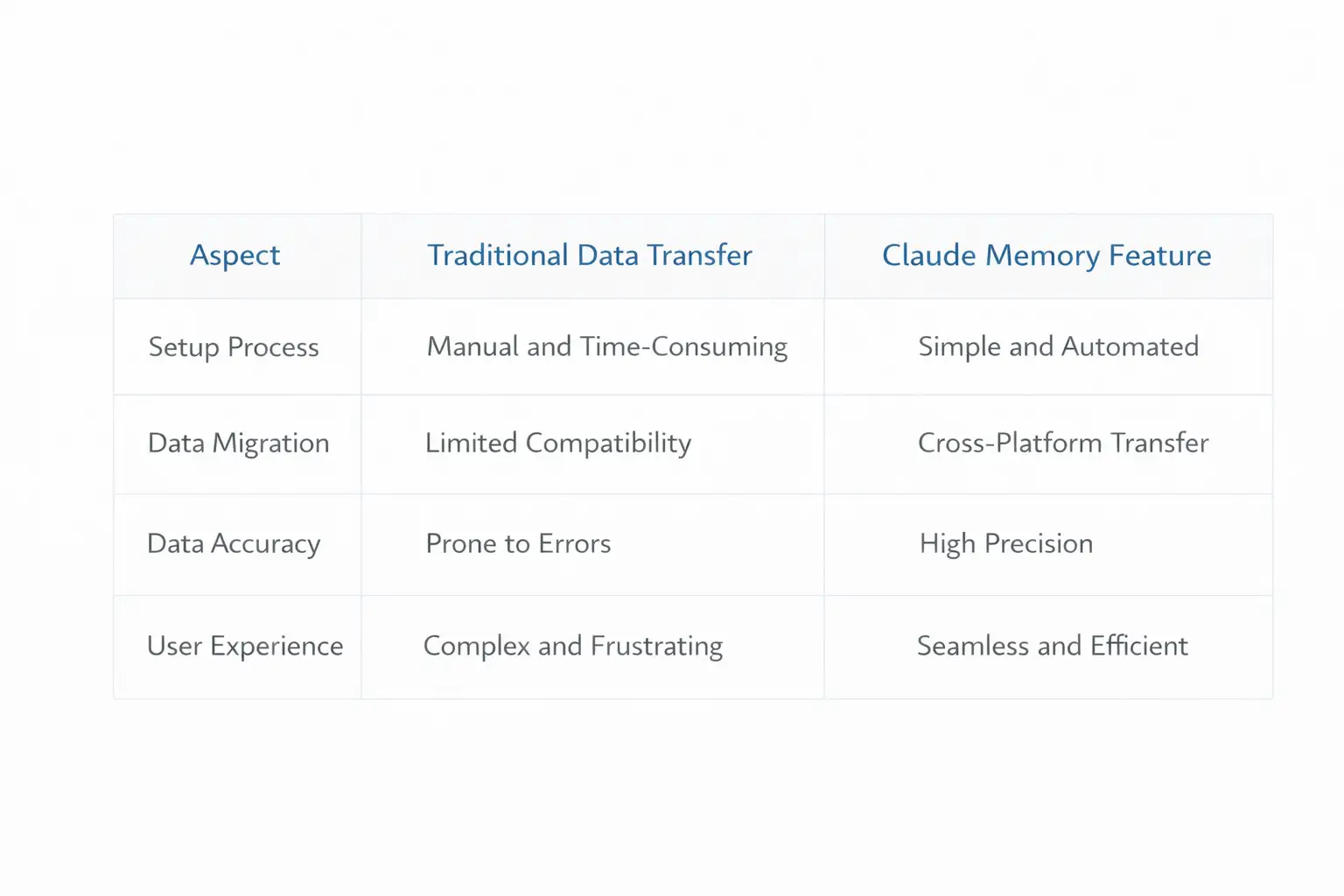
Quick comparison table
Below is a simple, decision-friendly view. It’s not meant to crown a winner, just to clarify what this feature actually changes.
Memory portability impact
Common mistakes teams make
Most problems here are not technical. They are human.
One mistake is treating memory like a dumping ground. If people paste everything, they will eventually regret it. Another is skipping the “sanitization” step even though the official Claude documentation literally recommends excluding sensitive information before import.
A quieter mistake: importing stale preferences. If someone’s role changed six months ago, their assistant's memory might still reflect the old job. That leads to weird output, bad prioritization, and the classic complaint: “The AI is not listening.” It is listening. It is listening to old data.
FAQ
Can I really move my saved preferences into Claude?
Yes. Claude’s official help documentation describes importing memory from other AI providers using a built-in import flow.
Is Claude's memory available to free users?
Claude’s official release notes state that memory from chat history is available for all Claude users, including free users.
Is this the same as exporting my whole chat history?
No. The official documentation focuses on exporting and importing “memory,” meaning stored preferences and learned context. It does not describe importing your entire raw chat log as a single seamless archive.
What should a business do before letting employees import memory?
Set basic rules for what should not be imported, ask employees to review and remove sensitive details before import, and run a small pilot. Claude’s documentation itself recommends excluding sensitive information before importing.
What this changes and what to watch next
Claude Memory Feature Data Transfer from ChatGPT is a practical step toward user-controlled portability in the AI assistant space. It does not magically solve every migration problem, and it does not eliminate the need for governance, but it does change the default experience from “start over” to “carry over what matters.”
If you lead a team, the forward-looking insight is simple: once memory becomes normal, your AI strategy starts looking more like a data strategy. You will want portability, reviewed workflows, and a clear line between personal preferences and regulated business information.
Claude Memory Feature Data Transfer from ChatGPT is also a reminder that “assistant data” is becoming business data. Treat it with the same calm seriousness you treat other knowledge assets.
summary
A guided, prompt-based import flow that makes portability practical for non-technical users while encouraging review and edits before import.
Reduced switching friction because saved preferences and instructions can move with you instead of being rebuilt from scratch.
Hoplon Infosec can help organizations adopt features like memory import safely, with lightweight controls that protect sensitive data without slowing teams down.
Recommended next steps
If you are bringing this into a business environment, here is the practical playbook:
Treat memory exports as sensitive by default. Store them in approved locations.
Create a one-page rule set: what is allowed, what is prohibited, and who reviews exceptions.
Pilot first, then scale. Look for issues like oversharing, stale memory, or inconsistent team usage.
Add periodic checks. A quick monthly memory review avoids long-term drift.
If your team is adopting memory features or moving between AI providers, Hoplon Infosec can help you set up a clean, realistic process for Claude Memory Feature Data Transfer from ChatGPT that balances productivity with security. That usually starts with a short policy, a pilot, and a few guardrails that people will actually follow.
For more latest updates like this, visit our homepage.




-20260925120840.webp&w=3840&q=75)
