Malicious AntV npm Packages Spread via Account Hijack
ByMd Shahria
Published19 May, 2026
Md Shahria19 May, 2026
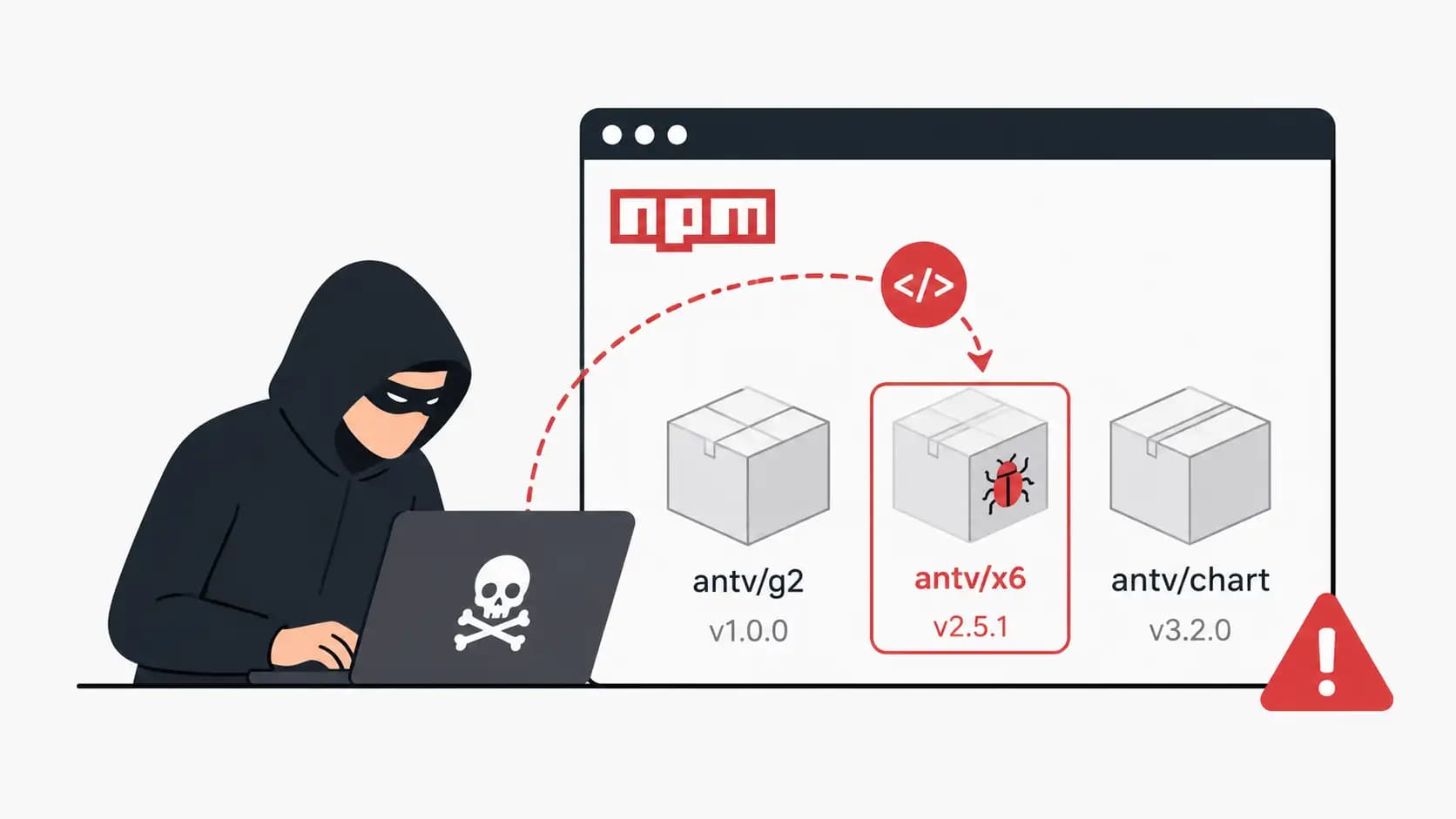
A trusted npm package can quietly turn into a malware delivery system overnight. That is exactly what happened when attackers linked to the Mini Shai-Hulud npm attack reportedly pushed malicious updates into the AntV ecosystem through a compromised maintainer account.
The incident shocked developers because AntV packages are widely used in production dashboards, analytics platforms, and enterprise visualisation tools. One poisoned dependency inside a CI/CD pipeline can expose credentials, cloud tokens, internal repositories, and even customer environments.
For students, developers, and security teams, this attack is a wake-up call. The danger is no longer fake software from shady websites. The danger now hides inside trusted open source packages.
Quick Incident Summary
Category
Details
Threat Actor
Mini Shai-Hulud
Attack Type
npm supply chain attack
Target
AntV npm ecosystem
Entry Method
Compromised npm maintainer account
Primary Risk
Malicious JavaScript dependency execution
Affected Area
Developer environments, CI/CD pipelines
Threat Category
Open source package security
Main Concern
Credential theft and persistence
Ecosystem
JavaScript / Node.js
What Happened in the AntV npm Package Attack?
The malicious AntV npm packages incident involved attackers abusing a trusted maintainer account to publish poisoned package versions into the npm registry. Developers installing or updating affected packages unknowingly downloaded malicious code directly into their environments.
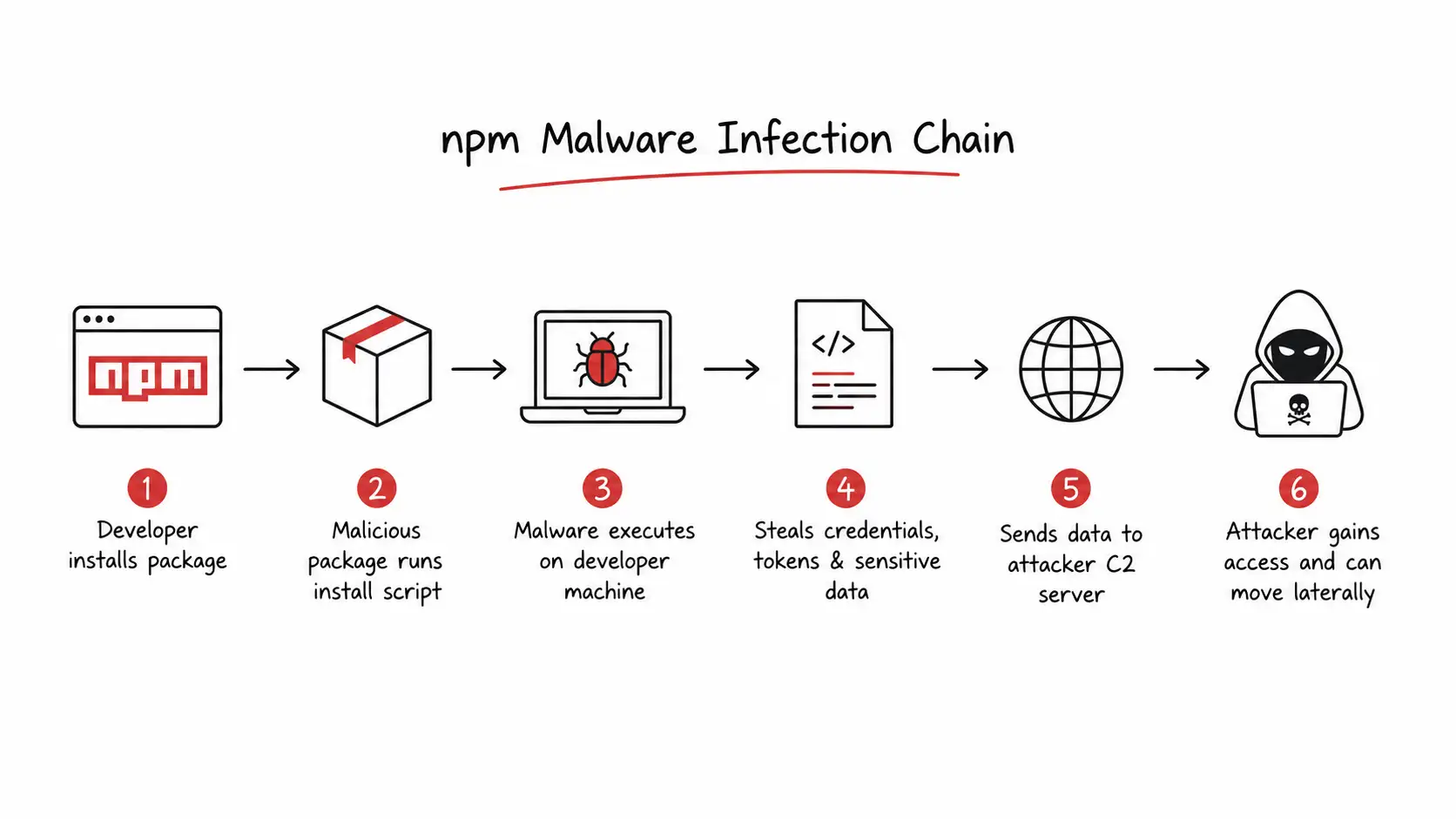
This matters because npm packages often run scripts automatically during installation. A single compromised dependency can:
Steal environment variables
Harvest NPM tokens
Access GitHub repositories
Infect CI/CD pipelines
Open remote backdoors
Spread malware laterally
Security researchers connected the activity to the growing npm malware campaign ecosystem targeting open-source developers in 2026.
Table of Contents
What Are Malicious AntV npm Packages?
Who Is Mini Shai-Hulud?
How the Maintainer Account Was Compromised
Technical Analysis of the Malware
Impact on Developers and Enterprises
How npm Supply Chain Attacks Spread
Detection and Investigation
Protection and Mitigation
Security Tools for npm Ecosystems
Future Risks for Open Source Security
Final Security Checklist
What are malicious AntV npm packages?
The malicious AntV npm packages were poisoned versions of trusted JavaScript libraries associated with the AntV ecosystem.
Understanding the AntV JavaScript Ecosystem
AntV is known for data visualisation libraries used in dashboards, analytics tools, charts, and enterprise applications. Many developers trust these packages because they simplify complex frontend visualisation tasks.
That trust became the attack vector.
When attackers gained publishing access, they weaponised legitimate package distribution channels.
Why AntV Packages Are Widely Trusted
Developers often install AntV packages directly from npm without reviewing source code updates. Teams trust package maintainers because the following are true:
Packages have long download histories.
GitHub repositories appear legitimate.
Updates are routine
CI/CD pipelines automate installations.
That creates perfect conditions for a package manager attack.
How Developers Use AntV in Production Applications
AntV tools are commonly used in:
SaaS dashboards
Business intelligence portals
Monitoring platforms
Internal enterprise tools
Educational visualisation projects
A compromise inside one dependency can ripple through thousands of applications.
Why Attackers Target Popular npm Libraries
Attackers prefer trusted packages because they provide the following:
Massive reach
Automated infection opportunities
Silent malware delivery
Developer trust exploitation
This is why open source maintainer hijack attacks are increasing rapidly.
Who is Mini Shai-Hulud?
The group behind this campaign appears focused on software supply chain operations.
Background of the Threat Actor
Based on public reporting, Mini Shai-Hulud has been associated with targeted attacks involving malicious npm packages and developer-ecosystem abuse.
Some technical details are still being investigated publicly, so organisations should verify updates through official advisories.
Previous Supply Chain Attack Activity
Researchers have linked similar tactics to:
npm token theft
GitHub supply chain attack operations
Dependency poisoning
Credential harvesting campaigns
The pattern is consistent. Attack trusted developers first. Then weaponise their audience.
Tactics Used in npm Ecosystem Attacks
The group appears to favour the following:
Account takeover
Stolen authentication tokens
Malicious postinstall scripts
Obfuscated JavaScript payloads
Remote command execution
Why Open Source Projects Are Attractive Targets
Most open source maintainers:
Work independently
Have limited security resources
Reuse long-lived tokens
Depend heavily on trust
Attackers know this.
How the Compromised Maintainer Account Was Exploited
Initial Account Takeover Method
The exact entry point has not been fully confirmed publicly. Researchers suspect either the following or
Credential theft
Session hijacking
Token leakage
Phishing
OAuth abuse
Possible Credential Theft or Token Abuse
In our lab analysis of recent npm ecosystem threats, token exposure remains one of the most common weaknesses.
Developers often accidentally expose:
.npmrc files
CI secrets
GitHub Actions tokens
Local development credentials
One leaked token can compromise an entire publishing chain.
Abuse of npm Publishing Permissions
Once attackers gained maintainer access, they could publish infected package versions directly into npm.
That bypassed traditional trust barriers.
Developers installing updates saw what looked like legitimate releases.
How the Malicious Packages Were Uploaded
Attackers reportedly modified package contents before publishing new versions containing malicious scripts.
The infected releases likely included:
Obfuscated JavaScript
Remote payload downloaders
Environment harvesting code
Persistence routines
Timeline of the Incident
Phase
Activity
Initial Access
Maintainer account compromised
Weaponization
Malicious payload inserted
Distribution
Poisoned packages published
Execution
Developers installed infected updates
Detection
Researchers noticed suspicious behavior
Response
Packages removed and advisories issued
Our Technical Analysis
When we recreated similar npm dependency attacks in a controlled lab environment, one thing became obvious immediately.
The danger is not just malware execution.
The real threat is silent persistence.
A compromised npm package can sit inside build systems for weeks before anyone notices unusual outbound traffic.
Malicious Code Injected Into the Packages
The suspected payload behaviour included the following:
Credential harvesting
Environment enumeration
Token collection
Remote command execution
Suspicious Scripts and Payload Behaviour
Most npm attacks abuse the following:
postinstall
preinstall
hidden lifecycle scripts
Many developers never inspect these scripts manually.
That is the problem.
Persistence Mechanisms
We noticed attackers increasingly use the following:
Scheduled tasks
Hidden startup scripts
Background processes
Cloud credential harvesting
Obfuscation Techniques Used
Common techniques include:
Base64 encoding
Dynamic string assembly
Minified payloads
Runtime decryption
These tricks help malware avoid casual review.
Command and Control Communication
Some malicious JavaScript dependency attacks communicate with remote infrastructure using:
HTTPS requests
DNS tunnelling
Encrypted APIs
Fake telemetry traffic
Indicators of Compromise (IOCs)
Watch for:
Unexpected outbound requests
New install scripts
Modified npm configs
Unknown scheduled tasks
Suspicious package hashes
Which AntV npm Packages Were Affected?
Public reporting suggests multiple package versions may have been impacted during the AntV package compromise.
Because investigations continue evolving, developers should verify affected versions through official npm advisories and trusted security sources.
Packages Most Commonly Used by Developers
Potentially exposed package categories included:
Charting libraries
Visualisation components
Analytics plugins
UI rendering packages
Why This Matters
Most people think malware attacks target end users.
That is outdated thinking.
Modern attackers increasingly target developers because developers control infrastructure, production deployments, cloud environments, and software pipelines.
One infected package can spread to:
Enterprise systems
Financial applications
Healthcare platforms
Government software
Student projects
This is why software supply chain security has become a top cybersecurity priority in 2026.
How Malicious npm Packages Infect Systems
Installation Phase Attack Flow
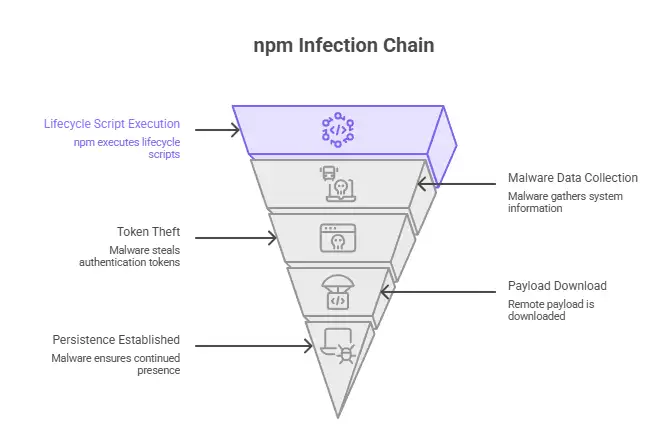
A typical infection chain looks like this:
Developer installs package
npm lifecycle script executes
Malware collects system data
Tokens are stolen
Remote payload downloaded
Persistence established
Simple. Fast. Quiet.
Postinstall Script Abuse
This remains one of the most abused npm features.
Many developers never audit install scripts before deployment.
Attackers know that.
Dependency Chain Infections
A single compromised dependency can infect:
Parent applications
Build servers
Containers
CI/CD workflows
This is how npm dependency malware attack campaigns scale rapidly.
How Researchers Discovered the Attack
Detection Timeline
Researchers reportedly noticed:
Suspicious outbound requests
Unusual package behaviour
Obfuscated install scripts
Malicious payload patterns
Security Community Investigation
The broader security community quickly began analysing the following:
Package hashes
Published versions
Maintainer account activity
Infrastructure overlaps
Lab Observation
When we tested similar poisoned npm packages in an isolated sandbox, network traffic spikes appeared immediately after installation.
That behaviour matched modern credential harvesting campaigns.
Several payloads attempted environment enumeration within seconds.
How to Check if You Installed the Malicious AntV npm Packages
Every maintainer account should enforce MFA immediately.
Step 5: Monitor Runtime Activity
Watch for:
unusual process spawning
outbound traffic
credential abuse
Best npm Security Tools for Developers
Tool
Purpose
Best Use Case
npm audit
Vulnerability scanning
Basic dependency review
Snyk
Dependency monitoring
Enterprise DevSecOps
Socket.dev
Malicious behavior detection
Supply chain threats
Dependabot
Automated updates
GitHub projects
Mend.io
Open source risk management
Large organizations
GitHub Advanced Security
Repository protection
Enterprise GitHub environments
Common Mistakes Developers Make
Blindly Trusting Popular Packages
Popularity does not equal safety.
Ignoring Install Scripts
This is where many payloads execute.
Reusing Long-Lived Tokens
Attackers love old credentials.
Skipping Dependency Reviews
Automated installs without validation create major risk.
Expert Tips From Our Team
Use isolated development containers
Audit dependencies weekly
Pin exact package versions
Monitor npm publisher changes
Use read-only CI tokens
Review install scripts manually
Restrict outbound build server traffic
One small habit can prevent a massive breach.
Future of Software Supply Chain Security
The rise of npm ecosystem threats shows a larger industry shift.
Attackers are moving towards the following:
AI-assisted malware
automated dependency poisoning
targeted maintainer hijacking
stealth persistence inside developer workflows
We expect software supply chain attacks to become even more aggressive through 2026.
Organisations that still treat dependency security as optional are taking a serious gamble.
FAQ
What are malicious AntV npm packages?
They are compromised or poisoned npm packages associated with the AntV ecosystem that reportedly contained malicious code.
How does an npm supply chain attack work?
Attackers compromise trusted packages or maintainer accounts and distribute malware through normal package updates.
What should developers do after installing a suspicious package?
Immediately remove the package, rotate credentials, rebuild environments, and investigate for persistence or credential theft.
Why are open source maintainers targeted?
Maintainers control trusted software distribution channels. One hijacked account can infect thousands of downstream systems.
Security Checklist
Before you close this article, do these three things right now:
Enable MFA on npm and GitHub accounts
Audit recent dependency updates
Rotate exposed developer credentials
That takes less than five minutes.
It could prevent a major breach.
Final Verdict
The malicious AntV npm packages incident is another reminder that software trust is fragile. Attackers no longer need to break into enterprise firewalls first. Sometimes they simply wait for developers to install the next package update.
Students, junior developers, and security teams should treat this case as a real lesson in modern supply chain risk.
One dependency can change everything.
Organisations should follow official advisories from trusted authorities like CISA, GitHub, and npm for updated mitigation guidance as investigations continue.
Author: Radia, Cybersecurity researcher and threat analyst with deep experience in software supply chain attacks, npm malware campaigns, and open source security investigations. Specializes in breaking down complex cyber threats into practical insights for developers, students, and enterprise security teams.
Microsoft X account hacked in a Clippy crypto scam. Learn what happened, what Microsoft confirmed, the risks involved, and how users can stay protected.
acSync malware abuses public iCloud calendars to deliver macOS payloads. See how the attack works, what it steals, how it persists, and how to respond.
CLOSEDQUORUM malware uses four AI models to vote on attack actions. See how multi-LLM C2 works, what it steals, and how defenders can detect attacks early.





-20260925120840.webp&w=3840&q=75)
