
Recently, security teams have seen threat actors using a modified version of an open-source tool called AuraInspector to scan Salesforce Experience Cloud environments that are open to the public.
The goal of the campaign is to find sites where guest user permissions are too broad. When configurations are wrong, attackers can get sensitive information from Salesforce CRM objects without having to log in.
Cybersecurity Research Desk is the author.
Published: Based on research that has been made public and official Salesforce security advice
What is the Mass-Scanning Attack on the Salesforce Experience Cloud?
A simple question makes the situation clear.
What is going on with Salesforce Experience Cloud sites right now?
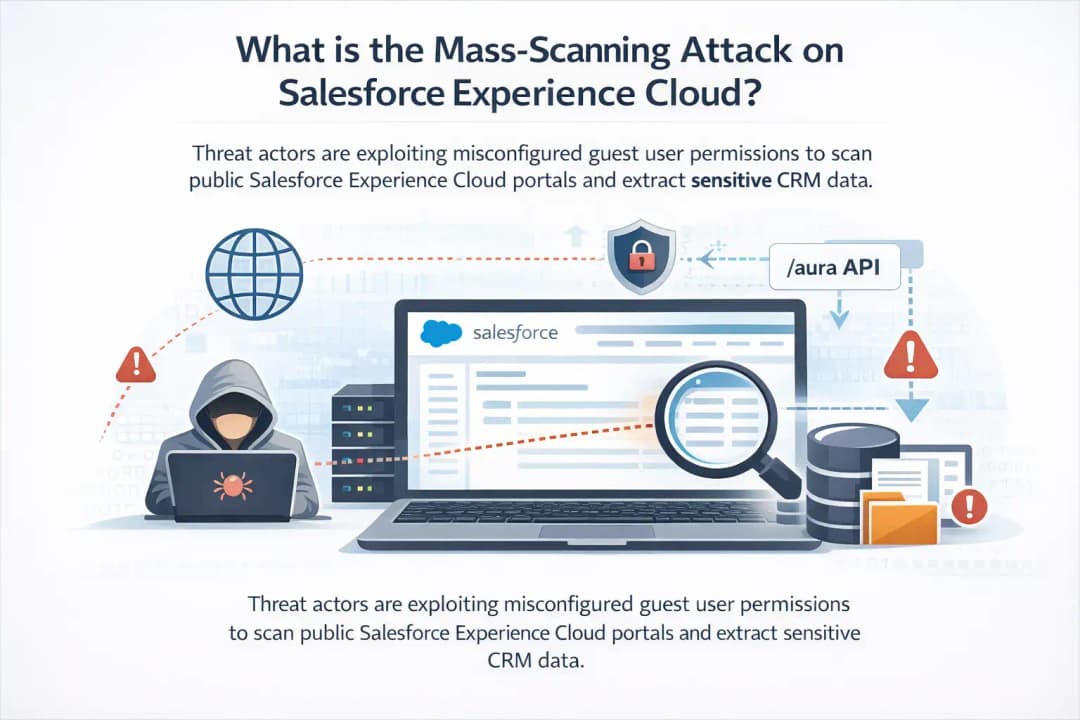
Security monitoring has found a campaign in which threat actors use a modified version of AuraInspector to scan public Salesforce Experience Cloud portals. The scanning activity is aimed at sites where guest users don't have strong permissions. Attackers can query internal Salesforce objects and get sensitive information when those permissions give them too much access.
Salesforce has made an important point clearer. The activity doesn't depend on a problem with the Salesforce platform itself. Instead, it takes advantage of mistakes that companies make when they set up their Experience Cloud environments.
That difference is important. It moves the focus from software flaws to how to manage identity and access.
This means that the platform stays safe as long as it is set up correctly. When guest users have more permissions than they need, problems can happen.
Why This Security Activity is Important Right Now
In modern business systems, public portals are very common.
Companies use Salesforce Experience Cloud to run help centers, knowledge bases, partner collaboration platforms, and customer support portals. These sites are meant to be open to the internet. Customers should be able to read articles, open cases, or look up information without having to log in.
Salesforce makes a guest user profile to make this possible. This profile lets people who aren't logged in see some content.
When set up correctly, the design works well. But if administrators let guest users look at internal data objects, a visitor may see a lot more information than they should.
It looks like threat actors are actively looking for these kinds of misconfigurations on the internet.
The scanning shows a bigger change in how cybercriminals work. Attackers are more and more going after identity settings and access policies instead of taking advantage of software bugs.
Getting to know Salesforce Experience Cloud
It's helpful to know how Experience Cloud works before you look into the attack activity more closely.
Salesforce Experience Cloud is a framework that lets businesses create digital experiences that are open to the public and linked directly to their CRM system.
These portals usually have:
• Knowledge bases for customer support
• Pages for submitting cases
• Boards for community discussion
• Spaces for partners to work together
• Portals for frequently asked questions and documentation
Some parts of the system are open to people who aren't logged in because these sites need to be open to customers.
The guest user profile controls who can get to that.
The guest profile can only see public content if it is set up correctly. If it is set up wrong, it could interact with Salesforce data objects that were never meant to be public.
This is where the current scanning activity comes into play.
What is AuraInspector and why do hackers use it?
The cybersecurity company Mandiant made AuraInspector, an open-source security tool. The tool was made to help defenders check the access control settings in Salesforce environments that use the Aura framework.
Its purpose is to protect. Security teams use it to see if guest users can access objects or API endpoints they shouldn't be able to.
Experience Cloud sites expose the /s/sfsites/aura endpoint for Lightning component communication, and the tool uses it.
At first, AuraInspector could tell which objects could be accessed through that endpoint. It was basically a tool for diagnosing.
Salesforce's security analysis says that attackers have changed the tool.
The personalized version goes even further. It doesn't just find exposed objects; it also tries to get data from them.
That difference changes a diagnostic tool into a tool for reconnaissance.
How the Mass-Scanning Attack on Salesforce Experience Cloud Works
The order of the attack seems simple, but it can have serious effects if things are set up wrong.
This is how the campaign usually goes.
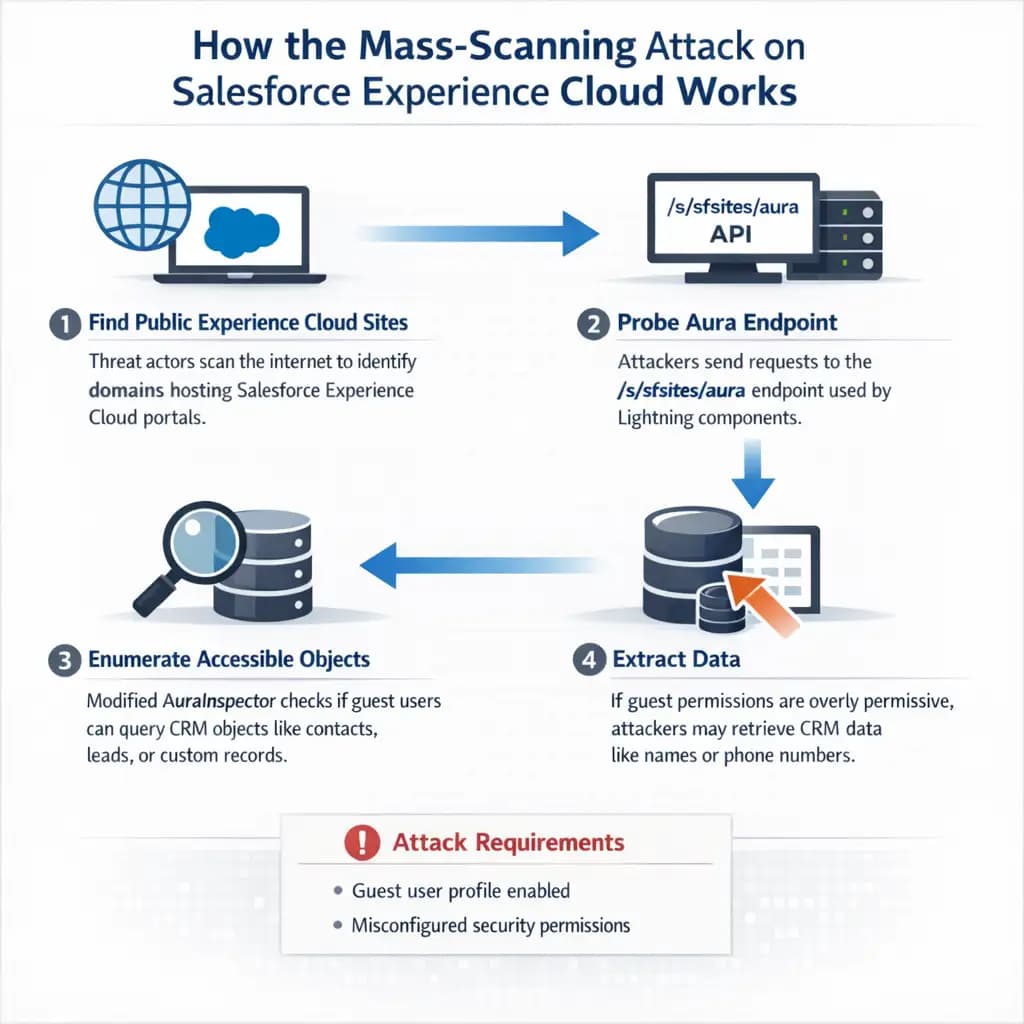
Step 1: Find Public Experience Cloud Sites
Threat actors look for domains that host Salesforce Experience Cloud portals on the internet. It's easy to tell these sites apart by how they are set up and the fact that their endpoints are open to the public.
Step 2: Check out the Aura Endpoint
The attacker sends requests to the /s/sfsites/aura endpoint once they know what a portal is.
This endpoint can talk to Lightning components and show metadata about available objects when access rules allow it.
Step 3: List the Objects You Can Access
The changed AuraInspector tool checks to see if the guest user profile can query Salesforce objects like leads, contacts, or custom records.
The scan moves on if access is denied.
The tool moves on if access is allowed.
Step 4: Get the Data
When permissions allow it, the changed tool tries to get real data fields from those objects.
Names or phone numbers saved in CRM records are two examples.
Salesforce says that the attack needs two things to happen:
• The group has a guest user profile that people can use to get in.
• The setup does not follow Salesforce's best practices for security.
The attempt to extract data fails if either of these conditions is not met.
Before and after the right settings
Think of a business that runs a customer service portal.
Before you tighten permissions, the portal lets guest users access some CRM objects without meaning to.
Someone who visits the aura endpoint and interacts with it might find that they can see contact records. That visitor could use automated tools to get names and phone numbers from those records.
Now think about the same situation after administrators check the permissions of guest users.
Access to objects is limited. Private is the default setting for external access. You can't get to the public API.
In that case, the same scanning tool wouldn't find anything useful.
Customers would still be able to use the portal. But the internal CRM records would still be safe.
Who is Affected by the Salesforce Experience Attack on Cloud Mass-Scanning
Different groups are at different levels of risk.
Companies that use Experience Cloud
If guest user permissions are too broad, it could affect businesses that run customer portals or community sites that are linked to Salesforce CRM.
Security groups
Security experts need to check configuration settings and keep an eye on logs for strange queries that are trying to get to aura endpoints.
People who buy and use
If CRM records are not set up correctly, personal information like names and phone numbers could be made public.
Salesforce has said that this kind of data could later be used to help social engineering campaigns. Attackers often use the information they get along with phone calls or phishing messages.
Evidence Points to Targeting Based on Identity
Salesforce security teams say that this kind of activity is part of a bigger trend in cybercrime.
Instead of going after traditional software vulnerabilities, attackers are more and more going after identity and access settings.
The reason is easy. It's common to make mistakes when setting things up. They are also easier to take advantage of than bugs in complicated software.
An attacker doesn't need advanced exploit code if a company accidentally lets public users query internal objects. A simple script that runs on its own might be enough.
Salesforce has linked the campaign to a group of known threat actors, but the company has not said who the group is.
Salesforce's architecture has pros and cons
It's important to keep things in perspective.
Salesforce Experience Cloud's architecture gives businesses the freedom to connect public portals to internal data.
When set up correctly, the platform can enforce strict rules about who can access it.
But being flexible also means being responsible.
Administrators need to know how guest profiles work with objects, APIs, and Lightning components.
It's not uncommon for large cloud deployments to have misconfigured settings. Many companies have more than one portal, each with its own set of permissions.
That makes it more likely that mistakes will happen.
What Organizations Should Do Now
Security teams don't need to freak out. But they need to look over a few configuration settings right away.
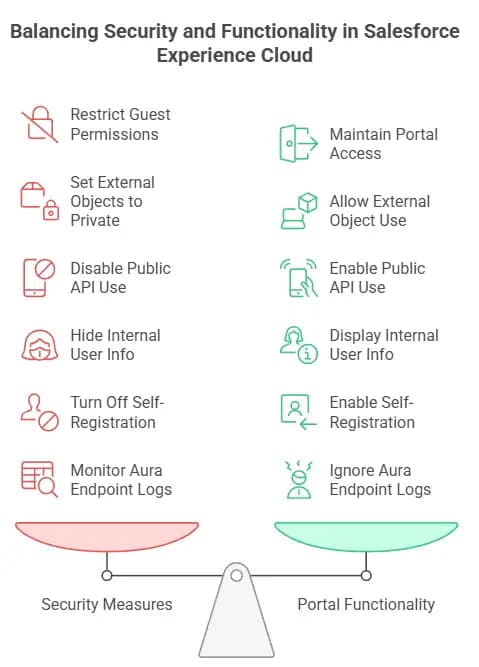
Salesforce suggests the following actions:
• Check the permissions for guest users on Experience Cloud
• Make sure that the default access for external objects is set to private
• If you can, don't let guests use public APIs
• Make it harder for guests to see information about internal users
• Turn off self-registration if it isn't needed.
• Check logs for strange requests that are aimed at the aura endpoint.
These changes won't affect how the portal works normally. They just make sure that anonymous visitors can't see or change sensitive CRM data.
Another important part is security monitoring. Traffic patterns that seem suspicious and are aimed at aura endpoints should be looked into right away.
Questions that are often asked
Is this a weakness in the Salesforce platform?
No. Salesforce has said that there is no inherent vulnerability in the platform. The activity is aimed at customer configuration settings, not software bugs.
What kind of information could attackers get?
If guest user permissions are too loose, attackers may be able to get to data stored in CRM objects. Salesforce has talked about things like names and phone numbers as examples.
Is every Experience Cloud site at risk?
No. Only sites that have guest user access set up wrong are at risk of exposing data.
What do attackers want with this data?
Information that has been harvested may be used in follow-up attacks like targeted phishing or voice-based scams.
How can businesses find out if they are affected?
Administrators should check the profiles of guest users and look for strange queries directed at aura endpoints in the system logs.
Summary
The mass-scanning attack on Salesforce Experience Cloud shows how cybersecurity strategies are changing.
Attackers are no longer just looking for bugs in software; they are also looking for weak spots in cloud platforms' identities and settings.
The main point is clear. If the Experience Cloud environment is set up correctly, this activity won't be able to happen.
Companies can greatly lower their risk by checking guest user permissions, limiting access to objects, and keeping an eye on logs.
Security teams that make configuration management a key part of their defense will be better ready for this kind of attack.
Platforms change. Attackers change too. The need for disciplined security practices stays the same.
More and more, businesses rely on cloud platforms to serve their customers and partners. You have to be responsible for that convenience. You need to keep an eye on identity and access configuration all the time.
Hoplon Infosec works with security teams to check SaaS environments, audit permission structures, and find unusual activity before it leads to a data breach.
A quick look at the settings today can stop a big problem tomorrow.
For more latest updates like this, visit our homepage.
Trusted References
Salesforce Security Advisory
Mandiant Security Research
https://developer.salesforce.com/





