
What Is a Brute Force Attack?
A brute force attack is a credential-based cyberattack in which an attacker repeatedly tries passwords, usernames, or other login combinations until the correct one is found. These attempts are usually automated, allowing attackers to test large numbers of combinations against an account, device, application, or online service.
The concept is simple, but the security risk can be significant. If an authentication system relies mainly on passwords and lacks controls such as rate limiting, account lockout protections, multi-factor authentication (MFA), and login monitoring, attackers may have enough opportunities to keep guessing.
Modern authentication security therefore focuses on layers rather than passwords alone. Strong password policies can reduce risk, but organizations also need controls that detect unusual login activity, slow automated attempts, and require additional verification when necessary.
It is also useful to understand how hackers guess passwords, because attackers do not always rely on pure brute force. They may use password spraying, credential stuffing, phishing, leaked credentials, or a combination of several methods.
For businesses, brute force attacks are more than a password-security problem. A successful login can become the starting point for account takeover, fraud, unauthorized access, data exposure, privilege escalation, or further movement through the environment.
That is why understanding what a brute force attack is matters from both a cybersecurity and business-risk perspective.
Why Brute Force Attacks Still Matter
Brute force attacks are not new, but they remain relevant because attackers continue to find systems with weak or reused passwords, exposed login interfaces, inactive accounts, and insufficient authentication controls.
The attack does not necessarily need to be technically sophisticated. If an internet-facing login portal allows repeated attempts with little resistance, automation can turn a simple guessing technique into a practical attack method.
A related technique is password spraying, where an attacker tries a small number of commonly used passwords across many accounts instead of repeatedly targeting one account. This approach may help attackers avoid traditional account-lockout thresholds.
The distinction matters because password-based attacks can begin as a stream of failed sign-in attempts but become far more serious if one account is successfully compromised.
At that point, the issue is no longer simply repeated login failures. Depending on the account and its privileges, the attacker may gain access to email, cloud services, internal systems, sensitive information, or administrative functions.
Organizations therefore need visibility into authentication activity. Repeated failures, unusual login frequency, unexpected geographic patterns, unfamiliar devices, or authentication attempts against many accounts can all deserve investigation when they appear outside normal user behavior.
What Is a Brute Force Attack in Cybersecurity?
In cybersecurity, a brute force attack generally refers to systematically testing possible credentials until a valid combination is identified.
The attack can take several forms.
In an online brute force attack, guesses are sent directly to an authentication service such as:
- a website login page
- a VPN portal
- an administrator panel
- a cloud account
- Remote Desktop Protocol (RDP)
- SSH
- another internet-facing authentication system
Because every attempt interacts with the real authentication service, defenders may be able to detect or restrict the activity through rate limits, lockout rules, risk-based authentication, bot detection, and monitoring.
An offline password-cracking attack is different. If attackers obtain password hashes through a separate compromise, they may test password candidates locally without sending every attempt to the victim's login system.
Password length, uniqueness, password-storage practices, and the strength of the hashing method can all influence how difficult this type of attack becomes.
Modern credential attacks also extend beyond pure password guessing. Attackers may combine brute force techniques with leaked passwords, phishing, malware, or other credential-theft methods.
This broader picture of password-based attacks explains why password security should be treated as part of identity and access management rather than as an isolated user issue.
Why Do Brute Force Attacks Still Work?
Brute force attacks continue to exist for a straightforward reason: some authentication systems still make repeated guessing practical.
Common contributing weaknesses include:
- short or predictable passwords
- password reuse
- default credentials
- exposed administrative interfaces
- inactive or forgotten accounts
- weak login throttling
- inadequate monitoring
- missing or poorly configured MFA
Attackers do not necessarily need an advanced software vulnerability if they can simply log in using credentials that are easy to guess, steal, or reuse.
Password reuse creates an additional problem. A password exposed through one service can sometimes be tested against completely unrelated websites or applications.
That leads to another closely related attack known as credential stuffing.
Credential stuffing differs from traditional brute force because the attacker is generally not generating completely new password guesses. Instead, previously exposed username-and-password combinations are automatically tested against other websites or services.
The distinction matters because the defensive strategy changes.
Strong passwords make guessing harder, but unique passwords are especially important for reducing credential-stuffing risk. Even a strong password can become dangerous when the same credential is reused across multiple services and one of them is compromised.
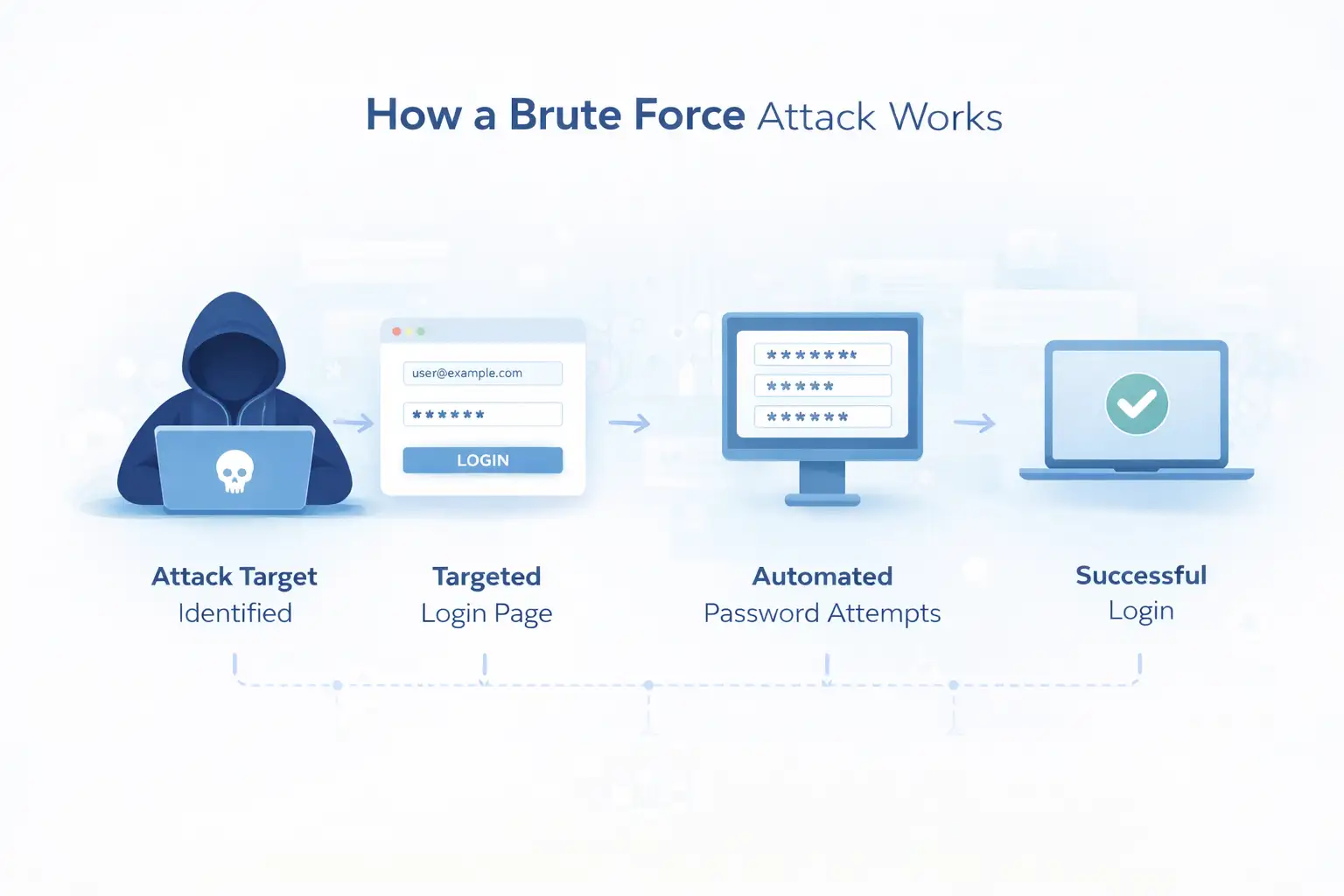
How a Brute Force Attack Works
Although individual campaigns vary, a typical online brute force attack follows several general stages.
1. The Attacker Identifies a Login Surface
The first step is finding an authentication endpoint that can be reached.
Examples may include a customer login portal, WordPress administrator page, VPN gateway, Microsoft 365 sign-in flow, RDP service, SSH server, or another exposed application.
Public-facing authentication interfaces are attractive because attackers can discover and test them remotely.
2. The Attacker Selects Credentials to Test
The next step depends on the attack method.
An attacker might use:
- generated password combinations
- dictionary-based password lists
- commonly used passwords
- likely usernames or email addresses
- credentials exposed in previous breaches
This is where brute force, password spraying, and credential stuffing begin to differ.
A traditional brute force attack may test many passwords against a smaller number of accounts.
Password spraying usually tests a few common passwords across many accounts.
Credential stuffing uses previously stolen username-password combinations and checks whether users have reused them elsewhere.
Understanding the difference between these techniques helps security teams choose the right detection and prevention controls.
3. Automation Performs the Login Attempts
Modern brute force activity is usually automated.
Scripts, bots, distributed infrastructure, or specialized tools can submit authentication attempts much faster than a person could manually.
The attacker may monitor the system's responses for signs such as:
- successful authentication
- account lockout
- incorrect-password responses
- MFA challenges
- CAPTCHA challenges
- throttling or rate-limit messages
Without appropriate safeguards, attackers may be able to continue testing credentials for an extended period.
Controls such as rate limiting, intelligent lockouts, anomaly detection, bot protection, and multi-factor authentication can make repeated login attempts substantially harder to turn into a successful compromise.
4. A Successful Login Changes the Nature of the Incident
Once valid credentials are identified, the brute force stage may be over, but the broader security incident can just be beginning.
What happens next depends on the compromised account.
An attacker may attempt to access sensitive information, take over an email account, change security settings, establish persistence, increase privileges, or reach additional systems.
This is why defenders should not look at brute force attacks only as a collection of failed password attempts.
The real objective is usually access.
Preventing that access, detecting it quickly when it occurs, and limiting what a compromised account can reach are the controls that ultimately determine the impact of the attack.
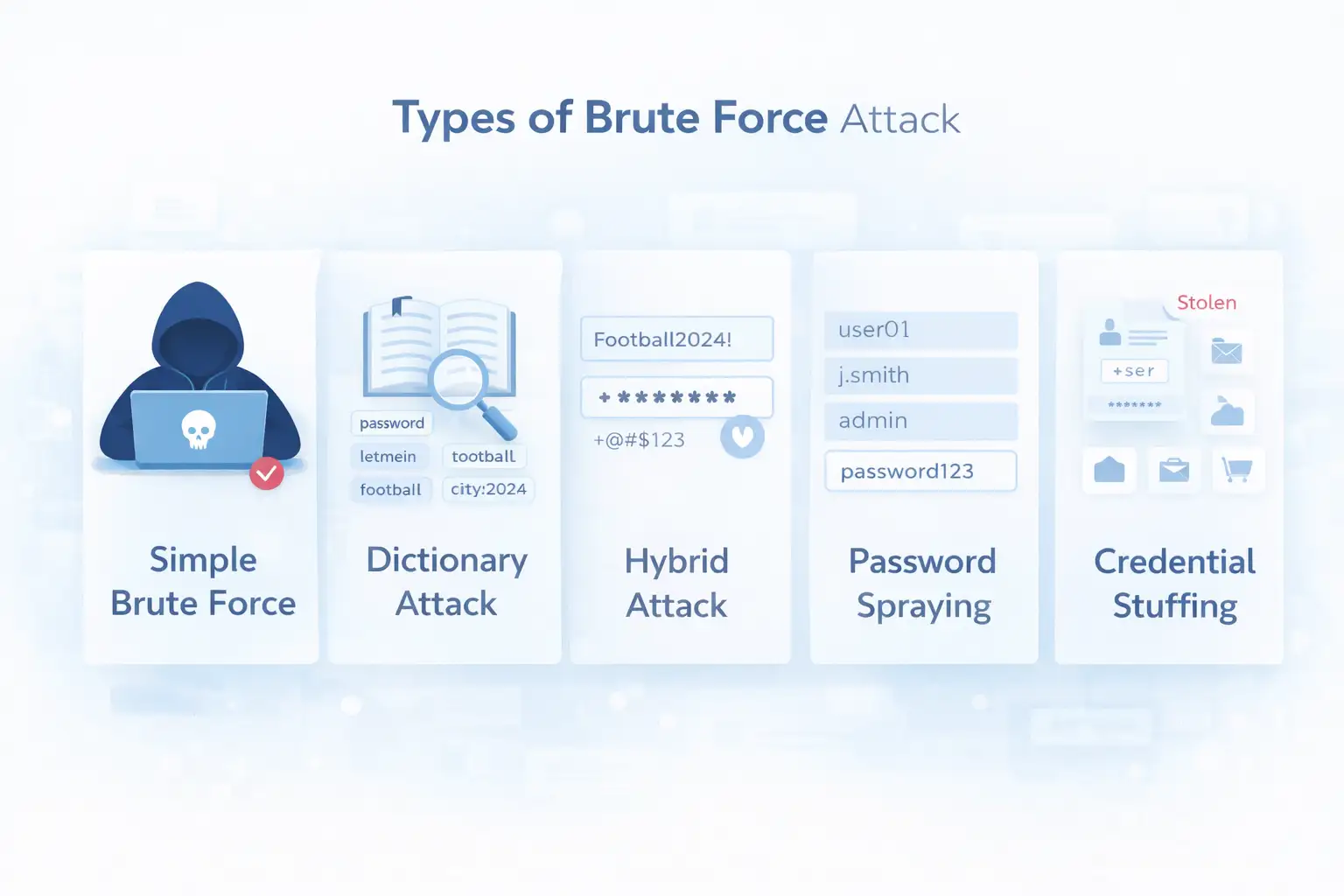
Main Types of Brute Force Attacks
Brute force attacks do not all follow the same pattern. Some attackers repeatedly target a single account, while others spread a small number of password attempts across many users or rely on credentials exposed in previous breaches.
Understanding these differences is important because each technique creates a slightly different security challenge and may require different detection and prevention controls.
Simple Brute Force Attack
A simple brute force attack repeatedly tests possible passwords against an account until the correct one is discovered or the authentication system blocks further attempts.
This is the classic form of brute force most people imagine: one account, many password guesses.
The attack becomes more practical when a password is short, common, predictable, or based on easily guessed information. Longer and less predictable passwords increase the amount of work required to guess them.
NIST identifies password length as an important factor in password strength and notes that passwords that are too short are more vulnerable to brute-force and dictionary attacks.
However, attackers do not always generate completely random combinations. Understanding how hackers guess passwords shows how common password patterns, leaked credentials, automation, and other techniques can make credential attacks more efficient.
For online accounts, controls such as login throttling, account protection, monitoring, and MFA can further reduce an attacker's ability to make unlimited guesses.
Dictionary Attack
A dictionary attack uses a prepared list of likely passwords instead of testing every mathematically possible character combination.
These lists may contain:
- common words
- popular passwords
- names
- keyboard patterns
- phrases
- predictable number combinations
- variations of commonly used passwords
For example, rather than testing millions of meaningless character sequences first, an attacker may prioritize passwords built around familiar words followed by numbers or symbols.
This can make dictionary attacks more efficient than exhaustive brute force when users choose predictable credentials.
Password-cracking techniques can also combine dictionaries with transformation rules that change capitalization, substitute characters, or add numbers and symbols. Our guide to password cracking explains how weak password habits can make these attacks more effective.
The practical lesson is simple: a password should not only be difficult for another person to guess. It should also be difficult for automated tools working through large collections of likely passwords.
Hybrid Brute Force Attack
A hybrid brute force attack combines dictionary-based guessing with brute force variations.
Instead of starting entirely from random combinations, the attacker begins with words or password patterns that people are likely to use and then modifies them.
For example, automated guessing may add:
- years
- numbers
- symbols
- capitalization changes
- character substitutions
- common prefixes or suffixes
A predictable base word does not suddenly become secure simply because a number or symbol has been added to it.
Patterns such as adding a year, replacing one letter with a symbol, or putting an exclamation mark at the end can still be incorporated into automated password-guessing strategies.
This is one reason why creating a strong password should focus on length, uniqueness, and unpredictability rather than relying only on superficial complexity.
Hybrid attacks demonstrate an important principle: attackers can design their guessing strategies around predictable human password habits instead of testing every possible combination equally.
Password Spraying
Password spraying reverses the traditional brute force pattern.
Instead of trying hundreds or thousands of passwords against one account, an attacker tries one or a small number of commonly used passwords across many accounts.
For example, rather than repeatedly attacking a single employee account, an attacker may test the same weak password against a large collection of usernames.
Spreading attempts across multiple accounts can reduce the likelihood of triggering protections based only on repeated failures for one user.
This makes password spraying particularly relevant in business environments where attackers can identify or predict employee usernames and email addresses.
Real-world attacks also show how password spraying can become more dangerous when combined with legacy authentication or incorrectly configured identity controls. Hoplon Infosec's analysis of an Azure CLI password spray attack illustrates how attackers can exploit weaknesses in authentication configurations rather than relying only on high-volume password guessing.
Organizations can reduce the risk by combining strong password practices with MFA, login monitoring, appropriate lockout or throttling controls, and protection for legacy or exposed authentication interfaces.
Credential Stuffing
Credential stuffing is closely related to brute force attacks, but there is one major difference: the attacker usually already has username-and-password combinations.
Instead of guessing a new password from scratch, attackers take credentials exposed through previous data breaches, phishing, infostealer malware, or other sources and automatically test them against different services.
OWASP categorizes credential stuffing within the broader brute force attack category, while distinguishing it from ordinary password guessing because it relies on previously obtained credentials.
The attack is especially effective when people reuse the same password across multiple accounts.
For example, credentials exposed in a breach of one website might later be tested against email accounts, cloud platforms, e-commerce services, financial services, or corporate applications.
Automation makes this possible at scale. Modern approaches may also make credential-stuffing campaigns more adaptive, which is explored further in Hoplon Infosec's analysis of AI-powered credential stuffing attacks.
This distinction matters because simply making a password more complex does not fully address the problem.
If that same password is reused across several services and one of those services is compromised, attackers may already possess the correct credential.
That is why preventing password reuse is an important defense against credential stuffing. Every important account should use a unique password so that one exposed credential does not automatically put other accounts at risk.
Brute Force Attack vs Credential Stuffing vs Password Spraying
Brute force attacks, password spraying, and credential stuffing all target authentication systems, but they do not work in exactly the same way.
A brute force attack generally involves testing multiple passwords against an account until a valid credential is found. Password spraying spreads a small number of common passwords across many accounts, while credential stuffing uses username-and-password combinations that have already been exposed elsewhere.
The easiest way to understand the difference is:
- Brute force: Many password guesses against an account.
- Password spraying: A few common passwords tested across many accounts.
- Credential stuffing: Previously stolen credentials tested against other services.
The techniques overlap because they share the same objective: gaining unauthorized access through authentication credentials.
For example, a traditional brute force attack may generate thousands of password guesses. A password spraying attack deliberately reduces the number of attempts against each account to make conventional lockout controls less effective.
Meanwhile, credential stuffing attacks often require little or no password guessing. Attackers already possess credentials from a breach, phishing campaign, infostealer infection, or another source and simply test whether those credentials work somewhere else.
OWASP distinguishes these attack patterns while noting that many of the same defensive controls can help protect against all three.
A layered authentication strategy may include:
- multi-factor authentication
- login throttling or rate limiting
- appropriate account lockout controls
- bot and automation detection
- suspicious-login monitoring
- breached-password screening
- unique passwords for each service
Among these controls, multi-factor authentication is particularly important because a stolen or successfully guessed password alone may no longer be enough to access the account.
The distinction between these attacks still matters. Understanding exactly how credentials are being abused helps defenders recognize attack patterns, tune monitoring, and select appropriate controls instead of treating every failed login as the same problem.
Real-World Impact on Businesses and Users
The most serious consequence of a brute force attack is not the volume of failed login attempts. The real risk begins when one of those attempts succeeds.
A compromised account may give an attacker access to email, cloud applications, customer information, internal systems, administrative tools, or other sensitive resources.
The impact can include:
- account takeover
- unauthorized data access
- financial fraud
- internal phishing
- business email compromise
- privilege escalation
- persistence inside an environment
- service disruption
- reputational damage
A compromised employee mailbox, for example, can become a platform for impersonation, invoice fraud, password-reset abuse, or phishing messages sent from a trusted internal address.
An administrator account can create even greater risk because it may allow an attacker to modify users, security settings, applications, or access permissions.
CISA has documented threat activity in which attackers used brute force and password spraying against organizational accounts and then continued with credential access, network discovery, account manipulation, and attempts to maintain access.
This illustrates an important point: credential guessing is often only the initial access stage of a much larger incident.
Consider a simple example.
A company has an older internet-facing administrative portal that relies only on passwords and allows repeated login attempts with limited monitoring.
After reviewing its authentication security, the company introduces rate limiting, disables dormant accounts, strengthens login monitoring, and requires phishing-resistant MFA for privileged access where supported.
Nothing about that change looks dramatic to users.
But the security outcome is meaningful: attackers have fewer opportunities to guess passwords, stolen credentials become less useful, and suspicious authentication behavior becomes easier to identify.
Reducing password reuse is also important. If employees use unique passwords for different services, credentials exposed through one breach are less likely to provide immediate access somewhere else.
The scale of automated credential attacks can also be significant.
Cloudflare reported observing large brute force campaigns in which HTTP requests containing exposed credentials exceeded 12,000 requests per minute. That observation does not mean every organization experiences attacks at that volume, but it demonstrates how quickly automated credential abuse can operate at scale.
For businesses, authentication security therefore affects more than the login page. It can influence fraud exposure, incident-response workload, data protection, operational continuity, and customer trust.
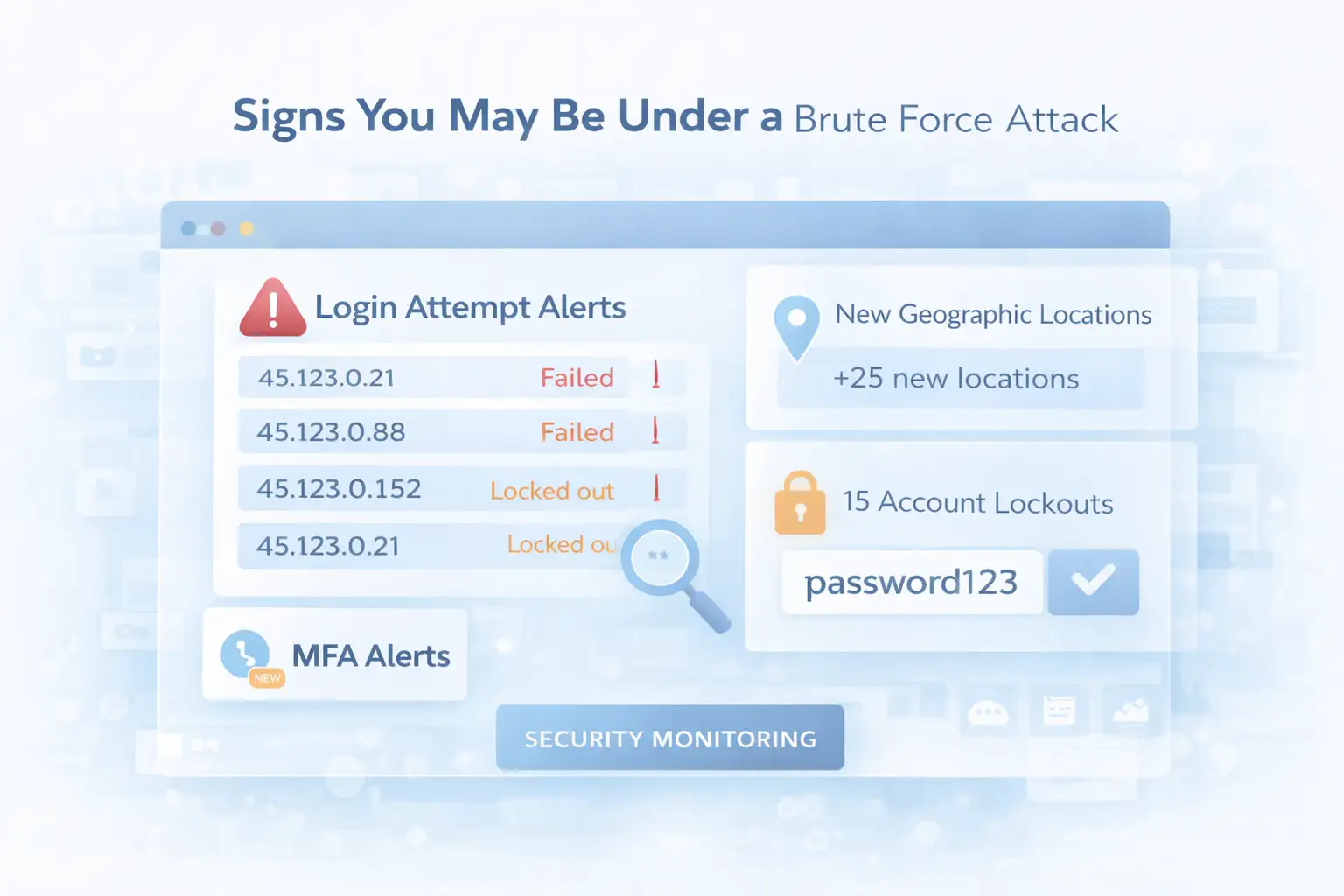
Signs You May Be Under a Brute Force Attack
Brute force activity does not always produce an obvious warning. In many environments, the first indication is a pattern of authentication events that looks different from normal user behavior.
Possible warning signs include:
- repeated failed login attempts
- unusually high authentication frequency
- many accounts receiving similar failed login attempts
- sudden increases in account lockouts
- login attempts from unfamiliar locations
- authentication attempts from unusual IP addresses or networks
- repeated attempts against administrator or privileged accounts
- unexpected MFA prompts
- unusual password-reset activity
- users reporting unexpected account lockouts
The pattern matters more than any single event.
A legitimate user can mistype a password several times. Someone traveling may also sign in from a new location. Neither event automatically proves that an attack is occurring.
However, hundreds of failed attempts distributed across employee accounts, followed by successful authentication from an unfamiliar source, deserve much closer investigation.
Password spraying can be particularly difficult to detect when monitoring focuses only on individual accounts. Because attackers deliberately spread attempts across many users, each account may experience only a small number of failures.
Credential stuffing creates a different pattern. Attackers may test large collections of already exposed credentials, potentially generating authentication traffic from distributed infrastructure to make simple IP-based blocking less effective.
Security teams should therefore monitor authentication activity across multiple dimensions, including accounts, IP addresses, devices, geographic locations, failure rates, and successful logins following unusual failures.
Unexpected MFA prompts can provide another warning sign. If users receive authentication requests they did not initiate, someone may already know or be testing their password.
The same applies to unexplained password-reset requests and unusual account-recovery activity.
None of these signals alone confirms a brute force attack. But when several appear together, organizations should investigate quickly to determine whether they are seeing normal user mistakes, automated credential abuse, or an active account-compromise attempt.
How to Prevent Brute Force Attacks
The most effective way to prevent brute force attacks is to use several security controls together rather than depending on a single defense.
A strong approach combines:
- long and unique passwords
- multi-factor authentication (MFA)
- rate limiting
- account lockout protections
- suspicious-login monitoring
- bot and automation detection
- proper account lifecycle management
Each layer makes credential guessing more difficult. More importantly, the layers help protect accounts even when one security control fails.
Start With Strong, Unique Passwords
Password quality is the first layer.
Current NIST guidance places strong emphasis on password length, blocking commonly used or compromised passwords, and limiting failed authentication attempts rather than forcing users to follow complicated composition rules.
That means organizations should move away from policies that simply require combinations such as one uppercase letter, one number, and one symbol while still allowing predictable passwords.
The goal is not to make passwords frustrating to remember. It is to make them difficult for automated guessing systems to predict.
Users should create a strong password or passphrase for every important account and avoid using the same password across multiple services.
Password reuse creates a separate risk because even a strong password can become dangerous after it appears in a breach. Attackers can reuse exposed credentials in credential-stuffing campaigns against completely unrelated services.
A password manager can make unique password use much easier by generating and storing different credentials for each account.
Add Multi-Factor Authentication
Passwords should not be the only barrier between an attacker and a sensitive account.
Multi-factor authentication requires another form of verification in addition to the password. Even if an attacker successfully guesses or obtains the password, the additional authentication requirement can prevent that credential alone from providing access.
However, not all MFA methods provide the same level of protection.
CISA recommends using phishing-resistant MFA where possible, particularly for administrators, privileged users, remote access, email, and other high-value accounts.
Organizations deciding between different authentication methods can review the practical differences between 2FA and MFA before choosing how to protect different types of accounts.
It is also important to remember that MFA itself can be targeted. Repeated unexpected approval prompts, for example, can be part of an MFA fatigue attack.
Users should never approve an authentication request they did not initiate.
Limit Repeated Login Attempts
A brute force attack depends on repeated guessing.
If an application allows unlimited authentication attempts, an attacker has far more opportunity to test passwords.
Rate limiting and lockout controls reduce that opportunity.
Rate limiting can slow the number of authentication attempts allowed within a given period, while account lockout controls can temporarily restrict further login attempts after suspicious failures.
Current NIST SP 800-63B guidance requires rate-limiting mechanisms for applicable authentication systems to protect against online guessing attacks.
Microsoft Entra uses smart lockout for a similar purpose. Instead of treating every failed login identically, smart lockout is designed to help identify and restrict likely attacker activity while reducing unnecessary disruption for legitimate users.
The exact thresholds should match the environment rather than being copied blindly from another organization.
Lockout policies that are too aggressive can create their own denial-of-service problem, while weak thresholds may provide attackers with too many opportunities.
Detect Automated Login Abuse
Modern brute force attacks are usually automated.
Organizations should therefore monitor authentication systems for patterns that indicate scripts, bots, or distributed credential attacks.
Useful controls may include:
- rate limiting
- bot detection
- CAPTCHA or similar challenges where appropriate
- risk-based authentication
- IP reputation signals
- device analysis
- geographic anomaly detection
- behavioral monitoring
No single signal should automatically be treated as proof of compromise.
For example, an unfamiliar IP address may simply belong to an employee who is traveling. But an unfamiliar IP combined with hundreds of failed authentication attempts across multiple accounts creates a much stronger reason to investigate.
Monitor Authentication Activity
Authentication logs should not be treated as background noise.
They can provide some of the earliest indicators of credential attacks.
Security teams should investigate patterns such as:
- repeated authentication failures
- password spraying across multiple accounts
- successful logins after unusual failure patterns
- unexpected administrative logins
- unfamiliar devices
- unusual source networks
- suspicious password resets
- unexpected MFA challenges
- repeated lockout events
Looking only at one account at a time may also miss password spraying because attackers deliberately distribute attempts across many users.
Centralizing authentication logs makes it easier to identify patterns that may not be obvious when applications are monitored separately.
Remove Dormant and Unnecessary Accounts
An account that is no longer needed can still become a target.
Former employees, temporary contractors, test users, old administrators, unused cloud accounts, and forgotten service identities can create unnecessary authentication exposure.
Organizations should regularly review accounts and remove or disable those that no longer serve a legitimate business purpose.
Privileges should also be reviewed.
An old account with administrative access creates considerably more risk than an ordinary unused account.
Account lifecycle management should therefore include:
- creating accounts only when required
- assigning only necessary privileges
- reviewing access periodically
- removing access when responsibilities change
- disabling accounts promptly when they are no longer needed
CISA guidance similarly recommends removing unnecessary accounts and continuously reviewing those that remain active.
Protect Public-Facing Login Interfaces
Every internet-facing login page creates an authentication surface attackers can potentially test.
Businesses should know exactly which systems expose authentication to the public internet.
These may include:
- VPN portals
- cloud applications
- webmail
- administrator dashboards
- customer portals
- WordPress login pages
- remote access services
- legacy applications
Older systems deserve particular attention because they may not support modern MFA, adaptive authentication, or effective throttling.
Organizations can also use web application security testing to evaluate authentication weaknesses, broken access controls, exposed interfaces, and other application security issues before attackers discover them.
Operational Security Practices That Reduce Brute Force Risk
Technology alone is not enough. Organizations also need consistent operating practices.
Useful measures include:
- Remove dormant or unnecessary accounts.
- Require MFA for privileged and high-risk accounts.
- Monitor authentication logs continuously or as close to real time as practical.
- Detect password spraying across groups of users rather than only individual accounts.
- Apply rate limiting or smart lockout to exposed authentication interfaces.
- Investigate suspicious geographies, IP addresses, devices, and lockout patterns.
- Use bot-management controls where automated abuse is a realistic concern.
- Require unique passwords across important services.
- Review service accounts and other non-human identities separately.
- Centralize security alerts so suspicious authentication patterns can be correlated.
For organizations that do not have the internal resources to assess every authentication surface, a cybersecurity provider can help identify gaps, validate controls, and improve monitoring.
The value is not simply receiving another checklist. It is verifying that the controls actually work in the organization's environment.
Common Mistakes That Make Brute Force Attacks Easier
Some weaknesses are easy to recognize:
- default passwords
- weak administrator credentials
- reused passwords
- no MFA on privileged accounts
- unlimited login attempts
Others are easier to overlook.
Protecting New Systems but Forgetting Legacy Applications
An organization may require MFA for Microsoft 365 while leaving an old VPN, web portal, or administrative interface protected only by a password.
Attackers naturally look for the weaker authentication path.
Modern authentication controls therefore need to be reviewed across the entire environment rather than only the newest applications.
Ignoring Contractors and Third-Party Accounts
Employees may have strong authentication requirements while contractors, vendors, external support teams, or temporary users operate under weaker policies.
Those accounts can still provide access to business systems.
Authentication policies should therefore be based on the sensitivity of the access rather than whether the account belongs to a permanent employee.
Forgetting Service Accounts
Service accounts and other machine identities can be particularly challenging because some cannot use ordinary interactive MFA.
That does not mean they should remain weakly protected.
Organizations should restrict their privileges, rotate and protect credentials appropriately, monitor their use, and remove unnecessary service accounts.
Keeping Dormant Accounts Active
Unused accounts provide attackers with additional targets while providing little or no business value.
They can also be harder to notice because legitimate users are not actively monitoring them.
Regular access reviews help prevent old accounts from becoming forgotten entry points.
Treating Authentication Logs as Noise
Large environments naturally generate failed login events.
The mistake is assuming that all of them are harmless.
A single failed login may mean very little. A coordinated pattern across dozens or hundreds of accounts may indicate password spraying, credential stuffing, or another automated attack.
Authentication monitoring should therefore focus on patterns and context rather than raw event counts alone.
What Users and Businesses Should Do Now
Individual users and organizations have different responsibilities, but the fundamental security principles are similar.
For Individual Users
Start with three practical actions:
- Use a unique password or passphrase for every important account.
- Store those credentials in a reputable password manager.
- Enable MFA wherever it is available.
If one of your passwords has already been exposed, change it immediately on that service and anywhere else it was reused.
Understanding the risks of password reuse is especially important because one compromised credential can otherwise expose several unrelated accounts.
For Businesses
Businesses should examine the entire authentication chain.
Ask:
- Where can users sign in?
- Which login portals are publicly accessible?
- Are failed attempts rate-limited?
- Which accounts have MFA?
- Which accounts cannot use modern authentication?
- Are privileged accounts protected more strongly?
- Are dormant accounts still active?
- Can password spraying be detected across multiple users?
- Are authentication logs centralized?
- Are suspicious successful logins investigated?
- Are service accounts appropriately restricted?
The question should not simply be, “Do we have an authentication policy?”
A more useful question is:
“Would our controls detect and stop a realistic credential attack?”
A practical brute force prevention program can focus on three areas at the same time:
Identity hardening: Strengthen passwords, MFA, privileges, and authentication policies.
Login-abuse visibility: Detect unusual failures, password spraying, suspicious successful logins, and automated behavior.
Account lifecycle hygiene: Remove unnecessary accounts and ensure access changes when employees, contractors, services, or business requirements change.
Organizations that need outside validation can use a security provider such as Hoplon Infosec to help assess exposed authentication surfaces and test whether existing security controls work as intended.
The goal should not be adding more tools for the sake of having more tools. It should be reducing the number of realistic paths an attacker can use to turn a password attempt into unauthorized access.
FAQs
What Is a Brute Force Attack in Simple Words?
A brute force attack is an attempt to gain access by repeatedly trying passwords or other login credentials until one works.
Modern brute force attacks are usually automated rather than performed manually.
Is Credential Stuffing the Same as a Brute Force Attack?
Not exactly.
Traditional brute force attacks generally involve guessing passwords. Credential stuffing uses username-and-password combinations that have already been stolen or exposed and tests them against other services.
The attacks are related because both attempt to gain unauthorized access through credentials, and many of the same defenses can reduce their effectiveness.
Can MFA Stop Brute Force Attacks?
MFA can significantly reduce the chance that a successfully guessed password results in account takeover because the attacker normally needs another authentication factor.
However, MFA is not a guarantee against every account attack.
Some MFA methods are more resistant to phishing and social engineering than others, which is why phishing-resistant authentication is preferred for sensitive accounts where practical.
What Is Password Spraying?
Password spraying is an attack in which one or a small number of common passwords are tested against many different accounts.
This approach helps attackers avoid repeatedly failing authentication on one account and may make simple account-lockout protections less effective.
Why Are Short Passwords Risky?
Short passwords generally provide fewer possible combinations and are therefore easier to guess or crack than sufficiently long passwords.
Current NIST guidance emphasizes password length, blocking common or compromised passwords, and rate limiting as important protections against password guessing.
Can Account Lockout Alone Stop Brute Force Attacks?
No.
Lockout controls can reduce repeated guessing against individual accounts, but attackers may adapt by distributing attempts across many users or sources.
Lockout should therefore be combined with MFA, rate limiting, monitoring, bot detection, and other authentication protections.
Should Businesses Use CAPTCHA to Stop Brute Force Attacks?
CAPTCHA can add friction to automated login attempts in appropriate situations, but it should not be treated as the primary defense.
It works better as one part of a broader authentication security strategy that includes rate limiting, MFA, anomaly detection, and monitoring.
Summary
A brute force attack is fundamentally an attempt to gain unauthorized access by repeatedly testing credentials.
Stopping it effectively requires more than a strong password.
The strongest approach combines long and unique passwords, MFA, rate limiting, intelligent lockout controls, authentication monitoring, automated-abuse detection, and disciplined account management.
Current NIST guidance supports password blocklists and rate limiting instead of relying on unnecessary password-composition rules, while CISA recommends MFA, with phishing-resistant methods preferred where practical. Microsoft also uses smart lockout specifically to reduce password-guessing and brute force risk.
For businesses, the real objective is not simply reducing failed login attempts. It is preventing those attempts from becoming successful account compromises.
That requires treating authentication as an ongoing security process rather than a one-time configuration.
For more latest updates like this, visit our homepage.
Suggested trusted references:
CISA advisory on brute force and credential access activity,




-20260925120840.webp&w=3840&q=75)
