
-20260409130800.webp&w=3840&q=75)
Is the Adobe Acrobat Reader zero-day a real and current threat on April 9, 2026?
Yes. Public reporting on April 9 says attackers have been exploiting a previously unpatched Adobe Reader flaw through crafted PDF files since at least December, and researcher Haifei Li said the activity can collect local data and may support follow-on attacks.
Adobe’s March 2026 bulletin fixed other Acrobat and Reader issues, but that bulletin did not say this newly reported in-the-wild issue was already patched.
If you use Adobe Reader for contracts, invoices, resumes, shipping paperwork, or random attachments that show up in your inbox before coffee, this story matters more than the average security headline.
The reported Adobe Acrobat Reader zero-day is not just another vague warning. It appears to be an active, document-based attack path built around a file type most people still trust almost automatically.
That is what makes this one uncomfortable. PDFs feel ordinary. They are part of office life, freelance life, school life, and honestly daily life.
So when researchers say a malicious PDF exploit has been active for months and can work by simply getting the victim to open a file, the risk shifts from abstract to very practical, very fast.
In Short
Attackers are reportedly using crafted PDF documents to exploit an unpatched Adobe Reader issue. According to current reporting, the campaign has been active since at least December, and one sample on VirusTotal was submitted in November 2025, which suggests the activity may have been running quietly for months before broader public attention arrived.
The reported behavior is serious because the exploit is said to work on the latest version of Reader available at the time of disclosure while also collecting information from the victim system.
Researcher commentary further suggests the document may be used as a first-stage foothold before more damaging steps such as remote code execution or sandbox escape. That is why this Adobe Reader zero-day exploit has drawn immediate concern even before a full vendor statement on this specific case has appeared.
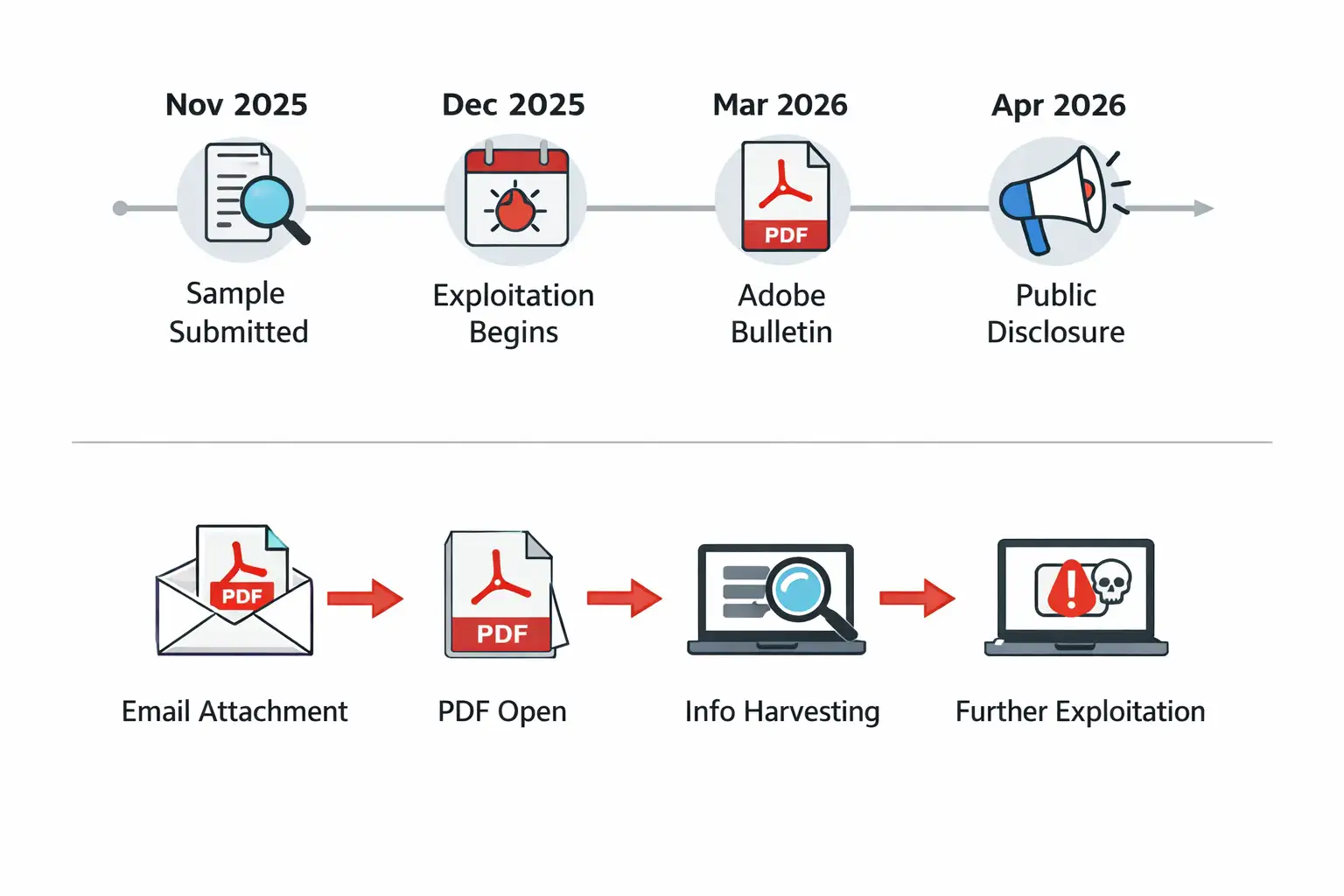 Adobe Acrobat exploit timeline and flowchart
Why this case stands out
Most security news stories sound dramatic for a day and then fade into the background. This one feels different because it combines three things attackers love.
First, it uses PDFs, which are common and familiar. Second, it reportedly needs very little user action beyond opening the file. Third, it appears to support information gathering before any second-stage attack is launched.
That combination matters in real organizations. Finance teams open invoices. HR opens resumes. Legal teams open signed documents. Procurement opens vendor forms.
Sales teams open proposals from strangers all week long. In other words, the environments most likely to receive important PDFs are also the environments most likely to open one quickly.
That gives an Adobe Reader malicious PDF attack a built-in advantage that browser pop-up scams simply do not have.
What happened, and when
The public story came into focus on April 9, 2026, when reports described an actively exploited Adobe Reader flaw being abused through malicious PDFs.
The reporting credited researcher Haifei Li, founder of EXPMON, with identifying the campaign and warning that it had already been active for at least four months.
Another important timeline clue came from a sample reportedly submitted to VirusTotal in November 2025.
That detail does not prove every part of the same campaign was identical from day one, but it does support the broader conclusion that the Adobe Reader exploit since December was not a one-day incident. It appears to have been a quiet problem before it became a headline problem.
Adobe Acrobat Reader exploit timeline
|
Date |
What matters |
|
November 2025 |
A relevant sample was reportedly submitted to VirusTotal, suggesting earlier activity. |
|
December 2025 |
Public reporting says exploitation had been active since at least this month. |
|
March 10, 2026 |
Adobe published APSB26-26 for other Acrobat and Reader vulnerabilities. |
|
March 26, 2026 |
Adobe shipped a planned Reader update in the continuous track. |
|
April 7, 2026 |
Haifei Li publicly described a sophisticated PDF exploit through EXPMON. |
|
April 9, 2026 |
Broader security news coverage brought the threat into mainstream visibility. |
How the attack appears to work
The available public details are still incomplete, and that limitation matters. There is no full vendor write-up for this exact incident yet, and the researcher himself said he could not reproduce the full chain to obtain any later payloads. So some parts are confirmed, while some parts remain educated risk signals rather than fully documented end-to-end proof.
What does appear consistent across current reporting is this: the PDF acts as a first-stage exploit, the file can gather local information, and it may prepare the way for more serious follow-on activity.
In security terms, that means this is not just a crash bug story. It is a potential Adobe PDF zero-day pathway that starts quietly, fingerprints the system, and then decides what to do next.
That “fingerprinting” angle is worth pausing on because it changes the feel of the attack. Think of it like a burglar checking which windows are open before trying the back door.
Instead of smashing everything at once, the document learns about the target first. That makes the Adobe Reader zero-day attack explained in simple terms: it is a smart document that may test the environment before escalating.
Is there a CVE or an official Adobe confirmation yet?
As of April 9, 2026, the public reporting around this active case focuses on an unpatched Reader issue, but Adobe’s March bulletin APSB26-26 covers other vulnerabilities and says the company was not aware of in-the-wild exploitation for the issues addressed there.
That is an important distinction. A March patch bulletin existing does not automatically mean this newly reported case has already been fixed.
So, if you are looking for a neat checkbox answer such as “patched” or “not patched,” the honest answer is messier.
The current public evidence supports concern, supports active exploitation claims, and supports immediate caution.
It does not yet give a clean, official Adobe statement saying this exact newly reported Adobe Acrobat Reader vulnerability has been fully remediated through a specifically named emergency fix.
Why malicious PDFs remain so effective
Security teams have been warning about dangerous attachments for years, yet document attacks continue to work because people make context-based trust decisions.
A PDF labeled “contract revision,” “invoice copy,” or “delivery update” does not feel suspicious in the same way a random executable does. That normalcy is the whole trick.
Adobe itself documents that PDFs are no longer simple digital paper. They can contain scripting, multimedia, forms, and other features that expand what a document can do.
Those capabilities are useful in legitimate business workflows, but they also increase the attack surface. That is why the phrase "how Adobe Reader zero-day works" matters for regular users too, not just for reverse engineers.
A modern PDF can behave like a miniature software container, not just a page.
Who is most at risk?
The obvious answer is “everyone who opens PDFs,” but that is too broad to be useful. In practice, the most exposed groups are people who routinely open files from outside their own organization.
Accounts payable teams, recruiters, legal staff, procurement teams, customer support staff, and executives all sit in that zone. Their work depends on opening documents from vendors, applicants, partners, and unknown senders.
Unmanaged endpoints raise the risk further. A personal laptop used for business, an old workstation that skips updates, or a contractor device with looser controls can become the easiest target in the room.
If this Adobe Reader security flaw is indeed being used as an initial stage for information harvesting, those softer endpoints are exactly where attackers would expect weaker visibility and slower response.
The Russian-language lure detail
One of the more striking details in the public reporting is that analysts found Russian-language lure content in the malicious PDFs, including references to current events in Russia’s oil and gas sector.
That is a useful threat-hunting clue. It is not the same thing as firm attribution. A lure can point to a target audience, a language preference, or even a false flag, but it does not by itself identify the actor.
Still, it is a meaningful clue. If your organization deals with energy, commodities, translation, or regional business tied to those themes, this detail belongs in your triage notes.
It is one of the few publicly discussed indicators tied to the Adobe Reader exploit Russian phishing lure narrative so far.
A quick comparison that clears up the confusion
People are already mixing up three different things: the newly reported active exploit, Adobe’s March bulletin, and Adobe’s planned product updates later in March. They are related because they all involve Acrobat and Reader, but they are not interchangeable.
|
Item |
What it means |
|
Active exploit reports |
Public reports describe a current Adobe Acrobat Reader exploit used through malicious PDFs since at least December. |
|
APSB26-26 |
Adobe’s March 10 bulletin patched listed vulnerabilities and said it was not aware of exploitation for those listed issues. |
|
Planned March 26 update |
Adobe also shipped a regular planned update for Reader’s continuous track. |
Is Adobe Reader protected mode enough?
Adobe’s own documentation says Protected Mode and related sandbox features are designed to isolate risky actions and limit what malicious code can do.
Reader and Acrobat also leverage AppContainer protections on Windows, and Adobe recommends sandboxing and enhanced security features specifically because PDFs can carry risky actions or scripts.
That said, the public concern in this case is precisely that the attack may lead to later sandbox escape activity. So protected features are still worth enabling and keeping on, but they should not be treated as magic armor. They are guardrails, not a reason to open random files with confidence.
That is the practical heart of Adobe Reader zero-day mitigation right now. Use the safety layers, but do not rely on them alone.
Quick Safety Steps
The first step is boring and effective: stop opening PDF attachments from unknown or unexpected senders.
This advice sounds old-fashioned because it is old-fashioned, but attackers keep using it because people keep opening files in a hurry.
If the document arrives out of context, verify it somewhere else first. A quick chat, a phone call, or a second email can save a long incident report later.
The second step is updating. Adobe’s current bulletin page and release notes show that Reader updates continue to roll out through normal channels, and Adobe recommends users move to the newest versions.
Even if the newly reported Adobe Reader zero-day patch is not yet clearly mapped to a public vendor statement, being behind on routine updates only makes your position worse.
The third step is configuration. Keep Protected Mode and enhanced security enabled. Those settings exist for a reason.
Adobe explicitly says enhanced security helps block or selectively permit dangerous actions in PDFs and that Protected Mode runs untrusted files in a safer environment.
For everyday users asking how to protect from malicious PDFs, that is the most realistic baseline answer.
Defender & IT Actions
For defenders, the most useful operational clue in public right now is the recommendation to watch for HTTP or HTTPS traffic carrying the string “Adobe Synchronizer” in the User-Agent field.
That is specific enough to turn into a hunt query, a detection rule, or at least a quick dashboard check.
It also helps to separate mailbox triage from endpoint triage. Mail teams should look for recent inbound PDFs that match suspicious themes, especially files tied to external senders or unusual regional lure content.
Endpoint teams should review Reader activity on devices that handled those files, paying attention to network behavior, follow-on process activity, and any signs of data leakage.
This is the part many top stories skip, and it is where the Adobe Reader zero-day malicious PDF risk becomes an actual incident response workflow instead of just a headline.
-20260409130800.webp "Adobe Acrobat Reader zero-day")
Quick Actions for the Next Day
1. Freeze trust in unexpected PDFs from outside the company.
2. Confirm reader versions across managed devices and push the latest available updates.
3. Keep Protected Mode and enhanced security enabled.
4. Hunt for suspicious reader-related network activity, especially the reported User-Agent clue.
5. Alert finance, HR, procurement, and legal teams first, because they open the most business-critical PDFs.
6. Document uncertainty clearly. Some parts of this attack chain are public and credible, but not every step has been independently reproduced.
Final takeaway
The real story here is not just that hackers found another bug. It is that a familiar file type, opened every day by millions of people, may have been turned into a quiet first-stage attack path for months.
That is why the Adobe Acrobat Reader zero-day since December angle matters so much. It suggests patience, stealth, and a strong understanding of how normal office behavior works.
If you are publishing this as a pillar article, the strongest editorial angle is simple: explain the risk, stay honest about what is verified and what is still uncertain, and give readers something practical to do immediately.
That will make the piece more useful than most fast-moving news rewrites, and usefulness is usually what earns the second click, the backlink, and the trust.
You can also read these important cybersecurity news articles on our website.
· Apple Update,
· TikTok Warning
· Apple OS update
For more, please visit our homepage and follow us on X (Twitter) and LinkedIn for more cybersecurity news and updates. Stay connected on YouTube, Facebook, and Instagram as well.
Emergency warning: Opening unknown PDF files right now could expose your system to an active Adobe Acrobat Reader zero-day attack, so avoid untrusted attachments immediately.




-20260925120840.webp&w=3840&q=75)
