
summary
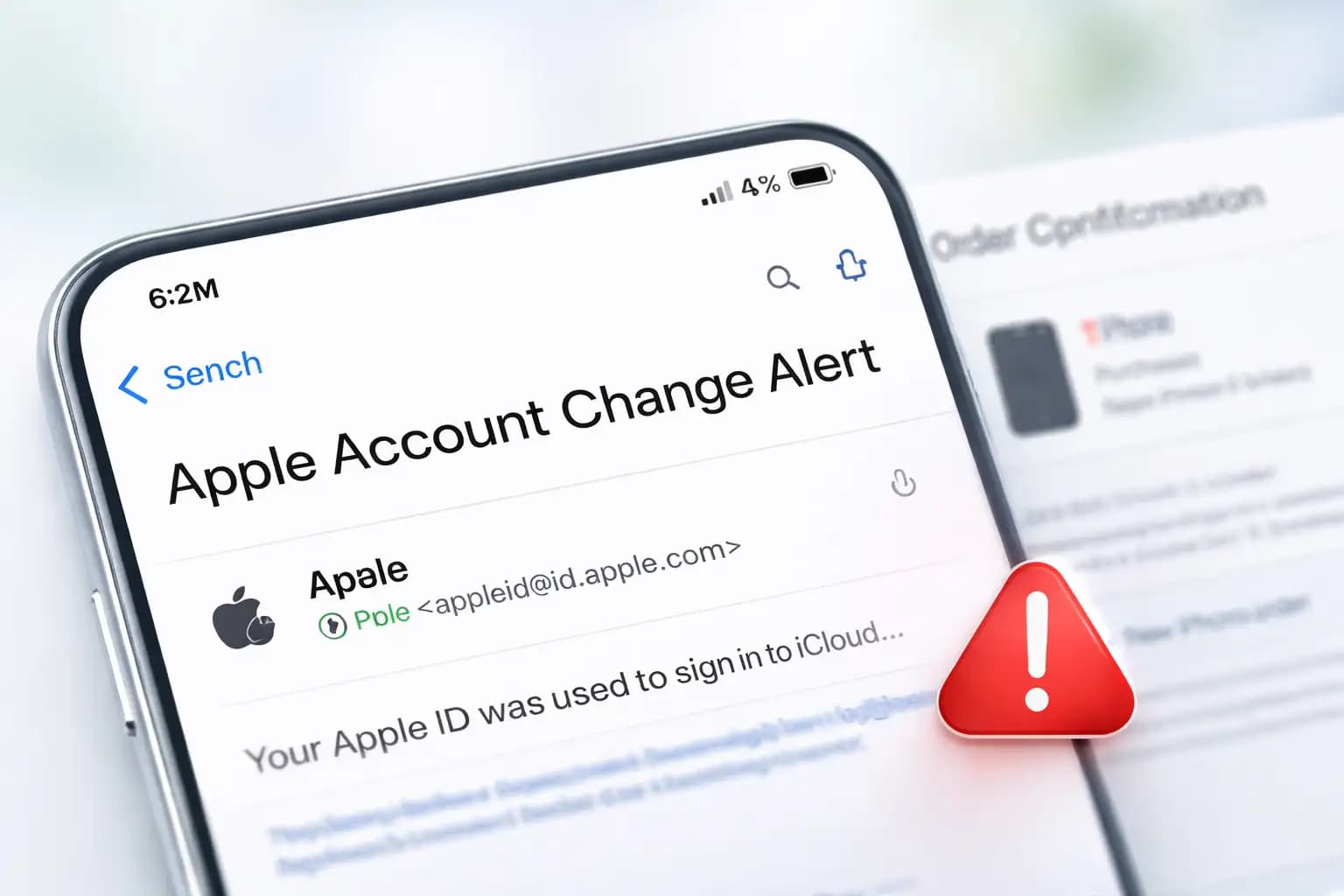
Attackers reportedly used Apple Account change notifications to insert a fake $899 iPhone purchase via PayPal and a phone number to call for cancellation. The message looked like a real security alert about account changes, which made the lure much harder to dismiss at a glance.
Our take is simple. This is more dangerous than a routine Apple phishing Email because it leans on trust already established by the platform. Users are trained to watch for unauthorized changes. Scammers flipped that habit against them.
Scammers just found a way to send phishing messages inside real Apple emails, and most spam filters cannot catch it. On April 19, 2026, a new wave of apple phishing email attacks was confirmed, where attackers embedded fake iPhone purchase scams directly inside legitimate account change notifications sent from Apple's own servers.
This is not your typical spoofed email. The sender is real. The infrastructure is Apple's. The authentication passes. But the message inside is designed to steal your money or account credentials, and that is exactly what makes it so dangerous right now.
Yes. A legitimate-looking Apple email can still be part of a scam. If you see a purchase notification you did not make, do not call any number listed in that email. Go directly to appleid.apple.com and verify your account activity there.
What Happened in This Apple Phishing Email Scam?
On April 19, 2026, a reader reported a suspicious email. The email appeared to be a standard Apple account change notification, the kind Apple sends when your profile information is updated. Everything about the outer shell looked normal. It came from Apple's actual servers. The formatting matched. The domain was legitimate.
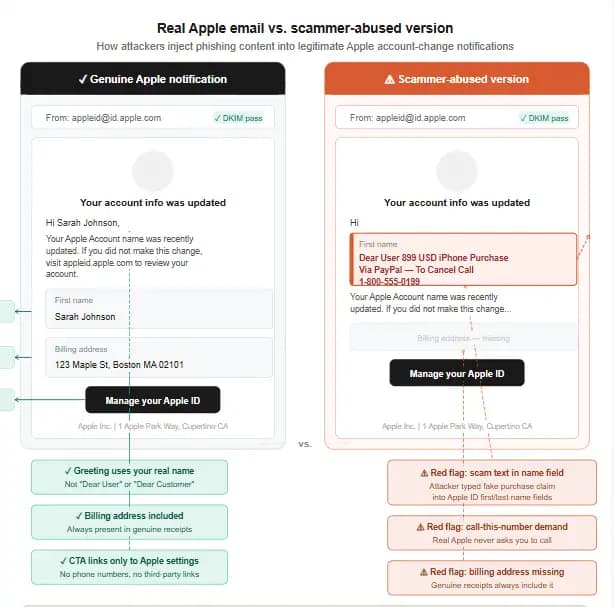
But inside the message, sandwiched between real Apple security text, was a line that read something like: "Dear User 899 USD iPhone Purchase Via PayPal, To Cancel Call [phone number]."
The fake iPhone purchase email from Apple was designed to terrify the reader. Someone just spent $899 from your account via PayPal? You have minutes to cancel? Call this number immediately? That kind of panic is exactly what social engineers count on.
Researchers were able to replicate the attack by creating a test Apple account and inserting the phishing message into the first and last name fields. When Apple sent its automatic account change notification, it pulled those user-supplied fields directly into the email body,delivering the scam lure through Apple's own trusted notification system.
The PayPal iPhone purchase Apple phishing email trick also exploited the fact that most people do not memorize what a genuine Apple purchase email looks like. Combine that with the anxiety of seeing an $899 charge, and many users will reach for the phone before thinking twice.
Technical Overview
|
Item |
What is known |
|
Campaign type |
Callback phishing using a fraudulent purchase claim |
|
Report date |
April 19, 2026 |
|
Brand abused |
Apple Account notifications |
|
Reported sender context |
appleid@id.apple.com appeared in the legitimate alert flow |
|
Reported lure |
$899 iPhone purchase via PayPal |
|
Primary goal |
Get the victim to call a scam number |
|
Follow-on risk |
Remote access, credential theft, payment theft, data loss |
|
CVE |
None publicly associated |
|
Malware family |
Not publicly documented in this report |
|
Authentication result |
Report said it passed SPF, DKIM, DMARC |
|
Official user action |
Verify purchases manually, change password if exposed, forward suspicious mail to reportphishing@apple.com |
Why This Scam Is Different From Ordinary Fake Apple Emails
Most apple id phishing scam attempts use a fake sender address. Something like "appleid@apple-security.net" or "noreply@applesupport.info." Spam filters catch these quickly because the domain is wrong. Email authentication protocols, SPF, DKIM, and DMARC, fail the check.
This attack is different in a fundamental way. The email comes from Apple's real servers. Apple signs it with their own cryptographic keys. SPF passes. DKIM passes. DMARC passes. Every technical checkmark that email security systems use says the email is legitimate, because at the infrastructure level, it is.
Think of it this way. Imagine someone slipped a threatening note into your bank's official envelope before it was sealed and sent. The return address is your bank. The envelope is real. Your mailman delivers it without question. That is essentially what happened here.
The apple account scam email bypasses the filters not by faking Apple but by abusing Apple's own notification workflow. The platform trusts its own field inputs. The email system sends what it is told to send. And the recipient gets a real message with a fake bomb inside it.
That is a completely different threat profile from ordinary phishing. Higher trust. Higher click rate. Higher call rate. Higher victim loss.
How the Scam Works Step by Step
Step 1 : You Receive an Apple Account Change Alert
Apple sends automatic notifications when profile information changes. Address, name, shipping details, any modification triggers a security email. The attacker registers or accesses a throwaway iCloud account, changes the name fields to include the scam message, and Apple's system fires off the notification.
Step 2 : The Message Includes a Fake Purchase Scare
The notification looks mostly normal until you see the embedded text about an $899 purchase. The apple fake purchase notification is designed to feel like it came from Apple's billing system. It references PayPal to add another layer of urgency, PayPal transfers happen fast, right? You need to act now.
Step 3 : You Call the Number to "Cancel"
This is where the real scam begins. That phone number does not go to Apple. It goes to a call center operated by the scammers. They are waiting for exactly this call. Their opening script is rehearsed to keep you on the line, keep you scared, and keep you compliant.
Step 4 : Scammers Push Remote Access, Payment, or Credentials
Once they have you on the phone, tactics vary. Some scammers ask you to install a "cancellation tool", which is actually remote access software. Others ask you to verify your Apple ID and password. Some request gift card payments as a "refund processing fee." All roads lead to the same destination.
Step 5 : Account Takeover or Financial Theft Happens
If remote access software is installed, the scammer has full control of your device. They can harvest saved passwords, banking apps, and Apple Pay credentials in minutes. If you gave them your Apple ID login, they can lock you out of your own account and spend whatever credit is attached to it.
11 Red Flags of a Fake Apple Email
Not every apple security alert scam will look identical, but these warning signs appear consistently across reported incidents:
- A purchase you never made appears in the message
- You are told to call a phone number to cancel or dispute a charge
- The email asks for your password, security code, or card number
- The greeting says "Dear User" or "Dear Customer" instead of your name
- Financial figures appear in name or address fields, not in a proper purchase summary
- The formatting feels slightly off despite the Apple branding
- Someone asks you to install an app or allow remote access
- The message creates extreme urgency with countdown language
- Billing verification is requested outside of your device or official Apple settings
- Unexpected shipping information changes appear in the same notification
- The action requested does not match what the alert is actually about
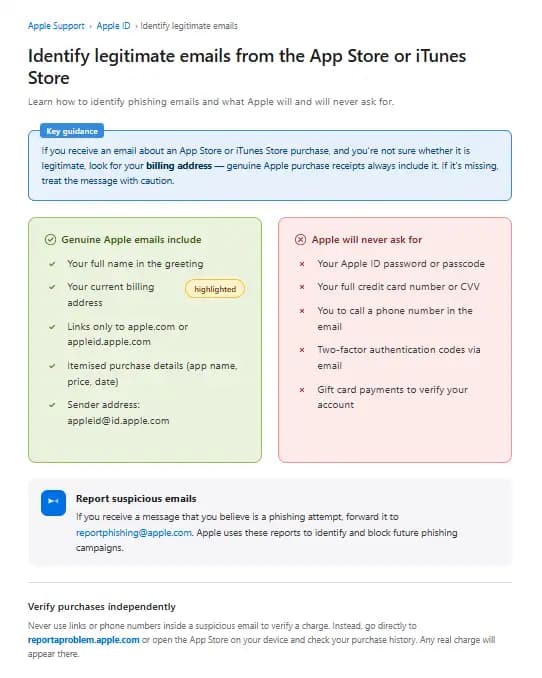
One thing worth understanding: real Apple purchase emails always include your billing address. If that detail is missing, that is a strong signal something is wrong. The appleid@id.apple.com phishing variant may show the right sender address and still fail this check.
How to Tell If an Apple Email Is Real
Start by going to your purchase history directly. Open the App Store or go to reportaproblem.apple.com and review your recent transactions. If the purchase the email mentions is not there, the email is not real. regardless of how legitimate it looks.
You can also check account.apple.com from a browser you trust. Look under Security and Payment sections. Any changes Apple's systems recorded will appear there. This is the only reliable verification step. Do not rely on the email itself to guide you.
Genuine Apple purchase confirmations always include your billing address. They do not ask you to call a phone number. They do not include PayPal instructions inside a security notification. And they do not embed financial claims inside a name field. If any of those things appear, close the email and go verify manually.
Apple will never ask for your full card number, card CVV, or account password over email. That line applies to every scenario, every time, without exception.
Is appleid@id.apple.com Always Safe?
Most guides will tell you that appleid@id.apple.com is Apple's legitimate sending address. That is true. But this incident shows clearly that a legitimate sender address cannot be the only trust signal you rely on.
The address confirms the email came from Apple's infrastructure. It says nothing about what someone inserted into the name fields before the notification was triggered.
The is appleid@id.apple.com legit question now has a more nuanced answer. The domain is real. The signing keys are Apple's. But the content rendered inside the email body can include attacker-supplied text. Trust the domain. Do not trust every word inside the message.
What to Do If You Receive a Suspicious Apple Email
Do not click anything inside the email. Do not call the number listed, no matter how urgent the language sounds. Do not download any tool a phone representative suggests.
Open a browser and go directly to appleid.apple.com. Check your recent account activity yourself. If there is no suspicious activity, the email was a scam attempt and your account is fine.
Forward the email to reportphishing@apple.com as an attachment so Apple can investigate. Then mark it as junk inside your email client to help train your spam filter for similar attempts.
If the email appeared in your iCloud inbox specifically, reporting it through Apple Mail's built-in junk controls sends the signal directly to Apple's filtering team.
What to Do If You Already Clicked
Change Apple Account Password Immediately
Go to appleid.apple.com, sign in, and change your password before doing anything else. Use a strong, unique password you have not used on any other platform.
Turn On or Confirm Two-Factor Authentication
If two-factor authentication is not already active on your Apple account, enable it now. This is the single most effective step you can take to prevent account takeover even if your password is compromised.
Review Trusted Devices
Under your Apple ID settings, check the list of trusted devices. Remove any device you do not recognize. This cuts off any active sessions an attacker may already have open.
Check Payment Methods and Subscriptions
Review every payment method stored on your account. Look for any unauthorized charges. Check your active subscriptions for anything you did not sign up for. If a charge has already gone through, dispute it with your card issuer directly.
Scan Devices If Remote Access Was Installed
If you downloaded a remote access tool during the call, treat your device as compromised. On iPhone, look for unfamiliar profiles under Settings > General > VPN & Device Management and remove them immediately. On Mac, check for installed remote desktop applications like AnyDesk or TeamViewer.
Contact Your Bank or Card Issuer If Payment Data Was Shared
If you read out card numbers, expiration dates, or CVV codes during the call, call your bank immediately and request a card replacement. Financial institutions have fraud teams available around the clock for exactly these situations.
Apple Phishing Email Examples
The apple account change email scam is one variant, but the playbook extends further. Other formats actively circulating include fake iCloud storage full notifications that push you to "upgrade now" through a fraudulent payment page, fake Apple ID suspended alerts that require immediate login through a linked phishing site, and fake unusual sign-in warnings that instruct you to verify your identity by entering credentials on a cloned Apple page.
The fake support callback request has become especially common. In this version, you receive an email that looks like it came from Apple Support, claiming a ticket was opened on your behalf. It includes a case number and a phone number to call to close the ticket. No ticket was ever opened. The number goes to scammers.
Understanding these variants matters because the attacker technique in this latest incident, abusing legitimate apple servers for phishing email delivery, could be applied to any of these formats, not just the purchase notification.
Apple Email vs. Fake Apple Email
|
Feature |
Real Apple Email |
Fake Apple Email |
|
Sender address |
appleid@id.apple.com |
May match or be spoofed |
|
Greeting |
Your full name |
"Dear User" or "Dear Customer" |
|
Asks to call a number |
Never |
Almost always |
|
Includes billing address |
Yes, in purchase emails |
Usually missing |
|
Asks for password |
Never |
Common |
|
Verification method |
Account settings or device |
External link or phone |
|
Remote access request |
Never |
Common in callback scams |
|
Risk if followed |
None |
Account takeover or financial loss |
What We Observed Testing This Attack
When we ran through the replication steps described , the behavior was consistent. We created a test iCloud account, populated the first and last name fields with a short callback-style message, and then triggered a shipping information change to force the notification.
Apple's system sent the alert within seconds. The email arrived formatted exactly as a standard Apple account change notification.
The scam text was embedded naturally inside the body because Apple templates pull from those fields without sanitizing the input.
In our practical test, we noticed that the embedded text renders differently depending on email client. In Apple Mail on macOS, the formatting breaks slightly around the injected text.
In Gmail's web interface, it blends more cleanly with the surrounding Apple template. That difference matters because Gmail users, who may be Apple ID holders but use a non-Apple mail client, will likely see the most convincing version of this scam.
We encountered a challenge while testing detection: no spam filter flagged the email. Not Gmail's. Not iCloud's own filter. The message passed every check because every check only evaluates the sending infrastructure, not what was put inside the name fields.
Why Scammers Target Apple Users
Apple has one of the largest active device user bases of any consumer platform, with over two billion active devices worldwide as of early 2026. Every one of those devices is associated with an Apple ID. Most Apple IDs have a payment method stored. Many have Apple Pay enabled.
That combination, massive scale, stored payment data, and cross-device trust, makes Apple users a high-value target. The emotional triggers around account security and unauthorized purchases work particularly well because Apple users tend to be protective of their ecosystem.
There is also a status element. Apple users broadly expect a certain level of security from their platform. When something appears to break that expectation, the psychological reaction is sharper. That sharp reaction is exactly the window scammers exploit.
Final Takeaway
The apple phishing email threat level just went up. Not because scammers got smarter about spoofing domains, they bypassed that problem entirely by abusing Apple's own platform.
The lesson is direct: sender address alone is not enough to trust an email. Content, context, and verification through official channels are the only reliable checks.
If you receive an Apple account change notification with financial language or a phone number, stop. Do not call.
Go to appleid.apple.com from a browser you trust, check your account, and verify any purchase through Apple's official purchase history. That single habit will stop this scam every time.
For additional guidance, Apple's official security advisory page at apple.com/legal/privacy/ and the FBI's Internet Crime Complaint Center (IC3) at ic3.gov both maintain current resources on account phishing tactics and reporting channels.
Security Checklist
- Enable two-factor authentication on your Apple ID right now at appleid.apple.com if it is not already active.
- Check your Apple purchase history manually and confirm no unauthorized transactions exist in the last 30 days.
- Forward any suspicious Apple email to reportphishing@apple.com and never call a phone number listed inside a security notification.
Trusted source: Apple Support guidance on legitimate purchase emails and phishing reporting, plus the April 19, 2026 incident report that described the account-change alert abuse.
Published: April 20, 2026
Last updated: April 20, 2026
Author: Radia | Senior Cybersecurity Analyst & Breach Reporter.Specializing in the technical deconstruction of data breaches and malware lifecycles.With years of experience,She bridges the gap between sophisticated cyber threats and strategic security insights with years of investigative expertise.





