
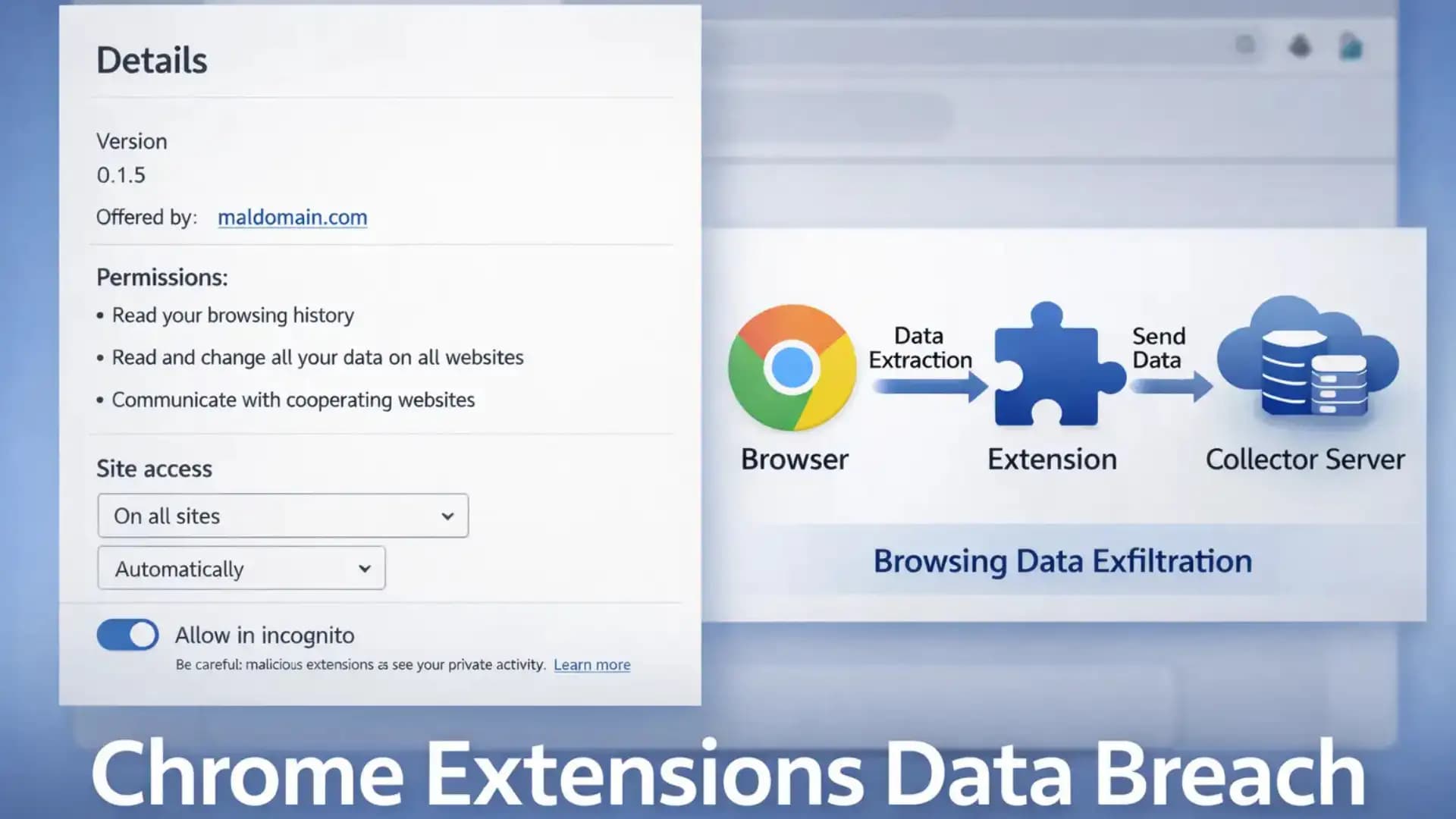
In the last few years, browser extensions have quietly become part of the security perimeter. They can read pages, modify content, watch network requests, and sometimes see the most sensitive thing of all: the URLs you visit.
That is why the Chrome extensions data breach story around “spying extensions” hit a nerve. The core claim is straightforward: a set of extensions, collectively installed tens of millions of times, appeared to transmit browsing history details to outside parties.
If you are an IT admin, security analyst, student, or decision-maker, this matters for two reasons.
First, browser history is not harmless. It can reveal internal portals, SaaS tenants, patient resources, finance tools, mergers, job searches, and incident-response work.
Second, extensions are “inside the house.” Traditional network controls often do not treat them like software with supply chain risk.
In this guide, you’ll learn what happened, how browser extension data exfiltration works, what risks are realistic and how to build a practical defense plan for users and organizations.
What happened
Reporting and a public repository describe an investigation that flagged 287 Chrome extensions based on observed network behavior consistent with sending visited-URL data outward, totaling an estimated ~37.4 million installations.
The analysis approach is worth understanding because it is different from simply reading permissions or store descriptions. The researchers describe running Chrome in an automated environment and watching outbound traffic patterns while visiting controlled URLs designed to reveal leakage signals.
One important nuance: this is framed as “exfiltration” of browsing history signals, not a traditional breach where a single database gets hacked. In other words, the risk is about where your browsing data flows and who receives it, not only whether a server was compromised.
Chrome extensions data breach
Security folks use the word “breach” in different ways. In this context, the Chrome extensions data breach idea is about the unauthorized or unexpected disclosure of browsing history data to outside parties, sometimes via complicated chains of collectors and resellers.
This matters because a URL is often more revealing than people assume. Even if the page content is encrypted (HTTPS), the full URL can include paths, document titles, ticket numbers, share links, password-reset tokens, and internal app routes. You do not need a credit card number to cause harm. Sometimes just knowing “what system you use and where it lives” is enough.
A second reason it matters is scale. Tens of millions of installs means the “average” user is exposed to a wide marketplace of extensions, many built by small teams, some bought and sold, and others quietly changing behavior over time through updates.

Chrome extensions stealing browsing history
Let’s slow down and define the sensitive asset: browsing history is not only a list of sites. It is a behavioral profile.
Think about a normal week at work. You log into payroll. You open a customer CRM. You search for a new vendor. You click a private slide deck link. You check a cloud console. Each one leaves a trail of URLs that can map your role, your employer’s tooling, and sometimes your current problems.
That’s the core of “Chrome extensions stealing browsing history.” Even when data is “aggregated,” it can often be linked back to a person if the trail contains unique patterns. Reporting around this story points to prior academic work on how seemingly anonymous browsing data can be tied to identities.
Why URLs are sensitive data
URLs can expose:
· Internal admin panels (example: /admin, /console, /billing)
· SaaS tenant names (example: companyname.okta.com)
· Project codenames inside wiki paths
· Shared document links that are valid for weeks
· Password reset links and one-time tokens (sometimes)
You do not have to panic about every URL. But it is absolutely enough data to support targeted phishing, credential-stuffing prioritization, and social engineering.
What is a Chrome Extension Data Breach?
A Chrome extension data breach is a situation where a Chrome extension causes browsing or page-derived data to be disclosed to a party that the user or organization did not reasonably expect, or where the disclosure creates meaningful privacy or security harm.
Why this risk exists at all
Extensions are powerful by design. They sit between you and the web page. Many need broad access to do legitimate jobs like
· blocking ads and trackers
· injecting password-manager UI
· checking grammar
· managing tabs and sessions
· integrating with enterprise tools
The problem is not that extensions exist. The problem is that their access can be broader than their function requires, and users click “Add extension” faster than they would install desktop software.
How It Works
The extension architecture, quickly
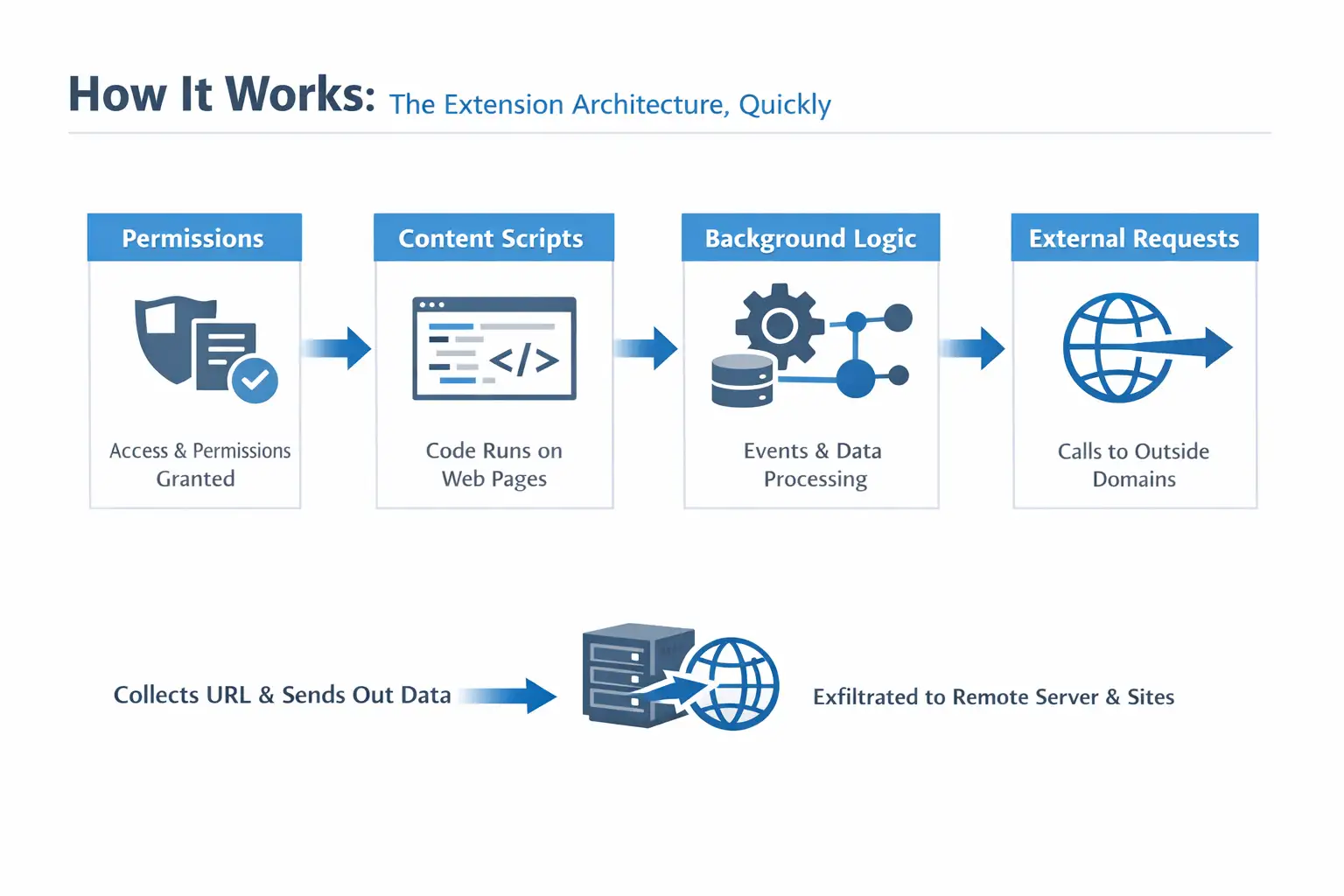
Most Chrome extensions rely on a few building blocks:
· Permissions: what the extension is allowed to access
· Content scripts: code that runs inside web pages you visit
· Background logic (service worker in modern Chrome): handles events, network calls, and data storage
· External requests: calls to domains outside the page you are visiting
That last piece is where browser extension data exfiltration shows up. An extension can observe a URL, collect it, and send it out using normal web requests. Nothing “exotic” is required.
Common data-exfiltration routes
Here are patterns security teams see repeatedly:
· Telemetry beacons that include full URLs or identifiers
· Third-party SDK-like endpoints embedded into extensions
· Affiliate and analytics rewrites that quietly add tracking parameters
· Remote configuration that changes behavior after install
· Collector domains that receive a stream of browsing events
At the risk of sounding obvious: if the extension can read the URL and it can make outbound requests, it can leak history.
Why the “URL-length correlation” trick matters
The public report describes an automated pipeline that runs Chrome in a controlled environment, routes traffic through an MITM proxy, and measures whether outbound traffic grows in a way that tracks the length of URLs being visited.
The intuition is simple. If you feed an extension a series of increasingly long “honey URLs” and outbound requests grow proportionally, something may be transmitting the URL or parts of it.
This is clever because it focuses on observed behavior, not marketing claims. Still, it is not perfect. Extensions may transmit data for benign reasons (debug logs, sync features) and still create risk. Others may leak selectively to avoid easy detection.
287 Chrome extensions security breach
The headline number is attention-grabbing, but the more useful lesson is operational: at-scale extension review requires automation.
The report describes scanning at scale (including large compute consumption) and pairing it with follow-up validation ideas like honeypot URLs to see who comes looking later. That combination, behavior plus downstream observation, is closer to how defenders think.
What about threat actors, “spyware,” and intent?
Some coverage uses strong language like “spyware.” From a defensive standpoint, it is safer to stick to what is observable: data flows, recipients, and controls.
The report also discusses a mix of possible collectors, including well-known analytics ecosystems and other entities. But attribution is messy in the extension world. Ownership changes, domains get repointed, and resellers sit behind other services.
If you see claims about specific operators that you cannot confirm in primary materials, treat them carefully. This appears to be unverified or misleading information, and no official sources confirm its authenticity.
Where to find the malicious Chrome extensions list
If you are looking for a malicious Chrome extensions list, the most responsible approach is to rely on primary material that documents extension IDs and evidence. The public repository associated with this story is the best starting point because it is the source that many secondary articles cite.
A practical tip: for enterprise triage, you usually do not need all 287 names in a blog post. You need a repeatable way to:
· inventory installed extensions
· match extension IDs against known-bad or high-risk lists
· remove or block them
37.4 million users' data leak
When people read “37.4 million,” they picture passwords spilling into the street. That is not always how this kind of leak works.
A 37.4 million user data leak number in this context is better understood as “potential exposure via installation footprint.” The harm depends on what was collected (full URL, partial URL, or domain only), how long it was retained, and whether it was linked to identifiers.
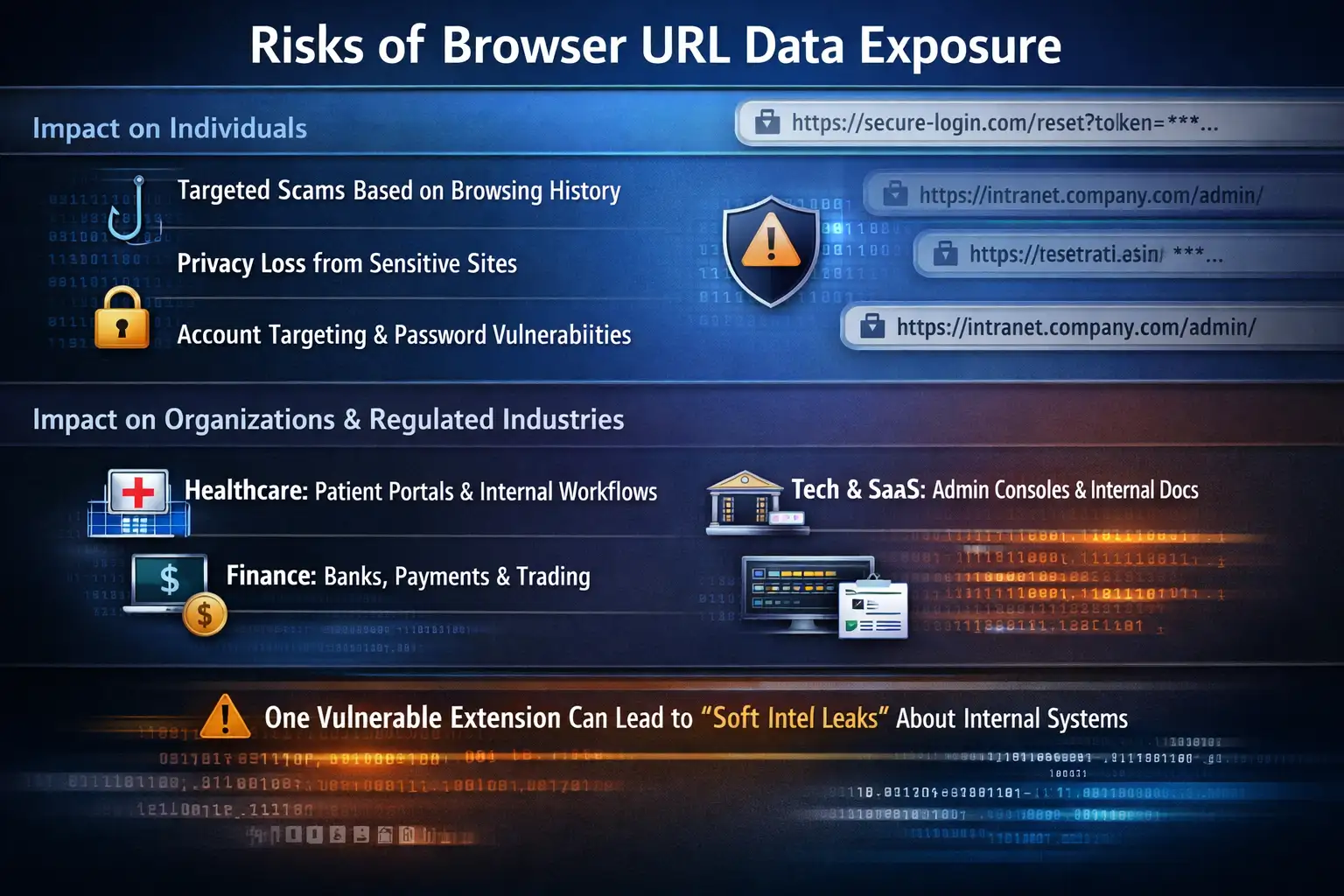
Impact on individuals
For everyday users, the realistic harms look like:
· targeted scams based on sites you recently visited
· embarrassment or privacy loss from sensitive browsing categories
· account targeting if URLs reveal identity providers or password reset workflows
Even without page content, URL metadata can be enough for convincing social engineering.
Impact on organizations and regulated industries
For enterprises, the Chrome extension privacy risk becomes a governance and compliance issue:
· Healthcare: URLs can hint at patient portals, internal tools, or care workflows.
· Finance: browsing trails can reveal institutions used for payments, trading, or vendors
· Tech and SaaS: URLs often expose admin consoles, environments, and internal documentation paths.
If a single employee has a risky extension, it can create a “soft intel leak” about internal systems. That intel is exactly what attackers use to choose phishing themes and targets.
Why it matters in cybersecurity
Browsers are now operating systems. Extensions are applications. That framing is useful.
The extension ecosystem also has a part that deals with the supply chain. Developers can be phished, accounts can be taken over, and once-trustworthy extensions can later ship risky code. Separate reporting over the last year has shown multiple campaigns where extensions were compromised or later turned malicious.
So this story is not an isolated headline. It is part of a broader pattern: dangerous Chrome add-ons can appear legitimate at install time and only become a problem later.
If you are waiting for a single Google Chrome security warning banner to save you, you will be waiting a long time. Chrome Web Store controls help, but they are not the same as an enterprise software review process.
Real-world example: a realistic attack scenario
Picture a mid-size company with a hybrid workforce.
An employee installs a “PDF helper” extension. It asks for broad permissions, but the prompt is vague, and the employee clicks through. Nothing breaks. The extension even works.
Weeks later, the employee starts working on an acquisition. They visit internal data rooms, open vendor questionnaires, and log into finance tooling. The URLs include vendor names and unique folder paths.
If that extension performs browser extension data exfiltration, the data does not need to include file contents. The URL trail alone can tell a story:
· Which vendor platforms are in play
· Which internal tools are being used
· Which departments are active?
· when logins happen
Now imagine a phishing email crafted with those exact vendor names and a believable “document updated” message. That is how “small” leaks become high-conversion social engineering.
That is also why defenders treat the Chrome extension spyware threat category seriously, even when the only confirmed behavior is URL leakage.
What users or organizations should do now (mitigation steps)
This section is intentionally practical. No heroics, no special tools required.
How to remove malicious Chrome extensions
If you are an individual:
1. Open Chrome and go to Extensions (type chrome://extensions in the address bar).
2. Disable anything you do not recognize.
3. Remove extensions you do not absolutely need.
4. For the ones you keep, open Details and check:
o permissions
o “Site access” (all sites vs. specific sites)
o whether it can run in Incognito
If you are an organization, do the same but at scale:
· inventory extensions via endpoint management or browser management
· remove unknown items
· move to an allowlist approach for production endpoints
Are Chrome extensions safe to use?
Here is the honest answer: some are, many are not, and the risk changes over time.
An extension can be safe today and unsafe after an update, an acquisition, or a compromised developer account. The safer question to ask is, “Do we have a way to notice and respond when an extension changes?”
This is the mindset shift that reduces real risk.
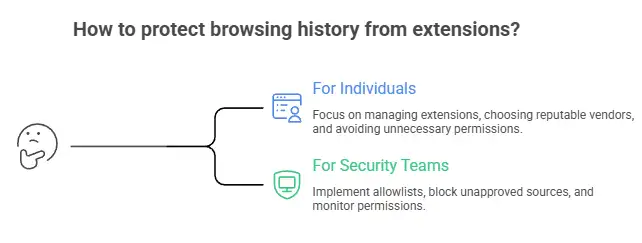
How to protect browsing history from extensions
For individuals:
· Keep only what you actively use. If you have not used it in a month, remove it.
· Prefer extensions from vendors with a clear reputation and transparent update history.
· Avoid “utility bundles” that request access to “all sites” without a strong reason.
· Treat browsing history like sensitive data. Because it is.
For security teams:
· Implement an extension allowlist for managed browsers.
· Block installation from unapproved sources.
· Review permissions with the same skepticism you apply to mobile apps.
· Watch for new extensions that suddenly request broader access after updates.
Enterprise controls that actually work
A simple, effective program usually has four layers:
1) Policy (the boring part that saves you later)
· Define which categories are allowed (password managers, meeting tools, accessibility).
· Ban categories with weak business needs (coupon injectors, “search helpers,” sketchy downloaders)
2) Approval workflow
· One intake form: purpose, vendor, permissions, business owner
· One review: security signs off, IT deploys
3) Monitoring and response
· Alert on new extension installs
· Alert on permission changes
· Remove at scale when a risk threshold is crossed
4) User education
· Teach users a single rule: “If it asks for access to all sites, assume it can read what you do.”
If you need external help operationalizing this, you might evaluate Hoplon Infosec cybersecurity services for browser extension governance and broader endpoint risk programs, but the fundamentals above still apply no matter who helps you implement them.
Common misconceptions
Misconception 1: “If it’s in the Chrome Web Store, it’s safe.”
Reality: store controls reduce risk, but they do not eliminate it. Extensions can change over time, and detection is not perfect.
Misconception 2: “Permissions tell me everything.”
Reality: permissions tell you capability, not intent. Behavioral testing (what it actually sends) is often more revealing.
Misconception 3: “It’s only browsing history, not credentials.”
Reality: browsing history can be enough to drive targeted compromise, even without passwords.
Hoplon Insight Box (expert recommendations)
If I were building a clean extension posture for a real company this quarter, I’d do these five things first:
1. Inventory every extension across managed endpoints and rank them by risk (site access, permissions, update cadence).
2. Enforce an allowlist for corporate browsers, even if the first version is small and annoying.
3. Create a fast approval lane so employees do not work around policy.
4. Add monitoring for extension installs and permission changes, and treat surprises as incidents.
5. Run a quarterly extension cleanup the same way you rotate keys or patch laptops.
That combination reduces both the “quiet leakage” risk and the “extension takeover” risk that keeps showing up in separate campaigns.
Conclusion
The lesson from this Chrome extensions data breach coverage is not “never use extensions.” It’s that extensions deserve the same skepticism as any third-party software with deep access to user activity.
If you remember one thing, remember this: treat installed extensions as part of your attack surface. Keep the set small, prefer trusted vendors, and for organizations, move to allowlists and monitoring. Those steps do more to prevent browsing-history exposure than any single cleanup day.
FAQs
1) How do I know if an extension is stealing my browsing history?
Look for red flags: “access to all sites,” unclear vendor identity, frequent background activity, or network calls to unrelated domains. For higher confidence, enterprises can test suspicious extensions in a sandboxed browser and inspect outbound requests.
2) Are Chrome extensions safe to use for work?
They can be, but only with governance. Use an allowlist, keep extensions to business-necessary tools, and monitor for changes. Without that, risk increases over time.
3) What should I do if I installed a suspicious extension?
Remove it, review other installed extensions, clear browser data if appropriate, and rotate credentials if you suspect broader compromise. If your company manages the device, report it so the extension can be blocked fleet-wide.
4) What is browser extension data exfiltration?
When an extension transmits data, it may send information such as URLs, page content, and unique identifiers to external servers. This can occur through standard web requests and may go unnoticed unless traffic is actively monitored.
5) Where can I find a malicious Chrome extensions list related to this incident?
Start with primary materials that document evidence and extension identifiers. The public repository associated with the 287-extension investigation is the most cited source for this specific story.
6) Does Google warn users about dangerous Chrome add-ons?
Sometimes extensions are removed or flagged, but users should not rely on warnings alone. Treat extension installs like software installs and minimize what you allow by default.




-20260925120840.webp&w=3840&q=75)
