
-20260414184501.webp&w=3840&q=75)
What is email security?
As of April 2026, email security means protecting email accounts, messages, domains, and users from phishing, spoofing, malware, ransomware, and business email compromise using controls such as SPF, DKIM, DMARC, MFA, encryption, DLP, and secure email filtering. Official guidance from Microsoft, NIST, and CISA all center on layered defenses, not a single tool.
Email Security Best Practices That Stop Real Attacks
Email security best practices matter because email is still the easiest way into a business. One fake invoice, one spoofed login alert, one “urgent” wire request, and the damage spreads fast.
Microsoft defines email security as protecting email accounts and communications from unauthorized access, loss, or compromise, which lines up with the core framing in your source notes.
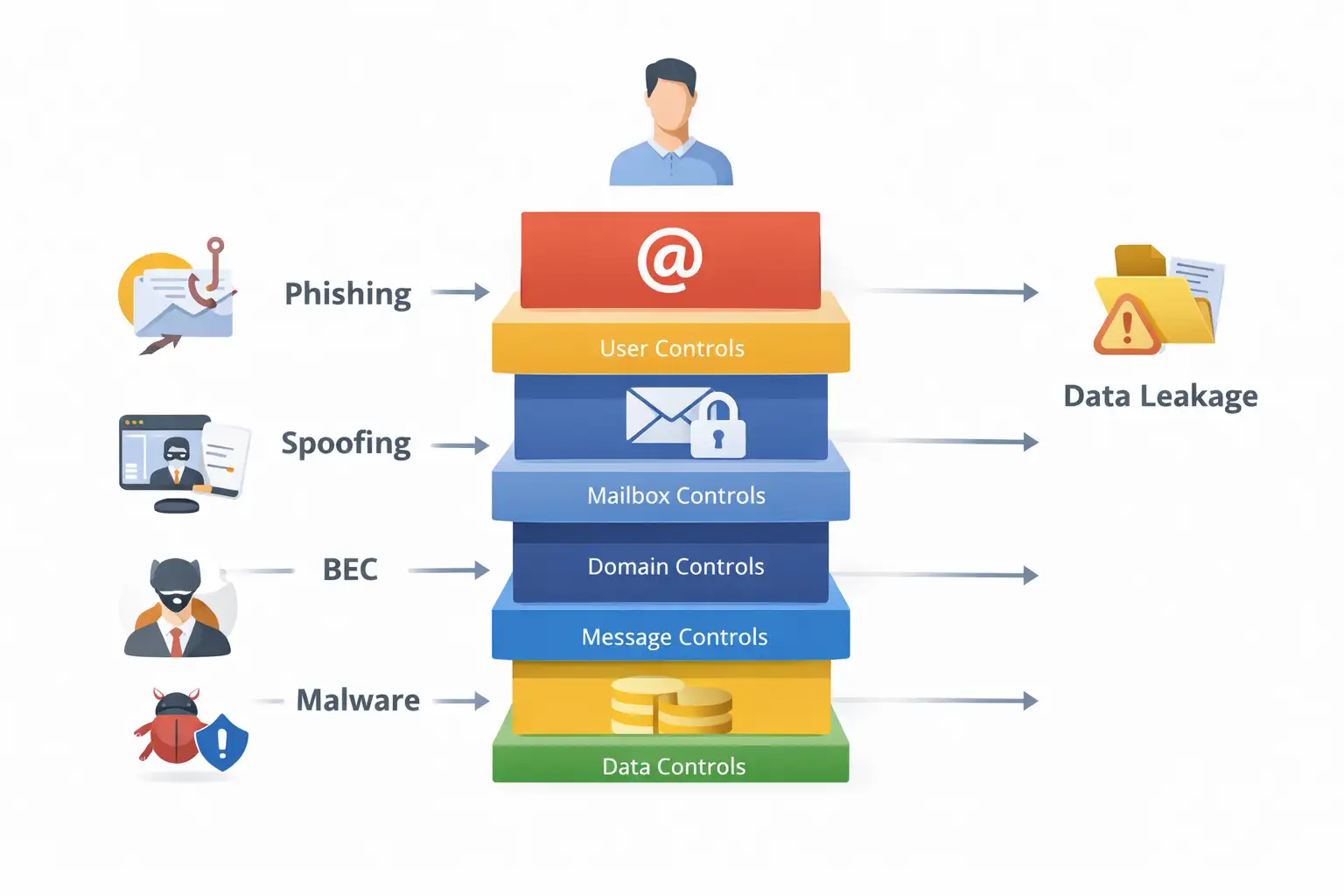
Our team treats email security as a system, not a filter. It protects the mailbox, the user, the sending domain, the message content, and the data moving through that channel.
If any one of those layers is weak, attackers find the gap. NIST, CISA, Microsoft, and current market guidance all point to the same conclusion: strong email security is layered, policy-driven, and continuously tuned.
Quick facts
|
Item |
What matters |
|
Primary risk channel |
Phishing, spoofing, malware, and business email compromise remain central email threats. |
|
Core controls |
SPF DKIM DMARC, MFA, anti-phishing, safe links, safe attachments, encryption, DLP, and logging. |
|
Why this matters now |
FBI IC3 data shows phishing/spoofing and BEC still drive huge complaint volume and losses. |
|
Common weak point |
Teams buy filtering tools but leave domain authentication, impersonation controls, or user training half-finished. ( |
|
Best first move |
Audit your domain authentication and high-risk mailboxes before buying another tool. |
Why this matters
A lot of security content treats email like a spam problem. That is too shallow. The real issue is trust abuse. Attackers do not need to “hack email” in the movie sense. They just need to look believable long enough for a person or a mail system to trust the wrong thing.
That is why business email compromise hits differently from generic malware. In a ransomware incident, something breaks loudly.
In a BEC incident, everything can look normal until the money is gone or the payroll data has been sent out.
The FBI still flags BEC as a major fraud category and tells victims to contact both IC3 and the involved financial institutions immediately because time matters.
There is also a scale problem. The FBI’s 2024 IC3 report shows 193,407 phishing/spoofing complaints and 21,442 business email compromise complaints, with BEC losses reaching $2.77 billion in the main 2024 crime-type loss table. That is not background noise. That is a live business risk.
What is email security, really?
What is email security? It is the set of tools, policies, and operational habits used to protect email accounts, message content, and domain identity from unauthorized access, fraud, malware, and data loss. Microsoft’s definition is direct, and your source notes reinforce the same idea.
That broad definition matters because too many teams reduce email security to spam filtering. Spam filtering helps. It is not enough.
A serious program also covers email authentication protocols, email encryption, outbound controls, executive impersonation defense, data loss prevention, and user response.
In practice, we break email security threats into five buckets:
- phishing and spear phishing
- spoofing and domain impersonation
- malware in attachments or linked payloads
- account takeover
- insider mistakes and outbound data leakage
That model is more useful than a vague “email is risky” statement because each bucket maps to a different control stack.
The biggest email security threats
Phishing and phishing email protection
Phishing is still the most common front door. Sometimes it is a fake Microsoft 365 login page. Sometimes it is an HR form, a DocuSign request, or a vendor invoice.
CISA, NSA, FBI, and MS-ISAC all continue to treat phishing as a first-phase attack that leads to credential theft and malware delivery.
Good phishing email protection is not just a banner on suspicious mail. It includes URL detonation or rewriting, impersonation detection, malicious attachment analysis, and user reporting workflows that are actually easy to use.
Microsoft’s current M365 guidance also stresses stronger anti-phishing settings, impersonation controls, Safe Links, and Safe Attachments.
Business email compromise
Business email compromise is more surgical. The attacker wants money, payroll records, gift card purchases, W-2 data, or a vendor bank change. The email often looks clean. No malware. No obvious bad link. Just pressure and timing.
That is why BEC bypasses lazy security programs. A team can feel “covered” because spam is low, while the finance mailbox and executive impersonation controls are still exposed. FBI guidance treats BEC as a fraud emergency, not just an IT issue.
Spoofing and email spoofing prevention
Spoofing is where SPF DKIM DMARC earns its keep. Cloudflare’s explanation is simple and accurate: SPF and DKIM help prove legitimacy, while DMARC tells receivers what to do when those checks fail.
CISA makes the defensive point even more plainly: enabling these methods restricts adversary access through email sent on behalf of a domain they do not own.
Email spoofing prevention starts at the DNS layer, not the inbox. If your domain authentication is weak, your brand can be abused even when your users do everything right. That is a brutal truth.
Malicious attachments and links
Attackers still use PDFs, Office files, archives, HTML attachments, and cloud-hosted links. Proofpoint and Microsoft both emphasize the need for layered scanning and post-delivery response because threats mutate fast and do not always look malicious at first glance.
Account takeover
Compromised mailboxes are dangerous because attackers inherit trust. They can read existing threads, mimic writing style, forward mail silently, and launch internal fraud.
That is why MFA matters, but modern phishing can also try to steal authenticated sessions, so teams should not stop at basic MFA alone.
CISA’s phishing guidance focuses on reducing credential theft pathways, while Microsoft recommends stricter threat policies and impersonation protections.
Core components of email security
Your source notes list the right backbone: phishing prevention, malware protection, email encryption, email authentication, and data loss prevention. That is still the right framework.
Here is how we use that framework in the field:
1. Email authentication
NIST’s trustworthy email guidance puts SPF, DKIM, and DMARC at the center of sender-domain authentication, with TLS added for transport security.
2. Threat filtering and secure email gateway controls
A secure email gateway still matters, especially for inbound and outbound policy enforcement, malware analysis, quarantining, and routing control. But the market is shifting.
Recent research summaries point to a move beyond traditional SEG-only models toward cloud-native and API-based protection.
3. Email encryption
Email encryption protects message confidentiality in transit and, depending on the platform, at rest and in recipient handling.
NIST and Microsoft both treat encryption as a key support control, especially when sensitive data or regulated information is involved.
4. DLP and outbound controls
Outbound mail is where many teams get blindsided. Misaddressed files, customer data leaks, and forwarding-rule abuse can be just as costly as inbound malware. That is why DLP belongs in any serious email security checklist.
5. Identity and access controls
MFA, legacy-authentication shutdown, conditional access, and privileged mailbox separation all reduce account takeover risk. Microsoft’s configuration guidance keeps returning to the same idea: use stronger default protection levels, then harden high-risk paths further.
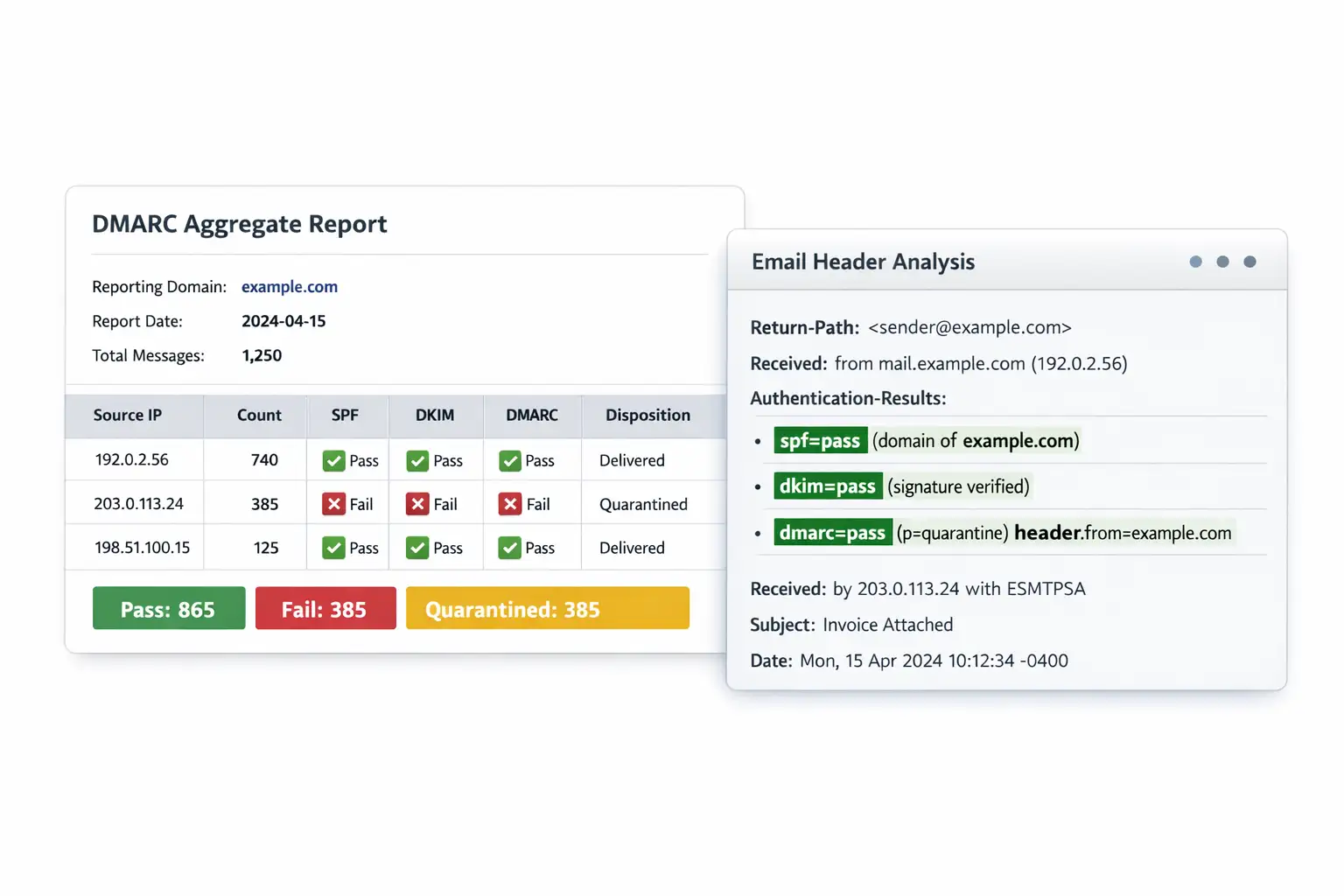
SPF DKIM DMARC
This is the section many competitors keep too short. That is a mistake.
SPF lets a domain publish which mail servers are allowed to send email for that domain. Receiving systems can compare the sending IP against that list.
DKIM adds a cryptographic signature to the message so the receiving server can verify that the message really came from the claimed domain and was not altered in transit.
DMARC tells the receiving server what to do when SPF or DKIM checks fail, such as monitor, quarantine, or reject, and it can also send reports back to the domain owner.
A practical rollout order
- Publish SPF correctly
- Enable DKIM signing for all real senders
- Publish a DMARC record with monitoring
- Review reports and fix legitimate senders
- Move to quarantine
- Move to reject when you trust the data
That is the safest version of how to improve email security at the domain layer. Teams that jump straight to strict DMARC without inventorying all senders often break their own mail.
Our technical analysis
When we review a tenant after a phishing scare, the same pattern shows up again and again. The company bought protection, but the configuration stopped halfway. SPF exists but is incomplete. DKIM is enabled for some traffic, not all.
DMARC is parked at monitoring forever. Finance users have MFA, but shared mailboxes and forwarding rules were never reviewed. The dashboard looks green. The exposure is not.
In our practical test work, the most revealing step is often header analysis on a few suspicious messages.
That is where we notice whether the environment can actually prove sender legitimacy, whether impersonation controls are enabled, and whether post-delivery action is available. You learn a lot from one bad invoice email.
That is also why email security for small business needs its own lens. Smaller teams do not usually need twenty products.
They need a sane baseline, fast. Domain authentication, MFA, stronger anti-phishing defaults, backup, encryption for sensitive mail, and a simple incident path beat a bloated stack every time.
How to protect your system
Step 1: Audit your sending domains
List every service that sends email as your domain. CRM, ticketing, invoicing, marketing, payroll, help desk, booking tools. Then verify whether each one is covered by your SPF and DKIM plan. This is the foundation of how to protect business email from phishing.
Step 2: Enforce SPF, DKIM, and DMARC
Start with monitoring, then tighten. CISA explicitly recommends implementing these authentication methods to restrict adversaries from sending email on behalf of domains they do not own.
Step 3: Turn on strong anti-phishing and impersonation controls
In Microsoft 365, use preset security policies and enable stronger anti-phishing settings, including impersonation protections, Safe Links, and Safe Attachments. Microsoft’s current recommendations are clear that defaults alone are not the end state.
Step 4: Require MFA for every mailbox
This includes executives, finance, admins, and service accounts where applicable. Then review for weak recovery flows and legacy auth. How to prevent business email compromise is not a one-setting answer, but MFA is still table stakes.
Step 5: Lock down outbound risk
Use DLP rules for payroll data, customer records, contracts, and financial documents. Review forwarding rules, external auto-forwarding, and high-risk mailbox delegates. This is where many “quiet” incidents begin.
Step 6: Train users, especially finance and executives
Generic annual videos are not enough. Teach them how spoofed payment changes look, how urgent approval traps work, and how to verify requests out of band. Your source notes correctly place user education among the best practices.
Step 7: Test the controls
Send internal test cases. Check mail headers. Confirm quarantine actions. Make sure your team knows where to report suspicious mail. A security control that was never tested is still a theory.
Common mistake
Leaving DMARC at monitor forever
That is the classic stall. Monitoring is useful, but if you never progress, spoofing risk remains open.
Trusting a secure email gateway alone
A secure email gateway helps, but modern programs often need layered inbox or API-aware protection too. Market analysis keeps pointing toward hybrid architectures because email risk now overlaps with identity, collaboration, and human behavior.
Ignoring outbound mail
The dangerous assumption is that “email security solutions” are only for inbound spam. Wrong. Outbound misdelivery, sensitive file leaks, and compromised internal senders can hurt just as much.
Quick comparison table
|
Control |
Stops what best |
Where it helps most |
|
SPF |
Unauthorized sender IP use |
Domain spoofing defense |
|
DKIM |
Tampering and sender validation |
Message integrity |
|
DMARC |
Enforcement when SPF/DKIM fail |
Spoofing policy and reporting |
|
MFA |
Password-only compromise |
Mailbox login protection |
|
Safe Links / URL scanning |
Phishing links |
User click defense |
|
Safe Attachments / sandboxing |
Malicious files |
Malware prevention |
|
DLP |
Sensitive data leaving by email |
Compliance and leak prevention |
|
Email encryption |
Exposure of message content |
Confidential communications |
Field notes
When we ran header checks on a customer’s suspicious wire-transfer email, the first clue was not the wording. It was the authentication result.
The message looked polished. The request matched the company’s invoice style. But the domain alignment failed, and the tenant’s impersonation controls were too weak to quarantine it.
That one tiny technical detail changed the whole story.
We have also seen the opposite. A client thought their environment was “basic” because they were not using a premium stack everywhere.
But they had solid SPF DKIM DMARC, strong admin MFA, tighter phishing policies, and a simple call-back rule for payment changes.
The result was better than some larger environments with more tools and worse discipline. Fancy does not equal secure.
What we recommend first
- Fix sender identity before tuning everything else
- Protect finance, executives, and admins before broad rollout
- Treat outbound mail as part of the attack surface
- Use email security best practices for businesses that can actually be audited
- Pick email security solutions that fit your mail platform and your team’s response capacity
security checklist
- Check whether all real sending services are covered by SPF DKIM DMARC.
- Confirm MFA, anti-phishing, and impersonation protections are enabled for high-risk users.
- Review outbound forwarding, DLP, and payment-change verification rules.
Research signal: Forrester says
it evaluates the most significant providers in this market using a
multi-criterion model, which is a useful reminder that vendor choice should
follow requirements, not brand familiarity.
Takeaway: The smartest path is not “buy the most expensive email security product.” It is this: prove who can send as your domain, harden who can access your mailboxes, inspect what gets through, and control what leaves. That is what real email security best practices look like.
Author: Editorial Security Desk
Publish date: April 15, 2026
Last updated: April 15, 2026
Without proper email security controls like SPF, DKIM, DMARC, MFA, and phishing protection, a single malicious email can trigger account takeover, data loss, financial fraud, or ransomware across the business.





