
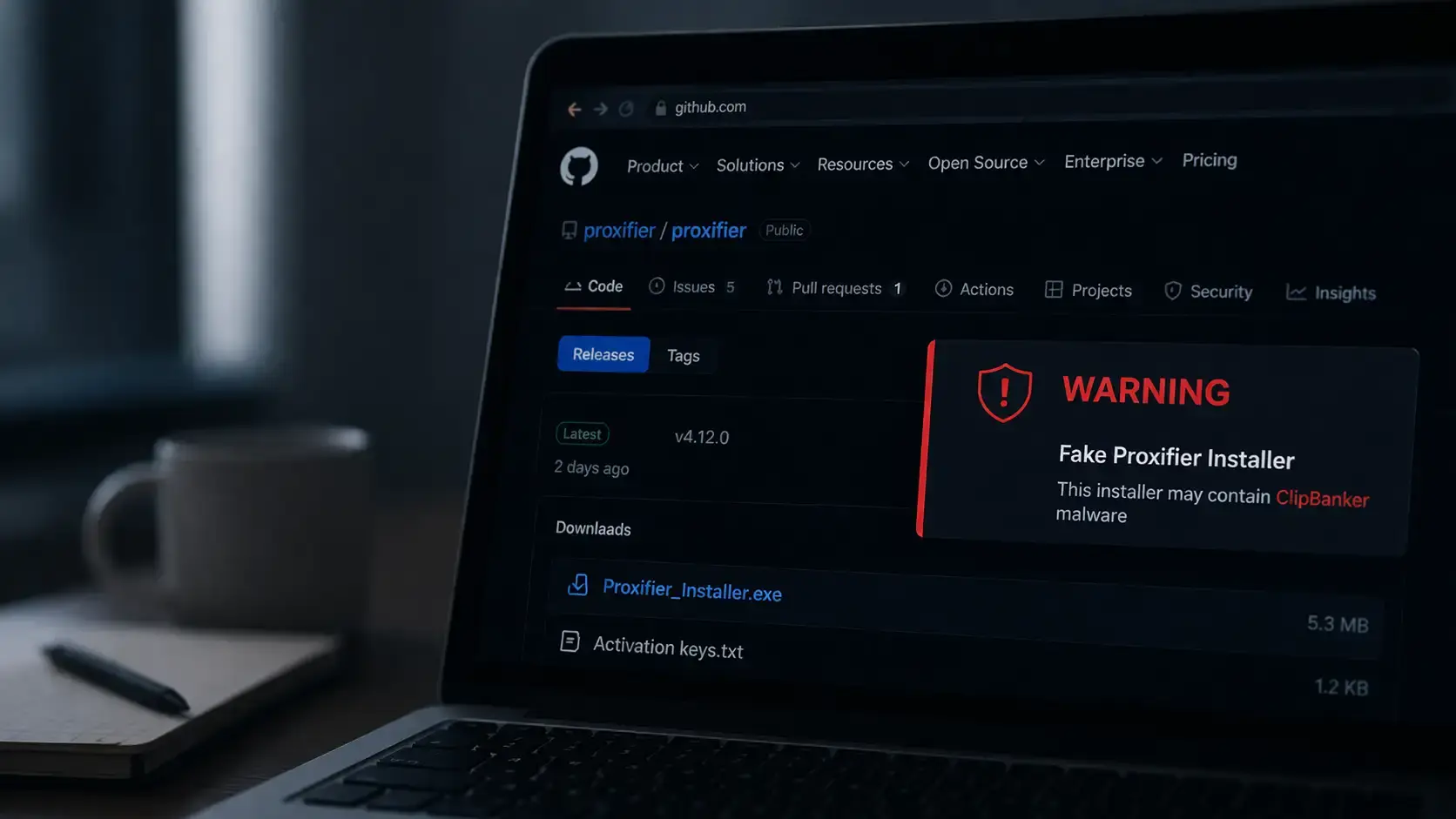
What is fake Proxifier installer malware?
It is a malicious installer campaign that used GitHub-hosted Proxifier-themed downloads to deploy ClipBanker, a clipboard hijacker that swaps crypto wallet addresses and can silently redirect funds.
What happened in the fake Proxifier installer malware campaign reported in April 2026, and why should users care right now?
Researchers reported that attackers used a trojanized Proxifier installer hosted through GitHub to launch a long, stealthy infection chain that ends with ClipBanker malware, a threat that replaces copied crypto wallet addresses with attacker-controlled ones.
The technical chain includes hidden PowerShell execution, Microsoft Defender exclusions, registry-stored scripts, and a scheduled task, which makes the attack more deceptive than a basic fake download. Trusted reporting came from Securelist on April 9, 2026.
The immediate risk is simple. A user searches for Proxifier, lands on what looks like a plausible GitHub-hosted release, runs the installer, and still sees the legitimate software launch. That last part matters. The malware does not need the victim to see an error. It wants the victim relaxed and moving on.
This is why the fake Proxifier installer malware story deserves more than a short news recap. It is a blueprint for modern malware spread through GitHub, and it shows how crypto stealing malware is now packaged with cleaner tradecraft, better social engineering, and fewer obvious signs on disk.
Technical Specs
|
Item |
What researchers reported |
|
Campaign type |
Trojanized installer delivering ClipBanker malware |
|
Primary lure |
Search result leading users to a GitHub repository tied to “Proxifier” |
|
Final payload goal |
Replace copied crypto wallet addresses in the clipboard |
|
Delivery style |
Multi-stage infection chain with PowerShell and in-memory execution |
|
Persistence |
Registry-stored Base64 script and scheduled task |
|
Defense evasion |
Microsoft Defender exclusions for powershell and conhost |
|
Software affected |
Windows systems where the malicious installer is executed |
|
CVE / CVSS |
No public CVE or CVSS was attached because this is a malware campaign, not a disclosed software vulnerability |
|
Known targeted data |
Wallet addresses across Bitcoin, Ethereum, Solana, XRP, Monero, Dogecoin, TRON, and many others |
|
Primary trusted source |
Securelist report dated April 9, 2026 |
That “no CVE” detail is worth stating clearly. Readers often expect a vulnerability ID when they see a security article.
Here, the danger is not a patched bug in Proxifier. It is the abuse of search behavior, platform trust, and a trojanized Proxifier installer that wraps the real app.
What Happened
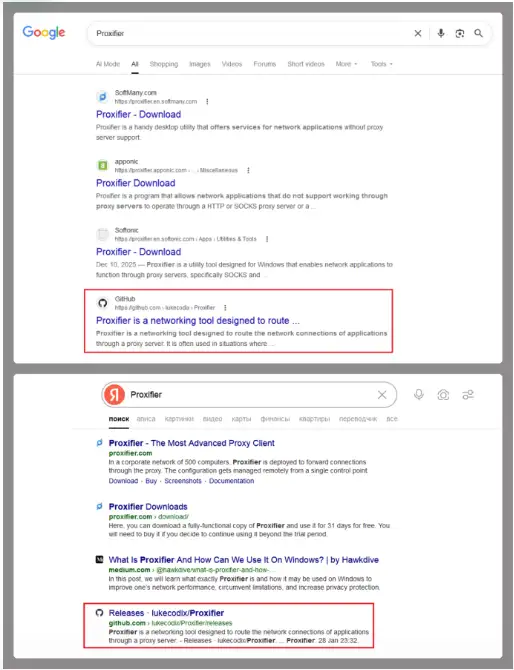
The campaign usually begins with a search for “Proxifier” or similar terms. Securelist says one of the top results in popular search engines led to a GitHub repository.
Inside the release archive, the victim found an executable and a text file containing activation keys, which added just enough credibility to lower suspicion.
This is where the fake software installer malware angle becomes more precise. The file was not just junk pretending to be software. It was a wrapper.
Once launched, it created a tiny temporary stub process, used a .NET component called api_updater.exe to handle Defender exclusions, and then extracted and ran the real Proxifier installer while the rest of the infection kept moving in the background.
That is a smarter deception than the usual “download, fail, disappear” pattern.
That is also why the fake Proxifier installer on GitHub hook is so effective. GitHub is widely trusted. Proxifier is a known utility name.
A release archive with a working installer feels routine. Would most users stop and inspect child process behavior or new Defender exclusions at that point? Probably not.
How the Infection Chain Works
The first stage
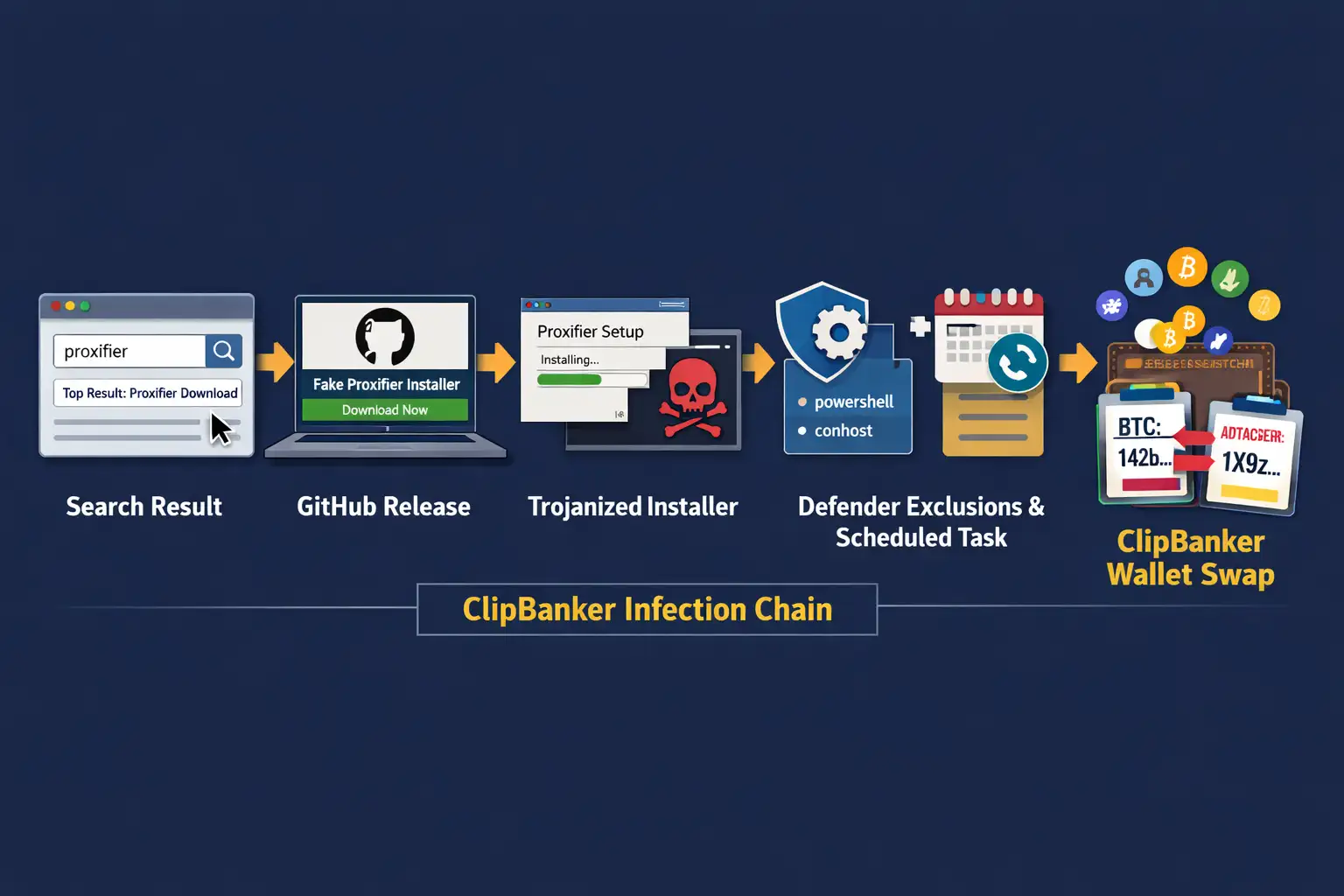
According to Securelist, the malicious executable first created a very small temp file named like Proxifier***.tmp and launched it as a donor process.
That donor was later used for injection. The malware then ran a PowerShell script through the PSObject class to help set Microsoft Defender exclusions.
After that, the real Proxifier installer launched. This is a key operational detail in the Proxifier installer malware analysis.
Attackers wanted the user to get a visible result and stop asking questions. While that happened, another donor process was created, a module named proxifierupdater.exe was injected, and then conhost.exe was launched and injected with another .NET component called bin.exe.
The second stage
Securelist reports that the malware added PowerShell and conhost to Microsoft Defender exclusions and stored another Base64-encoded PowerShell script in the registry at HKLM\SOFTWARE\. System::Config and created a scheduled task that launched PowerShell with a script argument.
That script read the registry content, decoded it, and continued execution.
This is where the chain becomes more interesting than a typical clipboard malware story.
The attackers were not satisfied with dropping one file and hoping it survived. They built a path that used memory execution, registry-stored logic, and scheduled execution. It reduced obvious artifacts on disk and complicated casual forensic review.
The final payload
The end goal was ClipBanker crypto malware. Securelist says the payload monitored the clipboard for strings that matched wallet formats from many blockchain networks, then swapped them with attacker-controlled addresses.
The published list included Bitcoin, Ethereum, Solana, Ripple, Monero, Dogecoin, TRON, Tezos, Litecoin, and many others.
That is the core of how ClipBanker malware works. It does not need to steal your private key to hurt you.
It simply waits for that common habit: copy address, paste address, send funds. The switch happens so fast that many victims only realize something went wrong after the transaction is already irreversible.
Broader explainer coverage of ClipBanker lines up with that behavior pattern.
Why This Matters
For regular users
A lot of malware still depends on panic or obvious fraud. This one leans on routine behavior. Search for a tool. Download it. Install it. Move on.
That makes the GitHub fake installer crypto malware model dangerous because it fits real habits, especially among people searching for networking tools, utility software, free downloads, or activation help.
For crypto users, the damage window is immediate. A single copied address can be replaced.
A single transaction can be enough. No ransomware note. No pop-up. Just money gone. That is why crypto wallet clipboard malware remains effective even though the idea itself is not new. The tradecraft around delivery keeps improving.
For businesses
Businesses should not dismiss this as a consumer-only issue. Search-driven software acquisition happens inside companies too, especially in smaller teams, labs, dev environments, and remote setups where employees grab utilities quickly.
If a workstation ends up with hidden PowerShell execution, modified Defender exclusions, and scheduled tasks, the incident moves beyond “one bad download” into endpoint trust erosion.
Our view is blunt. The real story is not just ClipBanker malware on GitHub. It is the abuse of a trusted platform plus a working installer plus memory-heavy execution.
That combination raises the cost of detection for defenders and lowers the friction for the attacker. That is exactly the kind of asymmetry modern campaigns aim for.
Our Technical Analysis
We have seen clipper malware before. Usually it is crude, noisy, and easy to explain. This campaign is not that.
The Proxifier GitHub malware campaign is stronger because it borrows legitimacy from several places at once: the software name, the search result, the repository format, the release archive, and the fact that the legitimate installer still appears to work.
That matters because users do not judge software by YARA rules. They judge it by feel. Did the file open? Did the install screen appear? Did the app launch? If the answer is yes, suspicion drops fast.
That gap between real user behavior and ideal security behavior is exactly where this fake Proxifier download malware campaign operates.
Another point often missed in lighter coverage is the Defender exclusion detail. Excluding PowerShell and ConHost is not a decorative step.
It helps the chain survive by reducing interference with tools and processes the malware is actively abusing. That is not commodity-level laziness. It shows operational intent.
When we review campaigns like this in a controlled setting, one thing always stands out. Users focus on the installer window.
Analysts focus on the processes around it. In a practical test workflow, the question is never just “Did the app install?” It is “What else launched with it, what changed in Defender, what new scheduled tasks appeared, and did the registry get new encoded content?”
That is where the truth usually lives. The behavior reported in this campaign fits that pattern closely.
We also notice a common blind spot. Teams often hunt for dropped binaries but spend less time checking clipboard behavior and wallet-replacement logic.
That is risky here because the final monetization path is not broad data theft first. It is transaction interception. If you are not checking for clipboard crypto stealer malware behavior, you can miss the part that actually costs money.
Recurring issues
The first mistake is assuming GitHub hosting equals safety. It does not. GitHub is a platform, not a guarantee that every release, fork, or repository is benign. Microsoft has also documented large-scale malware activity that used GitHub repositories as part of delivery chains, which reinforces the broader platform-abuse trend.
The second mistake is trusting a successful install. In this case, the real installer launching is part of the deception.
If a user says, “The app worked, so the file must be clean,” that logic fails here. The fake Proxifier installer malware was built to make that assumption feel reasonable.
The third mistake is only looking for browser pop-ups or ransom notes after a suspicious download. Why would attackers announce themselves when silent wallet redirection works better? Quiet theft scales well. Loud theft gets deleted.
How to Protect Your System
Step 1: Stop using the machine for crypto transactions.
If you installed a suspicious Proxifier package or any trojanized Proxifier installer, stop all wallet activity on that endpoint immediately.
Do not copy and paste wallet addresses. Do not approve transfers. Move transaction work to a known-clean system until the device is checked.
This is the fastest way to cut off the direct ClipBanker wallet address replacement malware risk.
Step 2: Review Microsoft Defender exclusions
Open Windows Security and inspect exclusions. Securelist reported exclusions involving PowerShell and conhost in this chain.
If those appear unexpectedly, treat them as suspicious. Microsoft’s Defender documentation explains where exclusions are managed and why they reduce protection coverage.
Users should refer to official advisories and product documentation from Microsoft, CISA, and the FBI for current defensive guidance.
Step 3: Check for suspicious scheduled tasks
Open Task Scheduler and look for recently created tasks that launch PowerShell or reference odd script arguments.
The reported chain used a scheduled task to continue execution from registry-stored content. That is a high-value inspection point for how to detect ClipBanker malware after a suspicious installer event.
Step 4: Inspect the registry carefully.
The report specifically mentions a key under HKLM\SOFTWARE\ System::Config containing a Base64-encoded PowerShell script.
If you are an administrator or responder, export suspicious keys before deletion so you preserve evidence.
Do not start deleting randomly if this is a business endpoint under investigation. Containment first. Evidence second. Cleanup third.
Step 5: Hunt for PowerShell and conhost anomalies
Review PowerShell logs if enabled, process creation telemetry, EDR alerts, and command-line history associated with powershell.exe and conhost.exe.
Those processes are ordinary in Windows. That is why attackers like them. The trick is to look for timing and relationships tied to the installer run.
Step 6: Test for clipboard tampering
Use a known crypto address on a clean offline note file and compare the copied value against the pasted value. Do not send funds as a test.
Just compare strings. This basic method is often recommended in general ClipBanker malware guidance, and it is especially relevant here because the end-stage behavior is address replacement.
Step 7: Scan with a reputable security product and isolate if needed.
Run a full endpoint scan with a trusted antimalware tool. If this is a work machine, isolate it from the network and involve the security team.
Because Securelist described fileless or “bodiless” techniques in the chain, a quick file-only scan may not tell the whole story. Memory-aware detection and telemetry review are more useful than blind confidence.
Quick Comparison Table
|
Threat type |
Delivery |
What the victim sees |
Main risk |
|
Basic fake installer |
Bogus setup file |
Often errors or fails |
Initial compromise |
|
fake Proxifier installer malware |
GitHub-hosted trojanized wrapper |
Legit installer may still run |
Hidden multi-stage infection |
|
Basic clipper |
Small standalone malware |
Usually invisible |
Clipboard address swap |
|
This ClipBanker malware chain |
Installer + PowerShell + registry + task |
Normal install plus hidden activity |
Fast crypto theft with stealthier persistence |
Security Checklist
1. Check Windows Security now.
Open Defender settings and review exclusions. Unexpected entries involving PowerShell or conhost deserve immediate attention.
2. Check Task Scheduler now.
Look for recently created tasks that launch PowerShell or reference encoded or unusual script arguments.
3. Verify every wallet address before any transfer.
If the copied and pasted address does not match exactly, stop. Assume crypto wallet clipboard malware until proven otherwise.
Trusted source: Securelist’s April 9, 2026 report is the primary technical source behind this incident and remains the most detailed public write-up reviewed for this article.
Research-firm quote: Securelist described the case as “The long road to your crypto: ClipBanker and its marathon infection chain,” which accurately reflects the campaign’s unusually long and layered execution path.
Recommendation 1: Block ad hoc software installs on business endpoints unless the source is verified and approved.
Recommendation 2: Alert on new Defender exclusions, especially when they touch scripting engines or console-host processes.
Recommendation 3: Train users that a working installer is not proof of safety.
Recommendation 4: Require manual verification of wallet addresses on any endpoint that handles crypto transactions.
Recommendation 5: Treat GitHub-hosted installers as untrusted until provenance is verified.
The takeaway is not subtle. The fake Proxifier installer malware campaign shows how easy it is to hide dangerous behavior behind a normal-looking setup flow.
If a download came from the wrong place, and it touched PowerShell, Defender exclusions, scheduled tasks, and your clipboard, do not negotiate with it. Treat it like an incident.
A fake Proxifier installer shared through GitHub may silently deploy ClipBanker malware and replace copied crypto wallet addresses without your knowledge.





-20260925120840.webp&w=3840&q=75)