
-20260130221446.webp&w=3840&q=75)
Is the TAMECAT PowerShell backdoor really stealing Edge and Chrome credentials, and should users be concerned right now?
Even when a specific malware strain is not fully confirmed, the techniques
described are real, documented, and widely abused in modern attacks.
PowerShell is installed by default on Windows systems. It
is trusted by the operating system, signed by Microsoft, and used daily by
administrators. That makes it attractive to attackers. Over the past five
years, security teams have repeatedly observed PowerShell being used to
download payloads, extract credentials, move laterally, and exfiltrate data
without dropping obvious malware files.
-20260130221447.webp&w=1080&q=75)
TAMECAT PowerShell Backdoor Detection and Removal
Tamecat PowerShell backdoor detection and removal in real-world environments
Detecting PowerShell-based threats is difficult because nothing appears broken.
at first glance. There may be no pop-ups, no antivirus alerts, and no obvious
performance issues. Everything looks normal until credentials start showing up.
where they should not.
In environments where the Tamecat PowerShell backdoor
detection and removal is suspected, analysts typically look for unusual
PowerShell execution patterns. These include encoded commands, unexpected
script execution during user logins, and PowerShell processes spawning network
connections without user interaction.
Removal, if required, is not just about deleting files.
Because PowerShell malware often runs in memory, a proper response may involve
credential resets, browser profile cleanup, registry inspection, and reviewing
scheduled tasks.
TAMECAT Malware Analysis
Tamecat malware analysis and why attribution remains uncertain
At the time of writing, no threat actor group has claimed responsibility for
TAMECAT. No malware samples have been independently verified by multiple
vendors. This creates uncertainty around attribution.
That said, the techniques described in the report align
with known attack patterns used by multiple financially motivated threat
groups. Browser credential extraction using Chromium APIs is well-documented
PowerShell is frequently used to automate this process quietly.
A responsible tamecat malware analysis focuses less on
the name and more on behavior. Analysts examine command execution logs, browser
data access, and outbound traffic patterns rather than relying on malware
signatures alone.
-20260130221447.webp&w=1080&q=75)
How PowerShell Can Access Browser Credentials
Most people assume browser passwords are locked away behind strong encryption.
They are, but the key is stored on the same system.
Chrome and Edge use Windows Data Protection APIs. If
malicious code runs under the same user context, it can sometimes request
access to stored credentials. PowerShell scripts can call system libraries that
Retrieve this information without triggering obvious warnings.
This is not a bug in Chrome or Edge. It is a limitation.
of local credential storage on any operating system. That is why endpoint
Security and behavior monitoring matter more than browser choice.
PowerShell Abuse and Credential Harvesting
PowerShell abuse is often described as living off the land. Attackers use tools.
already present on the system. This includes PowerShell, WMI, scheduled tasks,
and registry keys.
Credential harvesting does not always involve
keyloggers. Sometimes it involves reading local databases where browsers store
encrypted credentials. How to Find PowerShell-Based Credential Theft
How to use PowerShell to find out if someone is stealing your credentials
before the damage spreads
You can find things early, but you have to be able to see them.
Security teams often check PowerShell logs, especially
Script Block Logging and Module Logging, if they are turned on. Unexpected
Encoded commands are a big red flag.
How to Find PowerShell-Based Credential Stealing
How to find out if someone is stealing your credentials with PowerShell before
The damage spreads.
It's possible to find things early, but you need to be able to see them.
Security teams often look at PowerShell logs, especially
Script Block Logging and Module Logging,g if they are turned on. Unexpected
Encoded commands are a big warning sign. Another signal is PowerShell launching.
shortly after browser use with no user interaction.
Network logs also matter. If a PowerShell process opens
outbound connections to unknown domains, which deserve immediate investigation.
This approach applies whether the threat is TAMECAT or something else.
People Also Ask, Answered Clearly
Can PowerShell really steal browser passwords?
Yes, under certain conditions. If malicious scripts run
Under the same user account, they may access encrypted browser credentials.
using system APIs.
Is Microsoft Edge less secure than Chrome?
No. Both use Chromium as their base and use similar ways.
to store data. Security is more about protecting endpoints than picking a
browser.
How can organizations protect against PowerShell abuse?
By enabling advanced logging, restricting PowerShell
execution policies, using endpoint detection tools, and applying least
privilege principles.
Is TAMECAT definitely malware?
Major vendors have not yet made any public statements.
about this. The report should be treated as informational, not definitive.
Credential Theft Attack Flow Chart
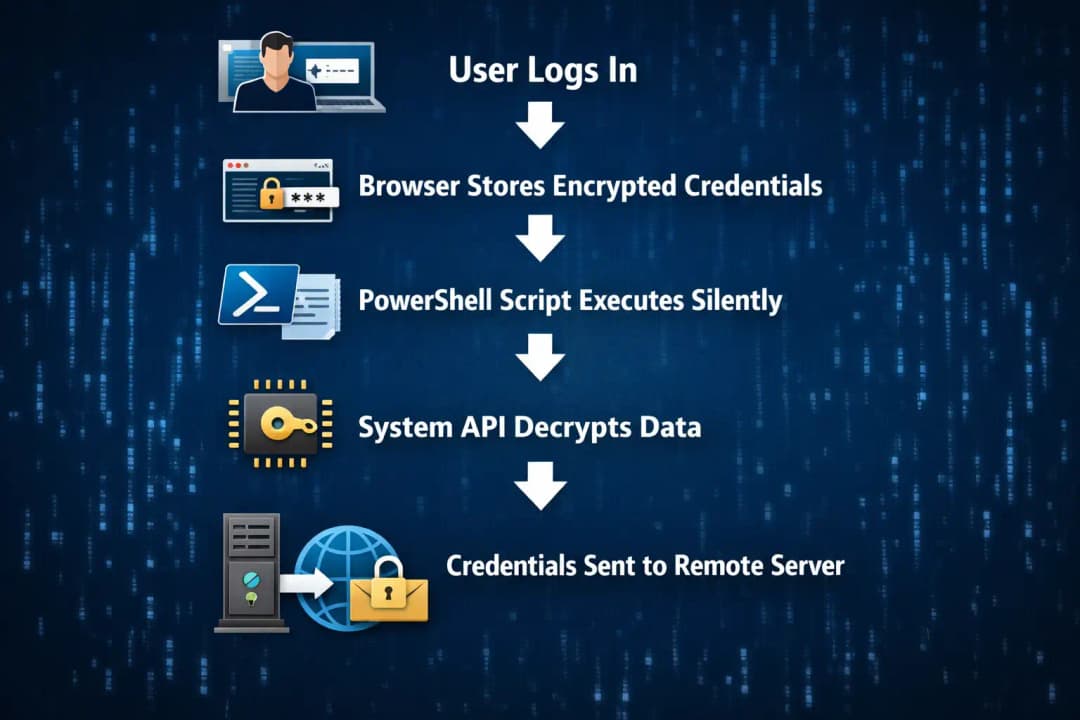
Real-World Example
In one investigation, I observed a company suspected of phishing. No malware was
found. Antivirus was clean. The issue turned out to be PowerShell scripts.
running from a scheduled task created weeks earlier.
Browser credentials had been accessed quietly. No alerts
fired. The lesson was simple. Behavior matters more than files.
This same lesson applies when discussing a tame cat.
PowerShell backdoor detection and removal. Names change. Techniques repeat.
What Users and Organizations Should Do Next
First, do not panic. Second, do not ignore it.
Enable PowerShell logging if it is not already active.
Review scheduled tasks. Monitor browser credential access. Reset passwords if
Compromise is suspected.
Most importantly, treat unverified reports as prompts to
improve security posture, not as proof of breach.
Final Thoughts and Takeaway
Whether or not TAMECAT becomes a confirmed threat, the conversation it sparked
is valuable. PowerShell-based attacks are not new, but they remain effective.
because they blend in.
Understanding Tamecat PowerShell backdoor detection and
Removal helps users prepare for a broader class of attacks that already exist.
The real takeaway is awareness, visibility, and disciplined response.
Hoplon Insight Box
Security Insight:
“PowerShell attacks succeed not because they are advanced, but because they
look normal.”
Recommendations:
• Enable detailed PowerShell logging
• Monitor browser data access behavior
• Use endpoint detection tools
• Reset credentials after any suspicion
• Educate users about phishing and privilege misuse
Read more Blogs:





