
_compressed-20260130134432.webp&w=3840&q=75)
Is the Windows 11 25H2 update real right now, and should you trust what you’re seeing online?
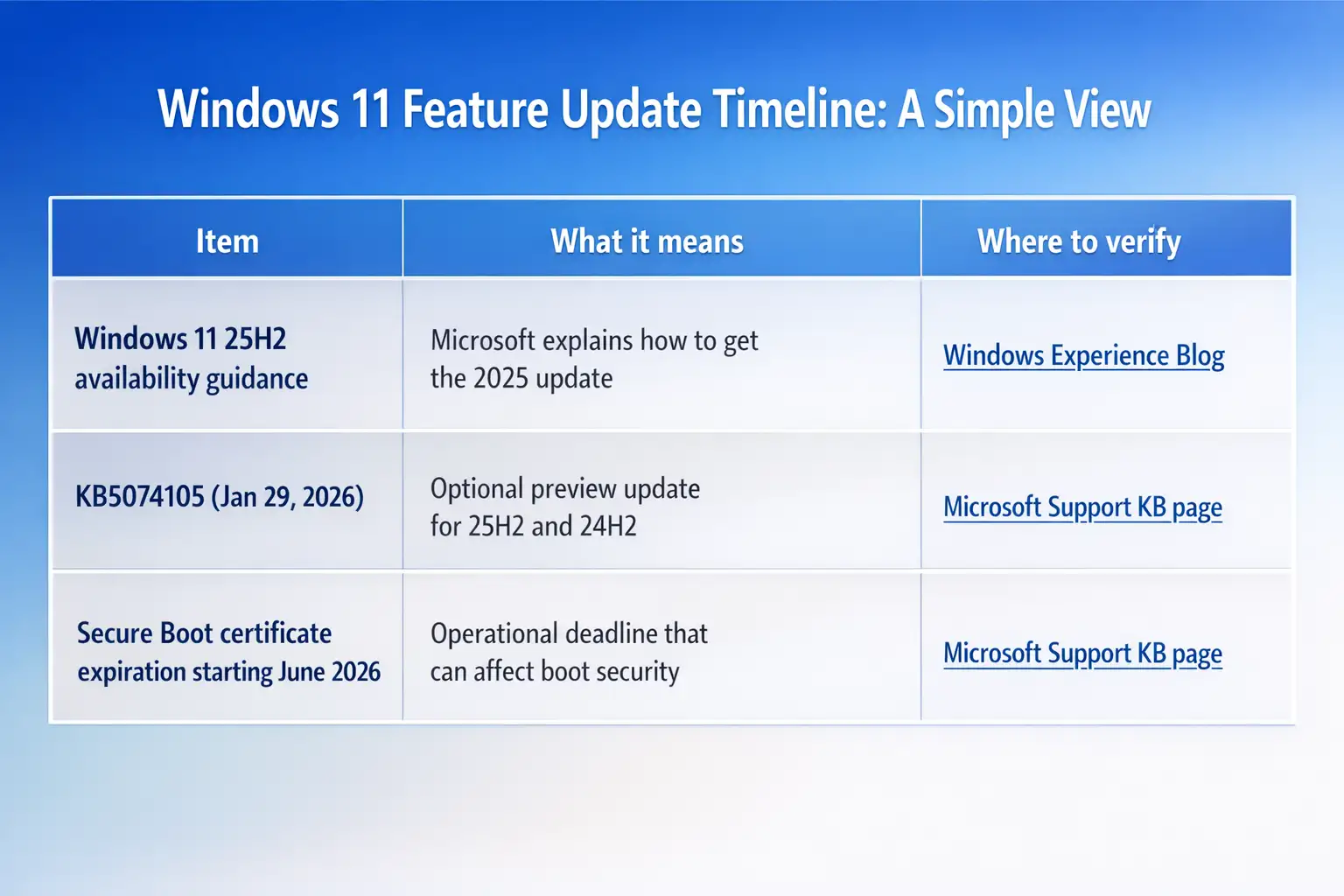
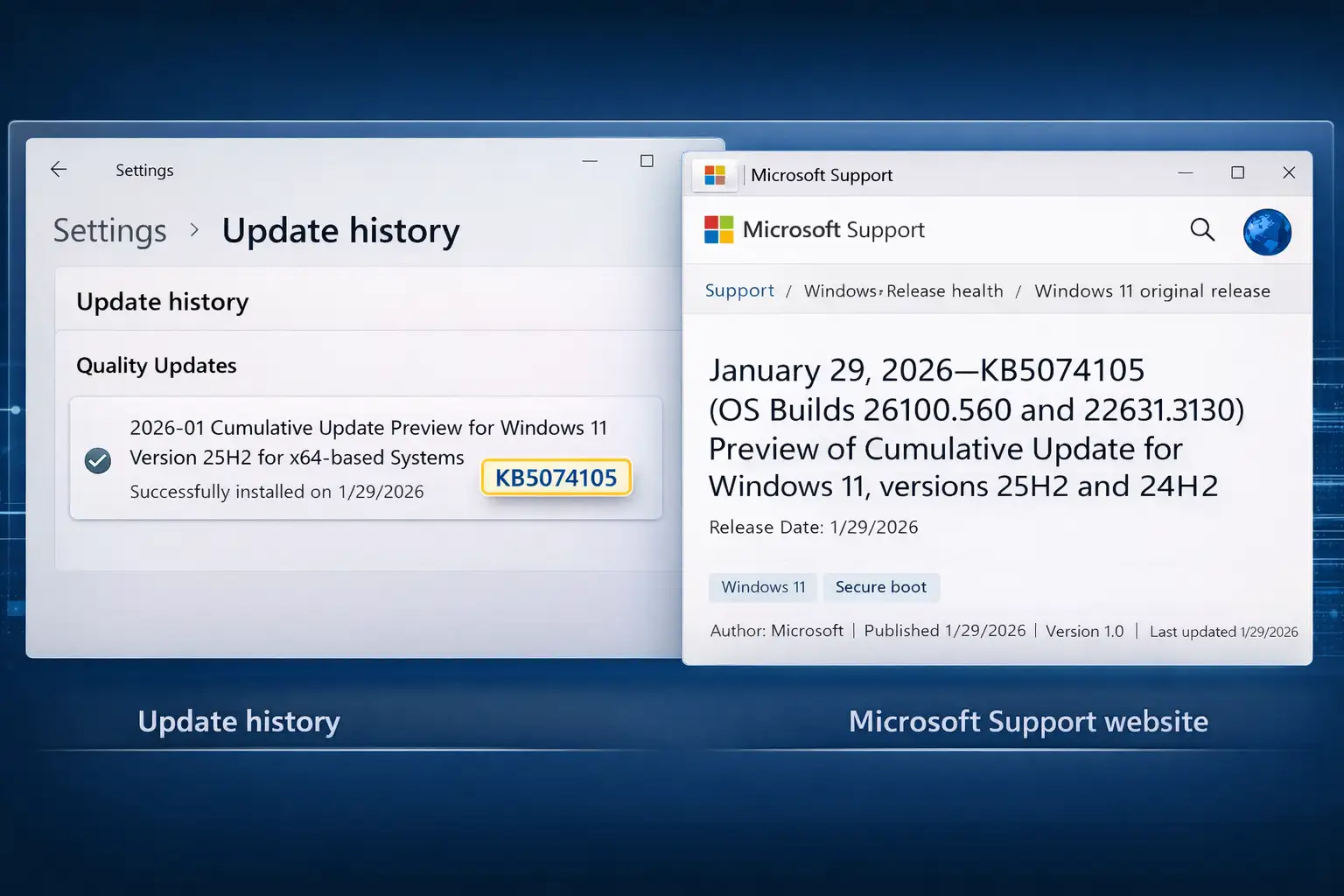
Yes, the update activity is real. On January 29, 2026, Microsoft published KB5074105, an optional non-security preview update that applies to Windows 11 version 25H2 and 24H2, and it includes important notes like the Windows Secure Boot certificate expiration starting in June 2026. That’s not a rumor; it’s documented in Microsoft’s own support channels.
Quick, clear summary
Microsoft released an update called KB5074105 in January 2026 for Windows 11 versions 25H2 and 24H2. This update is optional and mainly focuses on improving system quality and adding small feature enhancements, not fixing security issues.
Microsoft also warned that Secure Boot certificates will start expiring in June 2026, which could cause some devices to fail to start properly if organizations do not prepare in advance. In addition, the update reflects Microsoft’s effort to simplify update naming and includes background improvements related to AI components and the Windows servicing system.
The real story behind Windows 11 25H2
A lot of Windows update “news” spreads the same way a neighborhood rumor does. Someone sees a new KB number, someone else screenshots a half-loaded Update History page, and suddenly it’s “Microsoft secretly launched something huge.”
Here’s what’s actually happening with Windows 11 25H2 in plain terms: Microsoft is continuing its normal cadence of Windows servicing. That includes monthly security updates, optional preview updates (often called “C week” releases), and occasional out-of-band fixes when something breaks badly. The update mentioned in your reference link, KB5074105, fits neatly into that regular pattern as an optional preview update dated 1/29/2026.
And the bigger reason this matters is not just new features. It’s trust. The more confusion that floats around, the easier it becomes for fake “update tools” and shady download pages to blend in.
Is the Windows 11 25H2 update real or just internet noise?
Let’s answer the exact high-intent query: Is the Windows 11 25H2 update real?
The real part: Microsoft’s support documentation shows KB5074105 applies to Windows 11 25H2 and 24H2, with a release date of 1/29/2026, and it includes a clear alert about Secure Boot certificate expiration starting June 2026.
The noise part: a lot of posts you’ll see online mix three different things:
1. optional preview updates,
2. Insider previews, and
3. Feature enablement rollouts that arrive gradually.
That mix-up makes people think a feature update “dropped” overnight. In reality, Microsoft often rolls capabilities out in phases, and the support note for KB5074105 even explains gradual vs. normal rollout.
If you see a claim like “25H2 is fake” or “Microsoft denied it,” treat it as a verification task, not a debate. Which brings us to the practical part.
Microsoft Windows 11 update news you can verify, not guess
If you only remember one habit from this article, make it this: trust primary sources first.
Microsoft’s Windows Experience Blog has published guidance on getting the Windows 11 2025 update (25H2) and explains availability through managed channels like WSUS and how eligible devices may need a full OS swap depending on the version.
Microsoft Support also maintains update history pages and individual KB write-ups. For KB5074105, the details are explicit: it is a non-security update for both 25H2 and 24H2, includes improvements, and contains major operational guidance around Secure Boot certificates.
So when someone says, “It’s not real,” your response can be calm and boring, in a good way: “Show me the Microsoft KB page.”
Windows 11 24H2 update status
Here’s a small but important reality: people talk about “24H2” like it’s one single update. It isn’t. It’s a version line that keeps receiving cumulative updates.
Microsoft maintains a Windows 11 version 24H2 update history page, which is one of the cleanest ways to confirm whether something is official and when it shipped.
The confusion happens because:
Both 24H2 and 25H2 can receive the same KB preview update (like KB5074105).
Headlines tend to compress that into “Microsoft releases update for 24H2 and 25H2,” which sounds like a brand-new version launch even when it’s just a monthly servicing release.
If you manage devices for a business, that confusion is more than annoying. It can lead to rushed deployments and real downtime.
Windows 11 update verification in five minutes
Think of this like checking the label on medicine before you take it. Same logic, fewer side effects.
Step 1: Confirm it exists in Microsoft’s KB database.
For the January 29, 2026, preview update, Microsoft’s support page lists:
· KB5074105
· Applies to Windows 11 25H2 and 24H2
· Release date: 1/29/2026
· OS build numbers
· Key announcements like Secure Boot certificate expiration
If you cannot find the KB number on Microsoft Support, that’s a red flag.
Step 2: Match it with your device’s update history.
On a Windows PC:
· Settings
· Windows Update
· Update history
You should see the same KB number.
Step 3: Cross-check with the Windows release ecosystem.
Microsoft points admins to resources like the Windows release health dashboard for the latest status notes on releases. The KB5074105 page itself references official release tracking paths.
Step 4: Avoid “driver pack” and “offline updater” sites.
If the download page is not Microsoft, slow down. Many malware campaigns rely on “update lookalike” installers.
Step 5: Validate signatures if you’re downloading manually.
If you must use standalone packages, verify Microsoft digital signatures and avoid repackaged EXEs from third-party mirrors.
Windows 11 update authenticity vs. Windows 11 update authenticity myths
A myth I keep seeing: “If it’s optional, it’s probably fake.” That’s not how Windows servicing works.
Optional preview updates are normal and common. They are basically early releases of fixes that will often roll into a later mandatory cumulative update.
The safer takeaway is this:
Optional does not mean suspicious.
Random download links do.
And if you’re dealing with a scary-looking pop-up that says you must install an update right now, especially through a browser, that is when you should assume risk first and verify second.
Microsoft update clarification on preview updates, out-of-band fixes, and why January 2026 looked messy
Even verified updates can cause chaos. January 2026 is a good example of why admins should stay alert.
Multiple reputable outlets reported serious update-related issues around Windows 11 builds, including emergency out-of-band patches and reported boot problems affecting versions including 24H2 and 25H2.
That doesn’t mean updates are “fake.” It means quality can vary, and rollout discipline matters.
If you manage a fleet, you already know this feeling: you patch to stay safe, but you also fear breaking something critical like remote access, boot reliability, or line of business apps.
Windows update security advisory that matters more than the feature list: Secure Boot certificate.
Buried inside what looks like a normal preview update is a genuinely important operational warning.
Microsoft states that Secure Boot certificates used by most Windows devices are set to expire starting in June 2026, and devices could fail to boot securely if certificates are not updated in time. The KB page recommends reviewing guidance and taking action in advance.
This is the kind of detail that does not go viral on social media, but it absolutely should.
Real-world example.
Imagine a midsize company with shared laptops, loaner devices, and a few older models that only get attention when someone complains. If Secure Boot certificates lapse and the environment is not ready, you could end up with devices that fail secure boot checks at the worst moment, like after a BIOS update, a reset, or a recovery scenario.
That’s why this deserves calendar time now, not “later.”
Windows 11 Enterprise update planning
Home users can click “Check for updates” and hope for the best. Businesses do not get that luxury.
Enterprise environments usually use:
update rings,
staged rollouts,
WSUS or cloud-managed policies,
pilot device groups.
Microsoft explicitly notes IT admin deployment paths for updates like KB5074105 through managed tools such as WSUS and related channels.
A simple rollout pattern that works
· Ring 0: IT team machines only
· Ring 1: 5 to 10% of users, mixed hardware
· Ring 2: 25%
· Ring 3: broad deployment
That structure is boring. Boring is good.
The misinformation problem
There’s a difference between “someone got the details wrong” and “someone is pushing downloads that hurt you.”
If a post claims you must install Windows 11 25H2 from a file-sharing site, stop. That’s the exact setup malware authors love.
Here’s the line you asked to include, and it fits perfectly in this context:
“This appears to be unverified or misleading information, and no official sources confirm its authenticity.”
Use that sentence. when:
The KB number cannot be found on Microsoft Support.
The Support. The update is only referenced by a random download page.
or the “source” is a viral screenshot with no link to Microsoft documentation.
Windows update deployment risks you should actually watch for in 2026
Not every risk looks like ransomware. A failed patch can be its own incident.
Based on recent reporting, risks seen around Windows 11 update cycles include:
· app freezes or cloud app issues after emergency fixes,
· shutdown or hibernation failures,
· and in rare cases, boot failures that require recovery steps.
Risk
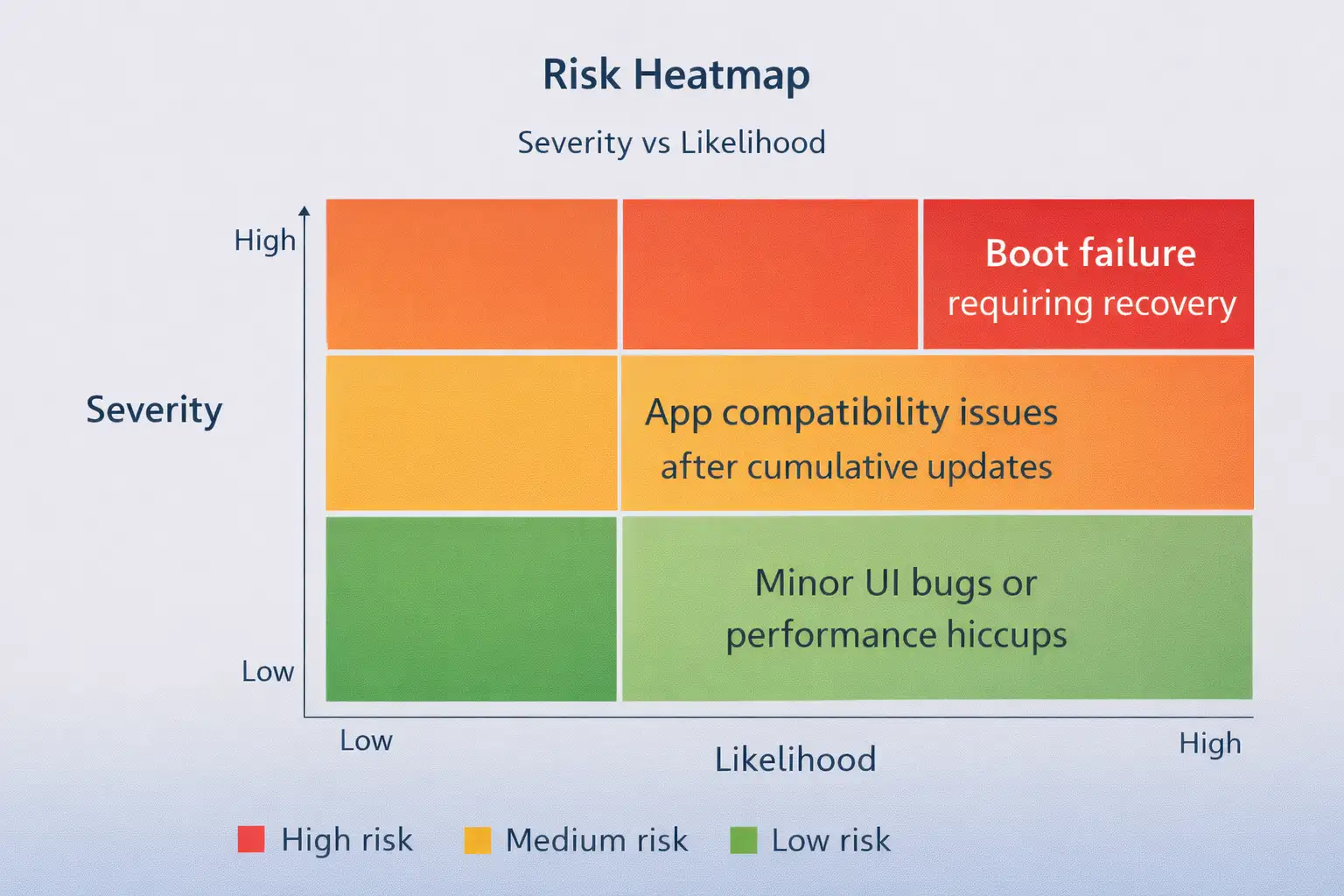
The point is not to panic. It’s planning.
Microsoft Patch Tuesday Clarification
Patch Tuesday is the monthly security update cycle, usually the second Tuesday of the month.
What your reference article covers is a preview update, not the main Patch Tuesday security bundle. Microsoft’s KB5074105 page directly describes it as a non-security update and points readers to resources that explain the difference between update types.
So if someone says “Patch Tuesday shipped 25H2,” they’re mixing terms. The fix is simple: ask what KB they mean.
Windows servicing channel updates explained
When Windows rolls out changes, it usually comes through channels like:
· Insider preview builds (test audience),
· controlled feature rollouts (gradual enablement),
· public servicing updates (monthly cumulative updates),
· out-of-band updates (emergency fixes).
Microsoft’s own communication around “continuous innovation” and rollout phases is part of the official explanation for why two users can be on the same version but see different features at different times.
If you’ve ever wondered why your friend has a feature you do not, this is often why.
Windows Insider vs. Public Release: The Fastest Way to Avoid Confusion
A quick rule:
· If it is Insider, it is not proof of broad public release.
· If it is on Microsoft Support update history, it is real.
Some blogs blur these lines because it makes for exciting headlines. But in real life, especially in business environments, clarity beats hype every day.
Windows 11 feature update timeline
What should users do next?
For home users
If you’re hearing “Windows 11 25H2 is fake,” do not argue. Just verify the KB on Microsoft Support, then update through Settings, not through downloads from search results.
If you’re cautious, wait for the normal rollout. Optional preview updates are useful, but not mandatory.
For businesses
Treat it like a change management event:
· pilot group first,
· Watch for app issues.
· track known issues through Microsoft’s release health resources,
· Plan now for Secure Boot certificate updates ahead of June 2026.
It instantly answers Iss this real?” without extra words.
Gartner has advised security teams to “leverage risk-based prioritization and automated workflow tools to reduce time-to-patch.”
FAQ
Has Microsoft released Windows 11 25H2?
Microsoft has published official guidance and update history resources for Windows 11 version 25H2, and Microsoft Support lists updates that apply to 25H2, including KB5074105 dated January 29, 2026.
Is Windows 11 24H2 officially confirmed?
Yes. Microsoft maintains official update history documentation for Windows 11 version 24H2, which is an authoritative confirmation channel.
How do I verify Windows updates are legitimate?
Use Windows 11 update verification basics: confirm the KB exists on Microsoft Support, install through Windows Update, and avoid third-party “update installers.” Microsoft’s KB5074105 page is an example of the official details you should expect to see for legitimate updates.
Can fake Windows updates harm my system?
Yes. Fake update prompts and repackaged installers are a common malware delivery trick. The safer approach is to rely on Microsoft’s update channels and validate KB numbers before installing anything.
Hoplon Insight Box
If you manage more than a handful of PCs, treat Windows updating like a business process, not a button.
Start with enterprise Windows patch management basics: inventory devices, define rings, and track exceptions.
Use a lightweight Windows update risk assessment before broad rollout: what changed, what might break, what is your rollback plan?
For high-risk environments like healthcare, finance, or schools, consider a Windows Update security verification service-style workflow: verify KB, confirm signatures, validate with pilot devices, then deploy.
If you outsource IT, ask specifically about managed Windows update services and how they handle out-of-band patches, rollback, and reporting.
For security teams, build a repeatable cybersecurity Windows update validation checklist that includes Secure Boot readiness ahead of June 2026.
Final takeaway
If you remember nothing else, remember this: Windows 11 25H2 is real, but the internet is messy.
Your best defense against confusion is boring verification. Check the Microsoft KB page, confirm the KB number on your device, and do not install updates from random download sites. And if you manage systems at work, start planning now for Secure Boot certificate updates before June 2026, because that warning is not noise; it’s a deadline.



-20260925120840.webp&w=3840&q=75)

-20260918120903.webp&w=3840&q=75)