

On May 20, 2026, GitHub confirmed unauthorised access to its internal source code repositories. A poisoned Visual Studio Code extension compromised an employee device, allowing a threat actor to exfiltrate data from roughly 3,800 internal repositories. No customer or public repositories are confirmed affected at this time. The stolen data is reportedly being offered for sale on underground cybercrime forums.
Table of Contents
Expert Analysis: What This Means for Developer Security in 2026
Comparison Table: GitHub Breach vs Past Major Code Platform Breaches
What Happened: The GitHub Hack Explained
GitHub hacked source code is not a headline anyone expected to read on a Tuesday morning. But on May 20, 2026, that is exactly what happened.
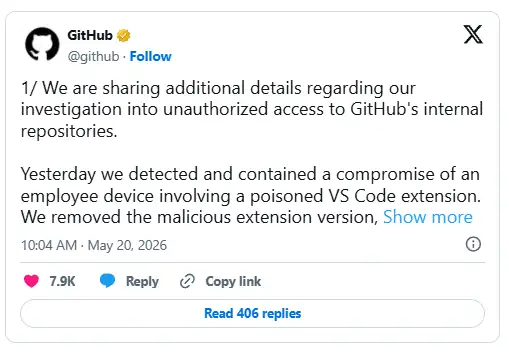
GitHub, the Microsoft-owned platform that hosts code for millions of developers worldwide, confirmed that a threat actor gained unauthorised access to its internal repositories. The entry point was not a zero-day exploit in GitHub's servers. It was something far simpler and far more alarming: a poisoned Visual Studio Code extension installed on one employee's laptop.
That one compromised device opened the door to roughly 3,800 internal repositories.
Think about that for a second. One person. One extension. Three thousand eight hundred repositories.
GitHub disclosed the breach through a series of official statements on May 20, 2026. The company moved quickly to contain the damage, rotating credentials, isolating the affected machine, and removing the malicious extension. But the data was already out.
A threat actor group calling themselves TeamPCP has claimed responsibility. They are reportedly selling the stolen dataset on underground cybercrime forums for offers exceeding $50,000.
What Exactly Was Hacked? Scope of the Breach
GitHub's investigation indicates that the breach was limited to GitHub-internal repositories only. Here is what we know so far:
Approximately 3,800 internal GitHub repositories were accessed and exfiltrated.
Public repositories hosted by customers were not confirmed to be affected.
Customer-hosted private repositories show no confirmed impact at this stage.
The stolen data include proprietary source code and internal organisational data.
TeamPCP claim they accessed roughly 4,000 private repositories tied directly to GitHub's main platform.
The stolen dataset is being offered for sale for $50,000-plus on dark web forums.
GitHub confirmed that the attacker's claims of around 3,800 repositories are "directionally consistent" with their own findings.
Internal Source Code vs. Public Repositories: What's the Difference?
This is a distinction that matters a lot, and most news coverage glosses over it.
Internal source code repositories contain the actual code that GitHub uses to build and run its own platform. Think authentication systems, internal tooling, infrastructure automation, and backend services. This is the code that makes GitHub itself work. Exposing this kind of code can reveal security weaknesses, proprietary algorithms, and internal API structures that attackers could exploit in future attacks.
Public repositories are the open-source projects and personal/team projects that developers store on GitHub. Your React project, your Python scripts, and your employer's codebase are pushed to GitHub private repositories. These are separate from GitHub's internal systems.
Right now, based on available information, this breach touches GitHub's internal code. Your code, stored on GitHub, is not confirmed to be part of this breach. But that could change as the investigation progresses.
Was Any User Data or Private Key Compromised?
GitHub has not confirmed any customer data exposure at this time. However, the company rotated critical secrets and credentials overnight as a precaution, prioritising the highest-impact credentials first. That action alone tells you they were worried about what the attacker may have seen.
No confirmed exposure of user passwords, private SSH keys, or OAuth tokens belonging to customers has been announced. This should be verified against GitHub's official security advisories before taking it as final.
How Did Hackers Get in? The Employee Device Attack Vector
This is the part of the story that should concern every developer, security team, and tech organisation reading this.
The attack did not involve breaking down GitHub's firewall or exploiting an unpatched server vulnerability. The attacker went after the weakest link: a trusted human using trusted tools.
What is an Employee Device Compromise?
An employee device compromise happens when an attacker gains control of a legitimate employee's computer. Once inside, they can access everything that the employee has access to. In GitHub's case, that meant internal repositories.
The attack chain in this breach likely looked something like this:
The attacker created or poisoned a Visual Studio Code extension. VS Code extensions can request broad permissions on a developer's machine, including filesystem access, network requests, and environment variable reads.
A GitHub employee installed the malicious extension. VS Code extensions are trusted by developers daily. Most people install them without much scrutiny.
The extension silently harvested credentials or access tokens from the employee's environment, likely GitHub API tokens or session credentials that had access to internal repositories.
The attacker used those credentials to authenticate to GitHub's internal systems and began pulling repository data.
Data exfiltration began, with approximately 3,800 repositories downloaded before GitHub's monitoring systems detected and contained the activity.
What is an IDE Extension Supply Chain Attack?
VS Code extensions are downloaded from the Visual Studio Marketplace. Any developer can publish an extension. This creates a huge supply chain risk. A legitimate-looking extension with a clever name can slip through and end up on thousands of developer machines.
Security researchers have documented this attack pattern repeatedly. Developers are high-value targets because they have privileged access to internal systems, credentials, CI/CD pipelines, and production environments.
Timeline of the Attack
|
Time |
Event |
|
Pre-breach |
Malicious VS Code extension published or updated with malicious code |
|
Unknown |
GitHub employee installs the poisoned extension |
|
May 19, 2026 (est.) |
Credential exfiltration begins silently |
|
May 20, 2026 |
GitHub detects unusual repository access patterns |
|
May 20, 2026 |
GitHub isolates the affected employee device |
|
May 20, 2026 |
Malicious extension version is removed |
|
May 20, 2026 |
GitHub begins rotating critical credentials overnight |
|
May 20, 2026 |
GitHub issues official public statements via Twitter/X |
|
Ongoing |
Log analysis, secret rotation validation, and monitoring continue |
Who is Affected and How Serious Is This?
The severity of this breach depends on who you are.
Impact on Individual Developers and Open-Source Projects
If you are a student, hobbyist, or solo developer storing code on GitHub, your personal repositories are not confirmed to be affected based on current information. The breach targeted GitHub's own internal codebase, not customer-hosted repositories.
That said, there is a longer-term risk. If attackers can analyse GitHub's internal authentication systems or API infrastructure code, they may find weaknesses that could be exploited against all GitHub users in future attacks. This is not confirmed, but it is a realistic concern.
Supply Chain Risk: Could This Affect Software You Use?
This is where things get genuinely concerning, especially for enterprise users and developers who depend on GitHub-hosted packages.
GitHub is the backbone of the global software supply chain. Millions of open-source projects, npm packages, Python libraries, and CI/CD workflows run through GitHub. If internal GitHub infrastructure code is exposed, and if that code reveals vulnerabilities in how GitHub handles webhooks, tokens, or repository access, then every developer who depends on GitHub indirectly sits at greater risk.
The GitHub source code breach of 2026 is not just a story about GitHub. It is a reminder that the tools developers rely on are themselves targets. The GitHub supply chain attack potential here should not be underestimated.
GitHub's Official Response
GitHub's response was reasonably fast once detection occurred. The company took the following actions:
Removed the malicious VS Code extension version from circulation immediately
Isolated the compromised employee's device
Rotated critical secrets and credentials, prioritising the highest-impact assets overnight
Initiated continuous log monitoring to catch any follow-on attacker activity
Published official statements through GitHub's official Twitter/X account
Committed to releasing a fuller incident report once the investigation is complete
What GitHub Has NOT Revealed Yet
GitHub have been fairly transparent about what they know, but several important questions remain unanswered:
Which specific internal systems does the exfiltrated source code relate to?
How long was the malicious extension installed before detection?
Were there other employees using the same poisoned extension?
What specific credentials were rotated, and which systems were potentially exposed?
Has any portion of the stolen data been verified as genuine by independent researchers?
These transparency gaps matter. The Microsoft GitHub security breach warrants full disclosure, especially given GitHub's role in global software infrastructure. Users should refer to GitHub's official Security Blog and GitHub's status page for verified updates as the investigation progresses.
Historical Context: GitHub Has Been Targeted Before
If you think this is the first time GitHub has been in the crosshairs, it is not.
2012: A critical flaw in RubyGems allowed attackers to push malicious gems to GitHub-hosted repositories.
2013: Distributed denial-of-service attacks disrupted GitHub's availability for hours.
2019: GitHub suffered a major outage tied to infrastructure issues, though not a breach.
2022: GitHub itself disclosed that threat actors used stolen OAuth tokens from Heroku and Travis CI to download data from dozens of private repositories, including some belonging to GitHub itself.
2023: Attackers used rotated tokens tied to third-party OAuth integrations to access private npm repositories.
The pattern is consistent. GitHub is a high-value target. The platform holds the source code for some of the most sensitive software on the planet. Attackers know this. And they keep finding new angles.
The 2026 breach via a VS Code extension is the most sophisticated employee-targeting attack GitHub has publicly confirmed. It shows that attackers have shifted their focus from network-level exploits to human-level manipulation through developer tools.
Expert Analysis: What This Means for Developer Security in 2026
Our team spent time analysing the technical details of this breach as they were disclosed. Here is what stands out.
The use of a malicious IDE extension as an initial access vector is not new in concept, but the fact that it worked against GitHub employees specifically is a significant escalation. GitHub employs some of the most security-conscious developers on the planet. If an attacker can get a poisoned extension onto a GitHub engineer's machine, they can get it onto yours.
"Developer environments have become the new perimeter," noted a threat intelligence analyst commenting on this breach pattern. "Developers have access to everything: production credentials, API tokens, CI/CD pipelines. Compromise a developer's machine, and you have compromised the organisation."
The insider threat cybersecurity landscape of 2025 and 2026 has consistently shown that attackers are moving towards developer toolchain attacks rather than brute-force network intrusions. This breach is a textbook example of that shift.
Is GitHub still safe to use after this breach?
Yes, with appropriate security hygiene. GitHub's core hosting infrastructure for customer repositories has not been confirmed as compromised. The breach affected GitHub's own internal code, not the platform's customer-facing systems.
However, this breach should prompt every developer and organisation to review their own security practices. GitHub is safe to use, but the trust model for VS Code extensions, npm packages, and developer tools across the board needs a serious rethink.
What Should You Do Right Now?
Immediate Steps: Audit Your GitHub Access Tokens
Go to GitHub Settings > Developer Settings > Personal Access Tokens
Review every token listed. If you do not recognise it or have not used it recently, revoke it immediately.
Check for tokens with overly broad permissions, especially those with repo or admin:org scope
Create new tokens with the minimum permissions needed for each specific task
Set expiration dates on all new tokens. Never create tokens with no expiry.
Enable Two-Factor Authentication and Passkeys on GitHub
GitHub two-factor authentication is no longer optional if you take security seriously.
Go to GitHub Settings > Password and Authentication
Enable 2FA using an authenticator app like Google Authenticator or Authy. Avoid SMS-based 2FA where possible.
Consider enrolling in a hardware security key, such as a YubiKey, for maximum protection.
Set up passkeys as a primary authentication method, which GitHub now supports fully
How to Check If Your Repository Was Affected
Review your GitHub Security Log at Settings > Security Log
Look for unusual access patterns, unexpected clones, or access from unrecognised IP addresses.
Check for any unauthorised collaborators or deploy keys added to your repositories.
If your organisation uses GitHub Advanced Security, run a secret scanning check immediately to catch any accidentally committed credentials.
Long-Term Security Best Practices for GitHub Repos
Audit all VS Code extensions you have installed right now. Remove anything you did not intentionally install or no longer use.
Use GitHub's secret scanning alerts to catch API keys, passwords, or tokens accidentally pushed to repositories
Enable branch protection rules so no single contributor can push directly to main without a review
Rotate credentials on a schedule, not only after a breach
Monitor for dependency confusion attacks and supply chain anomalies using tools like Dependabot or Snyk.
Train your team to treat extension installations with the same scrutiny as installing software from the internet.
Comparison Table: GitHub Breach vs. Past Major Code Platform Breaches
|
Incident |
Year |
Attack Vector |
Data Exposed |
Customer Impact |
|
GitHub 2026 (current) |
2026 |
Malicious VS Code extension on employee device |
~3,800 internal repos |
Not confirmed |
|
GitHub OAuth Token Breach |
2022 |
Stolen third-party OAuth tokens |
Private npm repos |
Limited |
|
GitLab.com Incident |
2021 |
Misconfigured server |
Internal backups |
Minimal |
|
Codecov Supply Chain Attack |
2021 |
Compromised CI/CD bash uploader |
Customer environment variables |
Broad |
|
SolarWinds |
2020 |
Compromised build pipeline |
Source code + customer networks |
Severe, widespread |
Common Mistakes Developers Make After a Breach
Mistake 1: Assuming silence means safety Just because GitHub has not confirmed your data was affected does not mean you are in the clear. Waiting for confirmation before taking action is how breaches escalate. Audit your tokens and access now.
Mistake 2: Rotating only the obvious credentials Most developers will change their password and call it done. But attackers care about API tokens, deploy keys, OAuth integrations, and SSH keys. If you do not audit all of these, you are leaving doors open.
Mistake 3: Trusting extensions blindly The VS Code marketplace does not vet extensions the way Apple or Google vet mobile apps. Any developer can publish an extension. Treat every extension install like installing software from a random website. Check the publisher, check the permissions, check the review count and age.
Mistake 4: Not enabling 2FA before an incident happens Every week, developers say they will set up two-factor authentication later.' 'Later' sometimes never comes until after a breach. Set it up today, specifically because of this incident.
Mistake 5: Ignoring secret scanning alerts. GitHub Advanced Security sends alerts when secrets are detected in commits. Many developers dismiss these alerts. Each dismissed alert is a credential left exposed.
Pro Tips From Our Security Analysis
Tip 1: Set up a separate, isolated VS Code profile for work involving internal or sensitive repositories. Install only the minimum extensions needed in that profile.
Tip 2: Use GitHub's Audit Log Streaming feature at the organisation level. It sends all access and activity events to a SIEM or storage destination in real time. This is how you catch unusual access before it becomes a full breach.
Tip 3: Check the GitHub Advisory Database at ghsa.github.com regularly. It tracks known vulnerabilities in open-source packages and is updated frequently.
Tip 4: For enterprises, implement IP allowlisting on GitHub organisation settings. This limits repository access to approved IP ranges and blocks access from unexpected locations even if credentials are stolen.
Tip 5: Enable required reviews and commit signing using GPG or SSH keys. This ensures every commit can be cryptographically traced to a verified identity.
Security Checklist: Do This Today
Use this checklist right now. It takes under 10 minutes.
Log into GitHub and revoke any personal access tokens you do not recognise or use.
Enable two-factor authentication if you have not already
Review your organisation's audit log for unusual activity in the last 30 days.
Open VS Code and audit your installed extensions. Uninstall anything unfamiliar.
Check for any unauthorised SSH keys under GitHub Settings > SSH and GPG keys.
Review your repository's deploy keys under Settings > Deploy Keys
Enable secret scanning on all your repositories if you have GitHub Advanced Security
Confirm that branch protection rules are enabled on your main branch.
Check your GitHub apps and OAuth app authorisations under Settings > Applications.
Bookmark GitHub's official security blog for updates on this incident
Frequently Asked Questions
Was my personal GitHub repository hacked in the 2026 breach? Based on GitHub's current investigation, the breach affected GitHub's own internal repositories, not repositories belonging to customers. Your personal or organisational repos are not confirmed to be compromised. However, reviewing your access logs and tokens is still a smart precaution.
What is TeamPCP, and why did they target GitHub? TeamPCP is a threat actor group that claimed responsibility for the GitHub source code breach. Groups like this typically target high-value organisations either to sell stolen data, use it for further attacks, or build a reputation in underground markets. GitHub's internal code is extremely valuable because it powers a platform used by over 100 million developers globally.
How did a VS Code extension compromise GitHub's internal repositories? A malicious VS Code extension can silently access environment variables, configuration files, and stored credentials on a developer's machine. If a GitHub employee had internal access tokens or session credentials stored locally, the extension could harvest those and send them to the attacker. The attacker then uses those credentials to authenticate to GitHub's internal systems.
Is GitHub still safe to use after this breach? Yes. GitHub's customer-facing repository hosting has not been confirmed as compromised. The breach affected GitHub's own internal code. That said, every developer should use this event as a prompt to enable 2FA, audit access tokens, and review which extensions they trust.
What was actually stolen in the GitHub hack? Based on available information, the attacker exfiltrated data from approximately 3,800 GitHub-internal repositories. This includes proprietary source code for GitHub's own platform and internal organisational data. No customer data exposure has been confirmed at this time.
How do I protect my GitHub repository from being hacked? Enable two-factor authentication, audit and rotate personal access tokens regularly, enable secret scanning, use branch protection rules, and be very selective about which VS Code extensions you install. Review your GitHub security log monthly.
Conclusion
GitHub's hacked source code is the story of May 2026. But the bigger story is what this breach reveals about where the real vulnerability sits: not in firewalls or server configurations, but in the tools developers use every single day.
A single poisoned VS Code extension reached inside one of the most security-focused organisations in the tech industry and walked out with thousands of internal repositories. That should give every developer pause.
The good news is that the defences are not complicated. Audit your tokens. Enable 2FA. Stop blindly installing extensions. Review your access logs. These are not heroic measures. They are basic hygiene practices that most developers skip because nothing bad has happened yet.
Something bad happened. Now is the time.
Bookmark this page. We will update it as GitHub releases additional findings from their investigation. And check GitHub's official security blog and their status page at githubstatus.com for the most current, verified information.



-20260925120840.webp&w=3840&q=75)

-20260918120903.webp&w=3840&q=75)