
Can hackers really guess passwords, or do they usually steal them another way?
Yes, both happen. The bigger pattern, though, is that many attackers do not rely on lucky guesses. They use leaked credentials, phishing, password spraying, credential stuffing, and malware to capture or validate passwords at scale.
Recent reporting from Google Cloud, IBM, Microsoft, CISA, OWASP, and NIST all points in the same direction: identity and credential abuse now sits at the center of modern intrusions.
Old way: treat passwords as a basic IT housekeeping issue.
New way: treat them as a primary attack surface tied to identity, access, and business continuity.
Result: fewer account takeovers, less lateral movement, and a much better chance of stopping attackers before they reach sensitive systems. That shift matters because valid credentials can let an attacker move through normal login paths instead of tripping the alarms you would expect from a noisy exploit.
Traditional advice often stops at “make passwords stronger.” That is not enough anymore. A stronger approach looks at the whole path: how passwords are created, reused, stored, reset, monitored, and paired with MFA.
That is also where a security partner such as Hoplon Infosec fits naturally, not as a hype machine, but as the kind of provider that helps organizations turn password risk into practical controls around identity, access, phishing resistance, and incident response.
What is password cracking, really?
Password cracking is the broader process attackers use to obtain valid authentication secrets. That can include guessing passwords, testing leaked username-password pairs, tricking users into revealing credentials, or stealing password material such as hashes or saved browser logins.
When people hear the phrase, they often picture a hacker furiously trying random combinations. Real life is messier. Sometimes attackers do guess. Quite often, they simply take advantage of weak reuse habits, fake login pages, or stolen password data from an older breach.
That difference matters for decision-makers. If your security model assumes the only threat is brute force, you will miss the attacks that look legitimate because the attacker is logging in with real credentials. IBM’s threat reporting found a sharp year-over-year rise in attacks using valid credentials, while Microsoft publicly described a password spray attack that compromised a test tenant account without MFA.
Why hackers target passwords first
Attackers target passwords because a valid login is often faster, quieter, and more profitable than exploiting software flaws. Once inside an account, especially a privileged one, they may move laterally, access sensitive data, or plant persistence with less friction.
There is a business angle here that executives should not ignore. A compromised password is not just a user problem. It can become a finance problem, a legal problem, and a customer trust problem within hours. One employee login may open email, cloud apps, remote access, file shares, and admin workflows. That is a surprisingly large blast radius for one weak secret.
Google Cloud’s Threat Horizons reporting says stolen credentials were involved in the majority of breaches it reviewed. IBM’s X-Force reporting adds that credential abuse continues to gain ground because logging in is often easier than hacking in. That may sound obvious, but it changes how you prioritize security spending.
How hackers guess passwords in practice
1. Common password guessing
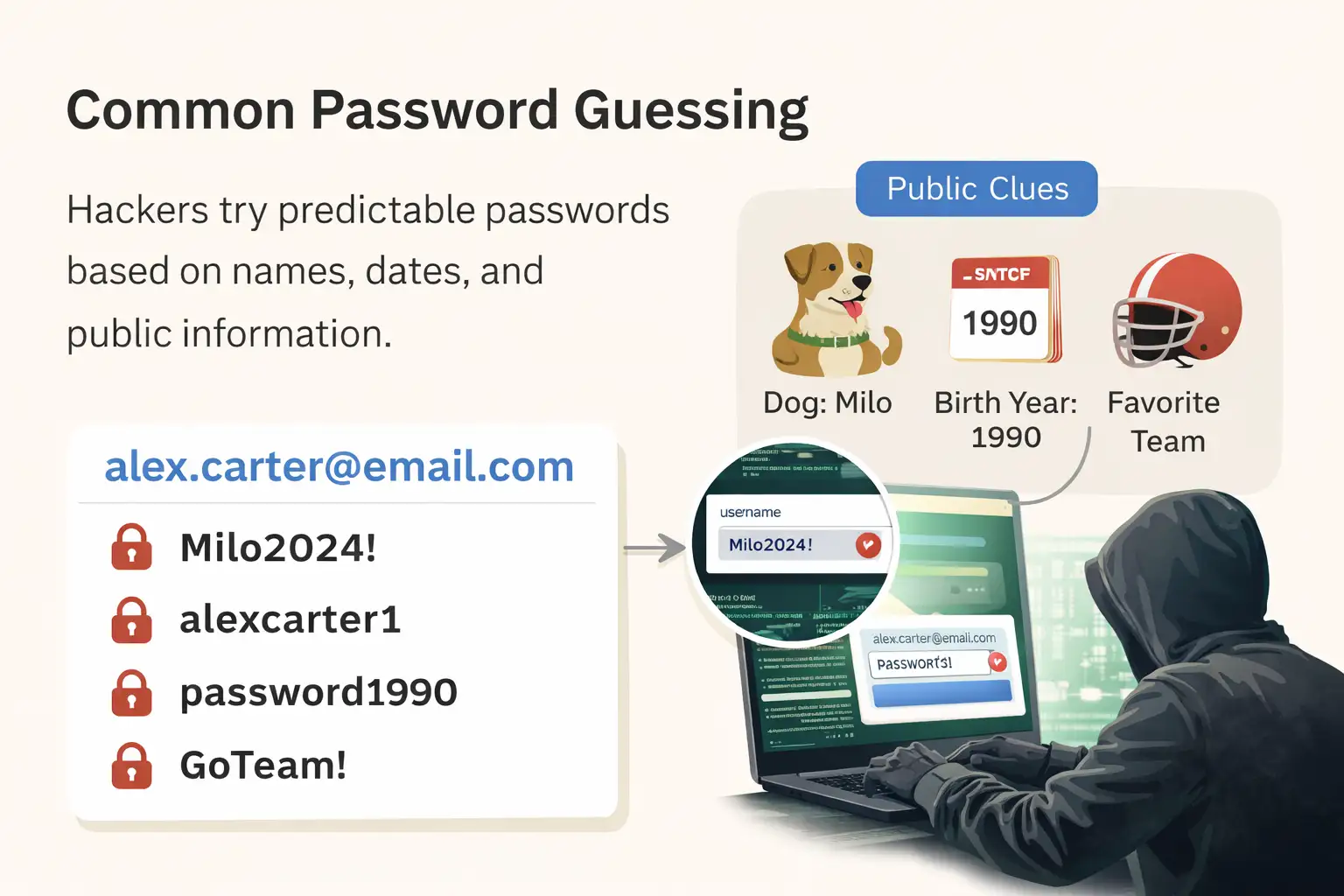
The simplest path is still alive: attackers try obvious passwords tied to human behavior, such as names, dates, keyboard patterns, or slight variations of “password.” This works because people still prefer memorable shortcuts over unique, random secrets.
A username is often easy to figure out. In many organizations, it is just an email address. Once that is known, the guessing gets smarter. Attackers lean on public clues such as birthdays, pet names, favorite teams, family names, and predictable substitutions like replacing “a” with “@” or adding a number at the end. NIST has long advised against relying on composition tricks alone because they tend to be predictable rather than truly strong.
A practical example helps. Think of an employee named Alex Carter whose public profiles mention a dog named Milo, a child’s birth year, and a favorite team. A password like Milo2024! may feel personal and strong. To an attacker, it may look painfully guessable.
2. Dictionary attacks
A dictionary attack uses wordlists rather than pure randomness. Attackers test common words, phrases, names, and expected variations, often tuned to likely password rules such as minimum length or required symbols.
This is where a lot of “strong-looking” passwords fail. People use real words, then dress them up. Add an exclamation point. Capitalize the first letter. Put a year at the end. The result looks better to a human reviewer than it looks to modern attack tooling.
For organizations, the lesson is uncomfortable but simple: password policies that force predictable behavior may create the illusion of strength while still leaving users inside an attacker’s playbook. OWASP recommends layered defenses, not just password complexity rules.
3. Brute force attacks
Brute force tries many possible combinations until one works. It is most effective against short, weak passwords or against systems that lack strong rate limits, lockouts, or detection controls.
This is the attack most people know, and oddly enough, it is not always the first choice. Pure brute force can be slow, expensive, and noisy. Attackers often prefer easier routes first. Still, it remains relevant when passwords are short or when remote access services are exposed and poorly protected.
Government guidance has repeatedly warned that brute force and credential access activity can enable persistent access to sensitive networks. That is one reason why login monitoring, MFA, and rate controls matter so much.
4. Credential stuffing
Credential stuffing uses previously stolen username-password pairs from other breaches and tests them across different sites and services. It succeeds when users reuse passwords across accounts.
This is one of the clearest answers to the question of how hackers guess passwords. In many cases, they are not guessing at all. They are replaying credentials that already worked somewhere else. OWASP explicitly describes credential stuffing as an attack that depends on reused credentials.
That is why one old breach can echo for years. A password exposed in a forgotten forum breach might later unlock email, payroll, cloud storage, or a customer portal if the same credentials were reused. It is boring advice, I know, but it stays true because it keeps failing in the real world: password reuse is one of the cheapest gifts a user can hand an attacker.
5. Password spraying
Password spraying flips the usual pattern. Instead of trying many passwords on one account, attackers try a small set of common passwords across many accounts to avoid lockouts and blend into normal authentication noise.
Microsoft’s public write-up on Midnight Blizzard is a useful real-world example. The company said the actor used a password spray attack against a legacy, non-production test tenant account that did not have MFA enabled. That detail is worth lingering on. Not the drama of the attacker. The ordinariness of the weakness. A leftover account. No MFA. One attack path. That is how a lot of serious incidents begin.
CISA describes password spraying in similar terms and notes why it is effective: the attacker spreads attempts across many accounts, which reduces the chance of triggering per-account lockouts.
The methods that steal passwords instead of guessing them
Phishing and fake reset pages
Phishing tricks users into handing over credentials or visiting malicious pages that capture passwords. Messages often imitate trusted brands, internal teams, or password reset workflows.
CISA explains phishing as messages that try to lure people into opening harmful links, attachments, or requests for personal information. In practice, a fake password reset email is especially effective because it creates urgency and feels routine. Users are used to resetting passwords. Attackers know that.
Even where MFA exists, phishing can still be dangerous if the attacker captures session data or persuades the user to enter a second factor into a fake portal. That is one reason phishing-resistant MFA gets so much attention from government guidance.
Malware and stored credential theft
Attackers also steal passwords directly from infected devices by using malware that records keystrokes, grabs browser-stored credentials, or extracts authentication material from memory.
This route matters because it bypasses the whole “guessing” conversation. The user types the password. The malware collects it. Or the browser saves it, and the malware steals it later. Either way, the attacker ends up with something more valuable than a guess.
For businesses, this shifts the defense story from password policy alone to endpoint protection, patching, browser hardening, and privileged session controls. A password can be strong and still be stolen from a weak endpoint.
Eavesdropping and shoulder surfing
Some passwords leak through plain human exposure. A temporary password spoken aloud on a help desk call. A PIN watched over someone’s shoulder. A sticky note at a reception desk. These methods sound old-fashioned, but they remain real because people remain human.
It is tempting to laugh at them. Then you walk through an office and notice how often convenience beats policy. That gap, small as it seems, is where social engineering lives.
Why weak password practices keep winning for attackers
Here is the uncomfortable part. Many password attacks work not because attackers are brilliant, but because normal password habits are weak.
People reuse passwords across personal and business accounts.
People make small, predictable modifications to old passwords.
Default credentials on devices and applications are left unchanged.
Password reset workflows sometimes rely on insecure channels or weak verification.
Security questions can often be answered from public information or old breach data.
NIST guidance is useful here because it moves away from security theater. It emphasizes longer passwords, screening against known weak or compromised values, and avoiding arbitrary complexity tricks that do not add much real protection. It also allows subscriber-chosen passwords up to substantial lengths, which supports passphrases and modern password manager use.
Who is affected?
Regular users are affected first at the account level. Email, banking, shopping, social platforms, and cloud storage all become targets when credentials are reused or exposed.
Businesses face the larger systemic risk. One employee account can lead to invoice fraud, mailbox compromise, SaaS access, remote VPN exposure, and deeper identity abuse. The closer an account is to admin, help desk, cloud control, or finance, the more dangerous the outcome becomes. Microsoft’s incident is a reminder that even non-production environments matter if identity controls are weak.
Security and IT professionals carry the operational burden. They are the ones who have to distinguish between a normal login and a valid credential in the wrong hands. That is much harder than blocking a known malware file.
What users and businesses should do now
A short answer first: stop treating passwords as isolated secrets and start managing them as part of identity risk.
Use unique passwords for every important account.
Turn on MFA, especially for admin, remote access, email, and cloud services.
Use a password manager so users are not forced to invent and remember everything manualy.
Monitor for password spraying, repeated failed logins, and suspicious sign-ins across accounts.
Review password reset flows so they do not become an attacker’s shortcut.
Then go one level deeper. Reduce the number of privileged accounts. Remove stale test tenants. Audit service accounts. Harden endpoints where passwords are stored or entered. This is the less glamorous work, but it is usually the work that changes outcomes.
For organizations that need outside support, Hoplon Infosec can be positioned here sensibly: as a partner for improving identity hygiene, phishing resilience, privileged access discipline, and response readiness. Not magic. Not a silver bullet. Just the kind of practical security work that closes the gaps attackers actually use.
Practical before-and-after example
Before: a company lets employees reuse similar passwords across SaaS apps, keeps a few legacy accounts without MFA, and relies on a help desk process that resets passwords after weak identity checks. Nothing looks broken. Then one low-profile account is hit by a password spray, a reused password works elsewhere, and the attacker expands from there.
After: the same company enforces unique passwords through a manager, adds MFA to every high-risk workflow, audits legacy accounts, blocks known weak passwords, and monitors authentication anomalies across accounts instead of in isolation. The result is not perfection. It is something better. Fewer easy wins for the attacker.
Frequently asked questions
How do hackers guess passwords most often?
Most often, they combine common password patterns, leaked credentials, phishing, and password spraying. Many attacks are automated and rely on human predictability rather than luck.
Is brute force still a major threat?
Yes, but it is not the only one. It remains relevant against weak passwords and exposed services, though many attackers prefer credential stuffing or spraying because those methods can be faster and quieter.
Why is password reuse so dangerous?
Because one breach can unlock many accounts. If the same username and password appear on multiple services, attackers can test them everywhere with automation.
Does MFA solve the problem completely?
No. It greatly improves protection, but weaker MFA methods can still be targeted through phishing or session abuse. Strong, phishing-resistant MFA is better than password-only access by a wide margin.
What is the safest password strategy for most people?
Use a password manager to create long, unique passwords for each account, turn on MFA, and avoid reusing old credentials or predictable variations.
summary
The quiet truth behind how hackers guess passwords is that they often do not need brilliant tricks. They win through reuse, weak reset processes, phishing, password spraying, and predictable human habits. The main benefit of a better approach is straightforward: fewer compromised accounts and less room for an attacker to turn one login into a wider breach.
Providers such as Hoplon Infosec are most useful when they help turn that reality into policy, monitoring, access controls, and practical remediation.
If your organization wants a practical starting point, begin with four checks this week: MFA coverage on every admin and remote access path, a review of legacy accounts, screening against known weak passwords, and monitoring for password spraying behavior. Those four moves will not solve everything. They will, however, remove a surprising amount of easy attacker leverage.
For more latest updates like this, visit our homepage.
Trusted sources
Google Cloud Threat Horizons Report
IBM X-Force Threat Intelligence Index
Microsoft security blog on Midnight Blizzard
NIST Digital Identity Guidelines
CISA phishing guidance
OWASP credential stuffing guidance
Author credibility
This article was prepared in an editorial, research-led format using public guidance and reporting from recognized security authorities, standards bodies, and major industry incident disclosures. Any claim that could not be tied back to a trusted public source was excluded.




-20260925120840.webp&w=3840&q=75)
