
-20260413071559.webp&w=3840&q=75)
What happened in the OpenAI macOS security update, who is affected, and why does it matter right now?
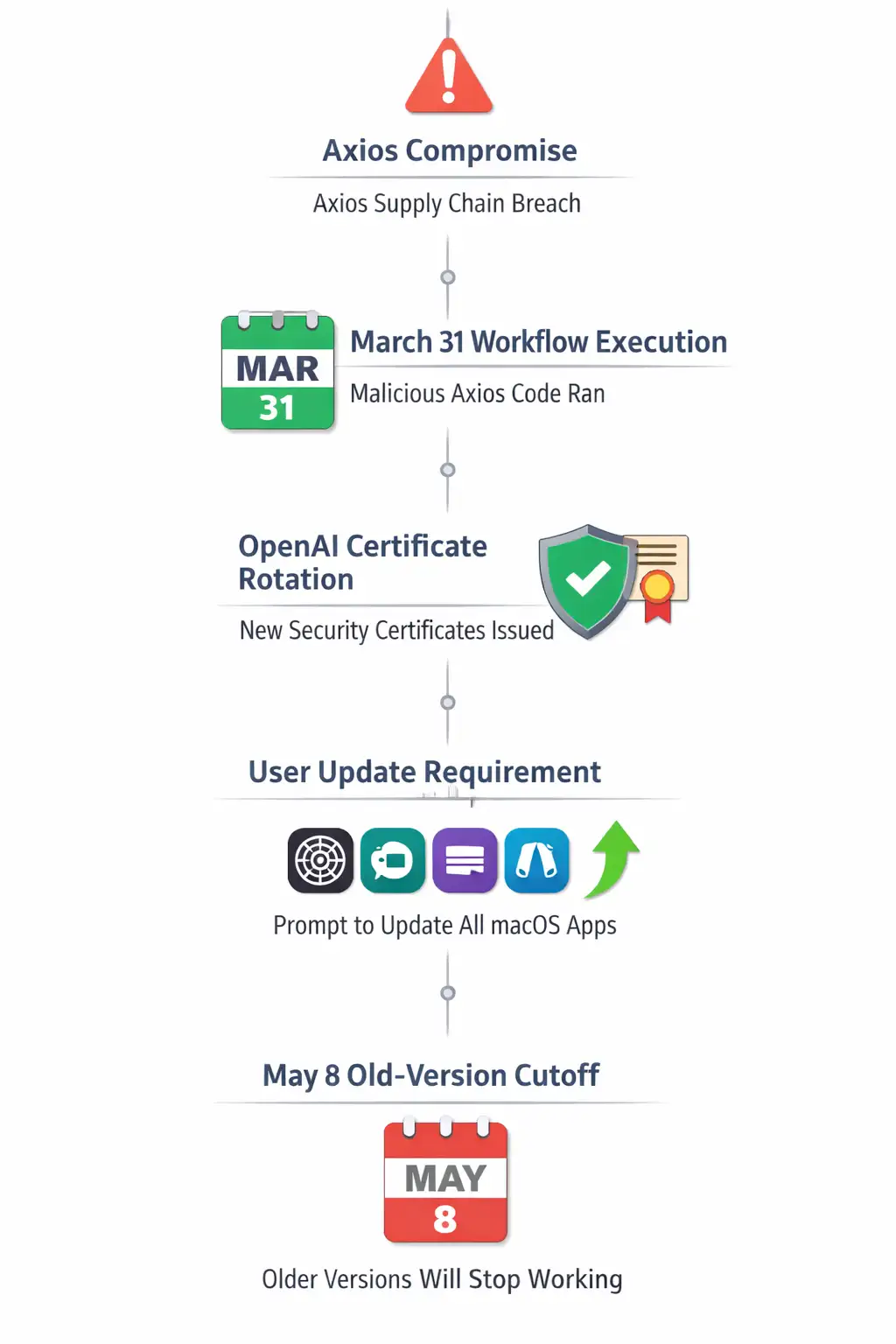
OpenAI told macOS users to update ChatGPT, Codex, Codex CLI, and Atlas after a third-party developer tool incident involving Axios affected part of the process used to verify legitimate Mac apps.
OpenAI says it found no evidence that user data was accessed, its systems were breached, or its software was altered, but it is rotating security certificates and cutting off support for older Mac app versions on May 8, 2026, as a precaution.
This article is built around your requested angle and keyword set.
Incident Summary
This is not a routine desktop app patch. It is a trust-chain response.
OpenAI disclosed that a malicious Axios version was executed on March 31, 2026, inside a GitHub workflow used in part of its macOS app-signing process.
That matters because code signing and notarization help macOS users distinguish real software from fake software.
OpenAI says the exposure raised concern that attackers could try to misuse signing-related material to make bogus OpenAI apps look legitimate, even though the company says it has found no evidence of misuse so far.
For users, the message is simple. Update now. For security teams, the lesson is bigger. A supply chain issue does not need to steal customer data to become a serious trust problem.
Security Overview
|
Item |
Current verified detail |
|
Incident type |
Software supply chain incident tied to malicious Axios package versions |
|
Affected area |
OpenAI’s macOS app-signing and verification process |
|
Reported malicious versions |
Axios 1.14.1 and 0.30.4 were cited in broader reporting on the compromise |
|
Affected OpenAI apps |
ChatGPT, Codex, Codex CLI, and Atlas on macOS |
|
User data breach confirmed? |
No. OpenAI says it found no evidence that user data was accessed |
|
Software tampering confirmed? |
No. OpenAI says it found no evidence its software was altered |
|
Deadline for old apps |
Older macOS app versions may stop working after May 8, 2026 |
|
CVE published? |
No public CVE was cited in OpenAI’s advisory or the main coverage reviewed |
|
Severity |
No official CVSS score published by OpenAI for this event |
|
Main user action |
Update all OpenAI macOS apps to the latest version |
The absence of a CVE is important. This was not framed as a classic remote exploit against end users. It was a trust and software supply chain problem that touched the signing workflow. That changes the risk picture.
Inside the Incident
The broad industry incident started with a compromise involving Axios, a widely used JavaScript HTTP client.
. Reporting around the event says attackers published malicious package versions after compromising the maintainer’s environment through a targeted social engineering operation. Those versions were then briefly available on npm before removal.
OpenAI later said one of those malicious versions ran inside a GitHub workflow connected to part of its macOS signing pipeline. That does not mean customer Macs were directly infected.
It means a trusted internal step in the software delivery chain touched a compromised dependency.
That is the kind of detail security teams hate seeing, because once the trust layer becomes questionable, the next problem is authenticity. Can a user still trust that the app on their screen is really the vendor’s app?
That is why the OpenAI macOS security update matters. The issue was not framed as malware spreading through the ChatGPT app itself. It was about protecting the cryptographic path that tells macOS and users that an app is real.
Which Mac Apps Are Affected
OpenAI specifically said macOS users should update these apps:
ChatGPT
Codex
Codex CLI
Atlas
This point deserves emphasis because many readers will assume the warning only applies to ChatGPT Desktop. It does not.
If you use any OpenAI Mac software in this list, you should update it. Older versions may stop working after May 8 as OpenAI rotates certificates and tightens trust controls.
That May 8 cutoff also makes this more urgent than a typical “install when convenient” notice. For many users, especially developers who rely on Codex CLI in daily workflows, this is an operational deadline as well as a security one.
Why This Matters
For regular Mac users
Most users do not think about app signing. They think about one thing: “Is this app safe to open?”
That is why code signing exists. NIST’s code-signing guidance explains that signing helps prove software authenticity and integrity across development, distribution, and runtime.
When signing-related trust is even potentially exposed, the risk shifts from direct compromise to impersonation and confusion.
A fake app that looks real can be enough to steal credentials, capture prompts, or trick a user into approving extra permissions.
For businesses and teams
For organizations, the impact is broader. This is a reminder that software supply chain risk lives upstream from the endpoint.
A company can patch laptops, enforce MFA, and run EDR everywhere, then still get dragged into a messy incident because a trusted developer dependency was poisoned at the wrong time.
CISA’s supply chain guidance stresses exactly this point: organizations need controls that cover acquisition, build, deployment, and maintenance, not just the finished product.
The other business issue is trust continuity. If employees use AI tools on managed Macs, IT now has to answer practical questions quickly.
Which versions are installed? Which devices still run old builds? Are users getting the update from the real source or from a fake page circulating on social media? Those are mundane questions, but in a real incident, they become the whole game.
Our Technical Analysis
We have seen plenty of security stories where the headline screams “breach” but the underlying issue turns out to be mostly theoretical. This one is different. The technical exposure may be limited, but the operational implications are real.
The reason is simple. Authenticity failures scale fast. If a vendor believes a signing path might have been exposed, it has to assume attackers could try to abuse that trust later.
That is why OpenAI is rotating security certifications now, before evidence of misuse appears. From a defender’s point of view, that is the correct move. It is disruptive, yes. It is also disciplined.
There is another angle here that many short news posts missed. This incident is not only about OpenAI.
It is about the fragility of modern developer ecosystems. One poisoned package. One automated workflow. One trusted build step.
Suddenly millions of end users are reading an urgent update notice. That is the real story behind the OpenAI macOS security update.
Field Notes
When we reviewed OpenAI’s disclosure alongside Apple’s trust model for signed apps, the likely user pain point became obvious almost immediately. The update itself is not the hard part. The hard part is confidence.
Users often respond badly to urgent update warnings. Some ignore them. Some search the web, land on a copied article or a shady download page, and make the problem worse. In practical security work, this is common. The technical fix may be straightforward, but the human step in the middle is messy.
That is why the smartest move here is boring and strict. Update only from the app’s built-in update flow or the official OpenAI distribution path. Do not trust random “mirror” links. Do not trust social posts that claim to host a “fixed” installer. A trust incident is exactly when fake sites become more dangerous.
How to Protect Your System
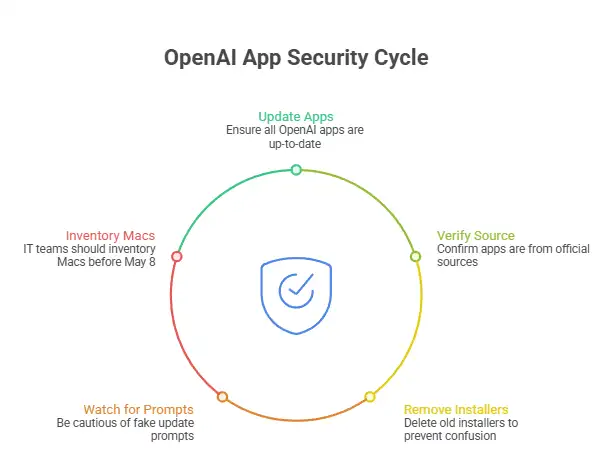
How to Protect Your System
Step 1: Update every OpenAI Mac app you use.
Open each OpenAI app on your Mac and check for updates. If you use more than one, do not assume updating ChatGPT covers Codex or Atlas. Confirm each app is current.
If you downloaded through a package manager or internal management tool, check whether your IT or MDM stack has already pushed the new release. Mixed environments are common, and they create blind spots.
Step 2: Verify the app came from an official source.
If you are reinstalling, use OpenAI’s official download route. Avoid third-party software sites and random GitHub mirrors.
On macOS, you can also inspect signing details from Terminal:
codesign -dv --verbose=4 /Applications/ChatGPT.app
spctl -a -vv /Applications/ChatGPT.app
These commands help confirm that the app is signed and accepted by Gatekeeper. They do not replace vendor guidance, but they are useful checks for admins and advanced users. NIST’s code-signing guidance explains why this verification step matters in the broader supply chain context.
Step 3: Remove stale installers.
Check your Downloads folder and shared team drives for old DMG or PKG installers related to ChatGPT, Codex, or Atlas. Delete old copies that users might accidentally open later.
This is a small cleanup step, but it matters. During incidents like this, the leftover installer is often the thing that keeps causing confusion two weeks later.
Step 4: Watch for fake update prompts.
Do not approve a new installer simply because it uses the right logo. Check the source. Check the domain. Check whether the prompt came from the app itself or from a browser pop-up.
Ask yourself a simple question: “Did I start this update from a place I trust?” If the answer is fuzzy, stop there.
Step 5: For IT teams, inventory Macs before May 8.
If your organization supports macOS at scale, pull a version inventory before the cutoff. Identify devices running old OpenAI app builds and notify users early.
The May 8 deadline means this is not just a security advisory. It is a change-management issue. You want to avoid the Monday morning ticket flood that starts with, “ChatGPT stopped opening.”
Common Pitfalls
Mistake 1: Updating one app and forgetting the others
This is the most likely failure. A user updates ChatGPT, then assumes Codex CLI is fine because both are from OpenAI. Not safe. Check them all.
Mistake 2: Searching for installers during a live security story
Urgent stories attract fake guides and copied pages. Attackers know that.
A hurried Google search in the middle of a vendor advisory is exactly how people land on counterfeit downloads. This is one reason the OpenAI macOS security update deserves a calm, direct response instead of a rushed one.
Mistake 3: Assuming “no data breach” means “no action needed”
OpenAI said it found no evidence that user data was accessed or that its systems were compromised. That is good news. It does not cancel the update requirement. The trust layer still changed, and older apps may stop working.
Pro Tip
If you manage Macs for a team, pair the update notice with a one-line policy reminder: “Install OpenAI app updates only through official app prompts or our managed software portal.” Short messages work better than long policy memos when people are busy.
Also, log which users rely on the Codex CLI update after OpenAI security incident scenarios. Command-line tools often escape the same visibility controls used for GUI apps.
The Key Security Lesson
This story lands at a time when supply chain security is already under heavy scrutiny. CISA, NSA, and NIST have all pushed guidance that emphasizes secure development, dependency governance, and trustworthy build and signing processes.
The OpenAI incident fits squarely into that pattern. It is another reminder that attackers do not always hit the front door. Sometimes they poison the factory.
Would a normal user ever think about notarization certificates or GitHub signing workflows? Probably not. Should they have to? Also no.
That is the vendor’s job. But once the vendor says, "Update now," the user’s part becomes simple: do it, and do it from the right place.
At-a-Glance Table
|
Question |
Verified answer |
|
Is this a confirmed user data breach? |
No, OpenAI says it found no evidence of that |
|
Is the risk only theoretical? |
Not entirely. The concern is around app authenticity and misuse of trust |
|
Are Windows users included in this update notice? |
OpenAI’s advisory reviewed here is specifically about macOS apps |
|
Could older apps stop working? |
Yes, OpenAI says older macOS app versions may stop working after May 8, 2026 |
|
Should businesses treat this as urgent? |
Yes, because it affects trust, user behavior, and software continuity |
What we recommend right now
Update every OpenAI macOS app you use today
Reinstall only from official OpenAI sources if you are unsure about provenance.
Remove old installers from Downloads and shared folders.
For teams, run a Mac app inventory before May 8
Watch for fake update pages and copied news posts.
Research Firm Quote
There is no primary-source research firm report attached to this specific OpenAI event in the material reviewed here. The broader industry takeaway, supported by CISA and NIST guidance, is that software supply chain trust now depends as much on dependency hygiene and signing integrity as it does on endpoint defense.
3-Point Security Checklist
Update now
Check ChatGPT, Codex, Codex CLI, and Atlas on your Mac and move them to the latest versions.Verify source
Only use official OpenAI update paths or managed enterprise software channels.Clean up old installers
Delete stale DMG or PKG files and warn coworkers not to trust random “fixed build” links.
The bottom line is clear. The OpenAI macOS security update is not noise, and it is not optional housekeeping. It is a trust-restoration move after a supply chain incident.
OpenAI says there is no evidence of user data compromise, which is the good part. The action item is still the same: update now, check every affected app, and stay away from unofficial installers.
Trusted Source
OpenAI’s official advisory remains the most reliable source for this event: OpenAI
Author:By Hoplon Cybersecurity Research Team
Publish Date: April 13, 2026
Last Updated: April 13, 2026
This content is for informational and awareness purposes only and should not be treated as legal, forensic, or vendor security guidance.




-20260925120840.webp&w=3840&q=75)
