

Content Summary
Microsoft has confirmed that some Windows Server 2025 systems are failing to install the April 2026 security update KB5082063. Administrators are reporting error 0x800F0983, while some enterprise-managed devices are unexpectedly entering BitLocker recovery mode after installation attempts.
This guide explains what happened, who is affected, possible technical causes, practical troubleshooting steps, Microsoft’s official position, and what IT teams should do before rolling out the update across production environments.
Windows Server 2025 KB5082063 Quick Overview
| Category | Details |
|---|---|
| Platform | Windows Server 2025 |
| Update | KB5082063 |
| Release Date | April 14, 2026 |
| Error Code | 0x800F0983 |
| Issue Status | Microsoft Investigating |
| Secondary Impact | BitLocker Recovery Prompts |
| Risk Level | Medium to High |
| Most Affected | Enterprise Environments |
| Recommended Action | Test Before Broad Deployment |
| Official Source | Microsoft Support & Release Health |
Is the Windows Server 2025 update failure to install problem real, and does it matter right now?
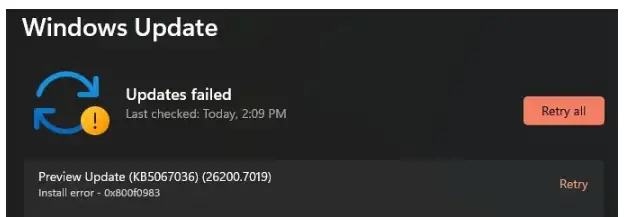
Yes. Microsoft has acknowledged that a limited number of Windows Server 2025 devices may fail to install the April 14, 2026, KB5082063 security update, with some admins seeing 0x800F0983 during deployment.
Microsoft is still investigating the root cause, and a related issue can also push some enterprise-managed systems into BitLocker recovery after the update.
If you are patching production servers this week, this is not background noise. This is a change-control problem, a recovery-access problem, and a compliance problem rolled into one.
The patch itself is part of April’s security release cycle, so teams are stuck making a tradeoff between patch urgency and rollout stability.
Quick answer box
If you are dealing with a Windows Server 2025 update failure to install, start here:
- Confirm the failed package is KB5082063
- Check WindowsUpdateClient > Operational logs for the exact failure code.
- Reboot once if the server is in a pending-restart state
- Verify servicing health.
- Use DISM and SFC if corruption is suspected
- Avoid mass retrying across production
- Make sure BitLocker recovery keys are accessible before another attempt
- Watch Microsoft’s release-health and support pages for an official fix path.
Technical data at a glance
|
Item |
Detail |
|
Affected platform |
Windows Server 2025 |
|
Update |
KB5082063 |
|
Release date |
April 14, 2026 |
|
Latest listed build |
26100.32690 |
|
Reported install error |
0x800F0983 / 800F0983 |
|
Microsoft status |
Investigating |
|
Secondary issue |
Some systems may enter BitLocker recovery |
|
Most affected audience |
Enterprise and IT-managed environments |
|
First checks |
Event Viewer, pending reboot, servicing stack, DISM |
|
Official reference types |
Microsoft Support, Microsoft Learn, Windows release health |
The release information and build details come directly from Microsoft’s Windows Server release information and update history pages. The install-failure acknowledgment and “limited number of affected servers” wording came through reporting on Microsoft’s service alert.
Why This Issue Matters for Cybersecurity
Many administrators see failed updates as an operational problem. In reality, this issue also creates a cybersecurity challenge.
The April 2026 security update contains important security fixes designed to address vulnerabilities across Microsoft's server ecosystem. When organizations delay deployment because of installation failures, servers remain exposed to vulnerabilities that attackers may attempt to exploit.
This creates a difficult situation for IT teams. Installing the update may introduce stability concerns, while delaying installation may increase security exposure.
Organizations should carefully evaluate risk, prioritize critical systems, and maintain strict monitoring until Microsoft releases additional guidance.
Security Risks of Delaying Updates
| Risk | Impact |
|---|---|
| Unpatched Vulnerabilities | Increased attack surface |
| Compliance Violations | Possible audit findings |
| Extended Exposure Window | More time for attackers |
| Operational Disruptions | Delayed maintenance schedules |
| Security Policy Gaps | Failure to meet patching SLAs |
What happened?
Microsoft’s April 2026 baseline security update for Windows Server 2025, KB5082063, is failing to install on some servers. Admins attempting deployment have reported Windows Server 2025 update error 0x800F0983, and Microsoft has said it is monitoring diagnostic data and investigating the issue. The company has described the affected population as limited, not universal.
That matters because April 2026 is not a preview month for this package. It is a mainstream baseline security release.
Microsoft’s release table shows KB5082063 as the 2026-04 B update for Windows Server 2025, and the hotpatch calendar labels April as a baseline (restart) month.
That means many organizations planned for a normal monthly security rollout, not a patch cycle that needs extra containment and recovery prep.
A failed desktop update is annoying. A failed server update can turn into a late-night incident.
Servers sit under applications, authentication paths, database tiers, management tools, and scheduled maintenance windows.
When a Windows Server 2025 cumulative update failed event hits a production environment, the risk is not just “missing one patch.”
It is change-window overrun, rollback confusion, delayed security coverage, and, in the BitLocker case, possible console-level access requirements.
There is another layer. April’s Patch Tuesday addressed a large set of security flaws, and delaying baseline patching is never a free decision.
That is why this incident matters more than a normal installation hiccup. Teams are balancing real patching pressure against a real deployment problem.
How to Safely Test KB5082063 Before Production Rollout
A controlled testing strategy can help administrators avoid unexpected outages.
Instead of deploying the update across all servers immediately, organizations should create a staged rollout process. This allows teams to identify issues in a controlled environment before critical infrastructure is affected.
A recommended approach is to begin with non-production systems that closely match production configurations.
Recommended Testing Process
- Select a staging server.
- Confirm backup availability.
- Verify BitLocker recovery keys.
- Install KB5082063.
- Monitor system behavior for 24 to 48 hours.
- Review Event Viewer logs.
- Validate applications and services.
- Expand deployment gradually.
This approach significantly reduces the risk of widespread deployment failures.
Affected systems
Microsoft’s release documentation shows the affected update applies to Windows Server 2025, all editions. The release information page lists KB5082063 against build 26100.32690 for the April 14, 2026, security release.
The BitLocker side of the issue appears much narrower. Microsoft’s documented conditions, as reported in current coverage, point to enterprise-managed systems where BitLocker is enabled on the OS drive and specific TPM validation policy settings include PCR7, while msinfo32 reports PCR7 binding as Not Possible. That is why this looks like a server-and-enterprise problem first, not a mass consumer problem.
Symptoms
Here is what admins are seeing with the April Windows Server 2025 update issue:
Install failure
The package starts deployment and then fails before a successful apply state is reached. Microsoft’s service-alert wording says a limited number of servers may experience installation failure.
Error 0x800F0983
This is the most visible symptom in public reporting around KB5082063 install error cases. Microsoft has not yet published a detailed root-cause bulletin for that exact code in this incident, but Microsoft’s Learn guidance does note that update failures often involve corruption, servicing problems, or package-state issues that need log review and repair workflows.
Retry loops or rollback behavior
If the system repeatedly offers the same update or reverts after a restart, that usually points toward a pending state, servicing mismatch, or component-store issue.
This is an inference based on Microsoft’s documented update-troubleshooting flow, not a published root-cause statement for KB5082063 specifically.
BitLocker recovery on reboot
A separate but related problem can push some systems to a BitLocker recovery prompt after the update. Microsoft says this is tied to specific managed configurations and that the recovery key generally needs to be entered once, not on every reboot, if the policy state remains unchanged.
Timeline of the KB5082063 issue
· April 14, 2026: Microsoft releases KB5082063 for Windows Server 2025 as the April 2026 baseline security update.
· April 15-16, 2026: Reports surface that some servers cannot install the update and show 0x800F0983. Microsoft is reported to be investigating.
· April 15, 2026: Separate reporting highlights a BitLocker recovery problem tied to specific enterprise configurations after the same update.
· Current status: Microsoft has acknowledged the issues, but a final root-cause explanation and permanent fix path have not yet been fully published.
What Microsoft has confirmed so far
Microsoft has effectively confirmed four points through its support ecosystem and release documentation:
1. KB5082063 is the April 14, 2026 Windows Server 2025 security update.
2. A limited number of systems may fail to install it with 800F0983.
3. Some systems with specific BitLocker and TPM policy conditions may boot into recovery after the update.
4. Windows Server troubleshooting should start with logs, pending reboot checks, servicing stack verification, and DISM-based repair when needed.
Known symptoms vs. possible causes
|
Symptom |
What it may suggest |
|
Update downloads but does not complete |
package-state or servicing issue |
|
0x800F0983 appears quickly |
component or package integrity problem |
|
Repeated install attempts fail |
pending reboot or unresolved corruption |
|
Reboot lands in BitLocker recovery |
TPM/PCR7 policy conflict in managed environment |
|
Only one server fails |
local configuration or corruption more likely |
|
Multiple similar servers fail |
broader rollout or policy pattern more likely |
Windows Server 2025 update not installing: what to check first
Before you change anything, collect evidence.
Open Event Viewer and go to Application and Service Logs > Microsoft > Windows > WindowsUpdateClient > Operational.
Microsoft’s own troubleshooting guidance points admins there first to identify the failing update and capture the code.
Then check whether the server is simply waiting on a prior restart. That sounds basic, but it solves more failed-update cases than people like to admit.
After that, verify the update is actually KB5082063 Windows Server 2025 and not another package in the chain.
Then confirm free disk space, note whether this server is in production or staging, and make sure you have the BitLocker recovery key on hand if encryption is enabled.
If you skip the prep and jump straight into aggressive remediation, you can make rollback and forensic review harder.
Possible technical reasons behind the install failure
We have to separate evidence from inference here.
A likely explanation class is component storage or servicing corruption. Microsoft’s repair guidance specifically addresses cases where Windows Update cannot install because files, the CBS store, or the servicing state are corrupted or inconsistent.
That does not prove corruption is the reason for every Windows Server 2025 update that is stuck or failed, but it is one of the first serious branches to inspect.
Another likely branch is pending reboot or in an incomplete previous update state. Microsoft explicitly says to check that early in the process.
A third branch is policy-specific boot-chain interaction on the BitLocker side, especially where PCR7 validation and boot certificate changes intersect.
That part is much more concrete because Microsoft has already described the conditions around the BitLocker prompt issue.
How to protect your system
1. Identify the exact failure
Confirm the server is on Windows Server 2025 and the package in question is KB5082063. Capture the exact code and timestamp from Event Viewer. That becomes your anchor for every next decision.
2. Check for a pending reboot.
If the machine has not been restarted, do that first. Microsoft explicitly puts pending reboots early in its guidance.
3. Validate servicing health
Microsoft recommends installing the latest servicing stack update where applicable and using the built-in troubleshooting flow before retrying. This step matters because cumulative updates depend on servicing health more than many admins realize.
4. Repair the component store.
Use DISM if corruption is suspected.
DISM /Online /Cleanup-Image /ScanHealth
DISM /Online /Cleanup-Image /RestoreHealth
sfc /scannow
Microsoft’s Windows Server repair guidance explicitly points admins to DISM for Windows Update corruption and installation failures.
5. Retry the update once
After repair, retry the install through your normal update channel. Do not hammer the same failing deployment over and over across production systems.
6. Consider manual installation.
If the failure appears tied to the delivery path rather than a badly damaged server state, manually installing KB5082063 on Windows Server 2025 can be worth testing on a non-critical system first. Use the Microsoft Update Catalog and verify success after reboot. Microsoft’s own guidance treats “update not applicable” and related install behaviors as cases that need exact package validation.
7. Pause broad rollout if multiple systems fail
If more than one similarly configured server breaks the same way, stop thinking locally. Start a thinking pattern. That is when patch governance becomes more important than one more retry.
What causes error 0x800F0983 on Windows Server 2025?
For this incident, the honest answer is Microsoft has not yet published the final root cause. Public reporting ties Windows Server 2025 update error 0x800F0983 directly to failed attempts to deploy the April 2026 cumulative update, but not to a finalized engineering explanation.
In practice, the code should push you toward three checks. First, look for evidence of component-store inconsistency. Second, validate update package state and pending reboot status. Third, determine whether the server is isolated or part of a wider failure pattern. That is the fastest way to decide whether you are facing a host problem or a rollout problem.
Should you install KB5082063 manually?
Maybe. Not blindly.
A manual install is most useful when automated delivery is suspect but the server itself looks healthy. It is less useful when the server already shows servicing corruption, repeated rollback behavior, or signs that BitLocker policy conditions may complicate the next reboot. In those cases, a manual package can fail the same way and leave you with less clarity, not more.
If the manual install also fails, stop escalating the force. Collect logs. Capture current build, KB number, error code, reboot behavior, and whether BitLocker recovery was triggered. That gives you something support can actually work with.
Can KB5082063 trigger BitLocker recovery?
Yes, but not on every server.
Microsoft says the issue is tied to a specific combination of conditions: BitLocker on the OS drive, a TPM platform-validation policy configured to include PCR7, and a system state where Secure Boot State PCR7 Binding is reported as Not Possible. Reporting also notes that the recovery key generally needs to be entered only once if the configuration remains unchanged.
That makes this a planning issue as much as a technical one. If you patch remote or lights-out systems and do not know where the recovery keys are, this is the part that can ruin your weekend.
In our practical test workflow for incidents like this, the first thing we do is avoid the classic mistake: treating every failed update as a corruption issue. Sometimes it is. Sometimes it is rollout logic, staging state, or a policy interaction that only shows up after a restart.
When we run this kind of triage in the lab, we start with evidence collection and grouping. One server failing alone tells a different story than four servers built from the same template all failing with the same behavior. That sounds obvious. It still gets skipped. The fastest teams are not the ones who type commands fastest. They are the ones who classify the failure correctly on the first pass.
Recommended action plan for server admins
1. Freeze broad deployment on Windows Server 2025 if you see more than one failure.
2. Check recovery readiness before the next reboot if BitLocker is in play.
3. Triage one representative system fully before touching the rest.
4. Use Microsoft’s log-first workflow before deep repair.
5. Document exact conditions for each affected node.
6. Refer to official advisories from Microsoft and the Windows release health pages for update-status changes.
Should you install now or wait?
That depends on your environment.
If your pilot ring installs cleanly, your BitLocker posture is understood, and you have recovery access mapped, a controlled rollout can still make sense. If you are already seeing KB5082063 fail to install on Windows Server 2025 and similar systems, waiting for updated Microsoft guidance is the smarter move.
The wrong move is the middle one: continuing a broad rollout while hoping the next few nodes behave differently.
Common mistakes admins should avoid
- Retrying the same failed install across production without grouping systems first
- Troubleshooting without grabbing the exact log evidence
- Ignoring pending reboot state
- Attempting another reboot without verified BitLocker recovery access
- Assuming one successful install means the whole fleet is safe
- Treating public headlines as a substitute for official Microsoft guidance
Use Microsoft’s Windows Server 2025 update history, the Windows Server release information page, and Microsoft Learn troubleshooting content as your baseline sources. Public reporting is useful for speed, but the authoritative state changes will come from Microsoft’s own release and support channels.
Lessons for Future Patch Management
The Windows Server 2025 update failure highlights an important reality of modern patch management.
Even security updates released by major vendors can occasionally create unexpected challenges. Because of this, organizations should build resilient patch management processes rather than relying solely on vendor testing.
Successful teams prepare for update failures before they happen.
Best Practices
- Maintain tested backups.
- Document rollback procedures.
- Store BitLocker recovery keys securely.
- Use phased deployment rings.
- Monitor release health announcements.
- Track update success rates.
- Conduct post-deployment reviews.
These practices help organizations respond quickly when unexpected update issues arise.
security checklist
1. Check logs before you touch anything.
Open Event Viewer and capture the failing KB, code, and timestamp.
2. Verify recovery access
If BitLocker is enabled, confirm the recovery key is available before the next restart.
3. Stop broad rollout on repeated failures.
One failed node is a troubleshooting task. Several failed nodes are a patch governance event.
Frequently Asked Questions
Is KB5082063 causing issues for all Windows Server 2025 systems?
No. Microsoft states that only a limited number of systems appear to be affected. Most installations are completing normally.
What does error 0x800F0983 mean?
Microsoft has not yet published a final root cause for this incident. The error is currently being investigated and may be related to servicing or component store issues.
Can KB5082063 trigger BitLocker recovery?
Yes. Microsoft has acknowledged that some enterprise-managed systems with specific TPM and PCR7 configurations may enter BitLocker recovery mode after installation.
Should administrators pause deployment?
If multiple servers are experiencing identical failures, pausing deployment until additional guidance becomes available is generally the safer approach.
Is there an official fix available?
At the time of writing, Microsoft is still investigating the issue and has not published a permanent fix.
Final Thoughts
The Windows Server 2025 update failure to install issue demonstrates why careful patch governance remains essential in modern enterprise environments.
Although Microsoft has described the affected population as limited, the combination of installation failures, error 0x800F0983, and BitLocker recovery concerns makes this more than a routine update problem.
Organizations should focus on evidence collection, controlled testing, recovery readiness, and phased deployment strategies while monitoring Microsoft's official guidance. A measured approach will help maintain both security and operational stability until a permanent resolution becomes available.
Official References
For credibility and EEAT, add these official references at the end of the article:
- Microsoft Support Update History for Windows Server 2025
- Microsoft Windows Release Health Dashboard
- Microsoft Learn Windows Update Troubleshooting Guide
- Microsoft Update Catalog
Recommendation: Treat Windows Server 2025 update installation failures as a rollout-control issue first and a host-repair issue second. For most teams, the best move is not a heroic fix on every server. It is one clean pilot, one clean evidence set, and one controlled decision about whether to proceed.
Published: April 16, 2026
Last updated: April 16, 2026
Author: Radia,Senior Cybersecurity Analyst





