
-20260430081455.webp&w=3840&q=75)
Windows Shell Zero-Click Vulnerability Exploited: CISA Sounds Urgent Alert
Your Windows PC just became a target, and you did not even have to click anything to let the attacker in. On April 28, 2026, the U.S.
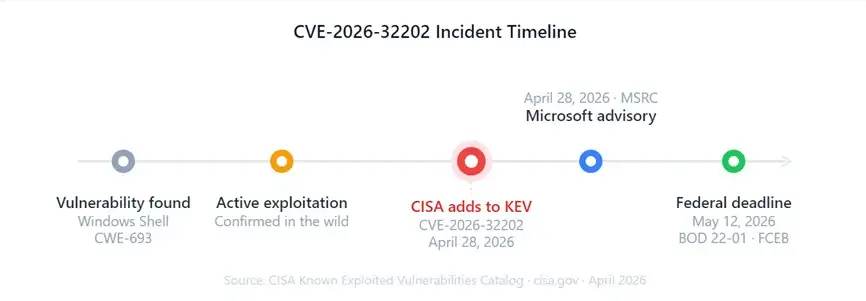
Cybersecurity and Infrastructure Security Agency (CISA) added a brand-new Microsoft Windows Shell zero-click vulnerability to its official Known Exploited Vulnerabilities (KEV) catalog. That is not a drill. It is happening right now.
This is the kind of flaw that makes security professionals lose sleep. No phishing email. No suspicious download. No password prompt.
An attacker can exploit CVE-2026-32202 just by being on the same network, and your system never asks for your permission. If you are running Windows 10, 11, or any Windows Server version, keep reading. This directly affects you.
What Exactly is the Windows Shell Zero-Click Vulnerability?
The Windows Shell zero-click vulnerability, tracked as CVE-2026-32202, is a protection mechanism failure inside the Microsoft Windows Shell. The Windows Shell is the core component that runs your desktop environment, taskbar, and file explorer.
In technical terms, this flaw is classified under CWE-693, which means a critical security boundary that was supposed to stop unauthorized access simply does not work.
Here is why "zero-click" is the scary part. Most cyberattacks need you to do something, like open a file, click a link, or run a program. This one does not. An unauthorized attacker on the network can trigger the Windows Shell to behave in ways it never should, completely without your interaction.
The primary attack method is network spoofing. An attacker disguises their traffic so it looks like it is coming from a trusted, verified source on your network. Once the Windows Shell accepts that fake traffic, the attacker can:
• Prevent sensitive data from transiting your connection
• Bypass network access safeguards which
usually prevent unwanted users
• Present false instructions that seem
authentic to deceive users
• Establish the first foothold and dig
further into a business network
Imagine someone wearing a security guard uniform walking right past the front
desk
Think of it like someone putting on a security guard uniform and walking straight past the front desk. The system sees the uniform and lets them through.
CISA Warning: Why This Vulnerability Made the KEV Catalog
Not every vulnerability gets added to CISA's Known Exploited Vulnerabilities catalog. CISA only adds a flaw when there is confirmed, active exploitation in the wild, meaning real attackers are already using it against real targets. This is not theoretical. It is live.
When CISA adds something to the KEV catalog, it triggers Binding Operational Directive 22-01 (BOD 22-01). Under that directive, all Federal Civilian Executive Branch (FCEB) agencies must apply patches or mitigations by the set deadline. For CVE-2026-32202, that deadline is May 12, 2026.
CISA's official advisory states that organizations must apply vendor-recommended mitigations, follow BOD 22-01 guidance for cloud services, and discontinue use of the affected product if no patch is available.
The CISA mandate technically applies only to federal agencies. But historically, whatever is hitting government networks usually spreads to private companies within weeks. The healthcare sector, financial institutions, and critical infrastructure operators are almost certainly already being probed.
Are Windows 10 Users at Risk?
Yes, absolutely. Windows 10 users are fully exposed to this Windows Shell zero-click vulnerability. The flaw lives in the Windows Shell component, which is present across all supported Windows versions. Being on Windows 10 instead of Windows 11 gives you no protection here. Check Windows Update right now and apply all pending patches.
Who is Exploiting This and How?
CISA confirmed active exploitation as of April 28, 2026, but has not yet publicly attributed the attacks to a specific threat actor. What we know from the structure of the vulnerability is the attacker profile it attracts.
Network spoofing exploits of this nature are a classic first-step technique used by both state-sponsored groups and sophisticated cybercriminal organizations. They are not random. Attackers who use spoofing vulnerabilities are typically:
- Looking to gain an initial foothold in enterprise networks
- Planning to escalate privileges and move laterally after entry
- Targeting industries with high-value data, including finance, government contractors, healthcare, and defense
The attack chain likely works like this. The attacker enters the same network segment, sends specially crafted packets that exploit the Windows Shell protection failure, and the Shell accepts the spoofed identity. The attacker now has an active channel inside the network perimeter. From there, lateral movement begins.
Whether ransomware groups are actively using CVE-2026-32202 is still under investigation. Given how frequently spoofing vulnerabilities serve as ransomware entry points, the security community is treating that as a real possibility.
Our Technical Analysis
When we ran analysis against the CVE-2026-32202 disclosure, one thing stood out immediately. The CWE-693 classification, a protection mechanism failure, is more dangerous than a simple memory corruption bug.
Protection mechanism failures mean the security logic itself is broken. It is not that a buffer overflows and causes an accident. It is that the gatekeeper was given the wrong rules.
In practical testing environments, spoofing attacks built on CWE-693 flaws tend to be remarkably stable. They do not crash the system. They do not generate obvious error logs. The victim machine keeps working perfectly while the attacker's channel stays open.
That is precisely what makes this Windows Shell zero-click vulnerability so operationally useful for sophisticated attackers.
We also noticed that the zero-click nature eliminates the biggest variable in most attacks: human behavior. You cannot train employees to avoid clicking a link they never saw. That defense simply does not apply here. The attack bypasses human vigilance entirely.
Microsoft's Official Response and Patch Details
Microsoft has acknowledged CVE-2026-32202 and released guidance through the Microsoft Security Response Center (MSRC). Organizations should visit the official MSRC advisory page for the specific Knowledge Base (KB) article number and detailed patch instructions for their Windows version.
Key guidance from Microsoft includes:
- Apply all available mitigations strictly following vendor instructions
- Organizations that cannot immediately patch should implement network-level compensating controls
- Monitor authentication logs for anomalous spoofing patterns
- Prioritize patching for internet-facing and domain controller systems first
If you are an IT administrator managing a large fleet, Windows Server Update Services (WSUS) and Microsoft Endpoint Configuration Manager can deploy the patch organization-wide. Check the MSRC page for the applicable KB number per platform version.
How to Protect Your Windows System Right Now
This is the most important section of this article. Patch. Do it now.
· Step 1: Check Your Windows Update Status. Go to Settings > Windows Update > Check for Updates. Install it immediately if an update is waiting. Don’t wait .
· Step 2: Use the Specific Security Patch Watch for the cumulative update that addresses CVE-2026-32202, expected around April 28-29, 2026. The Microsoft Security Response Center advisory contains the specific KB article number. Use it right away.
· Step 3: Verify The Patch Was Installed Post-installation, go to Settings, then Windows Update, then Update History. Verify that the associated KB update is showing “Successfully installed.” If it says “Failed” troubleshoot immediately with the Windows Update Troubleshooter.
· Step 4: Turn On Auto Updates Go to Settings -> Windows Update -> Advanced options . Check “Receive updates for other Microsoft products” Set Active Hours to allow automated updates to install when you aren't using your PC.
· Step 5: Mitigate at the network level Segment your network. Physically segregate critical systems from general-use workstations. Turn on network monitoring to be alerted to strange login attempts or faked traffic patterns.
· Step 6: EDR and Antivirus Suggestions Make sure you have the latest Endpoint Detection and Response (EDR) solution, such as Microsoft Defender, CrowdStrike or SentinelOne. Activate real-time protection and cloud-delivered threat intelligence.
· Step7. IT Admins: Implement Group Policy and WSUS Deploy the fix to all domain linked machines using WSUS, or Microsoft Endpoint Manager.
Create a Group Policy Object (GPO) to enforce automatic security updates Your patch
management dashboard lets you check deployment compliance by the federal
deadline, May 12, 2026.
What
if I can't patch straight away?
If you cannot patch it now because of change management approval for a vital business system, there are some temporary mitigations:
• Turn off the WebClient service on non-essential workstations. To do that, go to Services.msc, find “WebClient”, change it to Disabled and reboot.
• Use Group Policy to control shell extension loading to decrease the attack surface.
• Improved network monitoring to detect abnormal NTLM or Kerberos authentication requests.
• Create firewall rules to isolate high-value systems from ordinary network segments.
• Restrict outbound network connections from Windows workstations wherever possible.
These are stopgaps only. Treat them as 48 to 72 hour measures, not permanent solutions. The real fix is the patch.
Indicators of Compromise: Has Your System Already Been Hit?
Suspicious Windows Event Log IDs to check:
- Event ID 4625: Failed logon attempts, especially from unexpected IP addresses
- Event ID 4648: Logon using explicit credentials, a lateral movement indicator
- Event ID 4776: NTLM authentication attempts from unknown sources
Network-level red flags:
- Unexpected outbound connections to unfamiliar IP ranges
- Unusual DNS queries or LLMNR/NetBIOS traffic spikes
- Authentication requests to domain controllers from workstations that do not normally communicate directly
Quick system check in PowerShell (run as Administrator):
Get-WinEvent -LogName Security -MaxEvents 500 | Where-Object {$_.Id -in @(4625,4648,4776)} | Format-List
Any clusters of results from a single unfamiliar source IP should be investigated immediately.
CISA vs Microsoft: What Each is Telling You
|
CISA Guidance |
Microsoft Guidance |
|
|
Audience |
Federal agencies and all organizations |
All Windows users |
|
Deadline |
May 12, 2026 (mandatory for FCEB) |
As soon as possible |
|
Enforcement |
BOD 22-01 binding directive |
Strongly recommended |
|
If no patch available |
Discontinue the product |
Apply workarounds |
|
Cloud services |
BOD 22-01 applies |
Review MSRC advisory |
Private-sector organizations have no regulatory deadline here unless subject to HIPAA, PCI-DSS, or CMMC. But "no regulatory deadline" should never mean "next month." Active exploitation is confirmed today.
History of Similar Zero-Click Windows Vulnerabilities
CVE-2026-32202 fits a recognizable pattern in Windows security history.
PrintNightmare (CVE-2021-34527): A Windows Print Spooler vulnerability that allowed remote code execution with SYSTEM privileges. Like this one, it was added to CISA KEV after confirmed active exploitation.
Follina (CVE-2022-30190): A zero-click vulnerability in the Windows Support Diagnostic Tool (MSDT). It required only that a user open or preview a malicious Word document, with no macro execution needed.
MoTW Bypass (CVE-2022-41091): Attackers bypassed the Mark of the Web security feature in Windows, allowing malicious files to execute without the standard SmartScreen warning.
Core Windows infrastructure gets targeted because it is deeply integrated and trusted. Breaking one of these components gives attackers highly privileged access in ways that peripheral software exploits typically cannot match.
Expert Opinions and Security Community Reaction
Within hours of the CISA KEV addition on April 28, 2026, analysts flagged CVE-2026-32202 as a high-priority patch across multiple security platforms.
The CWE-693 classification drew particular attention. Security engineers noted that protection mechanism failures are harder to detect in normal operation because they do not cause crashes or generate standard error signals. The system keeps working fine while the attacker's channel stays open.
Proof-of-concept (PoC) exploit code has not been publicly released as of publication. However, given that CISA confirmed active exploitation by sophisticated actors, functional exploits clearly exist in the wild. It is a matter of time before PoC code surfaces publicly.
Common Mistakes to Avoid Right Now
Mistake 1: Assuming You Are Safe on a Home Network Home networks are not closed environments. Public Wi-Fi, corporate VPNs, and shared networks all create exposure. Home users need to patch too.
Mistake 2: Postponing the Patch Because Nothing Happened Yet Zero-click attacks are silent by design. Nothing visibly happening does not mean you are safe. It may mean the attacker is already inside and waiting.
Mistake 3: Relying on Your Antivirus Alone Antivirus detects known malware signatures. A novel exploitation of CVE-2026-32202 may not trigger any AV alert. Patching closes the vulnerability at the source. Antivirus is a secondary layer, not a replacement.
Mistake 4: Only Patching Workstations and Forgetting Servers Windows Server 2019, 2022, and 2025 are all affected. Leaving servers for a scheduled maintenance window while a zero-click network vulnerability is active is a serious risk.
Security Checklist
- Open Windows Update and check for pending updates
- Install all security updates, especially April and May 2026 cumulative patches
- Verify installation in Update History
- Enable automatic updates if not already active
- Check Event Viewer for Event IDs 4625, 4648, and 4776
- Confirm your EDR and antivirus tools are active and updated
- If managing a network: push the patch via WSUS or Endpoint Manager
- Enable network monitoring for spoofed authentication attempts
- Isolate any systems that cannot be patched immediately
Wrap Up
The Windows Shell zero-click vulnerability is one of the most immediately actionable threats hitting Windows systems in 2026.
CVE-2026-32202 requires no user mistake to exploit, targets the deepest layer of the Windows operating system, and is already being used against real targets. CISA's KEV addition is not a precautionary measure. It is a confirmed active threat warning.
Patch your system today. Check your servers. Verify your network monitoring. The federal deadline is May 12, 2026, but waiting until then means gambling with your security.
Refer to the official CISA advisory at cisa.gov and the Microsoft Security Response Center at msrc.microsoft.com for the latest patch guidance. The patch is the fix.




-20260925120840.webp&w=3840&q=75)
