
-20260408150759.webp&w=3840&q=75)
Is the Windows start menu search not working on some Windows 11 PCs right now?
Yes. On April 8, 2026, Microsoft said it had rolled back a server-side Bing change after some Windows 11 23H2 devices began showing broken or blank Start Menu search behavior starting around April 6.
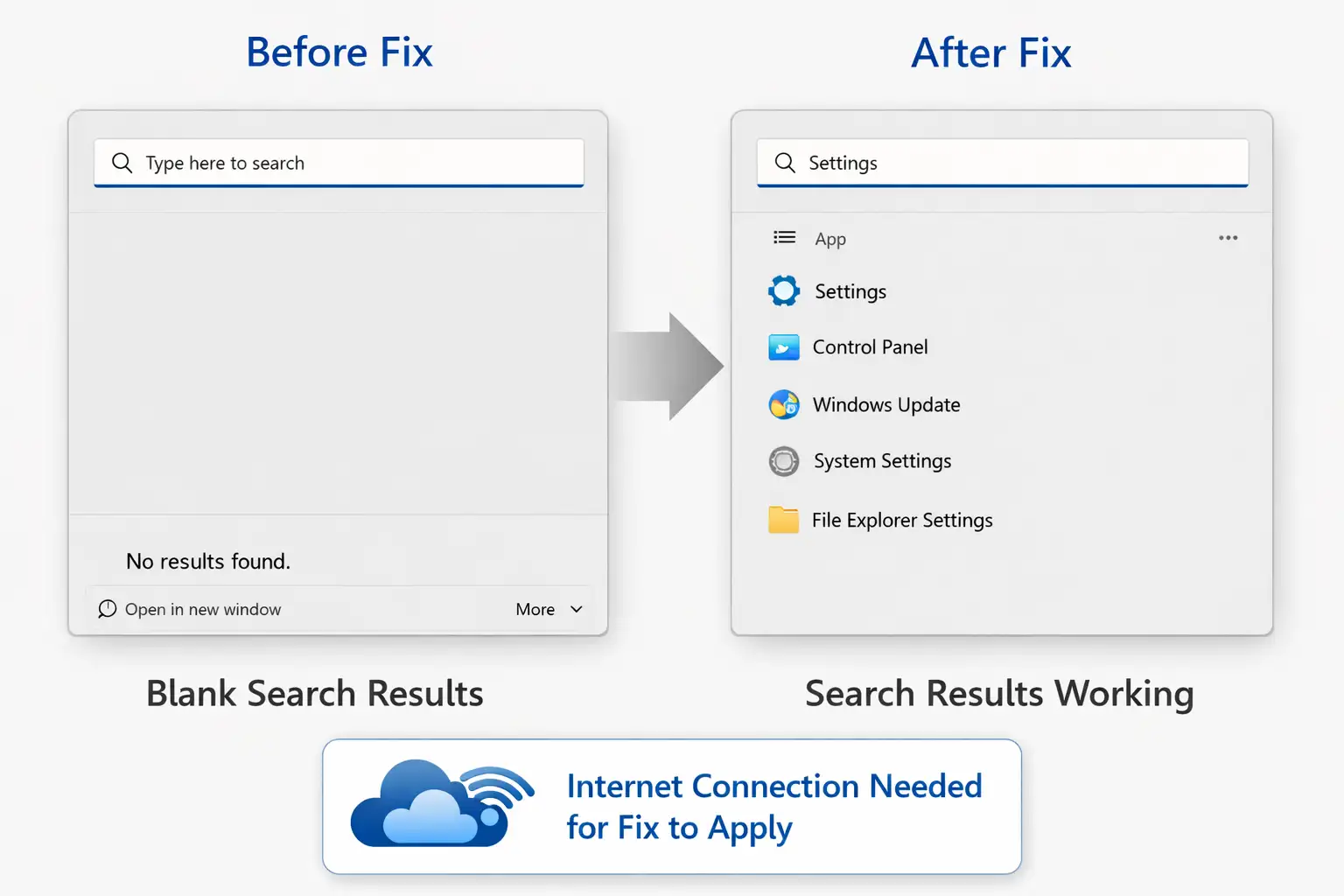
The company said the fix is rolling out automatically to affected devices, but only if the PC is online and Web Search has not been disabled by group policy.
If you noticed that the Windows Start menu search not working became a real problem this week, you were not imagining it.
Microsoft says a recent issue affected a small number of Windows 11 23H2 devices and caused Start Menu search to fail, sometimes with blank results that still looked clickable. The company traced the issue to a server-side Bing update and said it rolled that change back.
That matters because Start Menu search is one of those features people use without thinking. You hit the Windows key, type two letters, and move on with your day.
When it breaks, the whole system suddenly feels clumsy. Apps feel lost. Settings feel buried. Even simple tasks start taking longer than they should.
That is why this incident landed with such a thud, even though Microsoft says only a small slice of users was affected.
What happened?
Microsoft says the recent wave of complaints came from some Windows 11 23H2 systems where the Start Menu search stopped behaving normally.
In the cases described publicly, users could open search but received empty or broken-looking results.
In some reports, the results were blank yet still clickable, which made the bug feel even stranger because the function looked dead while parts of it were still alive underneath.
According to Microsoft’s release health guidance cited in public reporting, the issue started affecting a small number of users on April 6, 2026.
The company linked the behavior to a Bing-side update intended to improve search performance. Then it rolled that update back as the mitigation.
The problem was not described as a classic Patch Tuesday failure where users need to install a new file manually. It was a service-side problem that Microsoft says it has already started undoing.
That detail changes the advice. Many Windows problems begin and end with “install the latest cumulative update.” This one is more unusual.
If the bug on your device matches the latest incident, the recovery is supposed to happen automatically as the rollback reaches your PC.
Microsoft says the device needs an internet connection, and Web Search must not be disabled by Group Policy for that fix to land properly.
-20260408150758.webp "Windows Start Menu Search Not Working")
Who was affected?
The reports around this incident point mainly to the Windows 11 start menu search not working on some devices running version 23H2.
That is an important detail because 23H2 has already reached end of servicing for Home and Pro editions as of November 11, 2025, while Enterprise and Education editions continue to receive monthly security updates until November 10, 2026.
So when people say “Windows 11 is broken,” that is too broad. The available public guidance is much narrower than that.
Microsoft’s current Windows 11 23H2 known issues page says there are no active known issues at this time. That lines up with the idea that the company treated this as a resolved or resolving event rather than an ongoing broad outage.
Even so, real users often experience lag between an official rollback and a device behaving normally again. That is one reason these bugs generate so much confusion online. One machine recovers after a restart. Another stays flaky for hours. A third turns out to have a completely different local problem.
This is also where context matters. A home user and an IT admin are not really dealing with the same environment.
A personal laptop connected normally to Microsoft services may receive a server-side correction without much drama. A company-managed PC with tightly locked policies may not. That is why two people can search the same error phrase and see very different outcomes.
What the issue looked like on affected PCs
The most common symptom tied to the latest reports was Windows 11 search not showing results even though the Start Menu search panel still opened. For everyday users, the experience felt almost surreal. You type an app name. Nothing useful appears.
You try again with a file. Same thing. Maybe the panel flickers. Maybe a blank block shows up. Maybe a ghost result seems clickable, but the interface gives you no confidence at all.
Another phrase that matches what many people saw is "start menu search blank results." This matters for SEO, yes, but it also matters for clarity.
Users do not always describe Windows bugs in technical language. They describe what they see. “It is blank.” “It opens but shows nothing.” “Search is broken but not fully broken.” Those plain descriptions often map better to the real user experience than official wording.
Some people also experienced it as the Windows Start menu search being broken after the update, even though Microsoft’s current explanation points to a server-side Bing change rather than a normal downloadable Windows patch as the trigger.
That distinction is worth making carefully. If the timeline on your device happened to line up with an update or reboot, it can feel like an update bug even when the root cause lives somewhere else. In Windows land, timing often shapes user perception more than architecture does.
Common signs users noticed
The search opened, but no apps or files appeared
Results looked blank, frozen, or half-loaded.
Some empty-looking results still seemed clickable.
The bug showed up after a restart, login, or recent update.
The problem felt random, which made it harder to trust the system.
Why this happened
Microsoft’s public explanation, as reported on April 8, is that the issue coincided with a Bing update meant to improve search performance. The company then rolled that update back.
That is why Microsoft's fix for the Windows Start menu search is best understood here as a rollback, not as a new downloadable patch that you hunt down in a support catalog.
For regular users, “server-side” can sound vague, almost suspicious. A simpler way to think about it is this: parts of Windows search are not completely isolated from online components. If Microsoft changes something on its side and that change interacts badly with how Start Menu search behaves on certain devices, users can feel the effect without clicking Install on a new package first.
That is what makes a server-side fix for the Windows search story so confusing. It breaks quietly, and it recovers quietly too.
At the same time, not every Start Menu search failure should be blamed on this incident. Windows has a long history of search-related glitches that come from different causes.
Some involve indexing problems. Some involve corrupted files. Some show up in enterprise or virtualized setups because app packages and XAML dependencies do not register correctly.
If your PC still refuses to search after Microsoft’s rollback should have arrived, your machine may be dealing with a separate issue that only looks similar on the surface.
Microsoft’s fix
Microsoft says it identified the problem, linked it to the Bing-side change, and rolled that change back.
Reports of failures were said to be steadily decreasing as the rollback spread to affected devices. That means the latest Windows 11 23H2 start menu search fix is designed to reach users automatically rather than through a special emergency update button.
There are two catches, though. First, your device needs to be online. Second, Microsoft says Web Search cannot be disabled by Group Policy if you want this specific rollback-based correction to reach the device.
That detail is easy to miss, but it matters a lot for workplaces, lab setups, school fleets, and heavily customized environments.
A person at home may restart and be fine. An admin handling managed endpoints may need to confirm policies before deciding the fix has failed.
So yes, "Microsoft rolls out fix for broken Windows start menu search" is the headline. But the practical version is more nuanced. The fix is real. The fix is gradual.
And the fix assumes the affected device can still talk to the services involved in that rollback path.
What you should do right now
If Windows Start Menu search not working is still happening on your PC today, start with the boring steps first. They are boring because they work surprisingly often.
Restart the PC fully, not just sleep or hibernate it
Make sure the device is connected to the internet.
Test search with apps, files, and settings separately
Check Windows Update even if this issue was described as server-side.
If it is a work device, ask whether Web Search is restricted by policy.
A proper restart matters here because Windows shell issues sometimes linger even after Microsoft has already corrected the root problem in the background.
A restart gives the interface a fresh start and helps clear stale behavior. If the issue was tied to the recent rollout, this simple step may be enough.
Internet access matters more than usual in this case. Since the latest fix depends on a rollback reaching affected systems, an offline PC may stay stuck longer than a normally connected one.
If you are on a restricted office network or a filtered connection, testing on a clean network can reveal whether the device is simply waiting for the correction to arrive.
It also helps to test more than one type of search. Try an app name. Try a Windows setting. Try a local file. When users say search is dead, they are often describing one broken category while another is partly working. That difference can tell you whether you are dealing with the public incident or a more local issue.
If search still does not work
At this point, the story shifts from a breaking-news incident into a stronger evergreen guide. If you are still seeing Windows Search not working after the update or the search panel remains unreliable long after Microsoft’s rollback should have helped, work through the system itself.
Run the search and indexing troubleshooter
Windows still includes built-in repair paths for search problems. They are not magic, but they can catch obvious misconfigurations and indexing failures without much effort.
If the search database has gone stale or the service got confused after a system change, the troubleshooter sometimes points you in the right direction faster than manual guessing.
This step is especially useful for users who are not sure whether their issue matches the latest Microsoft incident. Sometimes the machine is not suffering from the current bug at all. It may simply have an older indexing problem that surfaced at the same time.
Rebuild the search index
This takes more patience, and on a busy machine it can take time before results fully normalize. But if the search database is corrupted or stale, rebuilding it can clear symptoms that look identical to the recent incident.
A lot of people skip this because it feels slow and old-fashioned. Still, Windows search relies heavily on its index. If that foundation is broken, the rest of the experience starts falling apart in strange ways.
Restart the Windows Search service
Some local search bugs come down to a service not starting cleanly or getting stuck after other system changes. Restarting the relevant service is not glamorous, but it is often more useful than random forum rituals.
If you have ever had a Windows feature feel half-awake, you know the type of problem. The panel opens. Typing works. Results do not. Or results arrive late. Or only some categories appear. A stuck service can create exactly that messy middle state.
Repair system files
If search is failing because shell-related files or dependencies are damaged, run standard system repair tools such as SFC and DISM. This is especially relevant if the machine has had update trouble, abrupt shutdowns, or storage errors.
This part matters for users searching for how to fix the Windows 11 Start menu search after the Microsoft update because not every post-update failure is Microsoft’s latest public incident. Sometimes an update simply exposes damage that was already waiting under the surface.
Test a second user profile
A fresh account can reveal whether the problem is system-wide or tied to a corrupted user profile. That one step saves hours of guesswork.
If search works correctly on another profile, you have learned something important. The whole operating system may not be broken. The damage may live inside one account’s settings, cached state, or search preferences.
If the issue still remains, try this recovery order
Run the built-in Search and Indexing troubleshooter.
Rebuild the Windows search index
Restart the Windows Search service
Check for corrupted system files with repair tools
Test another Windows user account
Escalate to Microsoft Support or internal IT if the device is managed
Why this bug felt bigger than Microsoft says
Microsoft described the latest incident as affecting only a small number of users. That may be true. But small bugs can feel enormous when they hit foundational parts of the interface.
The Start Menu search is not some obscure corner of the OS. It is muscle memory. A feature you hit without looking. A broken search box can make a healthy PC feel untrustworthy within seconds.
There is also a pattern problem. Windows users have seen enough Start Menu and search weirdness over the years that a new incident quickly inherits old frustration.
People remember previous crashes, slowdowns, update surprises, indexing problems, and shell oddities. So when a fresh issue lands, many users are not reacting only to today’s bug. They are reacting to the whole backlog of “here we go again.”
That broader history is not imaginary. Microsoft has documented other Start-related problems in different contexts, including enterprise scenarios where XAML-dependent apps such as Explorer, Start, Settings, Taskbar, and Windows Search can misbehave after provisioning with certain updates.
That issue is different from the current Bing rollback story, but it shows why broad online claims need to be sorted carefully.
-20260408150758.webp "Windows Start Menu Search Not Working")
Home users and IT admins should not follow the exact same playbook
If you are a home user and your machine matches the recent incident, your path is relatively simple. Restart, stay online, let the rollback reach the device, then verify whether the search is back. If it recovers, great. Do not over-fix a solved problem.
If you are an IT admin, the job is different. You need to know whether affected machines are on 23H2, whether the failure timeline matches the April 6 to April 8 incident window, and whether policies around web search could interfere with the rollback.
A company endpoint that cannot receive the service-side mitigation should not be treated as proof that Microsoft’s explanation is wrong. It may just be proof that enterprise controls are doing exactly what they were designed to do.
Admins also need to separate this case from the documented enterprise issue affecting XAML-dependent apps on some provisioned 24H2 and 25H2 environments.
That Microsoft support article describes a different class of failure, with symptoms ranging from black screens and Start menu errors to missing taskbars and Explorer crashes, especially in managed or virtualized environments.
If those symptoms are present, you may be troubleshooting the wrong incident.
Two different paths to keep in mind
Home users should focus on restart, connectivity, and waiting for the rollback
IT admins should verify version, policy restrictions, and device management context.
Consumer devices may recover quickly, while managed systems can behave differently.
Similar symptoms do not always mean the same root cause.
A quick timeline
Here is the cleanest public timeline available right now.
April 6, 2026: Microsoft says a small number of users began seeing Start Menu search problems on some Windows 11 23H2 devices.
April 8, 2026: Public reporting said Microsoft had identified the issue, tied it to a server-side Bing update, and rolled that update back.
Current status: Microsoft’s public Windows 11 23H2 known issues page shows no active known issues at this time, which suggests the company considers the incident resolved or in the process of resolving.
That timeline matters because it helps answer a common high-intent query: Windows Start Menu search not working after update 2026.
If your issue began well before this week, or on a different Windows version, or in a heavily managed enterprise image, your system may be suffering from a different problem that just happens to look similar.
What not to assume
One of the easiest mistakes in a fast-moving Windows story is to over-merge every complaint into one giant outage. That is rarely accurate.
A blank result panel on a home laptop, a policy conflict on a managed workstation, and a package registration failure in a VDI environment can all produce “search is broken” posts online. They are not automatically the same bug.
That is why it is worth saying this plainly: if you see dramatic claims on social platforms that go beyond Microsoft’s public explanation, treat them carefully.
This appears to be unverified or misleading information, and no official sources confirm its authenticity.
Publicly available reporting and Microsoft’s own statements, as of April 8, point to a limited issue tied to a server-side Bing update on some Windows 11 23H2 devices, not a universal collapse of Windows search.
That sentence is not just a disclaimer. It is practical advice. Panic makes troubleshooting worse. Precision makes it faster.
|
Symptom |
Likely context |
What to do next |
|
Blank Start Menu search on Windows 11 23H2 |
Latest Microsoft incident |
Restart, get online, wait for rollback, test again |
|
Search opens but no results appear |
Could be the current issue or local indexing trouble |
Check date and version, then rebuild index if needed |
|
Managed work PC still broken |
Policy may block rollback path |
Ask admin to review Web Search and endpoint policies |
|
Start, Explorer, Taskbar all failing together |
May be a separate XAML-related enterprise issue |
Compare symptoms with Microsoft support guidance |
The point of this table is simple. Similar symptoms do not always mean the same fix.
Recommendations
1. Do not overreact to the first failure.
If the latest incident matches your device, give the rollback path a fair chance before you start deeper surgery.
2. Restart and reconnect first.
That sounds basic because it is basic, and in this case Microsoft’s own explanation makes those steps especially relevant.
3. Separate home-device advice from managed-device advice.
A tightly controlled work PC may not behave like a consumer machine, especially when Group Policy settings are involved.
4. If the issue stays, treat it as a local troubleshooting case.
At that point, move to indexing, services, system file repair, and profile testing instead of waiting forever for a rollback that may already have passed your device by.
5. Keep your diagnosis narrow.
Windows search problems are easy to lump together. Resist that urge. It saves time.
Final takeaway
When the Windows Start menu search not working suddenly became a trending complaint this week, the good news was that Microsoft moved quickly.
The company says the problem was tied to a Bing-side change, not a classic do-it-yourself patch failure, and that the rollback is already in motion for affected Windows 11 23H2 devices.
The less comforting part is that Windows search bugs all look alike when they hit. A blank result, a dead panel, a missing app shortcut, a shell glitch, a managed-device policy conflict.
They blur together fast. So the smartest move is to keep your diagnosis tight. Match the timeline. Match the version. Match the symptoms.
And if the Windows start menu search not working is still the reality on your machine after the rollback should have landed, do not assume Microsoft is hiding something dramatic. More often, you are simply looking at a second problem wearing the same mask.
Related Blog Posts:
Windows 11 Update: New Features, Fixes & Changes
Windows 11 Black Screen Fix for Gaming Issue
Windows 11 Cumulative Update: Security & Risks
If windows start menu search not working, start by restarting your PC and ensuring it is connected to the internet so Microsoft’s server-side fix can apply, then check if Web Search is disabled in Group Policy, run the Search and Indexing troubleshooter, rebuild the search index if you see blank results, restart the Windows Search service, install the latest updates, and if the issue still continues, test with a new user profile to identify deeper problems.




-20260925120840.webp&w=3840&q=75)
