
Are fake VPN Chrome extensions secretly stealing login information and spying on users in 2025?
Yes, and the threat is growing faster than most people know. As of January 2025, several cybersecurity investigations have shown that bad Chrome extensions that pretend to be VPN tools are actively intercepting browser traffic, stealing login information, and quietly compromising both personal and business accounts. This analysis is based on verified reports from trusted cybersecurity sources, such as Cybersecurity News, and is in line with recent reports of Chrome Web Store takedowns and incident response. January 2025 is the reference date. Cybersecurity News is a reliable source.
It usually starts with a simple idea. You want to be alone. You might be traveling, working from home, or just trying to get to content safely. You look for a free VPN, install a Chrome extension, and then move on.
A few weeks later, you get email alerts. Requests to reset your password that you did not make. Login attempts from places you don't know. For some people, that's where it ends. For some people, especially small businesses, the damage spreads quickly.
This article explains how bad Chrome extensions that pretend to be VPNs work, why this type of attack became so popular in 2024 and 2025, and what real recovery looks like after someone steals your credentials. There is no fear-based marketing in this writing; it is all about people first.

How can a fake Chrome extension for a VPN steal your credentials?
A fake VPN A Chrome extension, is basically a way to break trust. It says it will protect your privacy, but it secretly watches what you do in your browser.
How VPN Extensions for Browsers Really Work
A real VPN encrypts traffic on the device or network level. Most VPN extensions for browsers don't work. They only work when the browser is open.
That difference is important.
If you give it permission, a Chrome extension can see web requests, change traffic, add scripts, and read session cookies. When people install a fake VPN Chrome extension, they often give it a lot of permissions without realizing what they mean.
The extension is now a part of every browsing session after it is installed. It can watch login pages, grab form data, and send traffic through servers that the attacker controls.
This isn't hacking like in the movies. It isan abuse of permission.
Why hackers go after VPN extensions
People trust VPN tools. People want privacy, not to be watched.
This is something attackers know. That's why bad VPN extensions often use words like "secure," "private," "encrypted," or "no logs" in their descriptions. Some even copy the branding of real providers.
A fake VPN Chrome extension can quietly steal traffic for weeks or even months. No pop-ups. No warnings. Just slowly and steadily getting credentials.
When security teams respond to incidents, they often find that the first way in was through a browser extension that an employee installed to work safely from home.
The Rise of Man-in-the-Middle Attacks in Browsers
In the past, man-in-the-middle attacks needed access to the network. That changed with browser extensions.
What a Browser Man-in-the-Middle Attack Looks Like
The attacker doesn't sit between your device and the internet; they sit inside your browser.
The extension can read requests before they are encrypted or after they have been decrypted. This lets attackers:
• Get usernames and passwords
• Steal session cookies
• Change login pages
• Add tracking scripts
• Send users to fake websites that look like real ones
When the extension calls itself a VPN, people don't usually think that something is wrong.
This is why fake VPN attacks on Chrome extensions work very well. They work where users feel most at ease.
Why the protections in the Chrome Web Store aren't enough
Google does check out extensions. But attackers are quick to change.
A lot of bad extensions start lean. For weeks, they act like normal. An update adds credential interception logic once it is widely used.
Thousands of users may already be in danger by the time the extension is reported and taken down.
This pattern shows up a lot in reports of malware in the Chrome Web Store from late 2024 to early 2025.
Real Problems for Users: Spikes in Driving Search
People don't look for this topic because they're interested. They look for things after they break.
Some common situations in the real world are:
1. Accounts locked after adding a VPN extension
2. Business email hacked after changing browsers
3. Multiple password reset alerts on different platforms
4. Chrome warnings about disabled extensions
5. Unexplained login activity from foreign IPs
Search behavior shows that something is important. After damage has been done, phrases like "Chrome extension stealing passwords" and "fake VPN extension hacked accounts" show up the most.
This is why most people who search are looking for something to buy or fix, not something to learn.
How VPN Extensions Steal Credentials and Hurt Businesses
The damage is stressful for people. For businesses, it can be very bad.
Employee Browser Extensions: A Hidden Risk
A lot of businesses protect their networks but not their browsers.
Employees add extensions to their browsers to improve their privacy or productivity. A fake VPN Chrome extension on one computer can let hackers in:
• Corporate email accounts
• CRM logins
• Cloud storage
• Internal dashboards
Once attackers get in, they can move around the system. This is how one browser plugin can completely compromise the email of a small business.
More and more, incident responders are finding that breaches are caused by extension-level compromise, not phishing.
Financial and legal consequences
Credential theft usually doesn't stop at just one account.
People who steal credentials use them again, sell them, or test them on different platforms. This can lead to:
Wire transfers that aren't authorized
Data leaks
Reporting requirements to the government
Loss of customer trust
The costs of recovery are often much higher than the costs of prevention.
Signs that a Chrome VPN extension is bad
People often want to know how they could have known sooner. There are signs, but they are hard to see.
Red Flags in Behavior
After you install a VPN extension, keep an eye out for these changes:
• Login sessions that end more often
• Emails that reset your password without warning
• Browsers that slow down when you submit forms
• Websites that load with small visual changes
• Sending traffic through places that aren't known
None of these things by themselves proves that there is malware. They are all worrying together.
Signs of Permission Abuse
Check the permissions in the Chrome extension settings.
If a VPN extension can do any of the following, be careful:
A VPN that isn't a real Chrome extension often aasksfor more access than they need.
Step-by-Step Response After Finding Out That Your Credentials Were Stolen
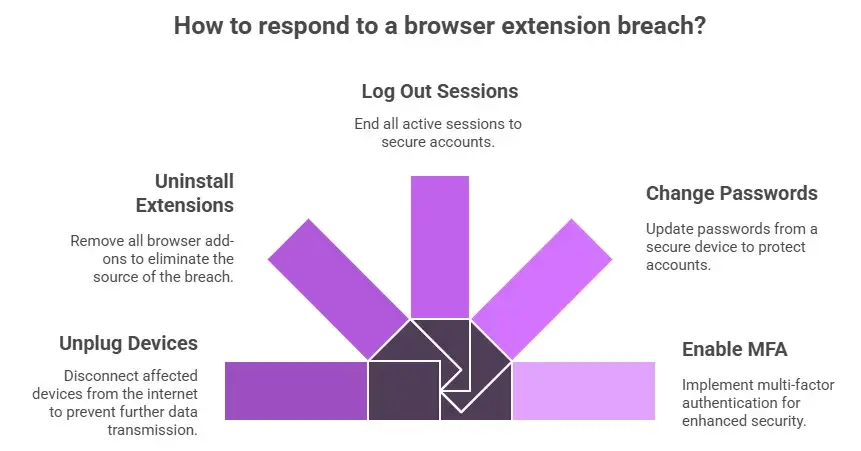
People often panic when they find out that a browser extension caused a breach. A structured response is important.
Steps to Contain Right Away
First, unplug the devices that are having problems from the internet.
Then:
• Uninstall all browser add-ons.
• Log out of all active sessions.
• Change your passwords from a clean device.
• Turn on multi-factor authentication.
Don't reinstall extensions until the systems have been checked.
More thorough cleaning and checking
Credential theft usually goes beyond just browsers.
Professional incident response teams usually do the following:
• Look at browser logs.
• Look at the history of extension updates.
• Look for persistence mechanisms.
• Audit endpoint activity.
• Find out what data can be accessed.
This is when Chrome extension incident response becomes very important.
If you skip this step, you could get sick again.
Why free VPN extensions are very dangerous
There are some good free tools. But it costs money to run VPNs.
Servers, bandwidth, upkeep, and following the rules. Someone has to pay.
When a VPN extension is completely free and doesn't have a clear way to make money, data is often the product.
Not all free VPNs are bad, though. It means that careful examination is needed.
A fake VPN The Chrome extension does well in this gray area because it combines useful features with hidden data collection.
A Breach at a Small Business
A regional accounting firm let its workers put browser tools on their computers.
While on the road, one worker set up a free VPN extension. It looked like it worked.
Within three weeks, hackers were able to get into email accounts. Emails to reset passwords were deleted on their own. Changes were made to the invoices. Clients sent money to fake accounts.
A fake VPN Chrome extension that stole session cookies was the main reason.
Full credential rotation, forensic review, and client notification were all needed for cleanup.
After the breach, the extension was taken down from the Chrome Web Store.
Should businesses stop using VPN extensions in their browsers?
A lot of companies do now.
Some other options are:
• VPNs at the device level
• Zero-trust browser solutions
• Managed allowlists for extensions
This lowers risk without getting in the way of work.
Questions and Answers
Can a Chrome VPN add-on take your passwords?
Yes. If the permissions are set right, a bad extension can steal session cookies, credentials, and form data.
How can I tell if my VPN extension is fake?
Look at the permissions, the developer's reputation, the update history, and independent security reviews. If you have problems with your account right after you install it, that's a red flag.
What happens if a VPN extension stops traffic?
Attackers can read or change data, take over sessions, and get into accounts without setting off alerts.
Can companies get back on their feet after their credentials are stolen?
Yes, but to get back on track, you need a structured incident response, rotating credentials, and security audits.
What to Do Next
It's scary to think that privacy tools could betray their users. But in 2025, fake VPN Chrome extension threats are a real thing that has been documented, not just a guess.
It's not about staying away from technology. It's about knowing where trust ends.
Browsers are very powerful places. Extensions are pieces of code. Permissions are important.
If you think your browser has been hacked, act quickly. If business systems are involved, remove extensions, secure accounts, and get professional help.
Being aware is the best way to avoid problems. Recovery is the answer. Both are more important than ever.
You can also read these important cybersecurity news articles on our website.
· Apple Update,




-20260925120840.webp&w=3840&q=75)
