

Are hackers using Google Cloud to get into Microsoft 365 accounts?
As of January 2026, this is what we know, and this is why security teams should pay attention.
Yes, threat researchers have seen campaigns where attackers use Google Cloud services to carry out phishing and identity-based attacks on Microsoft 365 users.
A Brief Overview of Google Cloud Abuse to Steal Microsoft 365 Credentials
Security researchers have found several phishing campaigns in which criminals use real Google Cloud services to host fake Microsoft 365 login pages. People often call this method "Google Cloud abuse to steal Microsoft 365 credentials." It takes advantage of how people trust well-known cloud domains and how hard it is for traditional security tools to check trusted infrastructure.
The attackers don't care about malware or suspicious file downloads; they care about identity. The goal is simple. Steal credentials or session tokens, get around multi-factor authentication, and take over Microsoft 365 accounts without anyone knowing.
This article talks about how these attacks work, why they work, what security teams are missing, and how businesses can realistically lower their risk.
Why this story is important right now
Phishing has been around for a while. Where it lives has changed.
Security teams have seen attackers move away from shady domains and toward trusted platforms over the past two years. Google Cloud, Microsoft Azure, and other big providers are now a common part of phishing infrastructure. Attackers have a big advantage because people trust these brands.
This change is why Microsoft 365 credential theft attacks keep working, even in companies that say they have strong security controls.
How does Google Cloud abuse to get Microsoft 365 login information?
At its most basic, Google Cloud abuse to steal Microsoft 365 credentials means that hackers use real Google Cloud services to host phishing pages, redirect links, or tools that collect login information that looks like Microsoft 365 login flows.
The attacker does not hurt Google itself. They instead sign up for cloud services like web apps, storage buckets, or serverless functions and use them to build phishing infrastructure. A lot of email security filters see the link as low risk because Google owns the domain. People also feel better about clicking it.
This is part of a larger trend called "cloud infrastructure abuse phishing," in which trusted platforms are used in ways they shouldn't be, instead of being hacked.
What usually happens during the attack?
Step 1: The email that tries to trick you looks normal.
The email often says it's about sharing a document, a security alert, or resetting a password. These themes are in line with what other vendors have said about past Google Cloud phishing campaigns.
The sender's address could be fake or hacked, but the link goes to a page hosted by Google Cloud. That little thing is important.
Users look at the URL, see a cloud domain they trust, and move on.
Step 2: A convincing Microsoft 365 login page
When you click the link, you go to a page that looks like Microsoft's real login page. The layout, fonts, and logos are almost the same.
Some pages are static credential harvesters. Some people send traffic to the real Microsoft login flow, where they can see and capture credentials and session tokens in real time. This is where Microsoft 365 token theft comes into play.
If OAuth permissions are asked for, users might give access without even having to enter a password.
Step 3: MFA is either bypassed or canceled.
Multi-factor authentication is still useful, but it is no longer a sure thing.
Attackers may be able to get around protection by using MFA fatigue attacks, repeated push notifications, or token replay methods. Microsoft and other companies have written about these methods, but it's often hard to tell which campaign they belong to.
After stealing tokens, attackers can use Microsoft 365 services without having to go through a new MFA challenge.
Step 4: Take over the account and abuse it quietly.
The attacker can now get into OneDrive, SharePoint, Teams, or email.
They could read private messages, make rules for their inbox, start business email compromise scams, or use the account as a base for more attacks from here.
This is the main risk of taking over a Microsoft 365 account that businesses don't realize.
Why Google Cloud makes it harder to stop these attacks
It's hard to block trusted cloud domains.
Most companies can't just block Google Cloud domains completely. A lot of people use these services for real business reasons.
This creates situations where email security fails because traditional filters let through bad links,s just because the hosting platform is trusted.
This is a problem that security teams are aware of. It is harder to fix.
Attribution gets hard to understand
When phishing happens on cloud platforms, it is harder to find the attacker. The infrastructure changes quickly. There may not be many logs. Jurisdiction problems make investigations take longer.
This makes it hard for SOC teams to figure out who is behind an incident, which is frustrating.
It doesn't look like a breach when OAuth is abused.
OAuth abuse is very dangerous because it doesn't always set off alarms.
Users give permissions willingly. No one stole a password. The logs show that people are signing in normally.
According to Microsoft Security Trends reports, this type of identity-based attack is on the rise.
Overview of the attack chain
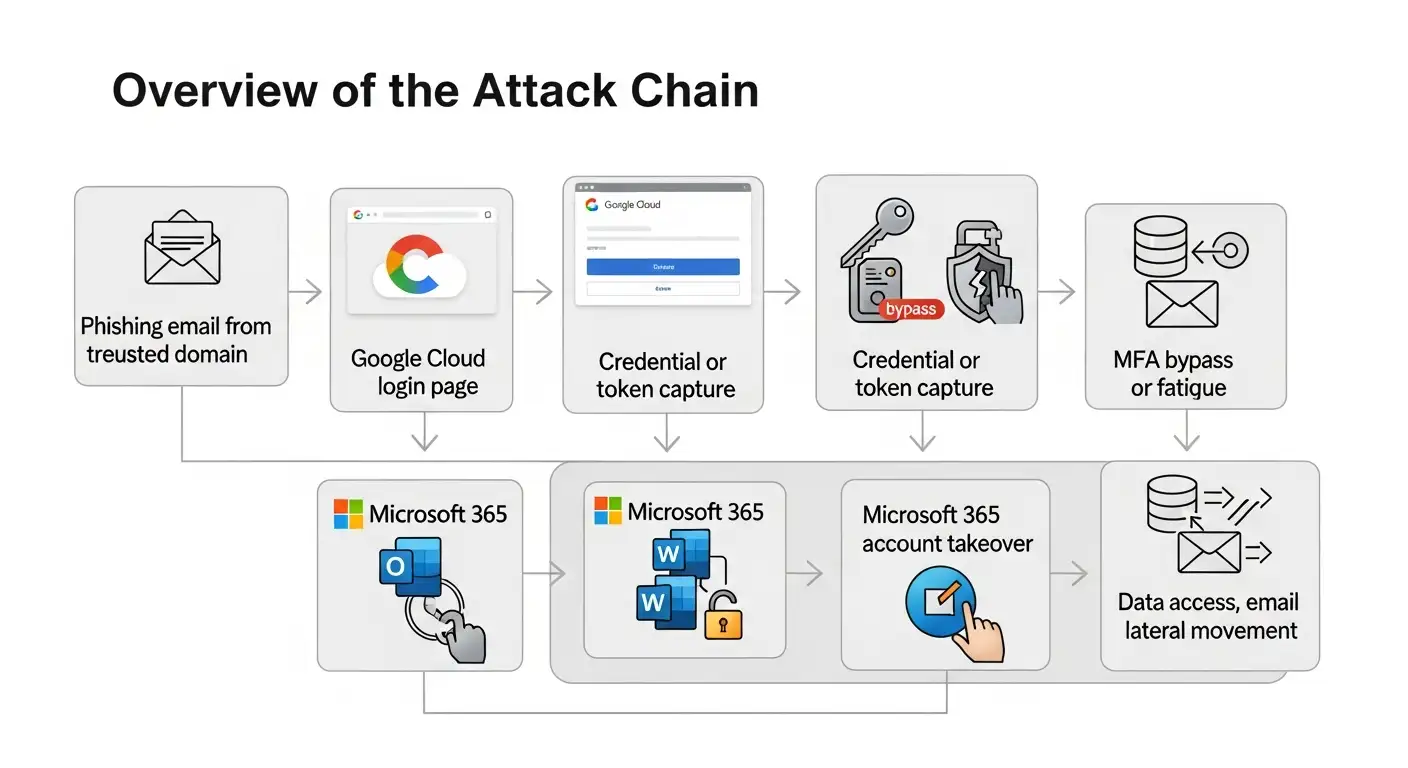
How often does this kind of attack happen?
It's hard to check the exact numbers in public.
In its annual Digital Defense Reports, Microsoft has confirmed that phishing and identity attacks hosted in the cloud are on the rise. Google has said that hackers use cloud services in a bad way all over the industry and regularly deletes bad projects.
Holes in the top results on Google
After reading coverage from well-known cybersecurity blogs, I noticed that a few gaps keep coming up:
1. Most articles talk about the attack, but not why detection doesn't work in real SOC environments.
2. Not many people talk about OAuth abuse in ways that non-experts can understand.
3. The advice on how to respond to an incident is often unclear or missing.
4. It's not often clear what steps to take after a breach.
This article talks about those gaps directly.
How to find out if your Microsoft 365 credentials have been stolen
To find something, you need to look beyond malware alerts.
Things that security teams should look for
Sign-ins from new places that are strange
Consent gives OAuth apps you don't know about
Rules for your inbox that delete or forward messages
Access to OneDrive files outside of normal hours
These signs are in line with what Microsoft has said in writing.
SOC teams should put SOC monitoring for cloud abuse attacks at the top of their list of things to do. This includes checking identity logs and OAuth audit trails.
Steps for responding to an incident in Microsoft 365
When you think something is wrong, time is of the essence.
1. Cancel active sessions and tokens.
2. Change the user's credentials.
3. Take away permissions from OAuth apps that seem fishy.
4. Look over the rules for your inbox and what happens in your mailbox.
5. Check sign-in logs for lateral movement.
These steps are in line with Microsoft's public advice on how to respond to incidents.
Safely get back into your hacked Microsoft 365 account
It's not just about resetting passwords to get back on track.
Companies need to rebuild trust in the identity. That means making people reauthenticate, checking who has admin roles, and making sure that MFA methods work.
If you don't revoke stolen tokens, they can still work even after you change your credentials.
How to keep Microsoft 365 safe from phishing that happens in the cloud
There is no one solution, buta layered defense can help.
Policies for conditional access
Tighter rules for OAuth apps
User education that focused on cloud URLs
Tools for detecting phishing that are more advanced
Most importantly, teams need to understand that the infrastructure for phishing in the cloud will keep changing.
Example from the real world
I saw a finance worker click on a Google Cloud-hosted link that looked safe in one investigation. There were prompts for MFA, and the user agreed to one out of frustration.
There was no malware installed. No alerts went off.
Two days later, requests for wire transfers started coming in from the hacked mailbox.
Better OAuth monitoring and user training could have stopped that from happening.

Questions that are asked a lot
Is it possible to use Google Cloud for phishing attacks?
Yes. Attackers can sign up for and use Google Cloud services legally and then use them to host phishing pages. Google works hard to get rid of abuse, but it doesn't happen right away.
Is someone hacking Microsoft 365 right now?
There is no proof that Microsoft 365 itself was hacked in these cases. The attacks are aimed at users, not Microsoft's infrastructure.
Why do phishing emails come from safe domains?
Trust is what attackers depend on. Emails and links from big cloud providers are less likely to be stopped or questioned.
How do hackers use cloud services to steal Microsoft 365 login information?
They host fake login pages or proxy real ones, which lets them collect credentials or session tokens while making them look real.
Final thoughts
Not breaking in is the most dangerous attack these days. They sign in.
Using Google Cloud to steal Microsoft 365 credentials is not about taking advantage of software bugs. It takes advantage of trust, tiredness, and gaps in visibility in identity security.
If companies only focus on malware, they will miss these threats. People who spend money on identity monitoring, OAuth governance, and realistic user education will be better prepared.
You can also read these important cybersecurity news articles on our website.
· Apple Update,




-20260925120840.webp&w=3840&q=75)
