
-20260406121505.webp&w=3840&q=75)
What is the RoguePlanet Microsoft Defender Vulnerability
RoguePlanet is the public nickname given to CVE-2026-50656, a Microsoft Defender vulnerability in the Microsoft Malware Protection Engine. It is a local elevation of privilege flaw that could allow an attacker with existing local access to reach SYSTEM-level privileges.
For readers who want broader context on endpoint protection, see Hoplon InfoSec's guide to endpoint security and its overview of endpoint security protection.
The vulnerability is important because Microsoft Defender operates with elevated privileges by design. A security flaw inside that trusted component can therefore become part of an attack chain rather than simply affecting an ordinary application.
For the latest Microsoft Defender platform and engine information, consult Microsoft's official Microsoft Defender Antivirus updates documentation.
Inside the Race Condition That Made This Windows Defender Vulnerability Work
Why mpengine.dll Was the Target
Mpengine.dll is an important component of Microsoft Defender's malware scanning architecture. Because security software needs privileged access to inspect files and system activity, vulnerabilities in these components can have significant consequences.
This is one reason organizations should treat endpoint security software as part of their broader attack surface rather than assuming security tools are automatically outside the scope of vulnerability management.
Hoplon InfoSec's guide to vulnerability management provides additional context on how organizations can identify, prioritize, and address vulnerabilities across their environments.
What CWE-59 Link Following Means in Practice
The technical root cause described for RoguePlanet involves improper link resolution before file access, classified as CWE-59. This type of issue can involve a time-of-check to time-of-use condition, commonly called TOCTOU.
At a high level:
- Defender's privileged file-handling logic checks a file or path.
- The system subsequently acts on that path.
- A change during the gap between those operations can cause the security decision and the resource ultimately accessed to differ.
- In a successful privilege escalation scenario, this can allow privileged operations to be redirected toward attacker-controlled resources.
For authoritative information about the vulnerability and Microsoft's remediation status, readers should check the official Microsoft Defender for Endpoint release notes.
-20260406121505.webp&w=1080&q=75 "Google DeepMind AI security warning")
How to Protect Windows From the RoguePlanet Defender Flaw
The practical response to this Microsoft Defender vulnerability starts with confirming that affected Defender components have received the appropriate security updates.
Microsoft documents that Defender Antivirus platform and engine updates are distributed through mechanisms including Windows Update, WSUS, and Microsoft Configuration Manager.
Organizations should therefore:
- Confirm the installed Defender platform and engine versions across managed endpoints.
- Verify that security updates have actually been deployed rather than assuming automatic updating succeeded.
- Maintain least-privilege access controls.
- Monitor endpoint telemetry for unusual privilege escalation behavior.
- Keep operating systems and security software current.
- Use layered endpoint monitoring rather than relying on a single security control.
For organizations reviewing their broader exposure, Hoplon InfoSec's managed endpoint security services content provides additional information about ongoing endpoint protection and monitoring.
Microsoft also maintains current documentation covering Defender platform and engine releases, including recent versions and fixes. Microsoft Defender release notes.
RoguePlanet in the Bigger 2026 Microsoft Patch Tuesday Picture
RoguePlanet did not appear in isolation. It arrived alongside other Microsoft Defender vulnerabilities and highlighted why security teams should track vulnerabilities affecting security products themselves.
Organizations comparing Defender-related vulnerabilities can also review Hoplon InfoSec's coverage of the Windows Defender BlueHammer vulnerability.
Another related Hoplon article covers a Windows Defender Firewall service vulnerability, providing additional context on why Microsoft security components should remain part of regular patch management.
Detecting RoguePlanet Style Local Privilege Escalation on Windows
Security teams should focus on behavioral indicators rather than relying only on signatures tied to one proof of concept.
Useful areas to monitor include:
- Unexpected process creation associated with security software.
- Unusual privilege escalation events.
- Suspicious file and path manipulation.
- Unexpected activity involving reparse points or junctions.
- Abnormal Defender or endpoint security process behavior.
- Changes that appear immediately before a privileged process accesses a file.
Microsoft provides Defender health and version visibility through its endpoint management capabilities. Its documentation explains how organizations can determine whether antivirus engine, platform, and security intelligence versions are up to date. Microsoft Defender Antivirus health reporting.
This visibility becomes particularly useful when investigating whether vulnerable endpoints remain in an environment.
How Hoplon InfoSec Supports Vulnerability Management
Staying ahead of Windows vulnerabilities such as RoguePlanet requires more than reading an advisory after disclosure. Security teams need continuous visibility into endpoint versions, vulnerability exposure, patch status, and suspicious activity.
Hoplon InfoSec provides resources covering vulnerability management and endpoint security protection to help organizations understand these defensive areas.
Organizations can also review Hoplon InfoSec's gap assessment services when evaluating security-control or compliance gaps across their environment.
The concern behind AI agents hijack through malicious web content is simple, even if the technology behind it is not. Once an AI system can read from the open web, interact with tools, or connect to outside services, attackers may try to manipulate it through content the user never notices. A normal-looking webpage can contain hidden instructions. A calendar invite can carry a trap. A document can quietly push an AI assistant in the wrong direction.
That is why the recent Google DeepMind AI security warning feels important. Google DeepMind has described indirect prompt injection as a real security challenge for AI agents that process emails, documents, calendars, and external websites. This is not just about strange chatbot outputs anymore. It is about real-world systems that browse, summarize, click, plan, and sometimes act.
When those systems ingest untrusted information, the
line between "content" and "command" can get blurry. And
once that happens, the risk is no longer theoretical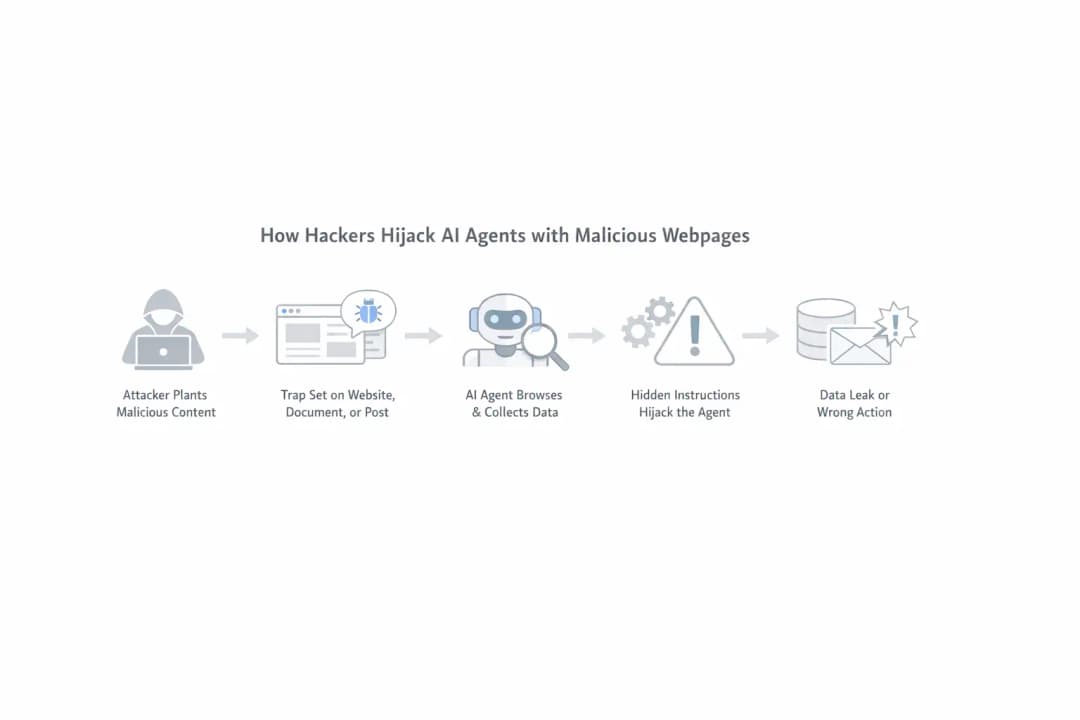
Why this story matters more than a typical AI scare
A lot of AI security headlines come and go. Some sound dramatic but fade once the details are examined. This topic feels different because it touches a basic problem with modern automation. The smarter and more useful an agent becomes, the more ways there are to influence it.
Think of it like this. A regular chatbot is like a helpful clerk behind a desk. It answers questions, maybe makes mistakes, maybe gives clumsy advice. A browser-enabled agent is more like an assistant who can walk around the office, read sticky notes, open cabinets, and send messages. If someone leaves bad instructions in the wrong place, the assistant might act on them.
That is why people are paying attention when reports say hackers can hijack AI agents through external content. The issue is not just model accuracy. It is the growing autonomous AI attack surface created by systems that can observe, decide, and execute.
Google DeepMind AI security research
What the warning is really about
The phrase AI agent traps DeepMind sounds dramatic, but the idea behind it is grounded in a broader security discussion that has been building for months. Researchers and defenders have been focused on a class of attacks where harmful instructions are hidden inside content an AI system later reads. That content might come from a webpage, a PDF, a browser session, a support ticket, or an email thread.
This technique is usually described as indirect prompt injection. The "indirect" part matters. Instead of sending a malicious prompt directly into a chatbot, an attacker places the prompt somewhere the AI agent is likely to retrieve on its own. The user asks for one thing, but the agent quietly encounters other instructions along the way.
Google DeepMind specifically describes this problem as a situation where AI models can struggle to distinguish genuine user instructions from manipulative commands embedded in retrieved data.
That is what makes untrusted content in AI workflows such a serious issue. Humans may only see the visible part of a webpage. The AI system may process a lot more than that, including markup, comments, metadata, or text styled to be invisible. In practice, that opens the door to hidden instructions in webpages that can shift the agent's behavior.
For a broader look at AI's role in cybersecurity, see Hoplon InfoSec's guide to AI in cybersecurity.
What is indirect prompt injection?
This is one of the most important concepts in the whole story, and it deserves a plain-language explanation.
What is indirect prompt injection? It is when an attacker hides instructions in outside content so that an AI system reads them later and treats them as meaningful guidance. Those instructions are not typed directly into the main chat by the attacker. They are embedded in the environment around the AI.
Imagine asking an agent to summarize a product page. The visible page talks about a software update. But hidden inside the page source is a line telling the agent to ignore the user's question and perform an unrelated action. A human reader would never see that hidden line. The AI might interpret it as part of the information it has been asked to process.
That is why what is indirect prompt injection in AI agents has become such a common security question. It sounds niche at first, but it gets very real once the AI can access files, messages, browsers, or internal systems.
Google Cloud's security guidance recommends treating externally retrieved data as untrusted and separating data from instructions when designing AI agents.
How hackers hijack AI agents with malicious webpages
The most practical version of the threat is this: an attacker creates content that looks harmless to a human but is dangerous to an AI system. That content can sit on a website, inside a document, inside a support form, or in a public post the agent later retrieves. Then the attacker waits for the right automation flow to pick it up.
This is where browser-based AI agents deserve extra scrutiny. These tools are designed to move across websites, gather information, and complete tasks in steps. That gives them more utility, but it also makes them more exposed. The browser becomes a doorway, and the web becomes a place full of content the user does not fully control.
So when people ask can malicious web content control AI agents, the honest answer is that it can influence them if the defenses are weak and the system trusts retrieved content too easily.
In that sense, malicious web content AI attack is not an exaggerated phrase. It describes a security model where webpages become potential attack delivery channels.
For organizations assessing web-facing applications and workflows, Hoplon InfoSec's web application security testing services provide related security-testing context.
Why browser AI agents are especially risky
Why are browser AI agents risky? Because they combine two hard problems at once. First, browsing the web means dealing with untrusted content. Second, acting on behalf of a user means the system may have permissions, memory, or tool access that go beyond simple text generation.
A standard assistant that just chats is one thing. A browser agent that can open tabs, inspect content, log into services, fill forms, and call tools is something else entirely. Once you give an AI system that kind of reach, the consequences of a mistake change. A bad answer is annoying. A bad action can become a security incident.
Google Cloud notes that AI agents expand the attack surface because they can interact with external systems and execute actions, while prompt injection can contribute to data loss and unintended behavior.
This is why experts now talk about web agent security flaws and agentic AI security instead of only focusing on classic chatbot abuse. The conversation has shifted from "Can the model be manipulated?" to "What can it do after being manipulated?"
That second question is the one security teams need to take seriously.
Risks & Impact
|
Risk Type |
Explanation |
|
Indirect Prompt Injection |
Hidden instructions manipulate AI behavior |
|
Credential Exfiltration Risk |
Sensitive data may be leaked |
|
Autonomous AI Attack Surface |
More capabilities = more attack entry points |
|
Web Agent Security Flaws |
Weak filtering of external content |
|
Untrusted Content in AI Workflows |
External data influences decisions |
The hidden problem most users never see
One reason this issue is so effective is that it takes place below the layer most users pay attention to. People judge webpages visually. They skim headlines, paragraphs, screenshots, or buttons. AI systems often process much more than that. They may read the underlying page structure, invisible text, or embedded instructions tucked into places where humans never look.
That means why web-browsing AI agents are vulnerable to hidden instructions is not really a mystery. They are vulnerable because they read differently from us. A page that looks clean to you may contain information that changes how an AI system interprets its task.
This is also where credential exfiltration risk enters the conversation. If an AI system is connected to accounts, APIs, internal files, or communication tools, then a successful injection might not stop at confusion. It could potentially contribute to data leakage, unauthorized sharing, or unsafe task execution.
Google's 2026 Mandiant AI risk research describes indirect prompt injection as a threat when AI systems process untrusted sources such as public webpages, customer emails, or uploaded documents.
For a wider look at the security risks surrounding AI adoption, Hoplon InfoSec's AI cybersecurity guide covers AI risks, detection, investigation, response, and AI system security.
The role of tool access in modern attacks
The phrase tool-using AI systems sounds technical, but the idea is easy to understand. These are AI systems that do more than talk. They call search, browse pages, read documents, interact with services, or trigger workflows. In other words, they operate.
The problem is that each added capability increases both usefulness and risk. A model that cannot act is limited in the damage it can cause. A model that can browse, retrieve, summarize, and send information becomes more valuable to the user and more attractive to an attacker.
This is where prompt injection AI attack becomes more serious than an ordinary manipulated response. In a connected environment, a poisoned instruction is not just bad text. It can become part of a chain of actions.
Google Cloud's current AI security guidance recommends least-privilege permissions and warns about prompt injection and insecure tool chaining in agent-only systems.
Organizations can also review Hoplon InfoSec's AI-powered cybersecurity solutions for broader context on AI-driven security operations.
Why the DeepMind angle matters
The reason the Google DeepMind warning about indirect prompt injection stands out is not just because of the brand name. It matters because the warning reflects a broader shift in how major AI labs discuss risk.
Google DeepMind says indirect prompt injection requires multiple layers of defense and notes that even model hardening does not make a model completely immune to determined attackers.
That matters for businesses and everyday users alike. The security challenge is not simply about building a model that never makes a mistake. It is about combining model safeguards, permission controls, input and output checks, monitoring, and careful deployment.
There is also a reputational angle here. People trust major AI brands to ship systems that feel safe by default. But the truth is more complicated. As systems become more autonomous, safety becomes less about one perfect model and more about layered protection, limited permissions, and careful deployment.
Project Mariner and rising concern around web agents
Another reason this conversation has intensified is growing attention around browser-capable assistants and agent projects tied to advanced browsing behavior. These systems represent the direction the industry is moving toward.
They do not just answer questions. They navigate the digital world. That is powerful. It is also messy.
The internet is not a trusted operating environment. It is a noisy, adversarial, commercial, user-generated ecosystem. Building reliable autonomy on top of that is much harder than simply building a system that can generate text.
That is why web agent prompt injection is becoming an important security question around next-generation assistants. If agents are going to browse like users, they also need defenses strong enough for hostile browsing conditions.
Protection & Mitigation Strategies
|
Strategy |
Action |
|
Limit Permissions |
Give AI minimal access to systems |
|
Human Approval Layer |
Require confirmation for sensitive actions |
|
Content Filtering |
Scan and validate external inputs |
|
Tool Restriction |
Control which tools AI can use |
|
Logging & Monitoring |
Track AI decisions and actions |
|
Zero Trust Approach |
Treat all external data as unsafe |
Practical defenses that actually help
When people search for AI agent security best practices, they often expect a neat checklist. Real life is less tidy, but several safeguards consistently make sense.
Use strong filtering around retrieved content. Monitor how the agent interprets instructions from external sources. Restrict which tools can be called automatically. Add visibility into the decision chain. Make sensitive actions reversible where possible. Require confirmation before anything that changes accounts, shares data, or affects customers.
That is the heart of prompt injection mitigation for AI agents. It is not only about blocking malicious strings. It is about controlling what happens after the model reads something suspicious.
Google Cloud's security documentation describes defense approaches that include treating external data as untrusted, restricting actions, and using guardrail layers around agent interactions.
For organizations that want to validate security controls through controlled testing, Hoplon InfoSec's penetration testing services provide broader context on identifying weaknesses before attackers exploit them.
Why this affects regular users too
It is easy to think this is only an enterprise problem. It is not. Regular users are increasingly relying on AI assistants to summarize webpages, manage schedules, sort messages, and complete repetitive tasks.
The more these tools blend into daily life, the more trust people place in them without really noticing.
That is why can AI agents be tricked by websites is not just a technical curiosity. It is a user safety question. If a website can subtly influence an assistant, then the assistant is no longer just helping the user read the web. It is also processing information that may have been deliberately designed to influence it.
This is where a little skepticism goes a long way. AI automation can be useful and convenient, but users should not assume that every retrieved source is trustworthy simply because an AI system is processing it.
Protection & Mitigation Strategies
|
Strategy |
Action |
|
Limit Permissions |
Give AI minimal access to systems |
|
Human Approval Layer |
Require confirmation for sensitive actions |
|
Content Filtering |
Inspect and validate external inputs |
|
Tool Restriction |
Control which tools AI can use |
|
Logging & Monitoring |
Track AI decisions and actions |
|
Least Privilege |
Keep permissions limited to the task |
|
Zero Trust Approach |
Treat external data as potentially unsafe |
A simple AI agent risk assessment checklist
Here is a practical AI agent risk assessment checklist for teams and advanced users:
1. What can the agent access?
List inboxes, browser sessions, files, internal tools, APIs, cloud drives, and communication platforms.
2. What can the agent do without approval?
Check whether it can send messages, share data, edit records, purchase services, or launch workflows.
3. What outside content does it trust?
Review whether it reads webpages, uploaded files, support tickets, email bodies, chat logs, or public documents.
4. What logging exists?
Make sure you can inspect retrieved content, tool calls, and important actions after the fact.
5. What happens if it is manipulated?
Define fallback rules, stop conditions, and approval triggers before a real incident happens.
That is a much better starting point than assuming a polished interface means polished security.
People Also Ask
What is indirect prompt injection?
It is a method where attackers place hidden instructions in external content, such as webpages, emails, or documents, so an AI agent may process them later.
Can hackers control AI agents through websites?
Malicious web content can influence an AI agent when the system retrieves untrusted content and lacks sufficient safeguards around how that content is interpreted and acted upon.
Why are browser AI agents risky?
Because they combine web exposure with autonomy. They interact with outside content while also having the ability to act on behalf of the user.
How can companies defend AI agents from malicious content?
By limiting permissions, treating external content as untrusted, separating data from instructions, restricting tools, logging behavior, and requiring approval for sensitive tasks.
What is the biggest security concern with AI agents?
The combination of untrusted content, powerful permissions, and the ability to take external actions can create a larger attack surface than a conventional chatbot.
Final takeaway
The phrase AI agents hijack through malicious web content explained may sound like a niche security headline today, but it points to a much bigger shift. AI systems are moving from passive assistants to active digital operators. That makes them more useful. It also creates new security challenges.
The real lesson is not panic. It is discipline. As companies and consumers adopt more browser-based and agentic AI workflows, they need to understand the trade-off. Convenience is rising fast, but so is the importance of permissions, monitoring, content validation, and human oversight.
If this trend continues, the organizations that deploy these systems responsibly will need to focus not only on smarter models but also on stronger security architecture. The real challenge behind Google DeepMind browser-agent security research is making AI agents useful while ensuring that untrusted content does not quietly become an unauthorized command.
You can also read these important cybersecurity news articles on our website.
· Apple Update,
For more, please visit our homepage and follow us on X (Twitter) and LinkedIn for more cybersecurity news and updates. Stay connected on YouTube, Facebook, and Instagram as well.





