
-20260405092800.webp&w=3840&q=75)
LinkedIn Chrome extensions data collection Tracking
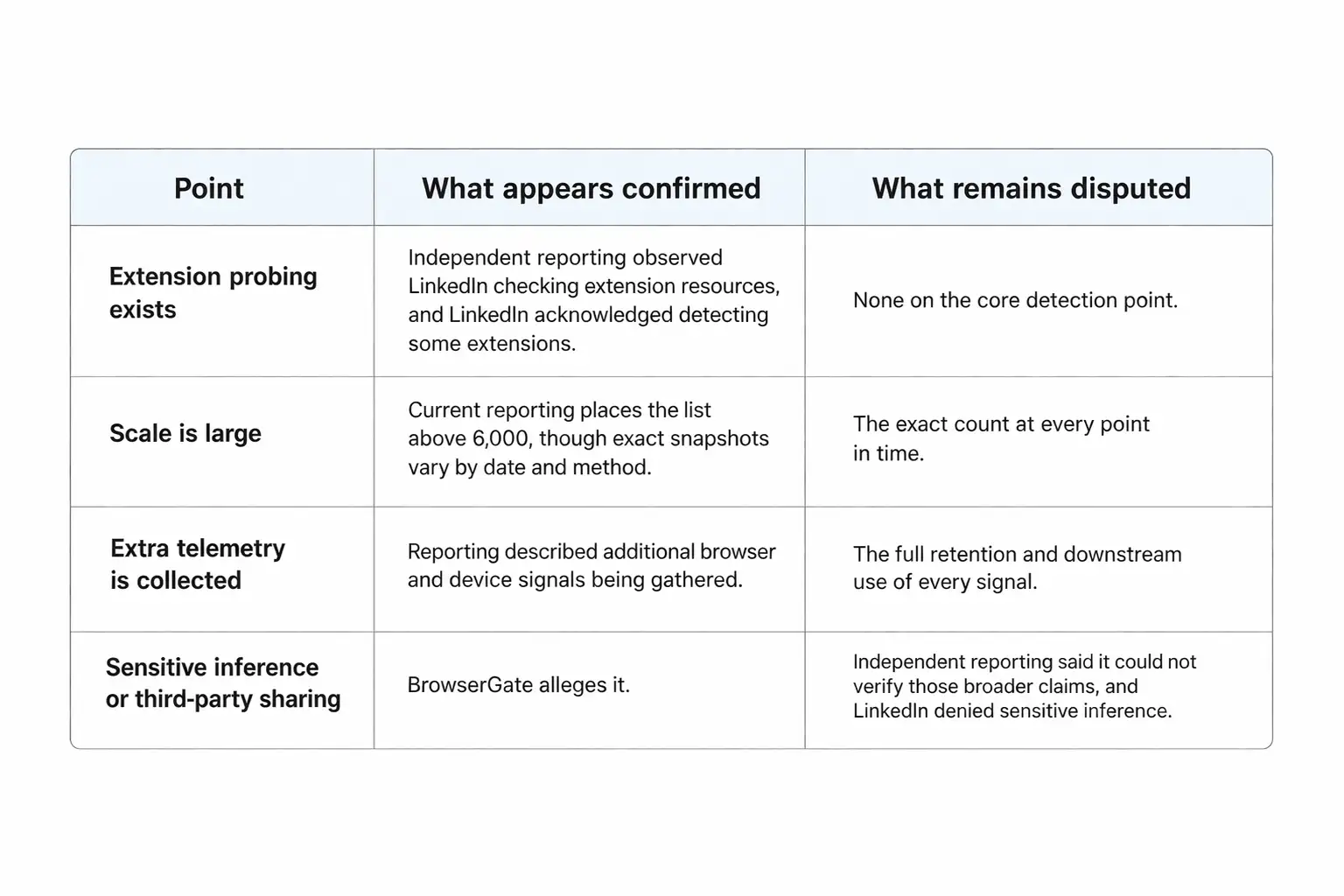
Yes, the core behavior appears real. Independent reporting said LinkedIn loaded a script that checked for thousands of Chrome extension resources, and LinkedIn itself did not deny detecting certain extensions.
What remains disputed is the broader
claim that the data is used for sensitive profiling or undisclosed sharing
beyond security and anti-scraping defenses.
This story matters because LinkedIn is not a niche service. Microsoft’s 2025
annual report says LinkedIn is now home to 1.2 billion members.
When a platform of that size runs browser-side checks at scale, even a narrow technical behavior can quickly become a major privacy debate.
What makes this issue unusually tense is that both sides are holding part of the truth. Critics are right that quiet extension probing can feel invasive.
LinkedIn is also right that it faces
constant scraping, automation abuse, and account farming. The real question is
not whether the detection exists.
The real question is where security telemetry ends and unnecessary surveillance
begins.
Reporting Facts
The public controversy took off after BrowserGate, a campaign site run by Fairlinked e.V., accused LinkedIn of scanning users’ browsers for installed extensions and transmitting the results without clear disclosure.
Fairlinked says legal proceedings have been filed under the EU Digital Markets Act, and it frames the issue as far more than ordinary bot defense.
Those are serious allegations, but
they come from an advocacy campaign, so they need to be separated from what
outside reporting independently confirmed.
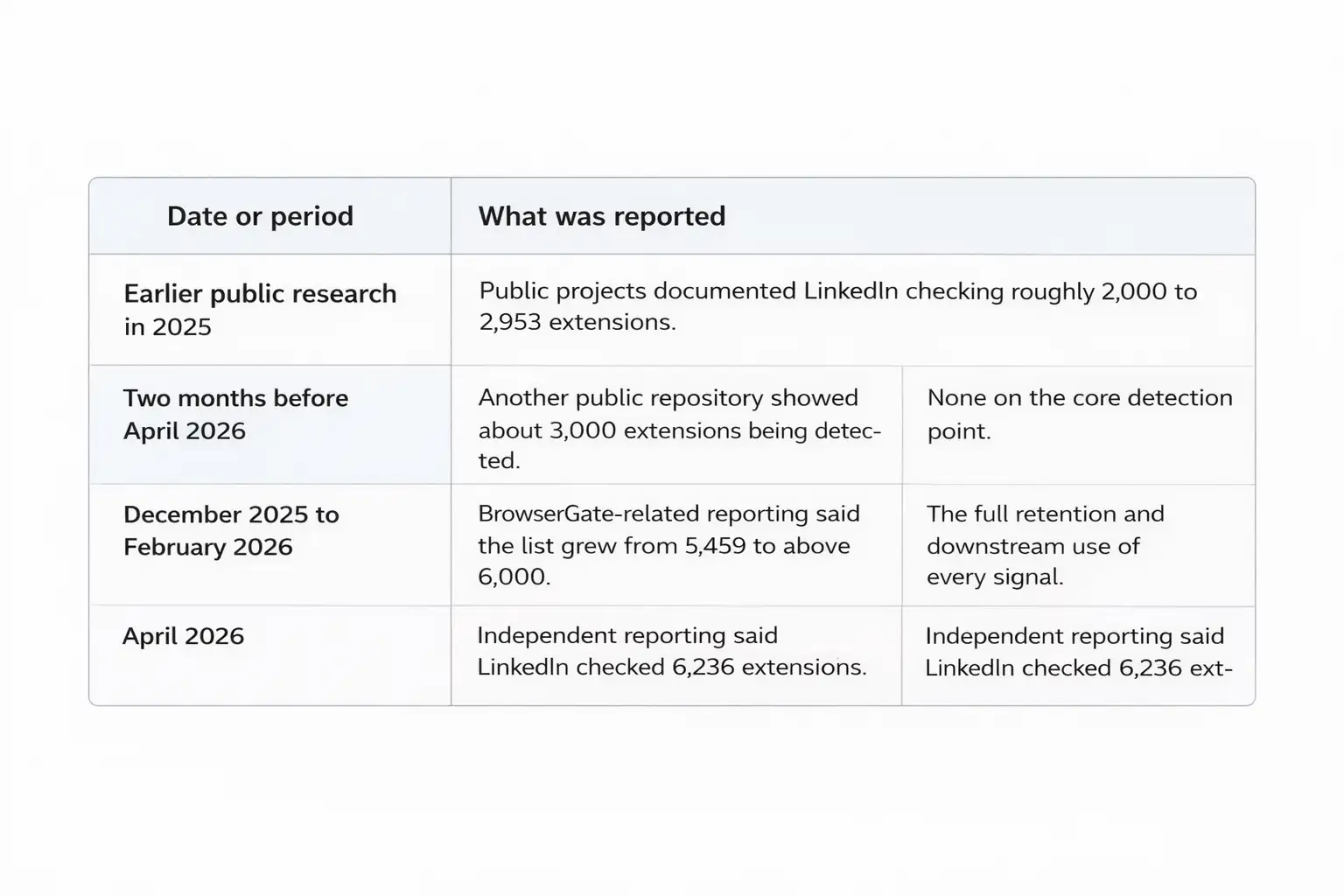
The harder, cleaner fact is this: independent reporting from BleepingComputer
said a LinkedIn script checked for 6,236 browser extensions by attempting to
access resources tied to specific extension IDs.
The same report also said the script collected extra browser and device details such as CPU core count, available memory, screen resolution, timezone, language settings, battery status, audio information, and storage features.
LinkedIn did not deny that extension detection exists. Instead, it said the data is used to identify extensions that scrape data or violate the platform’s terms, improve technical defenses, and understand unusual account behavior. It also said it does not use the data to infer sensitive information about members.
Verified vs Disputed
That distinction matters. Some of the loudest social posts flatten the whole story into a single dramatic accusation. That is sloppy.
Put plainly, some of the strongest claims around sensitive inference and third-party use remain unverified or disputed. In that narrower sense, this appears to be unverified or misleading information when presented as fully proven fact, because no official LinkedIn source currently confirms those specific downstream uses.
How It Works
At a technical level, this is less magical than it sounds. Websites do not have a normal browser API that simply lists every installed extension.
Castle’s research explains that extension detection usually depends on indirect clues, such as web-accessible extension resources, DOM changes, JavaScript globals, or other side effects created when an extension interacts with a page.
In LinkedIn’s case, Castle describes a direct probing method. The site keeps a list of extension IDs and known file paths, tries to fetch those resources, and if a request succeeds, it infers that the extension is installed. Castle also notes that extension IDs are stable and globally unique, which makes the technique narrow but effective.
Malwarebytes likewise explains that a Chrome or Edge extension ID is a unique 32-character string, and users can inspect installed IDs through chrome://extensions/ with Developer mode turned on.
There is an important tradeoff here. Castle says LinkedIn’s method is viable, but noisy and expensive. Failed chrome-extension:// requests can fill the console, create overhead, and make the behavior easier for researchers to notice.
That detail matters because it pushes back on two lazy narratives at once. This is not an invisible superpower, but it is not harmless either. It is a practical fingerprinting tactic with real limits and real privacy consequences.
Privacy Risk
The privacy concern is not just that a site can tell whether you installed a tool. The deeper concern is what that list of tools might imply. Academic research on extension fingerprinting has warned for years that extension sets can help identify users and reveal sensitive traits.
One ACSAC paper said 25 percent of
users in a pilot study could be uniquely identified through
multi-fingerprinting, while NDSS researchers said extension fingerprints can
reveal private and sensitive information based on the functionality and nature
of installed extensions.
That is why LinkedIn privacy issues and Chrome extensions data tracking feel
different on a real-name professional network than on a random website.
LinkedIn knows who you are, where you work, and what role you list on your profile. A plain extension list can become much more revealing when matched with employer, job title, account history, and usage patterns.
That is the real browser extensions
privacy risk at the center of this debate.
BrowserGate goes even further and claims the scan list includes extensions that
could signal religion, political views, disability-related tools, job-search
intent, and competitor software usage.
Those claims are politically explosive, and some examples on the BrowserGate site are striking. But again, that should be treated as an allegation from the campaign site unless independently verified.
What is independently supported is the broader academic point: extension fingerprints can expose more about a person than most users realize.
A simple way to understand the problem is to think about labels. An extension name alone can reveal context. A phrase like honorlock chrome extension can suggest testing, education, or a proctoring workflow.
A niche accessibility add-on can hint at a health or disability context. A sales plugin can point to the software stack inside a company. None of that is a password leak, but it is still sensitive.
Anti-Scraping Context
There is a reason LinkedIn can make
a plausible defense here. Castle describes LinkedIn as a high-value target for
scraping and automation, and its research notes that browser extensions are
often part of automation stacks used for scrapers, CAPTCHA solvers, and
workflow abuse.
LinkedIn’s own User Agreement also says members may not use software, scripts,
crawlers, browser plugins, or add-ons to scrape or copy the service.
That context matters because it explains why the platform might look for
extension signals in the first place. If a company is trying to identify
scraping tools, extension detection can look like one more fraud signal rather
than a standalone surveillance program.
LinkedIn’s official position leans heavily on that logic, saying it uses the data to determine which extensions violate its terms, improve technical defenses, and understand why an account may be fetching unusually large amounts of member data.
Still, a security rationale does not
automatically settle the privacy question. Plenty of intrusive practices begin
life as “defensive telemetry.” The right standard is proportionality and
clarity.
If the behavior is broad, persistent, and tied to identifiable users, the
company should explain it plainly. That is where the current LinkedIn data collection
controversy gets its force.
People are not only asking whether the platform can do this. They are asking whether it told them clearly enough, and whether the scope matches the claimed need.
Browser Risks
This story would still matter even if LinkedIn disappeared from it tomorrow, because the wider extension ecosystem is already messy. LayerX’s 2025 enterprise report, summarized by The Hacker News, said 99 percent of employees had browser extensions installed, 52 percent had more than 10 extensions, and 53 percent of enterprise users’ extensions could access sensitive data such as cookies, passwords, page content, or browsing information.
The same summary said 54 percent of publishers were essentially unknown and 51 percent of extensions had not been updated in over a year.
Microsoft’s security team added
another warning sign in March 2026, when it described malicious Chromium-based
AI assistant extensions harvesting chat histories and browsing data.
Microsoft said reporting tied the campaign to roughly 900,000 installs and
activity across more than 20,000 enterprise tenants.
That is not the same issue as LinkedIn’s detection script, but it proves something important: browser extensions now sit close to sensitive workflows, internal knowledge, and day-to-day business activity.
Barracuda makes the same point from
a supply-chain angle. Its analysis warns that trusted extensions can later
become dangerous through updates or ownership changes, which means download
counts and reputation can stop being good signals overnight.
Put all of this together and the takeaway is uncomfortable but clear.
Extensions are no longer cute little browser add-ons. They are part of the
security perimeter.
Timeline
Protect
Yourself
First, audit your browser like it is
software, not decoration. Chrome’s Safety Check can warn about potentially
harmful extensions, and Google says you can get to it through Settings, then
Privacy and security, then Safety Check. This is basic, but it is still one of
the most underused defenses on ordinary work machines.
Second, open chrome://extensions/, turn on Developer mode, and look at what is
actually installed. Malwarebytes notes that this view lets you see the unique
ID for each extension. That matters because names can be copied, rebranded, or
faked, while IDs are a cleaner way to confirm what you really have.
Third, remove anything you do not actively use. Barracuda recommends installing fewer extensions, reviewing them regularly, and separating work and personal browsing. Panda Security gives similar advice: trim unused add-ons, read permission requests carefully, and be suspicious of any tool that asks for broad access without a clear reason.
Fourth, stay away from scraping or automation add-ons on LinkedIn, even if they promise easy growth. LinkedIn’s User Agreement explicitly bans browser plugins and add-ons that scrape or copy the service. If an extension is built around mass prospecting, data extraction, or aggressive automation, you should assume account risk is part of the package. That is one of the most practical LinkedIn security risks in this whole conversation.
Fifth, review your LinkedIn controls anyway. LinkedIn’s policy says members have settings and ad choices, and it lets users manage visibility, some communication controls, and certain data uses. Those settings do not solve browser fingerprinting, but they still reduce unnecessary exposure elsewhere on the platform.
FAQs
Does LinkedIn really scan Chrome
extensions?
Based on current reporting, yes. Independent testing observed LinkedIn checking
extension resources, and LinkedIn told reporters it looks for extensions that
scrape data or otherwise violate its terms.
Is this proof of LinkedIn tracking
users data in a harmful way?
It is proof that LinkedIn detects some extensions and collects related
environment data. It is not full proof, at least from the sources reviewed
here, that LinkedIn uses those signals for sensitive profiling or third-party
sharing in the broad way some viral posts claim. That broader case remains
disputed.
Does private mode on LinkedIn stop
this?
There is no public evidence in the sources reviewed that privacy mode linkedin
or linkedin privacy mode settings stop browser-side extension probing. Those
controls are mainly about visibility, profile viewing, and related settings,
not the deeper mechanics of page-side detection.
Why are experts worried if LinkedIn
says this is for defense?
Because extension fingerprinting can do more than catch scrapers. Peer-reviewed
research says it can help uniquely identify users and infer private information
from the kinds of tools they have installed. That is why a narrow security
signal can still create broader LinkedIn privacy issues if it is used too
widely or disclosed too vaguely.
Final Take
The strongest version of this story is not that LinkedIn was “caught spying” in some cartoon villain sense. It is that LinkedIn Chrome extensions data collection shows how normal the logic of browser surveillance has become.
A company under constant attack pressure adopts more telemetry. That telemetry reveals more than expected. Users discover it only after a researcher or reporter pulls it into daylight. Then everyone argues about intent.
That is why the real lesson goes beyond one company. Extension detection lives in a gray area where security teams see context, users see opacity, and privacy researchers see fingerprinting risk.
If a platform wants the benefit of the doubt, it has to explain the behavior clearly, limit the scope, and make the boundary between defense and profiling visible. Otherwise, every future debate over LinkedIn Chrome extensions data collection will feel bigger, not smaller.
Research Quote
“significant real-world privacy risk posed by multi-fingerprinting.”
Recommendations
Audit extensions monthly. Keep work and personal browsers separate. Remove unused add-ons fast. Avoid LinkedIn scraping plugins. Run Chrome Safety Check after every major browser or extension update. Revisit LinkedIn ad and visibility settings once a quarter.
You can also read these important cybersecurity news articles on our website.
· Apple Update,
· TikTok Warning
· Apple OS update
For more, please visit our homepage and follow us on X (Twitter) and LinkedIn for more cybersecurity news and updates. Stay connected on YouTube, Facebook, and Instagram as well.




-20260925120840.webp&w=3840&q=75)
