
MacSync, a type of malware for macOS, has been seen pretending to be a real signed app. macOS Gatekeeper lets it run without the usual warnings because it has a valid Apple Developer signature. When the malware is running, it gathers information about the browser, credentials, and the system and sends it to servers controlled by the attacker. The campaign seems to be small based on what the media has said, but it brings up a bigger problem: people who think they can trust signed and notarized macOS apps.
As of this writing, there has not been an official Apple advisory released based on the data we have. Most of the information comes from security research and reporting done by other people. Some technical details are still not confirmed.
Why this story is more important than it seems
For a long time, macOS users have been told that code signing and Gatekeeper keep them safe. A lot of IT teams still think that software that is signed is safe. This event shows that making assumptions can be risky.
I have seen macOS users ignore basic safety rules just because an app opened without warning. Attackers count on that moment of relief. Stealer for MacSync Malware for macOS does not break through security walls. It goes right through the front door.
This change in how attackers act shows how macOS threats are getting stronger. Instead of taking advantage of complicated kernel bugs, hackers are taking advantage of trust, how people act, and Apple's own security processes.
What is the MacSync stealer malware for macOS?
The MacSync stealer macOS malware is an infostealer. Infostealers are meant to gather useful information without making a big deal out of it.
According to reports, MacSync's main goal is to steal saved passwords, cookies, autofill data, and maybe even system metadata from browsers. These data points are very useful for stealing someone's identity, taking over their account, and other attacks.
MacSync is different from older macOS stealer malware in that it doesn't use unsigned binaries or obvious malicious installers. It comes as a signed macOS app, which makes users much less likely to be suspicious.
How does signed macOS app malware bypass Gatekeeper?
Apple Gatekeeper security is meant to stop untrusted software from running. Gatekeeper checks to see if an app is signed by a known Apple Developer ID and has been notarized when a user opens it for the first time.
Most of the time, the app opens without any problems if both checks pass. This is the main trust model.
Gatekeeper doesn't look very closely at how things work while they are running. It checks where something came from, not what it means.
This is where the trust model fails. MacSync stealer macOS malware takes advantage of this. The app passes the first checks even if it does bad things after launch because it has a valid developer signature.
This is not a weakness in the usual sense. It is a misuse of Apple's trust system. The malware acts normally during the first checks, but then it starts stealing data later.
Other macOS stealer malware families have used this method before, but MacSync shows how well it still works.
What kind of data does MacSync go after?
MacSync seems to be going after the following based on reports and patterns seen in other macOS infostealer attacks:
• Usernames and passwords saved in the browser
• Cookies and session tokens • Autofill data like names and emails
• Basic information about the system, such as the version of macOS and the hostname
There is no proof yet that it goes after keychains or password vaults that are encrypted. At this time, it is not possible to be sure of claims that go beyond browser-level access.
Data from just a browser can be very harmful. Attackers can use session cookies to get into accounts without passwords, which is especially easy for cloud services.
Why do macOS users still fall for this?
The false idea that macOS doesn't get viruses
"I thought macOS was safer than Windows" is one of the most common things people say in Apple admin groups. Even though there has been evidence for years that Apple macOS malware threats are growing steadily, this belief still holds.
The design of macOS does not make it unsafe. But attackers are drawn to popular things. As more businesses use macOS, attackers follow the money.
This gap between what people think and what is real is a great place for MacSync stealer macOS malware to thrive.
People feel safe around Gatekeeper when they shouldn't
Warnings from Gatekeeper seem like they are coming from someone in charge. Users think they are safe when they don't show up.
I've seen experienced developers use unknown tools just because macOS didn't complain. This is something that attackers know very well.
Misuse of notarized macOS apps
Notarization is meant to add another level of review. Before letting apps run widely, Apple checks them for known malware.
Notarization, on the other hand, isn't perfect. It depends on scanning that is done automatically and signatures that are already known.
If malware acts in a sneaky or slow way, it might pass the first checks. Defenders are becoming more worried about the abuse of notarized macOS apps, even though Apple does take away certificates when abuse is proven.
There is no public information yet that says whether MacSync was notarized or just signed. Reports say there was a signature, but it's not clear if it was notarized.
There is more and more abuse of macOS code signing
Stealer for MacSync. There is a bigger trend that includes macOS malware. More and more, attackers are using real developer certificates for bad things.
Some people steal certificates. Some people get them by using fake names. Sometimes, developers unknowingly give out builds that have been hacked.
Apple has made it easier to revoke certificates, but users often find out too late.
How does this differ from other macOS stealer malware??
Earlier macOS-stealing malware often used unsigned binaries, pirated software, or installers that were clearly fake.
MacSync is a quieter change. It works with other apps. No scary messages. Some pop-ups look suspicious.
From the point of view of a defender, this makes it harder to find things. When the OS itself signals trust, traditional user awareness training doesn't work as well.
Effect on people and businesses
If someone steals your browser data, they could hack your email, take over your social media accounts, or steal your money. A lot of people use the same passwords over and over again or let their browser fill them in automatically.
A single compromised session cookie can put sensitive accounts at risk.
As more businesses give their employees Macs, the risks to macOS endpoint security are growing.
If an employee installs a malicious signed app, it could expose corporate credentials, VPN sessions, and cloud access tokens.
This makes a single endpoint infection into a bigger security problem.
Why is it hard to find?
Limits of Apple malware detection
Apple has XProtect and MRT built in to find malware. These tools work by using known signatures.
New types of malware can often go undetected for weeks until their signatures are updated.
Based on what we know, MacSync stealer macOS malware seems to have gotten past these defenses at first.
Behavior mixes with regular apps.
At the system level, stealing browser data doesn't always look suspicious. A lot of real apps use browser folders to sync or back up.
This gray area makes it harder for automated detection.
macOS holes in threat intelligence
Threat intelligence for macOS is not as good as for Windows. Fewer public samples. Less telemetry. A smaller group of researchers.
This is getting better, but attackers still like it when they can't see them.
Many businesses don't have dedicated macOS SOC monitoring; instead, they use basic antivirus tools.
How attackers probably spread MacSync
Based on similar campaigns, some ways to spread the word are:
• Fake productivity tools
• Downloading cracked software
• Trojanized installers shared on forums
• Links shared through phishing emails or chat apps
There is still no confirmed single way to deliver. Claims that go beyond these patterns are still guesses.
Step-by-step attack flow
Step 1: The user downloads what looks like a real macOS app.
Step 2: Gatekeeper lets the app run because it is signed.
Step 3: The app starts up normally and may show the expected features.
Step 4: The stealer collects browser data in the background.
Step 5: The stolen data is sent to a server far away.
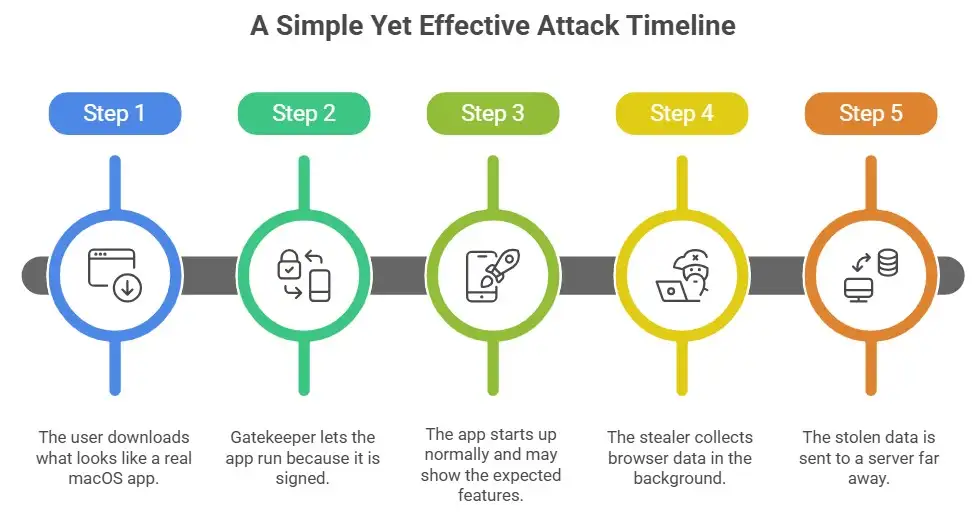
The attack works because it is so simple.
How to keep your Mac from getting MacSync malware
For users:
• Don't install apps from developers you don't know, even if they are signed.
• Use password managers instead of browser storage.
• Keep macOS up to date.
• Be careful with "free" tools that need deep system access.
For businesses
• Use macOS endpoint protection that looks at behavior, not just signatures.
• Limit users' ability to install apps that aren't signed or approved.
• Set up macOS SOC monitoring.
• Log and review unusual outbound connections.
One control isn't enough. Defense must have layers.
Things to think about when responding to an incident on macOS
If you think your Mac has the MacSync stealer macOS malware, you should:
• Disconnect the device from the network.
• Change all of your browser's saved passwords.
• Check the login logs for any strange activity.
• Reimage the system if necessary.
As far as we know, there is no public decryptor or cleanup tool available.
This event does not mean that Apple's security is weak. That means people don't understand it.
Apple's security architecture is all about lowering risk, not getting rid of it. Trust signals don't mean that something will happen.
MacSync stealer macOS malware is a reminder that everyone is responsible for keeping their devices safe: the platform, the developer, and the user.
Questions That Are Often Asked
Can apps signed by macOS have malware in them?
Yes. Signing proves who the developer is, not what the code is meant to do. One example of this kind of abuse is the MacSync stealer macOS malware.
Does Apple Gatekeeper completely stop malware?
No. Gatekeeper lowers the risk, but it doesn't make things safe. It can't find all the bad behavior.
How do macOS thieves get away with it?
They usually gather stored passwords, cookies, and system information and send it to attackers without any obvious signs.
How to tell if your macOS is being attacked by an infostealer
Look for alerts about strange network connections, unexpected browser behavior, and credential misuse. Behavioral endpoint tools are helpful.
Final thought
The most dangerous malware right now doesn't break into secure systems. It fits in with them.
MacSync malware for macOS shows how attackers use trust instead of technology. Apps that are signed feel safe. That feeling can be wrong.
One thing we can learn from this is that security signals don't mean safety. Skepticism, layered defenses, and constant monitoring are what really protect you.
You can also read these important cybersecurity news articles on our website.
· Apple Update,
· Windows Fix,




-20260925120840.webp&w=3840&q=75)
