
-20260408130254.webp&w=3840&q=75)
Ninja Forms Vulnerability: Is Your WordPress Site at Risk Right Now?
Yes. As of April 7, 2026, the Ninja Forms vulnerabilitytracked as CVE-2026-0740 is being actively
exploited, and vulnerable sites using the File Uploads add-on could face
malicious file uploads and possible server-side code execution.
Public reporting says attacks were already observed in the wild, while the vendor changelog shows version 3.3.27 as the release that fully blocks the issue.
If you run a WordPress site, this is one of those stories you do not scroll past and promise yourself to check later. A lot of site owners assume contact form plugins are low risk because they feel routine. They collect leads, files, applications, invoices, maybe a support screenshot or two. Quiet, boring, useful. That is exactly why these tools become attractive targets when something breaks.
This incident centers on the File Uploads add-on tied to Ninja Forms. The problem is not just that files can be uploaded.
The problem is that the upload handling could fail to properly validate what is being sent and where it lands.
That opens the door for attackers to send something harmful, place it where it should never go, and potentially run code on the server. That is the kind of bug security teams treat as urgent for good reason.
What happened
The current issue is being tracked as CVE-2026-0740, a critical bug in the Ninja Forms File Uploads add-on for WordPress. Public reporting describes it as an arbitrary file upload issue that can be exploited without authentication.
That last part matters a lot. When a flaw does not require an account, the barrier to abuse drops dramatically. A curious attacker, a botnet, or a copycat scanner can all take a shot.
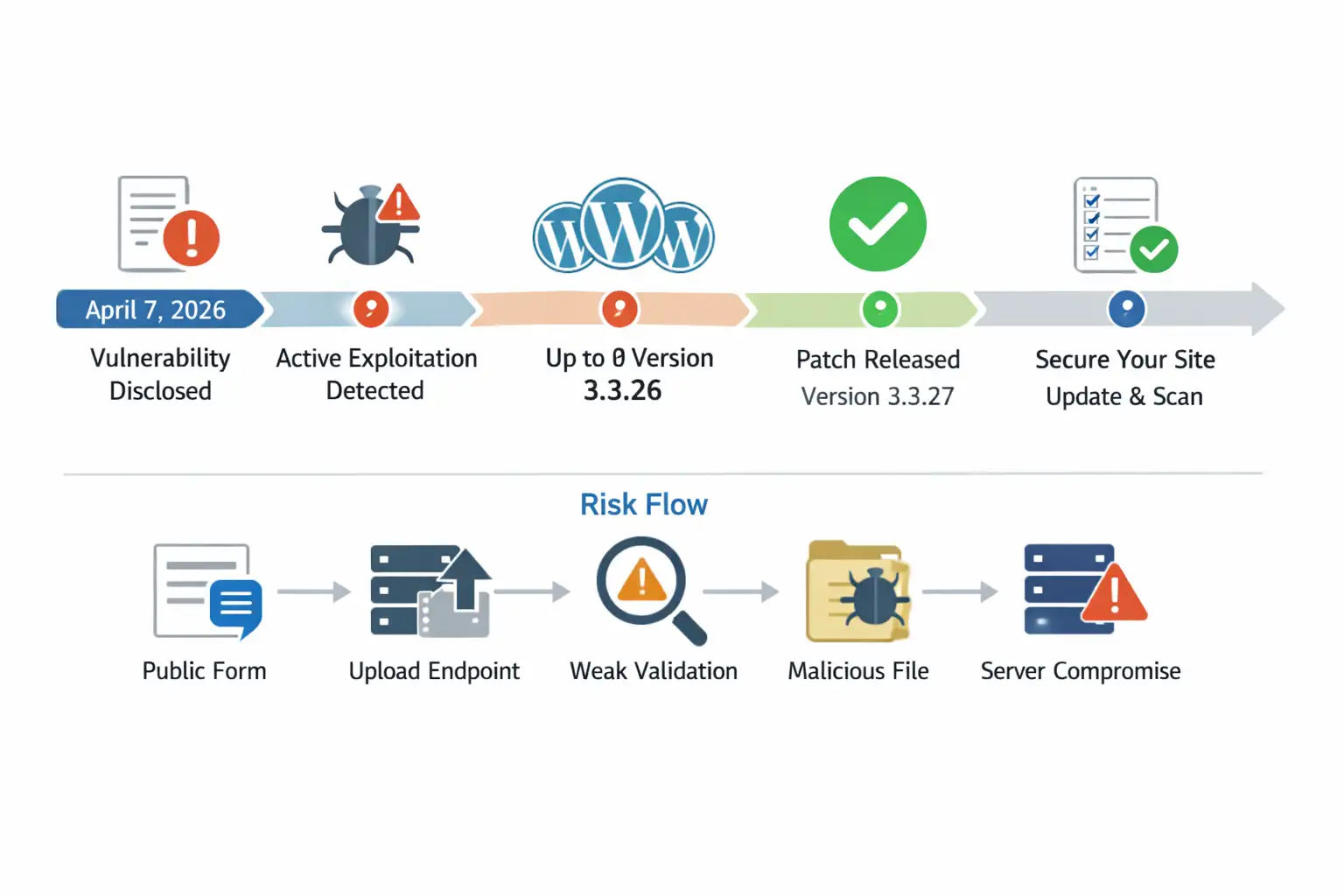
According to public details, the flaw affects File Uploads versions up to and including 3.3.26. The vendor changelog shows security-related changes in 3.3.25 and 3.3.26, but independent reporting around the CVE says the earlier remediation was incomplete and that version 3.3.27 is the full fix.
That sort of patch progression is not unheard of in real-world software. A first fix closes one path, researchers or attackers find a bypass, then the vendor has to tighten the implementation.
Why this flaw stands out
A normal bug is annoying. A critical upload bug is different. The reason is simple. Upload features touch the filesystem, and once that boundary gets shaky, damage escalates quickly.
The reported weakness involves missing validation around the destination filename in the upload flow. Security reporting says that weakness can allow malicious files, including PHP scripts, to be uploaded.
It also notes filename manipulation that may enable path traversal, meaning an attacker might influence where the file ends up. That is how a simple upload bug starts turning into a server compromise story.
If you have ever watched a tidy house develop one tiny roof leak, you know the pattern. First it is a stain. Then it is hidden moisture.
Then the drywall buckles. A Ninja Forms critical flaw works the same way in security. The visible issue is “file upload.” The real problem is what that upload lets an attacker do next.
-20260408130255.webp "Ninja Forms Vulnerability Puts WordPress Sites at Immediate Risk")
Which component is affected
This detail is worth slowing down for because many headlines compress it too much. The reports point to the File Uploads add-on, not necessarily every installation of the core builder alone.
In other words, site owners need to confirm whether they are using the upload extension as part of their forms workflow.
The vendor changelog for the File Uploads product lists version 3.3.27 on March 16, 2026 with a security enhancement that blocks a destination filename whitelist bypass in file upload.
It also shows 3.3.25 and 3.3.26 included earlier security adjustments. Public CVE summaries specifically say versions up to 3.3.26 were affected, with 3.3.27 fully patched.
So if you are asking about Ninja Forms vulnerability affected versions, the practical answer is this: the risk centers on the File Uploads add-on up to 3.3.26, and the safe move is to update immediately to 3.3.27 or later.
How hackers are exploiting it
At a high level, how hackers exploit Ninja Forms vulnerability comes down to abusing the upload logic before the site properly rejects or sanitizes the dangerous input.
Public reporting says the vulnerable function lacked sufficient file type validation on the destination filename. That matters because attackers do not always attack the obvious field.
Sometimes the dangerous trick is hidden in how the file is named, moved, or interpreted by the server.
The likely attack path is familiar to incident responders. An attacker finds a public-facing form that accepts uploads. They probe the endpoint.
If the site is vulnerable, they try to place a file that should never be accepted in the first place. If that file lands in a web-accessible location and the server executes it, the attacker can move from nuisance to control.
That is why this incident is being discussed in terms of Ninja Forms remote code execution, not just a broken upload form.
This is also why the phrase unauthenticated file upload WordPress should scare administrators more than it sounds. “Unauthenticated” means no login barrier. “File upload” means direct server interaction. Put those together and you have a very efficient attack surface.
What makes the risk larger than it looks
A lot of WordPress site owners hear “plugin flaw” and imagine defacement. A weird homepage. A pharma spam page. Embarrassing, yes. But manageable. In reality, arbitrary file upload flaws often carry a much heavier downstream risk.
An attacker who gains a foothold through a WordPress plugin security vulnerability may upload a web shell, create persistence, alter content, skim leads, redirect traffic, or quietly plant malware for later use. On a business site, that can mean lost leads, brand damage, SEO penalties, hosting suspension, and legal headaches if user files or personal data were exposed.
Public sources also show slightly different numbers for product reach. Wordfence’s vulnerability database entry lists 57,944 active installs for the File Uploads software record, while broader product pages describe a larger commercial customer footprint.
That does not change the urgency, but it is worth being precise instead of casually repeating inflated or mixed numbers.
Signs your site may already be compromised
If you are worried about Ninja Forms hacked scenarios, do not start by guessing. Start by looking for evidence. The most obvious signs are suspicious PHP files inside upload-related directories, unfamiliar admin users, changed core files, unexpected redirects, or new pages appearing in search results that you never published.
There are also quieter clues. A host may flag abnormal outbound traffic. Your server may feel slower for no clear reason. Security logs may show repeated requests to upload endpoints. Sometimes the first real clue is painfully ordinary: a client says your site suddenly looks “off” on mobile, and that turns out to be injected junk or malicious redirects.
The tricky part is that some compromised sites keep working normally. Forms still submit. Pages still load. Sales still come in. That false calm is what makes these incidents expensive. A breach that looks invisible often lasts longer.
How to fix the issue fast
If you want the blunt answer to how to fix Ninja Forms vulnerability, here it is: update the File Uploads add-on to version 3.3.27 or newer right away, then verify that the update actually applied, then audit the site for signs of abuse. Public sources indicate that 3.3.27 is the version that fully patches the flaw.
That is the patching side. The response side matters just as much. If your site was exposed for any period of time, assume patching alone may not be enough. Updating closes the door going forward. It does not automatically remove whatever may already have been dropped before the update.
A practical response looks like this:
- Update the vulnerable add-on immediately.
- Disable upload features temporarily if you cannot patch at once.
- Scan the uploads directory and surrounding web paths for suspicious executable files.
- Review web server logs and WordPress logs for unusual upload activity.
- Reset administrator passwords and rotate secrets if compromise is suspected.
- Check for unknown cron jobs, users, and modified theme or plugin files.
- Restore from a clean backup if you find confirmed malicious persistence.
That is the real Ninja Forms CVE-2026-0740 fix path. Patch first. Investigate second. Clean up third. Monitor after that.
Is the plugin safe now?
The honest answer to is Ninja Forms plugin safe now is more nuanced than yes or no. If your site is running the affected File Uploads component at 3.3.26 or earlier, then no, it is not safe in light of the current reports. If you have updated to 3.3.27 or newer and found no signs of compromise, your immediate exposure to this specific issue is much lower.
Still, “patched” is not the same as “finished.” Good security practice means checking what happened before patching, not simply trusting that the update solved every consequence. That is especially important when there are reports of active exploitation already happening in the wild.
So when people ask, how to secure Ninja Forms on WordPress, the answer is not just one update. It is a small chain of habits: patch fast, reduce exposure, monitor uploads, use a web application firewall, remove unused plugins, and keep backups that are recent and restorable.
Why this story matters beyond one plugin
This is not just a Ninja Forms plugin vulnerability story. It is a reminder that upload features are among the most sensitive parts of a web application. The convenience users love is the same convenience attackers test first. Resume forms, support forms, vendor onboarding portals, refund workflows, media uploads, all of them sit close to the danger zone.
The broader lesson is about plugin hygiene. WordPress sites often grow like garages. One useful tool becomes three, then nine, then twenty.
A plugin you needed two years ago still sits there, half-forgotten, quietly expanding your attack surface. A Ninja Forms file upload vulnerability becomes much worse on sites that already lack log visibility, endpoint monitoring, backup discipline, or update routines.
That is why some of the best protection is boring. Inventory your plugins. Remove what you do not use. Limit upload permissions. Validate file types carefully. Keep your stack lean enough that you actually know what is installed. Security teams say this every year because it keeps being true every year.
A quick comparison table
|
Item |
Details |
|
Primary issue |
WordPress Ninja Forms arbitrary file upload |
|
CVE |
CVE-2026-0740 |
|
Severity |
Critical, publicly described as 9.8 CVSS |
|
Affected component |
Ninja Forms File Uploads add-on |
|
Affected versions |
Up to and including 3.3.26 |
|
Full fix |
3.3.27 |
|
Exploitation status |
Public reporting says active exploitation |
|
Main risk |
Malicious file upload and possible code execution |
What site owners should do today
If you use this add-on in production, treat it like an incident, not a routine plugin update. That means assigning ownership, documenting what you checked, and confirming the fix on every affected site. Agencies and freelancers should be especially careful here because one vulnerable workflow might exist across many client properties.
For teams managing multiple WordPress environments, the smartest sequence is simple. Identify every site using Ninja Forms File Uploads.
Confirm version numbers. Patch the affected ones. Review the upload paths and server logs. Add short-term monitoring around form endpoints for the next several days. Even a lightweight checklist beats improvising after the fact.
And if you are still wondering about the best Ninja Forms remote code execution fix, it is not a magic plugin or a dramatic cleanup script. It is disciplined patching paired with evidence-based review.
What smart site owners should do next
- Update the File Uploads add-on to 3.3.27 or later immediately
- Search for unexpected executable files in upload-accessible paths
- Review logs for suspicious form submissions or repeated POST requests
- Reset privileged credentials if there is any sign of compromise
- Put a WAF rule or managed WordPress firewall in front of public forms
- Remove unused plugins and any stale upload-related extensions
The big takeaway is not just “patch this bug.” It is “treat file upload features like high-risk infrastructure.”
FAQ
What is the Ninja Forms vulnerability?
The Ninja Forms vulnerability in this incident refers to CVE-2026-0740, a critical arbitrary file upload flaw in the Ninja Forms File Uploads add-on for WordPress. Public descriptions say it can allow unauthenticated attackers to upload malicious files and potentially achieve code execution.
Which versions are affected?
Public sources say versions up to and including 3.3.26 are affected, and that 3.3.27 fully patches the issue.
Is this being actively exploited?
Yes. Public reporting on April 7, 2026 said the flaw was being exploited in attacks at the time of publication.
How do I patch it?
The practical answer to how to patch Ninja Forms critical flaw is to update the File Uploads add-on to 3.3.27 or newer, then inspect the site for compromise indicators because patching does not remove files that may already have been uploaded.
Incident Summary
On April 7, 2026, reports confirmed active exploitation of a critical flaw in the Ninja Forms File Uploads add-on for WordPress.
The bug, tracked as CVE-2026-0740, can let unauthenticated attackers upload malicious files and potentially execute code on vulnerable servers.
Public reporting and vendor-side changelog details indicate versions up to 3.3.26 were affected, while version 3.3.27 includes the full fix.
Final takeaway
The story here is not complicated, even if the bug itself is. A publicly exposed upload feature, a validation weakness, active exploitation, and a direct path to serious site compromise. That combination is exactly why this Ninja Forms WordPress plugin exploit deserves immediate attention.
If your site uses the File Uploads add-on, do not treat this as background noise. Check the version, apply the fix, review the filesystem, and verify that nothing suspicious slipped in before the patch. For many WordPress teams, that hour of work today is the difference between a routine security update and a long, expensive cleanup later.
Research firm quote: Defiant’s Wordfence analysis, cited in public coverage, described the issue as enabling arbitrary file upload and possible remote code execution when filename validation is missing.
If you want, I can turn this into a cleaner publish-ready CMS version next with FAQ schema, meta tags, and a WordPress blog formatting layout.
You can also read these important cybersecurity news articles on our website.
· Apple Update,
For more, please visit our homepage and follow us on X (Twitter) and LinkedIn for more cybersecurity news and updates. Stay connected on YouTube, Facebook, and Instagram as well.




-20260925120840.webp&w=3840&q=75)
