

Tsundere Botnet in 2026: How Node.js, npm and Ethereum C2 Work
A developer sees Node.js, npm, WebSockets and Ethereum libraries inside an application and usually has no reason to panic. They are legitimate technologies used by millions of projects.
That trust is exactly what makes Tsundere interesting.
The Tsundere botnet is a malware operation that combines JavaScript execution, Node.js, PowerShell, WebSockets and Ethereum smart contracts to maintain remote control over compromised systems.
Kaspersky's Global Research and Analysis Team, or GReAT, discovered the botnet around the middle of 2025. Its research also connected Tsundere to an earlier October 2024 campaign in which a related threat actor published 287 malicious Node.js packages using typosquatting techniques. That earlier supply-chain campaign affected Windows, Linux and macOS systems. The later Tsundere bot investigated by Kaspersky was primarily an active Windows threat distributed through MSI installers and PowerShell.
That distinction matters.
Tsundere should not be described simply as a cross-platform npm botnet. Its history includes both a cross-platform malicious-package campaign and a later Windows-focused botnet operation.
The story also did not end in 2025. During 2026, Proofpoint documented Tsundere Bot in campaigns associated with the initial-access actor TA584, while MITRE ATT&CK added the malware as S9034 and documented an associated variant called DinDoor that uses the Deno runtime instead of Node.js and has been linked to MuddyWater activity.
Key Findings
- Kaspersky connected Tsundere to a 2024 malicious npm operation involving 287 identified malware packages that impersonated packages related to Puppeteer, Bignum.js and cryptocurrency libraries.
- The original 2024 package campaign affected Windows, Linux and macOS, while Kaspersky described the later Tsundere botnet as an active Windows threat.
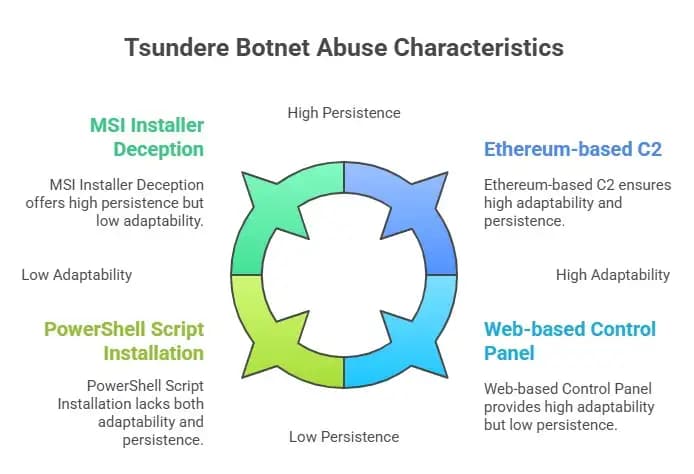
- Tsundere can be deployed through malicious MSI installers or PowerShell-based installers.
- Its Node.js environment uses legitimate packages including ws, ethers and pm2. Those packages themselves are not malware.
- The malware retrieves WebSocket command-and-control information through an Ethereum smart contract, allowing operators to change C2 infrastructure without rebuilding every infected client.
- Kaspersky documented an integrated marketplace and the “Tsundere Netto” control panel, version 2.4.4, which supported bot building, SOCKS proxy functionality and other services.
- Proofpoint later observed TA584 delivering Tsundere through ClickFix-style PowerShell attack chains.
- MITRE ATT&CK now tracks Tsundere as S9034 and maps it to techniques involving JavaScript, PowerShell, supply-chain compromise, masquerading, persistence and blockchain-based C2 discovery.
What is the Tsundere Botnet?
The Tsundere botnet is a JavaScript-based remote-access malware system that uses Node.js components and WebSocket communication while retrieving command-and-control information through the Ethereum blockchain.
Once a victim is infected, the malware can maintain contact with an operator-controlled server and execute JavaScript received from that infrastructure.
This makes Tsundere relatively flexible. Instead of shipping every capability inside one large malware binary, its operators can send additional JavaScript functionality after infection. Kaspersky observed that the C2 could send code that the infected client then evaluated and executed.
That ability turns a comparatively small implant into a flexible remote execution platform.
Tsundere's story is also part of a wider change in software supply-chain attacks. Developers increasingly need to consider not only compromised applications but also package registries, dependency names, build systems, IDE extensions and CI/CD infrastructure.
A recent example is Hoplon Infosec's analysis of the Miasma npm supply-chain attack, which explains why developer workstations and package ecosystems have become such valuable targets.
Tsundere Botnet Timeline: From npm Typosquatting to 2026 Activity
Understanding the timeline prevents several common misconceptions about Tsundere.
|
Period |
What Happened |
|
October 2024 |
A related threat actor used 287 malicious npm packages with names resembling legitimate Node.js libraries. The campaign affected Windows, Linux and macOS. |
|
Around July 2025 |
The actor resurfaced with what Kaspersky later named the Tsundere botnet. |
|
Mid-2025 |
Kaspersky discovered and began investigating the new botnet. |
|
November 20, 2025 |
Kaspersky GReAT publicly documented the Node.js and Ethereum-based Tsundere infrastructure. |
|
Late 2025 |
Proofpoint observed TA584 delivering Tsundere Bot in its campaigns. |
|
January 2026 |
Proofpoint published details showing ClickFix and PowerShell-based Tsundere delivery associated with TA584. |
|
April–May 2026 |
MITRE ATT&CK added Tsundere Botnet as S9034 and documented DinDoor as an associated variant. |
The timeline shows why calling the entire operation simply an “npm attack” misses much of the story.
The npm Supply-Chain Connection Explained
One of the most important pieces of the Tsundere story happened before the current botnet appeared.
Kaspersky connected Tsundere to malicious npm activity previously reported in October 2024.
The attacker created packages with names similar to legitimate libraries. This technique is known as typosquatting.
For example, instead of compromising the real package, an attacker may publish a similarly named package and wait for a developer to mistype the installation command or confuse it with the legitimate dependency.
Kaspersky reported that the campaign targeted names related to:
- Puppeteer
- Bignum.js
- Cryptocurrency packages
- Other Node.js libraries
Researchers identified 287 malicious packages in that operation.
This attack model matters because package managers sit directly inside software-development workflows.
A developer workstation can hold:
- Git credentials
- npm authentication tokens
- SSH keys
- API keys
- Cloud credentials
- Environment files
- Source code
- CI/CD access
- Production deployment credentials
Compromising one developer can therefore create opportunities far beyond the original laptop.
Hoplon Infosec's guide to PyPI and npm supply-chain attacks explains how typosquatting and cross-ecosystem package abuse can target developers.
Another useful example is the more recent malicious AntV npm package incident, where trusted package infrastructure became part of the attack surface.
How the Tsundere Botnet Works
The attack chain varies, so there is no evidence that every Tsundere infection follows exactly the same path.
However, Kaspersky and later Proofpoint research provide a clear picture of the major stages.
1. The Initial Infection
Kaspersky said there was no conclusive evidence showing one universal distribution method for the implants.
One documented infection involved a legitimate Remote Monitoring and Management tool that downloaded a file called pdf.msi from a compromised website.
Other samples were named after games such as:
- Valorant
- CS2
- R6X
Researchers assessed that these filenames were likely intended to attract people looking for pirated or unofficial game installers.
The important distinction is that a game-themed filename is evidence of a lure, not proof that every infection came from game piracy.
In 2026, Proofpoint documented another route: ClickFix social engineering.
Victims encountered a page instructing them to perform actions that ultimately caused PowerShell to execute a remote script. That script installed Node.js and prepared the Tsundere payload.
This type of PowerShell-driven social engineering is part of a wider pattern. Hoplon's analysis of ClearFake PowerShell malware techniques provides more context on why attackers increasingly try to make users execute trusted Windows tools themselves.
2. Node.js Is Placed on the System
Tsundere does not require the victim to be a Node.js developer.
The malware can bring the runtime with it.
Kaspersky found that the MSI installer contained legitimate Node.js files such as node.exe, npm.cmd and npx.cmd. These were placed alongside malicious files under the user's local application-data directory.
The PowerShell version used a slightly different method.
According to Kaspersky, it downloaded an official Node.js ZIP package and extracted it into the victim's local application-data directory before deploying the malicious scripts.
This is an important defensive lesson:
A legitimate binary does not guarantee legitimate behavior.
The attacker does not need to create a fake JavaScript runtime when a real one can execute the attacker's code perfectly well.
3. The Loader Decrypts the Malware
Kaspersky found that the loader used AES-256-CBC to decrypt encrypted components containing the main script and configuration information.
The loader then reconstructs the environment required by the malware.
This includes the node_modules directory and the dependencies needed to execute the bot.
The encrypted packaging also makes simple static inspection less useful because important parts of the malware are not immediately visible in plaintext.
4. Legitimate npm Packages Support the Malware
The Node.js version installed three notable packages:
- ws
- ethers
- pm2
These are legitimate packages.
ws provides WebSocket functionality.
ethers allows JavaScript applications to interact with Ethereum.
pm2 is a legitimate Node.js process manager.
Kaspersky found that Tsundere used these tools as components of its malicious infrastructure.
This distinction is important for developers and defenders:
The presence of ws, ethers or pm2 does not mean a computer is infected.
Millions of legitimate applications may use these libraries.
Detection needs context.
For example, pm2 appearing unexpectedly on a non-development workstation alongside an unusual Node.js runtime in a user's AppData directory deserves more attention than the same process running on a known Node.js application server.
How Tsundere Maintains Persistence
Persistence allows malware to return after a reboot or user login.
Kaspersky observed Tsundere using pm2 and Windows Registry-based startup mechanisms to keep the malicious process running.
The PowerShell version created a value in:
HKCU\Software\Microsoft\Windows\CurrentVersion\Run
That allowed the bot to execute when the user logged in.
MITRE ATT&CK maps this behavior to T1547.001 — Registry Run Keys / Startup Folder.
The defensive takeaway is not to block PM2 everywhere.
Instead, teams should understand where Node.js and process managers are legitimately expected and detect deviations from that baseline.
How Ethereum Becomes Part of Command and Control
This is the feature that makes Tsundere particularly interesting.
Traditional malware often contains a hardcoded domain or IP address for its C2 server.
Defenders can sometimes disrupt that infrastructure by blocking or taking down the destination.
Tsundere adds another layer.
The malware retrieves information about its current WebSocket C2 server through an Ethereum smart contract.
Kaspersky found that a contract variable was used to store the C2 address. The bot could query Ethereum RPC services, obtain the current value and use it as the destination for its WebSocket connection.
Changing the command server therefore does not necessarily require rebuilding every bot.
The operator can update the state stored through the contract, and infected systems can later retrieve the new value.
The original technical investigation is available in Kaspersky GReAT's Tsundere research.
Does the Malware Run on Ethereum?
No.
This point is easy to misunderstand.
Ethereum is not executing the Tsundere malware itself.
The blockchain is being abused as part of the infrastructure used to discover C2 information.
The malicious JavaScript still runs on the victim's machine, and the actual command traffic uses WebSockets.
In other words:
Ethereum provides a resilient pointer to the control infrastructure; it is not the malware execution environment.
You can also read these important cybersecurity news articles on our website.
What Happens After the C2 is Found?
Once Tsundere obtains an acceptable WebSocket destination, the bot can establish its C2 connection.
Kaspersky documented encrypted communication between the infected client and the server.
The malware also collected system information such as:
- MAC address
- Total memory
- GPU information
- Operating-system information
- Other host details
Those values helped identify individual infected systems.
MITRE ATT&CK maps this behavior to T1082 — System Information Discovery.
Kaspersky also found logic checking the system locale. The analyzed bot avoided execution on systems associated with CIS regions.
Why Dynamic JavaScript Execution Makes Tsundere Flexible
The bot's core capability is straightforward but powerful.
Kaspersky found that the server could send JavaScript code to an infected system. The client could evaluate that code as a function, execute it and return the result.
This means the malware does not need every future capability embedded inside the original implant.
The operator can change behavior dynamically.
That can potentially support:
- Additional reconnaissance
- Information collection
- Downloading additional payloads
- Proxy functionality
- Post-compromise actions
The exact behavior depends on commands sent by operators. Kaspersky specifically noted that it did not receive actual operational commands during its own observation period, so it would be misleading to claim every infected Tsundere machine performed every possible action.
The Tsundere Netto Control Panel and Marketplace
Tsundere was more than a standalone malware sample.
Kaspersky documented an integrated control panel and marketplace.
The panel was named Tsundere Netto, and the version researchers observed was 2.4.4.
At the time of the investigation, registration to the panel was open.
Its interface included functionality for:
- Viewing controlled bots
- Managing settings
- Creating MSI or PowerShell builds
- Listing services through a marketplace
- Managing a Monero wallet
- Using infected systems as SOCKS proxies
Kaspersky also reported that during its observation period, roughly 90 to 115 bots were typically connected to the C2 server at a given time. That figure describes Kaspersky's 2025 observation window and should not be interpreted as the botnet's current 2026 size.
This marketplace design is one reason Tsundere fits into the broader Malware-as-a-Service discussion.
Attribution is More Complicated Than One Hacker
The original Kaspersky research assessed with high confidence that the Tsundere developer was likely Russian-speaking.
Researchers also found infrastructure overlap with the 123 Stealer malware and connected the available evidence to an actor using the name koneko.
That does not mean every later Tsundere infection should automatically be attributed to the same operator.
This distinction became even more important during 2026.
Proofpoint documented the cybercriminal initial-access actor TA584 distributing Tsundere Bot during its campaigns. Proofpoint assesses TA584 as an initial-access broker whose infections can potentially lead to ransomware activity.
Separately, MITRE ATT&CK now documents an associated Tsundere variant called DinDoor and links its use to MuddyWater.
This is an important threat-intelligence lesson:
Malware developer, malware customer, infection operator and final attacker may be different entities.
Attributing an intrusion based only on the malware family can therefore produce the wrong conclusion.
The 2026 Evolution: DinDoor and the Deno Runtime
One of the biggest gaps in older Tsundere articles is that they stop with Node.js.
Current tracking goes further.
MITRE ATT&CK identifies DinDoor as an associated Tsundere variant and notes that it uses the Deno runtime instead of Node.js. MITRE also records DinDoor activity connected to MuddyWater operations.
This matters because security teams frequently build detection around known runtime behavior.
If monitoring looks only for suspicious node.exe activity, a related malware branch using Deno could bypass that narrow detection logic.
The broader lesson is to detect behavior, not just one executable name.
Look for the chain:
Unexpected installer
→ trusted scripting/runtime engine
→ persistence
→ system discovery
→ unusual network communication
→ remote code execution
rather than assuming a particular filename defines the entire threat.
The current MITRE record can be reviewed at MITRE ATT&CK S9034: Tsundere Botnet.
Tsundere Botnet MITRE ATT&CK Mapping
MITRE ATT&CK currently maps Tsundere behavior to multiple techniques.
|
ATT&CK ID |
Technique |
Tsundere Behavior |
|
T1195.001 |
Compromise Software Dependencies and Development Tools |
Related activity used malicious npm packages to deliver payloads |
|
T1059.001 |
PowerShell |
PowerShell scripts have been used for installation |
|
T1059.007 |
JavaScript |
Node.js executes malicious JavaScript and remote JavaScript functions |
|
T1547.001 |
Registry Run Keys / Startup Folder |
Persistence through Windows Run registry entries |
|
T1036.005 |
Match Legitimate Resource Name or Location |
Installers masqueraded as games and other software |
|
T1102.001 |
Dead Drop Resolver |
Ethereum blockchain nodes were used to obtain C2 information |
|
T1082 |
System Information Discovery |
Host information such as memory, GPU and MAC address was collected |
|
T1614 |
System Location Discovery |
Malware inspected system locale information |
MITRE's mapping is particularly useful for defenders because it converts one malware family into reusable detection behaviors.
Why Tsundere Matters to Developers
The biggest lesson is not that developers should stop using npm.
It is that package installation is part of the attack surface.
Installing a dependency can trigger code, scripts and transitive dependencies that the developer did not personally write.
Typosquatting makes this worse because a malicious package may visually resemble a legitimate project.
Modern developer environments are also unusually valuable because they often have access to code repositories, signing processes, CI/CD pipelines and cloud accounts.
Hoplon's coverage of malicious npm packages targeting Cursor AI users demonstrates how attackers can use developer tools and package ecosystems to reach high-value environments.
The problem extends beyond package managers. IDE extensions and auto-updates can create similar trust problems, which is why measures such as delayed updates and package-release cooling periods are increasingly discussed. See Hoplon's analysis of the VS Code extension update delay and supply-chain security.
Risks Created by Tsundere
Persistent Remote Access
Once persistence is established, the malware can return after login and reconnect to attacker infrastructure.
That gives operators more time to conduct follow-on activity.
Flexible Code Execution
Receiving JavaScript dynamically from the C2 gives operators a flexible platform rather than a narrowly defined one-purpose malware sample.
C2 Infrastructure Resilience
Using Ethereum to discover C2 addresses creates another layer defenders must account for.
Blocking one server does not necessarily eliminate the bot's ability to discover a replacement.
Developer Supply-Chain Risk
The earlier malicious npm campaign demonstrates how the same threat ecosystem can target software developers instead of relying entirely on phishing or fake installers.
A compromised developer workstation may provide access to secrets or systems with a much larger blast radius.
Abuse by Multiple Threat Actors
The later TA584 and DinDoor/MuddyWater reporting shows why security teams should not assume Tsundere activity belongs to a single campaign or operator.
Abuse of Trusted Technology
Node.js, npm, PM2, Ethereum and WebSockets all have legitimate purposes.
That allows malicious activity to blend into technologies defenders may normally consider safe.
How Security Teams Can Detect Tsundere-Like Activity
A reliable strategy should focus on combinations of unusual behavior rather than one indicator.
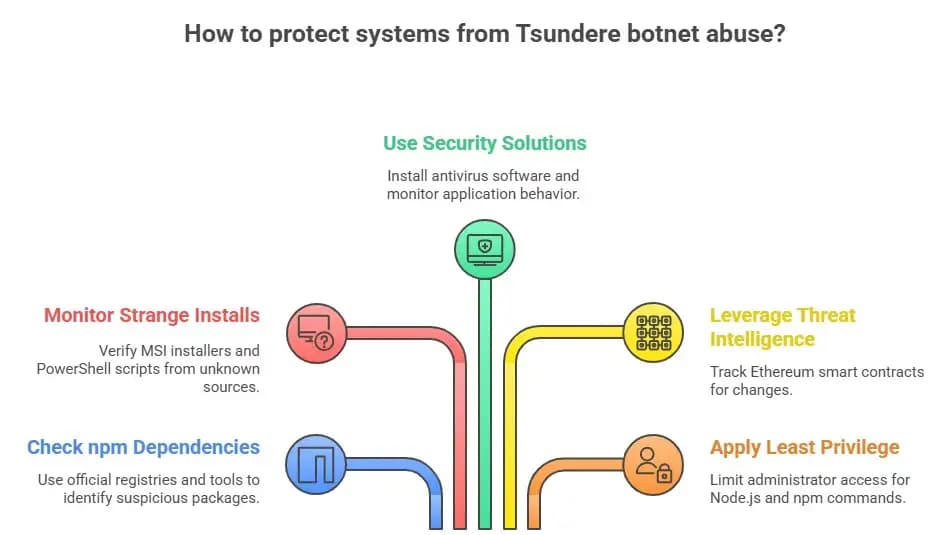
Watch for Node.js in Unexpected Locations
A developer workstation running Node.js from an approved installation path may be perfectly normal.
A non-development Windows workstation suddenly launching node.exe from a user-writable AppData directory deserves investigation.
Proofpoint specifically recommends watching for Node.js execution from unusual user-controlled locations.
Correlate PowerShell and Node.js
PowerShell launching or installing Node.js can be legitimate.
But a chain involving:
PowerShell
→ hidden or encoded activity
→ Node.js under AppData
→ WebSocket communication
→ persistence
is considerably more suspicious.
Proofpoint recommends detection around PowerShell or command-shell processes spawning Node.js, especially from non-standard locations.
Monitor Unusual WebSocket Connections
Tsundere uses WebSockets for C2 communication.
Security teams can inspect unexpected ws:// or wss:// traffic originating from endpoints that do not normally need WebSocket connections to unknown infrastructure.
Monitor Unexpected Ethereum RPC Activity
A Web3 developer machine may legitimately communicate with Ethereum RPC providers.
A finance workstation or office PC with no blockchain use case normally should not.
The useful signal is therefore:
Which process is making the RPC connection, from which device, and what happened immediately before it?
Proofpoint specifically recommends monitoring Ethereum endpoints used by Tsundere rather than assuming all blockchain traffic is malicious.
Check Persistence Locations
Monitor startup locations including Windows Run keys for unexpected scripts or Node.js execution.
Do not rely only on known file hashes. Malware builds can change.
Detect the Whole Process Tree
Behavioral endpoint monitoring provides more context than a single antivirus alert.
Hoplon's guide to modern endpoint security explains how EDR-style monitoring can connect process, network, registry and execution events during an investigation.
How Developers Can Reduce npm Supply-Chain Risk
1. Verify Package Names Before Installation
Do not rely on visual similarity.
Check:
- Exact spelling
- Publisher or maintainer
- Repository
- Package history
- Recent version changes
- Expected dependencies
Typosquatting succeeds when installation becomes automatic muscle memory.
2. Treat New Dependencies as Code
A dependency is not merely a downloaded file.
It may execute installation scripts and bring additional transitive dependencies into the project.
Review new dependencies before approving them for production or CI/CD use.
3. Review Lifecycle Scripts
Pay particular attention to packages that execute install, post-install or preparation scripts when such behavior is unexpected.
In high-risk build environments, teams may choose to restrict lifecycle scripts where operationally feasible.
4. Use Dependency and Software-Composition Analysis
Tools such as npm audit, software-composition analysis platforms and malicious-package scanners can help.
However, npm audit primarily focuses on known vulnerabilities. It should not be treated as a guarantee that a newly published malicious package will be detected.
5. Lock and Review Dependency Changes
Use lockfiles and review dependency changes through normal code-review processes.
An unexplained package addition deserves the same scrutiny as other executable code.
6. Protect Registry and Source-Control Accounts
Use strong authentication for:
- npm accounts
- Git hosting
- CI/CD systems
- Cloud platforms
Limit long-lived tokens and rotate credentials when compromise is suspected.
7. Separate Development From Production Access
A developer workstation should not automatically have unrestricted production access.
Least privilege can limit the damage when a package or extension compromises one endpoint.
How Organizations Can Defend Against Tsundere
Application Control
Restrict execution of scripting engines and runtimes from unexpected user-writable directories where this does not interfere with legitimate work.
Proofpoint specifically recommends application-control policies capable of stopping unexpected Node.js execution from paths such as user AppData directories.
Endpoint Detection and Response
Monitor:
- PowerShell
- Node.js
- Deno
- Registry persistence
- Child-process relationships
- WebSocket activity
- Unexpected runtime installation
- Suspicious downloaded scripts
Do not build detection around Node.js alone now that related DinDoor activity uses Deno.
Network Monitoring
Correlate unexpected RPC traffic, unknown WebSocket connections and endpoint telemetry.
Broadly blocking Ethereum may disrupt legitimate Web3 teams, so policy should reflect the organization's actual business requirements.
Software Allowlisting
Game installers and unofficial cracked software should not be allowed on managed business devices.
Application-control policies can reduce exposure to unauthorized MSI packages and scripting tools.
Developer Security Controls
Organizations with large engineering teams should consider:
- Approved dependency policies
- Internal package mirrors
- Dependency scanning
- Package-age controls
- Secret scanning
- CI/CD isolation
- Build-system monitoring
- Strong registry authentication
What to Do If You Suspect a Tsundere Infection
If an endpoint shows several Tsundere-like indicators, avoid treating the incident as only a malware-removal exercise.
1. Isolate the Endpoint
Disconnect or contain the affected machine according to your incident-response process.
Preserve evidence if the system belongs to an organization.
2. Review the Process Tree
Look for unexpected relationships involving:
- PowerShell
- msiexec
- Node.js
- Deno
- PM2
- JavaScript execution
3. Inspect Persistence
Review startup mechanisms, particularly suspicious Run-key entries or scripts that restart the malicious runtime.
4. Review Network Activity
Look for unexpected Ethereum RPC requests and unknown WebSocket destinations.
5. Investigate How Initial Access Occurred
Determine whether the infection came from:
- MSI installer
- PowerShell/ClickFix
- RMM software
- Malicious dependency
- Another downstream payload
Without understanding the entry point, deleting one malware file may leave the original weakness unresolved.
6. Rotate Exposed Credentials
Developer systems may contain high-value secrets.
If compromise is confirmed, consider the exposure of:
- Git tokens
- npm tokens
- Cloud credentials
- SSH keys
- CI/CD secrets
- Local environment variables
Rotate affected credentials from a trusted system.
7. Hunt Across the Environment
Check other endpoints for the same process, registry and network patterns.
One compromised workstation may not be the only affected asset.
For organizations that need broader visibility and response capability, Hoplon Infosec's endpoint security protection services can support endpoint monitoring, investigation and response.
Why Blocking Ethereum Alone is Not Enough
It may be tempting to think:
“Tsundere uses Ethereum, so block Ethereum.”
That is too simple.
First, some organizations legitimately use blockchain infrastructure.
Second, Ethereum is only one component in the control chain.
The broader behaviors still matter:
- Malware execution
- Persistence
- Host profiling
- Runtime abuse
- WebSocket C2
- PowerShell activity
- Suspicious installers
Blocking one RPC provider also may not solve the entire problem if the malware supports multiple providers or alternate control infrastructure.
The stronger strategy is layered detection.
Tsundere vs. Traditional Botnets
|
Area |
Traditional Botnet Pattern |
Tsundere Pattern |
|
Runtime |
Native executable commonly used |
JavaScript through Node.js; related DinDoor uses Deno |
|
Initial delivery |
Phishing, exploit or downloader |
MSI, PowerShell, RMM, ClickFix; historically linked npm packages |
|
C2 discovery |
Hardcoded domain/IP, DGA or similar |
Ethereum smart-contract-assisted C2 discovery |
|
C2 transport |
HTTP, HTTPS, custom protocols |
WebSockets |
|
Persistence |
Services, Run keys, scheduled tasks |
PM2/Node-related persistence and Run-key activity |
|
Flexibility |
Depends on malware architecture |
Dynamic JavaScript execution |
|
Ecosystem |
Centralized operator model common |
Marketplace/MaaS-style infrastructure documented |
|
Developer risk |
Sometimes indirect |
Direct historical connection to malicious npm supply-chain activity |
What the Tsundere Case Teaches About Software Trust
Tsundere is useful as a case study because almost every major technical component it abuses is legitimate.
Node.js is legitimate.
npm is legitimate.
PM2 is legitimate.
Ethereum is legitimate.
WebSockets are legitimate.
PowerShell is legitimate.
RMM software is legitimate.
The threat comes from how those technologies are combined and controlled.
This is increasingly common in modern malware.
Attackers do not always need to invent suspicious tools when operating-system utilities, developer runtimes and public infrastructure already give them what they need.
That is why defenders need behavioral context.
The same principle appears across today's software supply chain: trusted tools can become attack paths when package accounts, build processes or developer systems are compromised.
Frequently Asked Questions
What is the Tsundere botnet?
Tsundere is a malware botnet first reported in 2025 that uses JavaScript and Node.js for execution and can retrieve command-and-control information through Ethereum smart contracts.
MITRE ATT&CK tracks it as S9034.
Does Tsundere attack Windows, Linux and macOS?
This requires an important distinction.
The October 2024 malicious npm campaign linked to the same threat actor affected Windows, Linux and macOS.
Kaspersky's later Tsundere botnet investigation described the new bot as an active threat to Windows users.
MITRE's broader S9034 entry currently lists Windows, Linux and macOS because it incorporates later associated activity and variants.
How does Tsundere find its C2 server?
The analyzed Node.js bot queried Ethereum blockchain infrastructure through RPC providers and retrieved a WebSocket C2 address associated with data stored through a smart contract.
It then connected to the retrieved server using WebSockets.
Does Ethereum host the malware?
No.
Ethereum is used as part of the C2 discovery mechanism. The malicious JavaScript executes on the infected endpoint.
Are ws, ethers or pm2 malicious npm packages?
No.
They are legitimate Node.js packages.
Tsundere abuses them for WebSocket communication, Ethereum interaction and process management. Their presence alone is not evidence of compromise.
What does “Tsundere Netto” mean?
“Tsundere Netto” is the name shown on the botnet's control panel documented by Kaspersky.
The research observed version 2.4.4 of the panel.
The origin or intended linguistic meaning of the name is not established well enough in the available primary research to make a stronger claim.
Is Tsundere ransomware?
No.
Tsundere itself is described as a bot/backdoor and loader rather than ransomware.
Proofpoint observed TA584 using Tsundere and assessed that infections associated with the initial-access actor can potentially lead to ransomware activity. That is different from saying Tsundere itself encrypts files for ransom.
What is DinDoor?
DinDoor is an associated Tsundere variant documented in 2026.
Unlike the original Node.js-heavy Tsundere activity, DinDoor uses the Deno runtime. MITRE ATT&CK links its use to MuddyWater operations.
Can npm audit detect Tsundere or malicious packages?
It can help identify known vulnerable dependencies, but it should not be treated as a complete malicious-package detection system.
Developers should combine vulnerability scanning with package-name verification, dependency review, publisher checks, secret protection, version control and software-composition analysis.
What is the strongest defense against Tsundere?
There is no single control.
The strongest approach combines:
- Secure dependency management
- Application control
- Endpoint behavioral monitoring
- PowerShell visibility
- Node.js and Deno monitoring
- Network monitoring
- Credential protection
- User awareness
- Incident-response readiness
Final Takeaway
The Tsundere botnet is important because it demonstrates how little modern malware needs to look like traditional malware.
A fake installer can deploy a legitimate Node.js runtime.
Legitimate npm packages can provide WebSocket, Ethereum and process-management capabilities.
A public blockchain can help the malware discover changing command infrastructure.
A legitimate scripting engine can execute the attack.
And a marketplace can allow those capabilities to be reused by additional operators.
The original npm connection also shows why developers now belong inside the security perimeter. A dependency, IDE extension, CI/CD workflow or local runtime can be just as important to defend as a conventional executable.
The most effective response is therefore not to fear Node.js, npm, Ethereum or PowerShell.
It is to understand where those tools should normally appear, monitor when that behavior changes, reduce unnecessary privilege, protect the software-development chain and investigate suspicious combinations quickly.
Finding one suspicious JavaScript file is not enough when an intrusion may involve PowerShell, Node.js, persistence, network C2 and exposed developer credentials.
Organizations need visibility across the complete endpoint activity chain.
Hoplon Infosec provides endpoint security services designed to help organizations monitor suspicious endpoint behavior, investigate malware activity and respond to compromised systems.
If your organization finds unexplained Node.js or Deno execution, suspicious PowerShell activity, unexpected persistence, unknown WebSocket connections or other signs of compromise, investigate the affected endpoint before treating it as an ordinary software problem.
· Apple Update,





